In the previous article, How to automate multi-cluster deployments using Argo CD, you learned how to get your admin Argo CD instance up and running. You're now ready to explore how to manage and configure your Argo CD instances. By the end of this article, you'll be ready to start deploying applications.
Configure a tenant-level Argo CD instance
In our design proposal, one of the important roles of admin Argo CD is to manage and configure the tenant-level Argo CD instances. Let's dive into that process here.
In this management and configuration stage, you will:
- Create secrets.
- Create service accounts.
- Create tokens.
- Create a namespace.
Bootstrap your tenant application
On the hub cluster, create the namespace and the Argo CD tenant instance(s). In this example, we’ll call the tenant team-foo.
Create a namespace:
---
apiVersion: v1
kind: Namespace
metadata:
    name: argocd-team-foo
Then create an Argo CD instance as follows:
---
apiVersion: argoproj.io/v1beta1
kind: ArgoCD
metadata:
  name: argocd-team-foo
  namespace: argocd-team-foo
spec:
  server:
    route:
      enabled: true
You can customize the Argo CD instance as desired. One important aspect to configure is the Argo CD role-based access control (RBAC) permissions where the tenant groups should be configured to access and use this Argo CD instance.
Here is an example:
rbac:
    defaultPolicy: role:readonly
    policy: |-
      g, system:cluster-admins, role:admin
      # team-foo is the OpenShift group corresponding to team-foo tenant
      g, team-foo, role:admin
    scopes: '[groups]'
You can find additional details for configuring Argo CD in the OpenShift GitOps documentation.
Now move to the spoke cluster(s) and configure API credentials (OAuth tokens) with proper permissions to manage tenant namespaces.
Create a namespace:
---
apiVersion: v1
kind: Namespace
metadata:
  name: argocd-team-foo
Create a ServiceAccount:
---
apiVersion: v1
kind: ServiceAccount
metadata:
  name: argocd-team-foo
  namespace: argocd-team-foo
Create a secret for obtaining long-life tokens for API Access:
—
apiVersion: v1
kind: Secret
metadata:
  name: argocd-foo-tenant-sa-secret
  annotations:
    kubernetes.io/service-account.name: argocd-admin-sa
type: kubernetes.io/service-account-token
Extract the long-term token using the following command:
oc get secret argocd-foo-tenant-sa-secret -o jsonpath='{.data.token}'Extract the CA certificate of the API server of the spoke clusters as follows:
echo | openssl s_client -connect https://<API_SERVER>:6443/api 2>/dev/null | openssl x509 -outform PEMThe tenant Argo CD instance will only have permissions to the namespaces of the team to which it belongs, and these RBAC permissions will be provided at the namespace creation step. I will describe this in more detail in the namespace creation section.
Move back to the hub cluster and create the ArgoCD cluster Secret (similar to the admin Argo CD):
apiVersion: v1
kind: Secret
metadata:
  name: spoke-cluster-1
  labels:
    argocd.argoproj.io/secret-type: cluster
type: Opaque
stringData:
  name: spoke-cluster-1
  server: https://api.<cluster-name>.<cluster-domain>:6443
  config: |
    {
       "bearerToken": "<authentication token>",
       "tlsClientConfig": {
        "insecure": false,
        "caData": "<base64 encoded certificate>"
       }
     }
Disclaimer:
Plain Kubernetes secrets shouldn’t be directly committed to Git repositories. Use a secret management solution to better manage your secrets.
Similar to the creation of admin Argo CD, the previous steps for deploying tenant Argo CD instances (except for token configuration in the hub cluster) can be automated using a declarative approach leveraging Helm and GitOps, with the help of the admin Argo CD instance.
You can configure each of the tenant Argo CD instances with the automation:
- Connect with the Red Hat OpenShift spoke clusters (using previous Kubernetes secrets of type
argocd.argoproj.io/secret-type: cluster). - Connect with Git and Helm repositories (using Kubernetes secrets of type
argocd.argoproj.io/secret-type: repository). - Manage the managed tenant namespaces.
Create namespaces
As mentioned earlier, one of the responsibilities of the admin Argo CD instance is to create and configure new namespaces. This includes the creation of objects like egress, ingress, quotas, and RBAC permissions. Of course, a Helm chart may help with the automation of creating all of these.
This process is depicted in Figure 1.
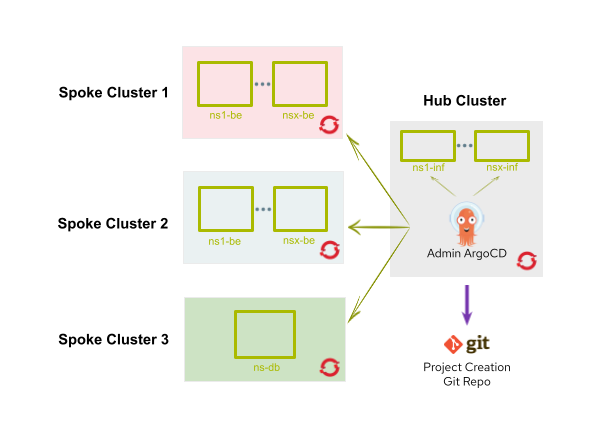
Whenever the admin Argo CD instance creates a new namespace (besides the previously mentioned objects configuration), these two additional tasks will happen:
- An
edit rolewill be assigned to the Argo CD tenant service account (I'll explain the creation of the service account in the next section). - The new namespace will also be labeled with
argocd.argoproj.io/managed-by: argocd-team-foo. This will provide the tenant Argo CD instance with the permissions to deploy applications into that namespace.
With the admin and tenant Argo CD instances set up, we are now ready to deploy the application.
Application deployment
Let's dive into the final step of this process.
In this section, you will:
- Understand the application development workflow.
- Use Helm charts.
- Configure and correlate Helm charts.
Figure 2 depicts the application deployment workflow.
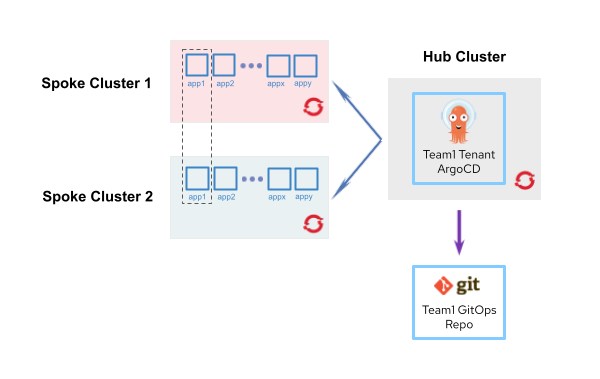
The diagram in Figure 2 illustrates how a tenant called team1 deploys its applications to OpenShift. As explained in the previous sections, a dedicated Argo CD instance for the tenant runs on the hub cluster, and it handles application deployment.
Helm chart repositories
Helm charts are a popular choice for the application deployment process. To support the deployment of applications and infrastructure services, use Helm umbrella charts to map Argo CD applications with business applications or infrastructure configurations.
In our design, we use the concept of Helm umbrella charts, which requires these two types of Helm charts:
- Base Helm charts deploy basic components ( i.e., Spring Boot applications).
- Configuration Helm charts correspond to business applications or business application components.
Disclaimer:
Starting with Argo CD 2.13, multiple repository sources are associated with a single Argo CD application. As a result, you can use the repository storing the base charts and the application configuration chart within a single Argo CD application, eliminating the need for umbrella charts. Find more details in the documentation.
Configure Helm charts
The first set of Helm charts, or base charts, are designed for deploying generic services. They are versioned and uploaded to a Helm repository for consumption by GitOps repositories and customized by any of the configuration Helm charts as necessary.
As mentioned earlier, application GitOps repositories make use of the umbrella Helm chart pattern. They only define dependencies for base Helm charts and specific customizations through values files.
If business applications are multi-component, which is usually the case, another design consideration is how to group these components together. Should you group at Helm level, or at Argo CD level?
For the Helm level approach, a configuration Helm chart represents a multi-component application, leveraging the Helm dependency model for grouping application components. For the Argo CD level approach, a configuration Helm chart is bound to a single application component (i.e., a Spring Boot service). Then, an Argo CD application corresponds to one component. However, to group all the components of the apps, an Argo CD ApplicationSet might be required.
Let’s take an example of an application consisting of two backends, backend-payment and backend-customer, deployed in an OpenShift cluster residing in an internally protected network zone, and one front-end component that deploys in another OpenShift cluster residing in a DMZ network zone.
For the rest of this article, we will describe the backend approach. Let’s look at what a GitOps configuration repository consisting of Helm multi-component application deployments might look like.
To group the back-end components of the aforementioned application, we can use the following Helm dependency construct:
apiVersion: v2
name: business-application1-<spoke-cluster-1>
description: Business Application 1 Spoke Cluster 1
type: Chart
version: 1.1.1
dependencies:
- name: springboot
  version: 1.0.10
  repository: "@charts"
  alias: backend-payment
- name: springboot
  version: 1.0.10
  repository: "@charts"
  alias: backend-customer
The GitOps configuration repository may have a structure similar to the following:
dev-team1
├── business-application1
│   ├── business-app1-app-of-apps.yaml
│   ├── argo-applications
│   │   ├── app-dev-<spoke-cluster-1>.yaml
│   │   ├── app-dev-<spoke-cluster-2>.yaml
│   │   ├── app-test-<spoke-cluster-1>.yaml
│   │   ├── app-test-<spoke-cluster-2>.yaml
│   └── charts
│       ├── values-common-frontend.yaml
│       ├── values-common-backend.yaml
│       ├── dev
│       │   ├── chart-<spoke-cluster-1>
│       │   │   ├── Chart.yaml
│       │   │   └── values-frontend.yaml
│       │   └── chart-<spoke-cluster-2>
│       │       ├── Chart.yaml
│       │       └── values-backend.yaml
│       └── test
│           ├── chart-<spoke-cluster-1>
│           └── chart-<spoke-cluster-2>
│
└── business-application2
    ├── argo-applications
    ├── business-app2-app-of-apps.yaml
    └── charts
        └──...
The Argo CD application definition for the back-end components may have a structure similar to the following:
apiVersion: argoproj.io/v1alpha1
kind: Application
metadata:
  name: app-dev-<spoke-cluster-1>
  namespace: dev-team1-gitops
spec:
  project: dev-team1-applications
  source:
    repoURL: https://argocdadmin@bitbucket.org/dev-team1.git
    targetRevision: master
    path: business-application1/charts/dev/chart-<spoke-cluster-1>
    helm:
      releaseName: business-application1-dev-<spoke-cluster-1>
      valueFiles:
        - ../../values-common-backend.yaml
        - values-backend.yaml
  destination:
    server: https://api.ocp-t-<spoke-cluster-1>-01.net:6443
    namespace: business-application1-dev
  syncPolicy:
    automated:
      prune: true
    selfHeal: true
Helm charts correlation
Figure 3 depicts the relationship between base and configuration Helm charts.

You can see in Figure 3 how both kinds of Helm charts are connected to each other. Basically, yellow base Helm charts are versioned and published so they can be used from light blue configuration Helm charts as base configuration dependencies, which will then be customized to trigger new deployments. This enables an easy-to-implement workflow.
Now that we have described the architecture in detail, take a look at Figure 4, which sums up all of the components and their relationship to one another.

Learn more
In this series, we described an automated approach to deploying applications on multi-cluster OpenShift environments using Argo CD. We accomplished this by setting up an administrative Argo CD instance that will be responsible for all infrastructure-related tasks, such as creating namespaces, managing the Argo CD instances for application teams, and deploying/configuring additional operational tools.
Then, we explored the namespace creation process using the admin Argo CD instance as well as the setup and configuration of the tenant Argo CD instance, which is responsible for deploying applications on multiple OpenShift clusters.
Finally, by implementing a GitOps-driven delivery using Helm, we can trigger and configure new OpenShift clusters with ease. By following a similar approach in your environments, you should be able to experience many of these same benefits.
Interested in learning more about GitOps, Argo CD, and Helm? Explore these offerings:
- E-book: Getting GitOps: A practical platform with OpenShift, Argo CD, and Tekton
- Learning path: Deploy to Red Hat OpenShift using Helm charts
- E-book: GitOps Cookbook: Kubernetes Automation in Practice
- Learning path: Manage OpenShift virtual machines with GitOps
- Video: Deploying an application using Red Hat OpenShift GitOps (Argo CD)

