Redhat Developers  Logo
  • AI

    Get started with AI

    • Red Hat AI
      Accelerate the development and deployment of enterprise AI solutions.
    • AI learning hub
      Explore learning materials and tools, organized by task.
    • AI interactive demos
      Click through scenarios with Red Hat AI, including training LLMs and more.
    • AI/ML learning paths
      Expand your OpenShift AI knowledge using these learning resources.
    • AI quickstarts
      Focused AI use cases designed for fast deployment on Red Hat AI platforms.
    • No-cost AI training
      Foundational Red Hat AI training.

    Featured resources

    • OpenShift AI learning
    • Open source AI for developers
    • AI product application development
    • Open source-powered AI/ML for hybrid cloud
    • AI and Node.js cheat sheet

    Red Hat AI Factory with NVIDIA

    • Red Hat AI Factory with NVIDIA is a co-engineered, enterprise-grade AI solution for building, deploying, and managing AI at scale across hybrid cloud environments.
    • Explore the solution
  • Learn

    Self-guided

    • Documentation
      Find answers, get step-by-step guidance, and learn how to use Red Hat products.
    • Learning paths
      Explore curated walkthroughs for common development tasks.
    • See all learning

    Hands-on

    • Developer Sandbox
      Spin up Red Hat's products and technologies without setup or configuration.
    • Interactive labs
      Learn by doing in these hands-on, browser-based experiences.
    • Interactive demos
      Click through product features in these guided tours.

    Browse by topic

    • AI/ML
    • Automation
    • Java
    • Kubernetes
    • Linux
    • See all topics

    Training & certifications

    • Courses and exams
    • Certifications
    • Skills assessments
    • Red Hat Academy
    • Learning subscription
    • Explore training
  • Build

    Get started

    • Red Hat build of Podman Desktop
      A downloadable, local development hub to experiment with our products and builds.
    • Developer Sandbox
      Spin up Red Hat's products and technologies without setup or configuration.

    Download products

    • Access product downloads to start building and testing right away.
    • Red Hat Enterprise Linux
    • Red Hat AI
    • Red Hat OpenShift
    • Red Hat Ansible Automation Platform
    • See all products

    Featured

    • Red Hat build of OpenJDK
    • Red Hat JBoss Enterprise Application Platform
    • Red Hat OpenShift Dev Spaces
    • Red Hat Developer Toolset

    References

    • E-books
    • Documentation
    • Cheat sheets
    • Architecture center
  • Community

    Get involved

    • Events
    • Live AI events
    • Red Hat Summit
    • Red Hat Accelerators
    • Community discussions

    Follow along

    • Articles & blogs
    • Developer newsletter
    • Videos
    • Github

    Get help

    • Customer service
    • Customer support
    • Regional contacts
    • Find a partner

    Join the Red Hat Developer program

    • Download Red Hat products and project builds, access support documentation, learning content, and more.
    • Explore the benefits

What's new in version 2.7 of the Red Hat build of Quarkus

June 6, 2022
Jeff Beck
Related topics:
Programming languages & frameworksJavaKubernetesMicroservicesQuarkus
Related products:
Red Hat build of Quarkus

    Red Hat recently released version 2.7 of the Red Hat build of Quarkus to support enterprise developers building Kubernetes-native Java applications. The latest release has several great new features and performance improvements, including tools to improve developer productivity.

    Let’s take a look at some highlights from this release. For a complete list, check out the release notes.

    Developer productivity

    One of the founding principles of Quarkus is to bring joy to Java developers by creating a frictionless experience through a combination of tools, libraries, extensions, and more. This release continues that mission by making developers more efficient with new tools and services such as Hibernate search, dev services, and a Kafka UI.

    Hibernate search

    Hibernate search is now fully supported, providing a powerful tool for free text search capability to data. Normal Jakarta Persistence API (JPA) queries are limited to SQL queries which only query per column. With Hibernate search, developers can easily express how their Java model should be indexed and searchable. Hibernate search can also extend web page search to a full-text search of your Java domain, including searches for synonyms, sound-alike words, and more. Check out the documentation and the Quarkus Insights session to learn more, or watch this video on Hibernate Search from Red Hat Developer.

    Dev services

    When an application starts in dev mode, dev services provide automatic provisioning of unconfigured services, such as a database or identity server. When Quarkus adds the service extension, it automatically starts the relevant service and wires your application to use it. This release adds to the growing list of dev services, including Neo4j, Keycloak, Infinispan, Vault, and more.

    Kafka UI

    The Kafka UI (Figures 1 and 2) allows developers to visualize Apache Kafka Streams for reactive applications within the Dev UI. The UI shows how the event streams sink in topics and how applications consume the streams from topics. The UI illustrates how the application aggregates streams from multiple topics to a single topic. The UI also showcases the continuous sequence of sourcing, joining, and aggregating streams in Kafka clusters. The Red Hat Developer article Visualize your Apache Kafka Streams using the Quarkus Dev UI has more on this topic.

    Quarkus Dev UI with Kafka Streams
    Dev UI Console
    Figure 1: Dev UI console.
    Quarkus Kafka UI
    Quarkus Kafka UI
    Figure 2: Quarkus Kafka UI.

    Performance and framework efficiency

    Quarkus makes Java supersonic and subatomic, with fast startup times, low memory footprint, and a small disk footprint. This release continues to improve the Quarkus framework's performance and efficiency.

    UPX

    UPX is an open source, portable, high-performance executable packer that takes an executable as input and produces a compressed executable. Quarkus can now automatically perform UPX compression as part of the container creation process. By using UPX to compress a native executable, developers can build containers that are smaller than 30MB with Quarkus in them. Learn more about compressing native executables using UPX.

    Kubernetes-Native

    Quarkus enables Java developers to create performant, easily deployable and maintainable applications on Kubernetes and the Red Hat OpenShift Container Platform. This release includes many impactful Kubernetes-Native features.

    SmallRye Stork

    In a distributed microservice architecture, discovery and load balancing can be challenging with interactions between services. Developers can use Stork (currently in tech preview) to fully abstract away the service discovery for Consul, Eureka, Kubernetes/OpenShift, or static machines. Learn more about how to use SmallRye Stork in the Quarkus guide, or check out this Red Hat Developer video on the subject.

    Community and standards

    Quarkus starts and ends with the community. Quarkus includes a vast ecosystem of over 400 extensions and support for popular Java APIs and standards. This release continues that mission with new features and standards support.

    Java 17 support

    This release includes improved developer tools for using Java 17. Now you can generate projects based on Java 17 without manually configuring the version. This release also includes a Technology Preview for Java 17 in native mode (Figure 3).
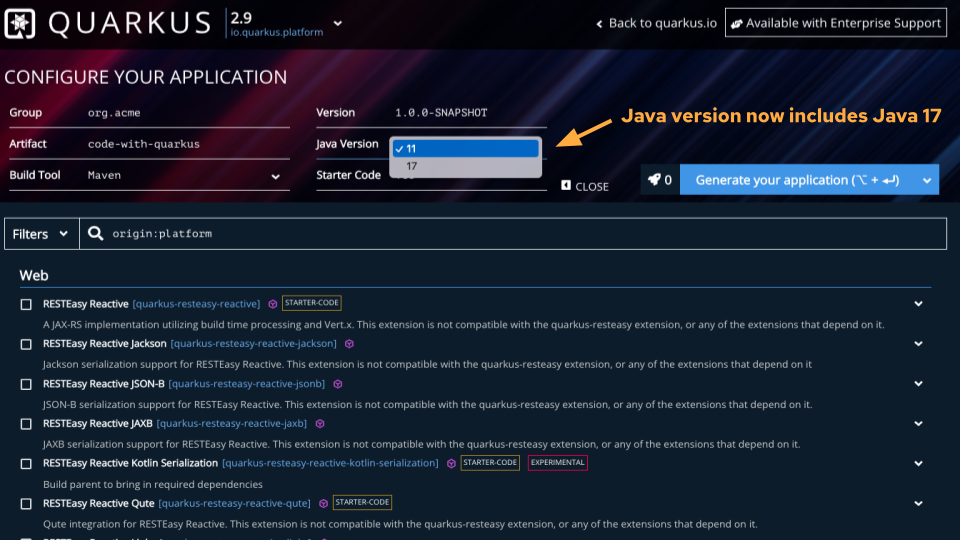
    Quarkus code generator for Java 17
    Quarkus code generator for Java 17
    Figure 3: Quarkus code generator for Java 17.

    Try Quarkus

    The best way to experience the new features of Quarkus is to start using it. Generate your code at code.quarkus.redhat.com.

    You can find more Quarkus resources on Red Hat Developer:

    • Quarkus for Spring Developers
    • Quarkus Cookbook
    • Learn Quarkus faster with quick starts in the Developer Sandbox for Red Hat OpenShift

    Last updated: August 14, 2023

    Recent Posts

    • Best Practice Configuration and Tuning for Linux and Windows VMs

    • Red Hat UBI 8 builders have been promoted to the Paketo Buildpacks organization

    • Using eBPF in Red Hat products

    • How we made one data layer serve the UI, the mocks, and the E2E tests

    • Build trusted Python containers with Project Hummingbird and Calunga

    What’s up next?

    Quarkus Spring e-book cover

    Quarkus for Spring Developers introduces Quarkus to Java developers, with a special eye to helping those familiar with Spring’s conventions make a quick and easy transition.

    Get the free e-book
    Red Hat Developers logo LinkedIn YouTube Twitter Facebook

    Platforms

    • Red Hat AI
    • Red Hat Enterprise Linux
    • Red Hat OpenShift
    • Red Hat Ansible Automation Platform
    • See all products

    Build

    • Developer Sandbox
    • Developer tools
    • Interactive tutorials
    • API catalog

    Quicklinks

    • Learning resources
    • E-books
    • Cheat sheets
    • Blog
    • Events
    • Newsletter

    Communicate

    • About us
    • Contact sales
    • Find a partner
    • Report a website issue
    • Site status dashboard
    • Report a security problem

    RED HAT DEVELOPER

    Build here. Go anywhere.

    We serve the builders. The problem solvers who create careers with code.

    Join us if you’re a developer, software engineer, web designer, front-end designer, UX designer, computer scientist, architect, tester, product manager, project manager or team lead.

    Sign me up

    Red Hat legal and privacy links

    • About Red Hat
    • Jobs
    • Events
    • Locations
    • Contact Red Hat
    • Red Hat Blog
    • Inclusion at Red Hat
    • Cool Stuff Store
    • Red Hat Summit
    © 2026 Red Hat

    Red Hat legal and privacy links

    • Privacy statement
    • Terms of use
    • All policies and guidelines
    • Digital accessibility