io_uring is an async interface to the Linux kernel that can potentially benefit networking. It has been a big win for file I/O (input/output), but might offer only modest gains for network I/O, which already has non-blocking APIs. The gains are likely to come from the following:
- A reduced number of syscalls on servers that do a lot of context switching
- A unified asynchronous API for both file and network I/O
Many io_uring features will soon be available in Red Hat Enterprise Linux 9.3, which is distributed with kernel version 5.14. The latest io_uring features are currently available in Fedora 37.
What is io_uring?
io_uring is an asynchronous I/O interface for the Linux kernel. An io_uring is a pair of ring buffers in shared memory that are used as queues between user space and the kernel:
- Submission queue (SQ): A user space process uses the submission queue to send asynchronous I/O requests to the kernel.
- Completion queue (CQ): The kernel uses the completion queue to send the results of asynchronous I/O operations back to user space.
The diagram in Figure 1 shows how io_uring provides an asynchronous interface between user space and the Linux kernel.
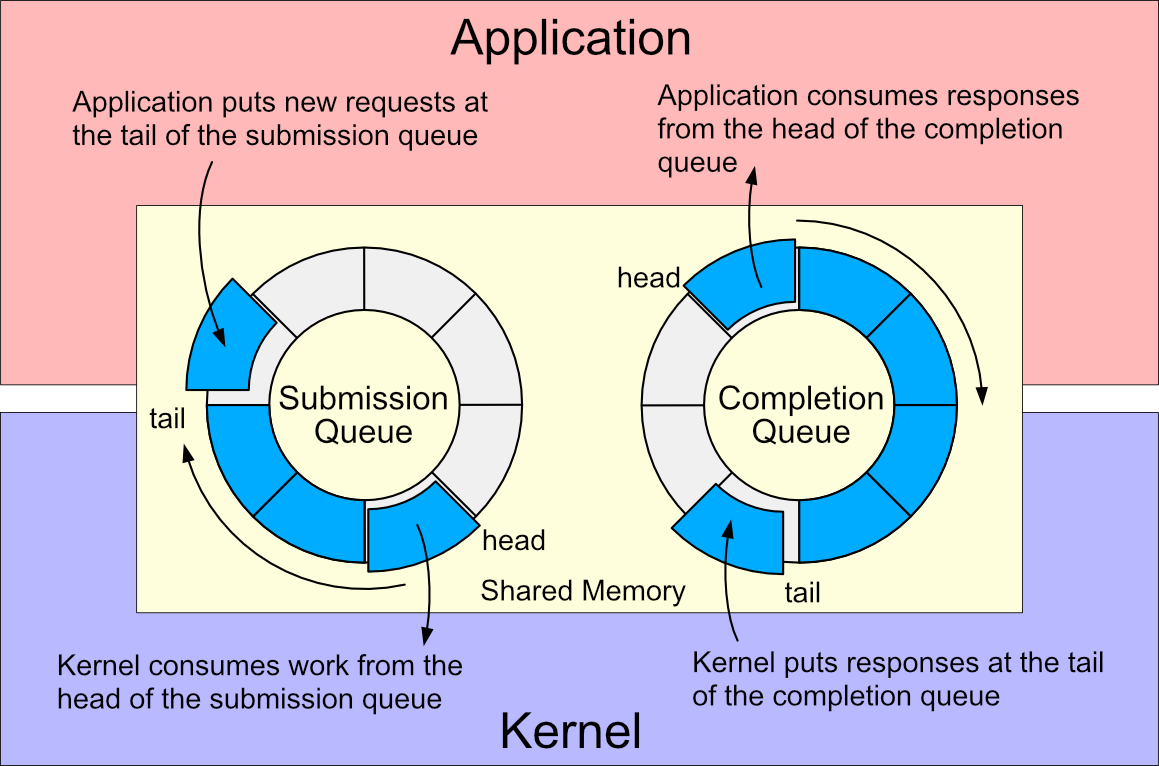
This interface enables applications to move away from the traditional readiness-based model of I/O to a new completion-based model where async file and network I/O share a unified API.
The syscall API
The Linux kernel API for io_uring has 3 syscalls:
io_uring_setup: Set up a context for performing asynchronous I/Oio_uring_register: Register files or user buffers for asynchronous I/Oio_uring_enter: Initiate and/or complete asynchronous I/O
The first two syscalls are used to set up an io_uring instance and optionally to pre-register buffers that would be referenced by io_uring operations. Only io_uring_enter needs to be called for queue submission and consumption. The cost of an io_uring_enter call can be amortized over several I/O operations. For very busy servers, you can avoid io_uring_enter calls entirely by enabling busy-polling of the submission queue in the kernel. This comes at the cost of a kernel thread consuming CPU.
The liburing API
The liburing library provides a convenient way to use io_uring, hiding some of the complexity and providing functions to prepare all types of I/O operations for submission.
A user process creates an io_uring:
struct io_uring ring;
io_uring_queue_init(QUEUE_DEPTH, &ring, 0);
then submits operations to the io_uring submission queue:
struct io_uring_sqe *sqe = io_uring_get_sqe(&ring);
io_uring_prep_readv(sqe, client_socket, iov, 1, 0);
io_uring_sqe_set_data(sqe, user_data);
io_uring_submit(&ring);
The process waits for completion:
struct io_uring_cqe *cqe;
int ret = io_uring_wait_cqe(&ring, &cqe);
and uses the response:
user_data = io_uring_cqe_get_data(cqe);
if (cqe->res < 0) {
    // handle error
} else {
    // handle response
}
io_uring_cqe_seen(&ring, cqe);
The liburing API is the preferred way to use io_uring from applications. liburing has feature parity with the latest kernel io_uring development work and is backward-compatible with older kernels that lack the latest io_uring features.
Using io_uring for network I/O
We will try out io_uring for network I/O by writing a simple echo server using the liburing API. Then we will see how to minimize the number of syscalls required for a high-rate concurrent workload.
A simple echo server
The classic echo server that appeared in Berkeley Software Distribution (BSD) Unix looks something like this:
client_fd = accept(listen_fd, &client_addr, &client_addrlen);
for (;;) {
    numRead = read(client_fd, buf, BUF_SIZE);
    if (numRead <= 0)   // exit loop on EOF or error
        break;
    if (write(client_fd, buf, numRead) != numRead)
        // handle write error
    }
}
close(client_fd);
The server could be multithreaded or use non-blocking I/O to support concurrent requests. Whatever form it takes, the server requires at least 5 syscalls per client session, for accept, read, write, read to detect EOF and then close.
A naive translation of this to io_uring results in an asynchronous server that submits one operation at a time and waits for completion before submitting the next. The pseudocode for a simple io_uring-based server, omitting the boilerplate and error handling, looks like this:
add_accept_request(listen_socket, &client_addr, &client_addr_len);
io_uring_submit(&ring);

while (1) {
    int ret = io_uring_wait_cqe(&ring, &cqe);

    struct request *req = (struct request *) cqe->user_data;
    switch (req->type) {
    case ACCEPT:
        add_accept_request(listen_socket,
                          &client_addr, &client_addr_len);
        add_read_request(cqe->res);
        io_uring_submit(&ring);
        break;
    case READ:
        if (cqe->res <= 0) {
            add_close_request(req);
        } else {
            add_write_request(req);
        }
        io_uring_submit(&ring);
        break;
    case WRITE:
        add_read_request(req->socket);
        io_uring_submit(&ring);
        break;
    case CLOSE:
        free_request(req);
        break;
    default:
        fprintf(stderr, "Unexpected req type %d\n", req->type);
        break;
    }

    io_uring_cqe_seen(&ring, cqe);
}
In this io_uring example, the server still requires at least 4 syscalls to process each new client. The only saving achieved here is by submitting a read and a new accept request together. This can be seen in the following strace output for the echo server receiving 1,000 client requests.
% time     seconds  usecs/call     calls    errors syscall
------ ----------- ----------- --------- --------- ----------------
 99.99    0.445109         111      4001           io_uring_enter
  0.01    0.000063          63         1           brk
------ ----------- ----------- --------- --------- ----------------
100.00    0.445172         111      4002           total
Combining submissions
In an echo server, there are limited opportunities for chaining I/O operations since we need to complete a read before we know how many bytes we can write. We could chain accept and read by using a new fixed file feature of io_uring, but we’re already able to submit a read request and a new accept request together, so there’s maybe not much to be gained there.
We can submit independent operations at the same time so we can combine the submission of a write and the following read. This reduces the syscall count to 3 per client request:
% time     seconds  usecs/call     calls    errors syscall
------ ----------- ----------- --------- --------- ----------------
 99.93    0.438697         146      3001           io_uring_enter
  0.07    0.000325         325         1           brk
------ ----------- ----------- --------- --------- ----------------
100.00    0.439022         146      3002           total
Draining the completion queue
It is possible to combine a lot more work into the same submission if we handle all queued completions before calling io_uring_submit. We can do this by using a combination of io_uring_wait_cqe to wait for work, followed by calls to io_uring_peek_cqe to check whether the completion queue has more entries that can be processed. This avoids spinning in a busy loop when the completion queue is empty while also draining the completion queue as fast as possible.
The pseudocode for the main loop now looks like this:
while (1) {
    int submissions = 0;
    int ret = io_uring_wait_cqe(&ring, &cqe);
    while (1) {
        struct request *req = (struct request *) cqe->user_data;
        switch (req->type) {
        case ACCEPT:
            add_accept_request(listen_socket,
                              &client_addr, &client_addr_len);
            add_read_request(cqe->res);
            submissions += 2;
            break;
        case READ:
            if (cqe->res <= 0) {
                add_close_request(req);
                submissions += 1;
            } else {
                add_write_request(req);
                add_read_request(req->socket);
                submissions += 2;
            }
            break;
        case WRITE:
          break;
        case CLOSE:
            free_request(req);
            break;
        default:
            fprintf(stderr, "Unexpected req type %d\n", req->type);
            break;
        }

        io_uring_cqe_seen(&ring, cqe);

        if (io_uring_sq_space_left(&ring) < MAX_SQE_PER_LOOP) {
            break;     // the submission queue is full
        }

        ret = io_uring_peek_cqe(&ring, &cqe);
        if (ret == -EAGAIN) {
            break;     // no remaining work in completion queue
        }
    }
    if (submissions > 0) {
        io_uring_submit(&ring);
    }
}
The result of batching submissions for all available work gives a significant improvement over the previous result, as shown in the following strace output, again for 1,000 client requests:
% time     seconds  usecs/call     calls    errors syscall
------ ----------- ----------- --------- --------- ----------------
 99.91    0.324226        4104        79           io_uring_enter
  0.09    0.000286         286         1           brk
------ ----------- ----------- --------- --------- ----------------
100.00    0.324512        4056        80           total
The improvement here is substantial, with more than 12 client requests being handled per syscall, or an average of more than 60 I/O ops per syscall. This ratio improves as the server gets busier, which can be demonstrated by enabling logging in the server:
% time     seconds  usecs/call     calls    errors syscall
------ ----------- ----------- --------- --------- ----------------
 68.86    0.225228          42      5308       286 write
 31.13    0.101831        4427        23           io_uring_enter
  0.00    0.000009           9         1           brk
------ ----------- ----------- --------- --------- ----------------
100.00    0.327068          61      5332       286 total
This shows that when the server has more work to do, more io_uring operations have time to complete so more new work can be submitted in a single syscall. The echo server is responding to 1,000 client echo requests, or completing 5,000 socket I/O operations with just 23 syscalls.
It is worth noting that as the amount of work submitted increases, the time spent in the io_uring_enter syscall increases, too. There will come a point where it might be necessary to limit the size of submission batches or to enable submission queue polling in the kernel.
Benefits of network I/O
The main benefit of io_uring for network I/O is a modern asynchronous API that is straightforward to use and provides unified semantics for file and network I/O.
A potential performance benefit of io_uring for network I/O is reducing the number of syscalls. This could provide the biggest benefit for high volumes of small operations where the syscall overhead and number of context switches can be significantly reduced.
It is also possible to avoid cumulatively expensive operations on busy servers by pre-registering resources with the kernel before sending io_uring requests. File slots and buffers can be registered to avoid the lookup and refcount costs for each I/O operation.
Registered file slots, called fixed files, also make it possible to chain an accept with a read or write, without any round-trip to user space. A submission queue entry (SQE) would specify a fixed file slot to store the return value of accept, which a linked SQE would then reference in an I/O operation.
Limitations
In theory, operations can be chained together using the IOSQE_IO_LINK flag. However, for reads and writes, there is no mechanism to coerce the return value from a read operation into the parameter set for the following write operation. This limits the scope of linked operations to semantic sequencing such as "write then read" or “write then close” and for accept followed by read or write.
Another consideration is that io_uring is a relatively new Linux kernel feature that is still under active development. There is room for performance improvement, and some io_uring features might still benefit from optimization work.
io_uring is currently a Linux-specific API, so integrating it into cross-platform libraries like libuv could present some challenges.
Latest features
The most recent features to arrive in io_uring are multi-shot accept, which is available from 5.19 and multi-shot receive, which arrived in 6.0. Multi-shot accept allows an application to issue a single accept SQE, which will repeatedly post a CQE whenever the kernel receives a new connection request. Multi-shot receive will likewise post a CQE whenever newly received data is available. These features are available in Fedora 37 but are not yet available in RHEL 9.
Conclusion
The io_uring API is a fully functional asynchronous I/O interface that provides unified semantics for both file and network I/O. It has the potential to provide modest performance benefits to network I/O on its own and greater benefit for mixed file and network I/O application workloads.
Popular asynchronous I/O libraries such as libuv are multi-platform, which makes it more challenging to adopt Linux-specific APIs. When adding io_uring to a library, both file I/O and network I/O should be added to gain the most from io_uring's async completion model.
Network I/O-related feature development and optimization work in io_uring will be driven primarily by further adoption in networked applications. Now is the time to integrate io_uring into your applications and I/O libraries.
More information
Explore the following resources to learn more:
- Faster IO through io_uring
- Detailed description (PDF)
- Fixed files
- What’s new (PDF)
- io_uring and networking in 2023
Find other tutorials on Red Hat Developer's Linux topic page.
Last updated: August 14, 2023
