In this post, we explore two prompting approaches and the advantages and disadvantages of each, based on our experience developing the it-self-service-agent AI quickstart.
The AI quickstart provides a reusable framework for IT processes. It includes request routing, agent services, knowledge bases, an integration dispatcher, and an evaluation framework. While the AI quickstart demonstrates the laptop refresh process as a concrete working example, the same components can be adapted to Privacy Impact Assessments, Request for Proposal (RFP) generation, access requests, software licensing, and other structured IT workflows.
Red Hat AI quickstarts provide a catalog of ready-to-run, industry-specific use cases for your Red Hat AI environment. Each AI quickstart is simple to deploy, explore, and extend. They give teams a fast, hands-on way to see how AI can power solutions on reliable, open source infrastructure. You can read more about AI quickstarts in AI quickstarts: An easy and practical way to get started with Red Hat AI.
This is the third post in our series about developing the it-self-service-agent AI quickstart. Catch up on the other parts in the series:
- Part 1: AI quickstart: Self-service agent for IT process automation
- Part 2: AI meets you where you are: Slack, email & ServiceNow
- Part 3: Prompt engineering: Big vs. small prompts for AI agents
- Part 4: Automate AI agents with the Responses API in Llama Stack
- Part 5: Eval-driven development: Build and evaluate reliable AI agents
- Part 6: Distributed tracing for agentic workflows with OpenTelemetry
- Part 7: 3 lessons for building reliable ServiceNow AI integrations
- Part 8: Guardrails: Enterprise safety shields with Llama Stack
- Part 9: Deploy with confidence: Continuous integration and continuous delivery for agentic AI
If you are interested in more detail about the business benefits of using agentic AI to automate IT processes, check out AI quickstart: Implementing IT processes with agentic AI on Red Hat OpenShift AI.
What do we mean by a big and small prompt?
The AI quickstart supports two styles of prompts: lg-prompt-big.yaml and lg-prompt-small.yaml. It uses the big prompt as the default.
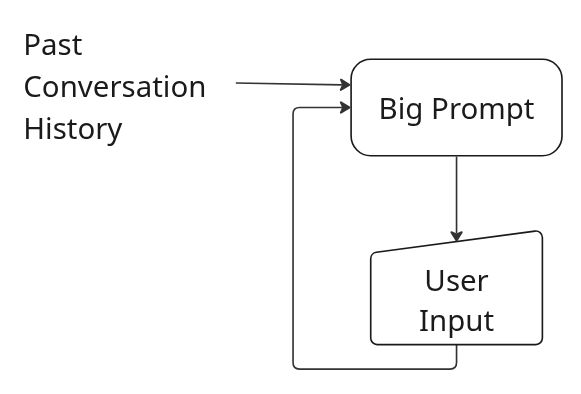
Both prompts use LangGraph for internal state management, but the big version does not use the multipart prompting. Instead, it defines a single large prompt that is given to the model on every request along with the full conversation history. Figure 1 illustrates the big prompt flow.
The small version uses LangGraph to a greater extent and defines smaller individual prompts for each step in the laptop refresh process. The information provided in the context sent to the model with each prompt is carefully managed so that it includes only the information from the conversation history which is relevant to the step to which the prompt is associated. For example, this prompt only includes the last response from the user (user_input), which was extracted and stored in an earlier step.
      Analyze the user's message and determine their intent. The user said: "{user_input}"
      Context: This user is NOT currently eligible for a laptop replacement under standard policy.
      Classify the user's intent as one of the following:
      1. RETURN_TO_ROUTER - User wants to return to the routing agent or stop laptop refresh process (e.g., "return to router", "go back", "stop", "cancel laptop refresh")
      2. FAREWELL - User wants to end the conversation (goodbye, bye, thanks, etc.)
      3. PROCEED_ANYWAY - User wants to see laptop options despite being ineligible (proceed, show options, I want to see, etc.)
      4. GENERAL_QUESTION - User has questions about policy or general assistance
      Respond with only the classification: RETURN_TO_ROUTER, FAREWELL, PROCEED_ANYWAY, or GENERAL_QUESTION
As shown in Figure 2, the flow for the small prompt approach consists of multiple smaller prompts, each of which is only provided with the context required. That context might have been provided by the user or generated by earlier steps, but it is carefully filtered and limited to just what the prompt for the specific step needs. For example, the eligibility check state receives {employee_info.response} only, while the intent classification state receives just {user_input}. Earlier states store results in fields like employee_info or eligibility_status. Later states reference only the fields they need, rather than the full conversation history.


The full graph for the small prompt approach ends up having a number of states as shown in Figure 3.
Why support both big and small prompts?
Now that we've explained what we mean by big and small prompts, why does the AI quickstart support both?
When we started working on the AI quickstart, we were using a smaller model, Llama-4-Scout-17B-16E, and it seemed to be capable enough for the use case with a big prompt. However, as we added more extensive evaluations (which we'll cover later in the series), we found that it could not handle the variability in conversations that were generated by our evaluations framework to an acceptable level. We switched to llama-3-3-70b-instruct-w8a8. While not perfect, this model achieved reliable results with the big prompt.
Given that it takes more resources, and therefore more cost, to run larger models we were still interested in exploring if we could implement the use case with a smaller model. A multipart prompt divides the context into smaller sections, which is easier for small models to process.
This was part of the motivation for the addition of the use of LangGraph in addition to the state management that it gave us. While LangGraph is used to manage the conversation in both the big and small prompts, it is used more extensively in the small prompts to allow coordination between multiple smaller prompts and more fine-grained state management. To read more about the framework we built on top of LangGraph in the AI quickstart, check out the Prompt Configuration Guide. The tool allows you to define a state machine using LangGraph and YAML. You can modify prompts by editing a YAML file instead of changing the application code.
Advantages of a big prompt
Using a single, large prompt offers several benefits, provided you have a capable enough model:
- It is easier to create the prompt in the first place.
- It is easier to maintain over the long term.
- It is less important that you identify and plan for all possible conversation flows.
With a capable enough model, particularly if you are using frontier models, it will be less work to create and maintain a single prompt versus multipart prompts. The stronger the model, the more this will be true. As an example of where you get greater flexibility with a large prompt, if the user asks for the ticket number after it has already been created the model can provide the answer without having to be told how to do that in advance. On the other hand, with the small prompt approach it requires additional prompts and storage of context information.
From our experience, we would recommend that you start with the most capable model you can afford, and start by implementing your use case with a big prompt and see what kind of consistency you can achieve. This will allow you to most quickly build out the overall application, implement thorough evaluations and validate that the use case is a good fit for agent-based automation. If you cannot get it to work reliably with a capable model there is no point in trying with smaller models.
Once you confirm it works with a capable model, you can explore smaller, more cost-effective models. Test both big and small prompt approaches until you find the right balance of cost, maintenance, and consistency. Starting in the reverse (small models first) is a sure recipe for wasting time and effort. We learned this the hard way by trying to use a smaller model in the beginning. We made better progress once we switched to a larger model. Once we had used the larger model to build out a good evaluation framework and key components like the required MCP servers it was then much easier to explore using smaller models and the small prompt approach.
As you explore different models, if you find yourself having trouble making even small changes to the prompt without regressing the desired behavior you might be nearing the dividing line between where a small and big prompt approach makes sense. As an example, using the big prompt some early testing showed excellent consistency with Gemini 2.5, reasonable reliability with the Llama 3 70B model, and poor results with all of the smaller models that we tried.
Disadvantages of a big prompt
Big prompts are often more expensive because they use more tokens. They also typically lack built-in guardrails, which can make it harder to keep the agent focused on specific tasks.
Using a big prompt most often will result in higher cost, not only because it needs a more capable model which often has a higher per token cost, but also because the use of a large prompt means that you will be using more tokens. In each request to the model you need to include the big prompt, along with the full conversation history with the end user, most often including both the messages from the user and the agent. We will cover this in more detail in the Cost comparison section.
The flexibility of a big prompt also presents a challenge. The agent is more likely to complete actions that are not part of your use case. For example, without additions to the big prompt, we found that if the user asked "tell me a story about a magic frog," the agent would return a story even though it is outside the scope of a laptop refresh process. With the big prompt approach, you need to include instructions on what not to do in addition to the desired actions. Depending on the model, it might also be more susceptible to prompt injection attacks by default than the small prompt approach. As an example, we had to add this to the big prompt to help keep the agent on task:
  ## Scope and Boundaries
      CRITICAL SCOPE RESTRICTION: You are ONLY authorized to help with laptop refresh and replacement requests. You MUST NOT answer questions or help with:
      - General IT support (password resets, software issues, network problems, etc.)
      - Non-laptop hardware (monitors, keyboards, mice, docking stations, phones, etc.)
      - Software installation or troubleshooting
      - Account access or permissions
      - Email or collaboration tool issues
      - Security or compliance questions
      - Any other IT topics outside of laptop refresh/replacement
      CRITICAL OUT-OF-SCOPE HANDLING: If the user asks about anything outside the laptop refresh process, politely explain you specialize ONLY in laptop refresh and offer to send them back to the routing agent who can connect them with the right specialist. If they confirm they want to be sent back (by saying "yes", "sure", "okay" or similar affirmative response), reply ONLY with: task_complete_return_to_router
Advantages of a small prompt
The small prompt approach offers several advantages, including support for smaller models and lower operational costs. This method also provides better task focus, validation and retry options, granular tool control, and specific temperature settings for each step.
Support for smaller models
One key advantage of using the small prompt approach is that you might be able to implement your use case with a smaller model. Depending on the complexity of the use case, it might not be possible to use a single large prompt even with frontier models. In cases where a larger prompt is feasible, the small prompt approach might allow you to use a less capable model. As a concrete example, in the AI quickstart we were able to achieve reasonable consistency using the small prompt approach and Llama-4-Scout-17B-16E model while we were not able to use Llama-4-Scout-17B-16E with the big prompt.
Lower cost per request
The second key advantage is that because each request sent to the agent has a smaller prompt and less context, fewer tokens will be required, leading to lower costs when you are billed on a per token basis. We'll dive into the differences between token counts in the Cost comparison section.
Better focus on task
By default, the agent behavior is more constrained to the specific use case. Each of the prompts sent to the agent is more limited in scope, making it easier for the agent to stay on task. For example, we did not need to add prompting to tell the agent what "NOT to do" as we did with the big prompt (see the Scope and Boundaries example in the disadvantages section above).
Validation and retry
The small prompt also allows you to check the output from the agent before passing it on to the user and asking the agent to try again if it did not do the right thing the first time around. As an example, after the step where the agent should have used the open_laptop_refresh_ticket tool to open a ticket, the small prompt has a check which you can see in the ticket_creation_retry section in:
    response_analysis:
      conditions:
        - name: "ticket_created_success"
          trigger_phrases: ["REQ"]
          actions:
            - type: "extract_data"
              pattern: "(REQ\\d+)"
              field_name: "ticket_number"
              source: "response"
            - type: "set_field"
              field_name: "ticket_creation_retry_count"
              value: 0
            - type: "transition"
              target: "waiting_post_ticket_input"
        - name: "ticket_creation_retry"
          trigger_phrases: [""]  # Match everything that didn't match REQ
          check_field: "ticket_creation_retry_count"
          check_value_less_than: 2
          actions:
            - type: "increment_field"
              field_name: "ticket_creation_retry_count"
            - type: "transition"
              target: "create_ticket"
Along with the check for a valid ticket in ticket_created_success, this validates that a ticket number in the correct format was returned and would catch cases where the agent responded with something like "I will now use the open_laptop_refresh_ticket to create you a ticket" instead of actually calling the tool. Smaller models often state what they are about to do instead of actually performing the action.. We found this check helped improve consistency when using the small prompt with the less capable Llama-4-Scout-17B-16E model. These kinds of checks were a key addition with respect to achieving an acceptable level of consistency with the small prompt approach and the Llama-4-Scout-17B-16E model.
Granular tool control
Additionally, you can limit tool calling to specific states. This reduces the risk that tools will be called when they are not needed, and makes it easier to ensure that they will be called when they are. As an example, in the small prompt the tool used to open a laptop refresh ticket is only available in the specific state where it is needed:
  # State 8: Create Ticket
  create_ticket:
    type: "llm_processor"
    temperature: 0.3
    allowed_tools: [ "open_laptop_refresh_ticket" ]
    prompt: |
      You have the employee information: {employee_info.response}
      Selected Laptop details: {selected_laptop_details}
      Create a ServiceNow ticket for the authenticated user by calling the open_laptop_refresh_ticket tool with these parameters:
      - employee_name: Extract the employee's name from the employee information above
      - business_justification: Use "agent submission"
      - servicenow_laptop_code: Extract the ServiceNow Code from the selected laptop details above
      CRITICAL: You must call the open_laptop_refresh_ticket TOOL (not try to call the laptop code as a tool). The laptop code is a PARAMETER to pass to the tool.
      EXAMPLE TOOL CALL:
      open_laptop_refresh_ticket(
        employee_name="XXXXXXXXXX",
        business_justification="agent submission",
        servicenow_laptop_code="YYYYYY"
      )
      After creating the ticket, respond to the user using EXACTLY this format (replace XXXXXX with the actual ticket number):
      A ServiceNow ticket for a laptop refresh has been created for you. The ticket number is XXXXXX. Your request will be processed by the IT Hardware Team, and you will receive updates via email as the ticket progresses.
      Is there anything else I can help you with?
No other states can use the tool to create a ticket as only this step has open_laptop_refresh_ticket in the allowed tools section.
Per-step temperature control
Finally, you can set a different temperature for each step. For example:
- 0.1 for deterministic classification
- 0.3 for factual lookups
- 0.4 for conversational responses
Lower temperatures (0.1 to 0.3) reduce randomness for more deterministic outputs. Higher temperatures (0.4+) allow natural variation in conversational responses. This can help with the consistency of responses when using a less capable model.
Disadvantages of a small prompt
There are also a number of disadvantages of using the small prompt approach:
- Higher number of requests, possibly slower performance
- Harder to maintain (remember the graph in Figure 3)
- Less flexible by default
While each prompt and related context is smaller, there are more steps when using the small prompt approach. Some of these additional steps might result in an additional call to the model. For example, this is the prompt for a step in the small prompt which validates that the agent has returned a valid assessment of the user's eligibility:
    prompt: |
      This is the summary of the user's eligibility: "{laptop_eligibility.response}"
      If the response says the user is eligible for a laptop replacement, respond: ELIGIBLE
      If the response says the user is not eligible, respond: NOT
      If unclear, respond: UNCLEAR
This catches cases where the model returns something like "I will now use the laptop refresh knowledge base to check your eligibility" instead of actually doing it, or if it returns a summary that does not actually state if the user is eligible or not. It improves reliability of the agent, but always requires an additional call to the model and might require more if retries are needed. The net result is that the small prompt commonly takes 2 times as many calls to the model as does the big prompt.
The small prompt approach is harder to maintain because complex state transitions increase the risk of interrupted conversation flows. As an example, as we went through the development process we ran into several cases where our state transitions were such that if an error or unexpected response from the user occurred the agent could get "stuck" in a particular state with no way to escape without resetting the conversation state. Even with our evaluations framework generating different conversation flows we would see new instances after an infrastructure or one-off error occurred illustrating that using multiple prompts and more carefully crafting the context comes with added complexity and possibility for making mistakes. This is an example of one we saw along the way:
    {
      "role": "user",
      "content": "Yes, I'd like to proceed with reviewing the available laptop options for my location."
    },
    {
      "role": "assistant",
      "content": "I apologize, but I'm having difficulty generating a response right now. Please try again."
    },
    {
      "role": "user",
      "content": "Can you please provide the list of available laptop options for my location as you mentioned earlier?"
    },
    {
      "role": "assistant",
      "content": "Please specify which laptop model you'd like to select from the options I provided."
    },
    {
      "role": "user",
      "content": "You didn't provide the list of options, can you please provide the available laptop models for my location so I can select one?"
    },
    {
      "role": "assistant",
      "content": "Please specify which laptop model you'd like to select from the options I provided."
    },
    {
      "role": "user",
      "content": "You still haven't provided the list of available laptop options, can you please provide them so I can select one?"
    },
Finally, as mentioned when we discussed the advantages of the big prompt, the small prompt approach will result in an agent that is less flexible by default, so you will need to think through the different conversation flows that you want to support in advance and make sure you have the steps required to support all of them.
Cost comparison
We previously mentioned that the big prompt approach can be more costly for two reasons. The first is that you might need to use a more capable model which costs more per token or request, and the second is that the number of tokens will be larger with the big prompt approach. In this section we'll pull some specific numbers based on the big and small prompts that are part of the AI quickstart.
As part of our evaluation framework we capture the tokens used to generate the conversations and run the evaluations. Every night, we run a set of 20 generated conversations and five predefined conversations—a total of 25—using both prompt styles. When possible we use token counts returned from the API calls, otherwise we estimate based on the requests and responses that are made. Figure 4 shows an example of a run with 20 conversations.

These are the results for a run with the small prompt:
📱 App Tokens (from chat agents):
  Input tokens: 180,043
  Output tokens: 35,818
  Total tokens: 215,861
  API calls: 326
These are the results for a run with the big prompt:
📱 App Tokens (from chat agents):
  Input tokens: 630,648
  Output tokens: 31,282
  Total tokens: 661,930
  API calls: 154
These numbers vary each night as the responses from the agent vary in each run, but the ratio stays in the same range.
As you can see, for our prompts, the big prompt approach uses almost 3.5 times as many input tokens as the small prompt approach. They both use a similar number of output tokens. This makes sense since they provide similar responses to the end user and pull similar information from the knowledge bases and MCP servers.
One thing to consider, however, is that the size of the big prompt will vary based on how capable your model is. For our AI quickstart, we wanted to work with a model that can be hosted on OpenShift AI instead of a foundation model like Gemini. We expect that a simpler big prompt could be used with Gemini, reducing the multiplier that is seen between the big and small prompt approach. Regardless, it's reasonable to expect that you should always be able to achieve smaller token counts with the small prompt approach.
However, the small prompt approach required 2.1 times as many requests. This could suggest the small prompt might be roughly 2 times slower if each request takes the same amount of time. However, the impact might be lower than expected as smaller prompts often generate more quickly. That said, there is often fixed overhead per request, and our experience is that the small prompt approach with the 70B model feels noticeably slower than the big prompt approach with the same model.
One size does not fit all
As you can see from the advantages and disadvantages, it's not a matter of always using the big or small prompt approach. Instead, you need to find the approach that balances what's important to you, and it might even make sense to start with one approach (big) and then transition to the small approach as you work to optimize cost.
Because the AI quickstart supports both styles, you can quickly deploy an implementation to test how different models perform with each approach.
Next steps
Run through the AI quickstart (60-90 minutes) to deploy a working multi-agent system.
- Time savings: Rather than spending 2-3 weeks building agent orchestration, evaluation frameworks, and enterprise integrations from scratch, you'll have a working system in under 90 minutes. Start in testing mode (simplified setup, mock eventing) to explore quickly, then switch to production mode (Knative Eventing + Kafka) when ready to scale.
- What you'll learn: Production patterns for AI agent systems that apply beyond IT automation—how to test non-deterministic systems, implement distributed tracing for async AI workflows, integrate LLMs with enterprise systems safely, and design for scale. These patterns transfer to any agentic AI project.
- Customization path: The laptop refresh agent is just one example. The same framework supports Privacy Impact Assessments, RFP generation, access requests, software licensing—or your own custom IT processes. Swap the specialist agent, add your own MCP servers for different integrations, customize the knowledge base, and define your own evaluation metrics.
Where to learn more
If this post sparked your interest in the IT self-service agent AI quickstart, here are additional resources to explore.
- Browse the AI quickstarts catalog for other production-ready use cases including fraud detection, document processing and customer service automation.
- Questions or issues? Open an issue on the GitHub repository or file an issue.
- Learn more about the tech stack:
- Read part 4 of this series: Automate AI agents with the Responses API in Llama Stack

