AI code assistants have emerged as powerful tools that are changing how developers write, edit, and debug code. An AI code assistant is powered by a large language model (LLM) trained on (among other things) billions of lines of public code, allowing it to become the ultimate paired programming assistant. An AI code assistant can autocomplete partially written code, find bugs, explain and summarize a codebase, generate documentation, convert code between languages, and even generate a project. A recent McKinsey study showed double-digit productivity growth as a result of multiple efficiency gains from AI code assistants.
Red Hat OpenShift Dev Spaces and AI-assisted development
Before integrating an assistant, you need a development environment. Red Hat OpenShift Dev Spaces is a cloud development environment (CDE) included in your Red Hat OpenShift subscription that allows developers to remotely code, run, and test any application on OpenShift with VS Code or Jetbrains IDEs. Key benefits include:
- Dev environment as code: In Dev Spaces, the file
devfile.yamldefines development environments as code (including languages, runtimes, tools, and so on), so developers work in the same reproducible environment. This nearly eradicates the "works on my machine" problem, while also reducing operational strain. - AI guardrails for dev environments: AI agents can generate code that breaks dependencies or corrupts configurations. With Dev Spaces, these errors are trivial. You can instantly revert to a clean slate by redeploying from your devfile. Compare this to a local workstation, where a single bad output could leave you debugging your operating system for hours.
- Development in air-gapped environments: For organizations with strict security requirements, Dev Spaces can be deployed in a restricted air-gapped environment while pointing to internal image and extension registries. This restricts developers (and AI agents) to pre-approved runtimes and plug-ins, which can prevent common vulnerabilities in agentic assistants such as prompt injections.
- Quick onboarding and switching between projects: Because all configs and dependencies are automatically pre-installed from the devfile when a workspace boots up, onboarding a developer and establishing the correct environment setup is practically instant. This is especially useful for contractors, offshored devs, and anywhere else turnover is high.
In short, OpenShift Dev Spaces provides a stable, reproducible developer environment by moving development to the cloud, eliminating configuration overhead, and allowing for the use of Code Assistants without risking local system integrity.
With the developer environment established, it's time to integrate an AI assistant.
Cloud and on-prem models: Balancing security with convenience
First, you must choose between a cloud hosted model or a local model as the underlying LLM for your AI code assistant. There are advantages and disadvantages to both.
Cloud hosted models
A cloud model is hosted and managed by a third-party vendor (like Google Vertex, AWS Bedrock, or OpenAI). Your code assistant sends API requests to the provider's servers, which return AI-generated suggestions.
Advantages:
- Low barrier to entry: The provider handles all the infrastructure, hardware, and model maintenance. This keeps upfront costs low and makes it easy to scale up or down.
- Access to specific models: Some models on the market today are not open source. If you require access to those models specifically, you have to sign up to use their provider.
Disadvantages:
- Data privacy and security risks: Your source code is sent to a third-party server, creating potential security risks. This is a deal-breaker for any organization with sensitive intellectual property or in regulated industries.
- Model changes: Because a closed source model can be deprecated or removed at any time without notification or recourse, you could be forced to use a new model that doesn't behave as expected with your specific configurations.
On-prem models
An on-premise model runs entirely within your own infrastructure, for example on Red Hat OpenShift with Red Hat OpenShift AI. The model and the data it processes never leave your network.
Advantages:
- Maximum privacy and customized security: All code and data remains within your private network, eliminating third-party data exposure. You have full control over your data and how it is accessed.
- Airgapped: Because these models can be air-gapped when used with a disconnected Dev Spaces instance, you can use a code assistant while mitigating the risk of common vulnerabilities such as prompt injections from the internet.
- Customization and control: You aren't locked in with a vendor or specific model configuration. Instead, you can pick and choose which model, infrastructure, and setup works for you.
Disadvantages:
- High initial investment: Deploying an on-prem LLM can require a large upfront investment in powerful server hardware, especially GPUs.
- Model capability: Some models are not available for self-hosting, so those aren't available in an on-prem instance.
Choosing a code assistant
Finding a code assistant that works for you is important, because some assistants limit what models you can run. There are plenty of choices out there. Here are some common ones validated with Dev Spaces, but this is by no means a complete list:
| Code assistant | On-prem models via RHOAI | Pay structure | Supported IDEs in Dev Spaces | Notes |
|---|---|---|---|---|
| Kilo/Cline/Roo | Yes | Bring your own API key | VS Code and Jetbrains (Kilo and Cline) | Fully client-side and open source |
| GitHub Copilot | No | Subscription | Remote SSH | Local VS Code connected to Dev spaces |
| Github Copilot CLI, Claude Code, Gemini CLI | No | Subscription or BYOK | VS Code and Jetbrains IDEs | Interact through the Terminal |
| Cursor IDE | No | Subscription | Remote SSH | Local Cursor connected to Dev Spaces |
| Amazon Kiro IDE | No | Subscription | Remote SSH | Local Kiro connected to Dev Spaces |
| Continue.dev | Yes | Bring your own API key | VS Code | Fully client-side and open source |
Nearly all possible choices, even the ones not in this list, work with Dev Spaces with the standard OpenVSX extension registry (in the Web IDE) or using SSH for Agentic IDEs (Desktop IDE). Figure 1 illustrates how models are configured for either the native Web IDE or the Destop IDE using remote SSH:
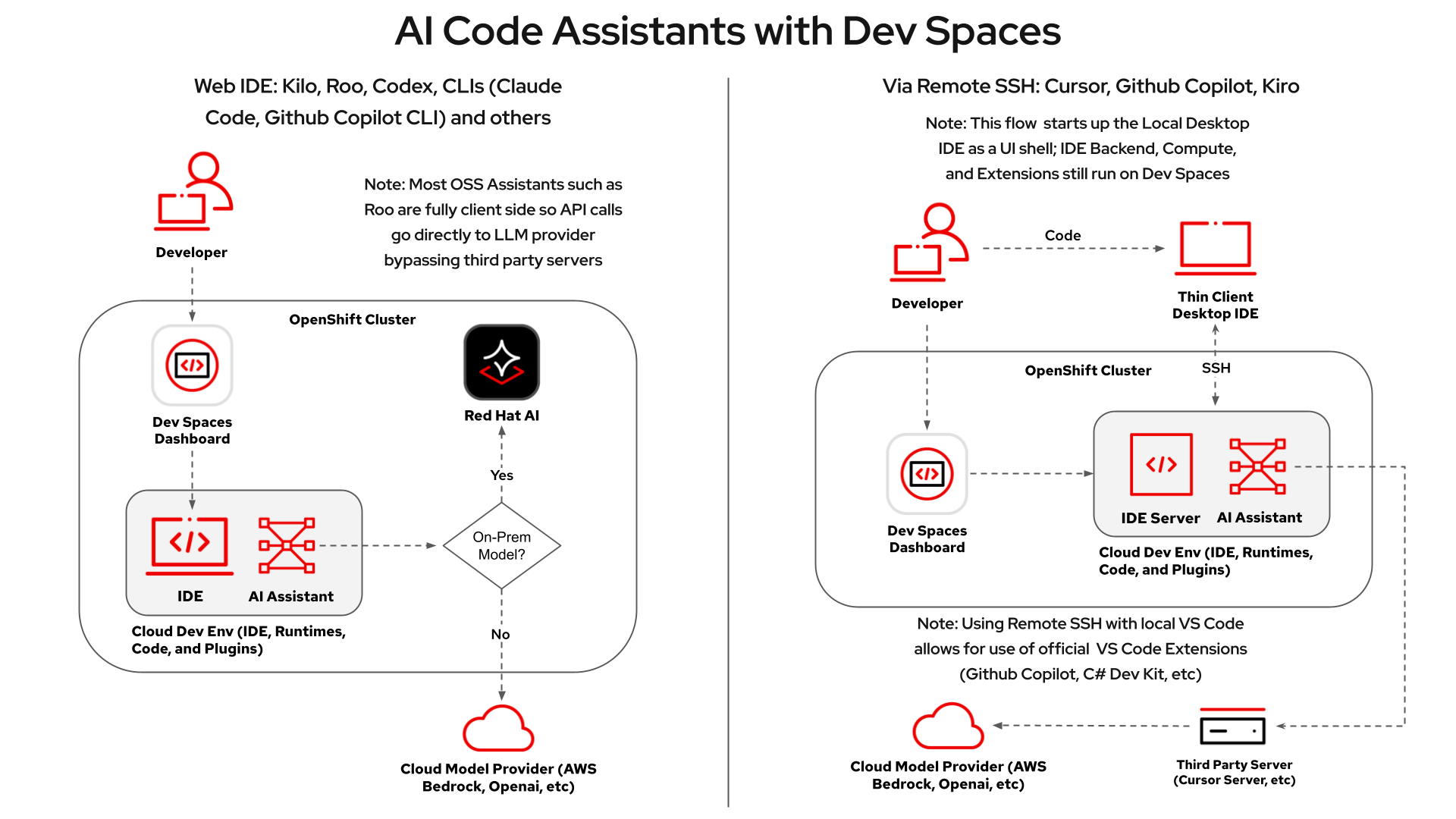
Configuring a code assistant with an on-prem model such as Red Hat Openshift AI
Assuming you've chosen a local model running on premises using Red Hat OpenShift AI, you can connect your code assistant using an OpenAI-compatible endpoint.
Serve a model on Openshift AI
As of Red Hat OpenShift AI 3.0, you can choose an LLM from the catalog and deploy it.
Otherwise, you can deploy your LLM as explained in this guide: https://github.com/IsaiahStapleton/rhoai-model-deployment-guide
Connect your code assistant to your model
With your LLM deployed, you must connect it to your code assistant:
- Provider: In your assistant settings, select OpenAI Compatible.
- Base URL: Input your Red Hat OpenShift AI inference endpoint and append
/v1to the end (for example,https://api.example.com/openai/v1). - API key: Input your token secret.
- Model ID: Input the exact name you gave your model deployment.
Configuring a code assistant with a cloud model
If you've chosen a cloud model provider, here's how to set up a code assistant for it on Dev Spaces. If you're using a subscription-based code assistant, you are typically limited to its cloud models. These steps are for a bring your own key (BYOK) assistants.
Input your API key and other access information
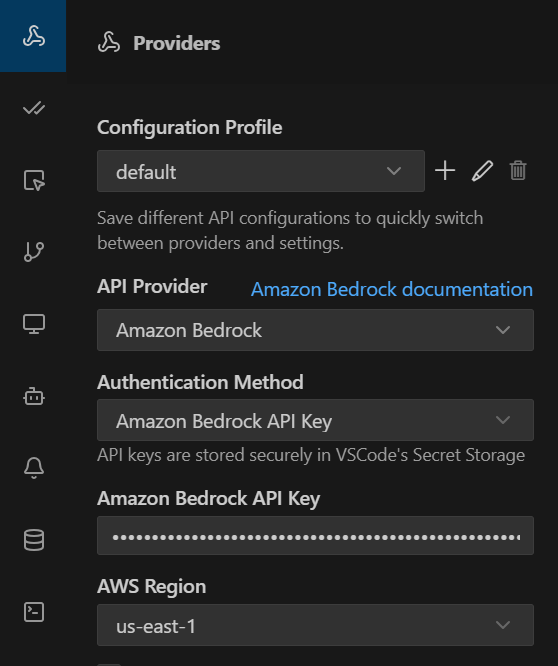
When you sign on with a model provider, you're provided with an API key and other access information. Input this information into your code assistant provider settings. Figure 2 shows an example configuration for AWS Bedrock.
Try it out today
Integrating AI code assistants is no longer just about writing code faster, it's about doing so securely and consistently across your entire team. OpenShift Dev Spaces provides the solution, placing native guardrails that ensure safe and scalable AI development.
Ready to get started? You can experiment with these workflows risk-free:
- OperatorHub: If you have an OpenShift subscription, install Dev Spaces from the OperatorHub today to build your own AI-ready development platform
- Developer Sandbox: Test these assistants with Dev Spaces in the Red Hat Developer Sandbox

