Within the Red Hat OpenShift ecosystem, OpenShift GitOps is one of the most popular Day 2 operators. This powerful tool enables teams to leverage Git as a single source of truth for the management of cluster configurations and application deployment. Built around Argo CD, OpenShift GitOps automates deployments and infrastructure updates using declarative, predictable workflows, ensuring consistency, reducing errors, and maintaining desired state across multi-cluster environments. We introduced the General Availability of the external secrets operator (ESO) for OpenShift in November of 2025, which brings the ability to securely manage credentials sourced from an external secrets management repository (such as HashiCorp Vault) within an OpenShift cluster.
Now we're introducing a critical integration between OpenShift GitOps and the external secrets operator for OpenShift that makes OpenShift GitOps use short-lived tokens to authenticate access to your repositories rather than traditional user access tokens.
Why do short-lived tokens matter?
In the world of zero trust, there are two critical principles that must always be observed:
- All workloads must have their own identity
- Identity must come with the least possible privileges to complete the task
Short-lived tokens play a key role in upholding these two principles. A user, or workload, is required to authenticate against an identity provider in order to obtain a token that can be used to access secure data or applications. The token that's returned contains encoded permissions matching the permissions of the user and an expiration date, meaning the token becomes invalid after a certain period of time.
Figure 1 illustrates the potential magnitude (or "blast radius") of a breach across two dimensions: Time and severity. In the event of a breach, the best case scenario is that the compromised credential has both a short life and minimal permissions. By comparison, the worst case scenario is that the compromised credential never expires and gives the attacker complete administrator-level access to the environment.
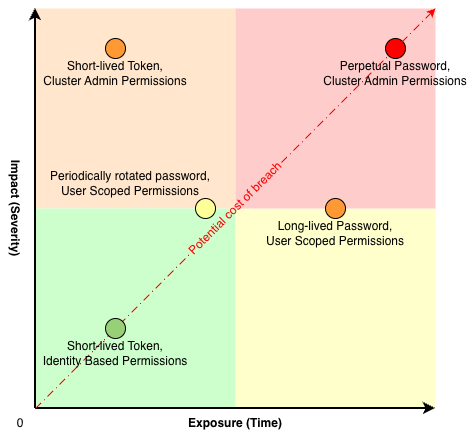
Usage of short-lived tokens can improve security over both dimensions. Firstly, it minimizes the blast radius of a breach. One of the core values of short lived tokens is their namesake. These credentials, by default, only live for a short period of time. This means that even if a bad actor were to obtain the token, they would only be able to use it for a short period of time. As a bonus, short lifespans for credentials force the actual users to refresh their tokens at periodic intervals, allowing the identity provider to re-validate that the user is indeed who they say they are.
In terms of breach severity, tokens are direct representations of the permissions of the user. No more, and no less. This helps mitigate the impact of a breach because the compromised credential only contain a limited set of permissions scoped to the specific user.
Finally, one of the most common challenges adopting short-lived tokens is that support for each specific system needs to be implemented in the requesting application. This adds to the software maintenance burden by adding additional dependencies and can quickly become complex whenever multiple systems require authentication with short-lived tokens. This is a problem that can be solved with the external secrets operator and its Generator feature which is flexible enough to connect to almost any provider with little to no additional code
Generating credentials on demand
The primary function of the external secrets operator is to automate management of credentials on Kubernetes clusters, but one of the less widely known features of ESO is the generators feature. The ESO API enables developers and vendors to define custom resources that produce new values based on pre-defined inputs. In combination with the basic functionality of ESO, this becomes an extremely powerful tool.
For example, the traditional GitOps workflow for GitHub private repositories uses a credential like a user and password pair or an access token. These credentials are stored as a Kubernetes Secret, labeled properly so that GitOps can find the secret. The issue here is that these credentials have no built in expiry period and are very difficult to track if leaked. This is where the external secrets operator Generators come into play, and the best part is that your standard GitOps workflow remains completely unchanged.
Available today is the GitHub Access Token Generator. This generator takes the form of a new CRD (GithubAccessToken). This CRD requires certain pieces of information, which it can then use to create an access token with a maximum lifespan of 60 minutes, and once generated, ESO takes the token and places it into a GitOps visible secret. You can even specify exactly which repositories to provide access to, as well as read/write permission.
With this generator in place, you can take precise control over the credentials passed to GitOps. It becomes significantly easier to create multiple automatically managed tokens, each authenticating GitOps to access a different repository or even branch within a repository, because you no longer need to manage deletion or rotation of these credentials. New tokens are automatically re-issued periodically and old tokens expire automatically.
Putting all the pieces together
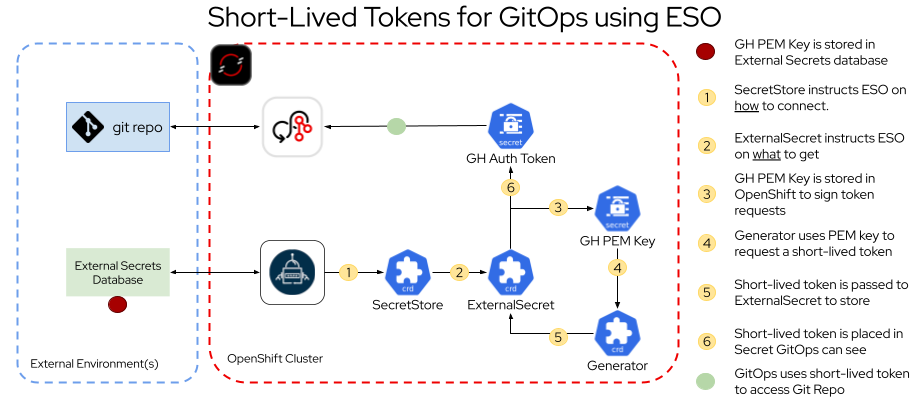
Figure 2 is a high-level architecture diagram that highlights the key pieces that must be deployed to OpenShift or externally, and how they interact in order. Assuming a GitHub PEM signing key stored in an external secrets database:
- SecretStore instructs ESO on how to connect
- ExternalSecret instructs ESO on what to get
- The GitHub PEM key is stored in OpenShift to sign token requests
- Generator uses PEM key to request a short-lived token
- Short-lived token is passed to ExternalSecret for storage
- Short-lived token is placed in a Secret that GitOps can see
The end result is that GitOps is able to use the short-lived token to access the Git repository.
Prerequisites
There are a few prerequisites that are not part of OpenShift. First, you must create a private GitHub repository, and install a GitHub App to that repository. Optionally, you can also have a running external secrets repository, such as HashiCorp Vault.
Once you have a GitHub app, you must know the app ID, installation ID, and have a generated PEM signing key. We recommend storing the PEM key in the external secrets repository and using ESO to pull the secret into OpenShift. This is more secure than placing the PEM key in OpenShift as a Kubernetes Secret.
The external secrets operator
Fortunately, the OpenShift steps are fairly straightforward. First, make sure that OpenShift GitOps operator and external secrets operator are installed.
Next, for the example displayed above, deploy these four ESO custom resources:
- SecretStore: Instructs the operator on how to communicate with your external secrets repository of choice.
- ExternalSecret: The first ExternalSecret tells the operator how to get the GitHub PEM key stored in the secrets repository, and where to place it in OpenShift.
- Generator: Communicates with GitHub using the App ID, Installation ID, and the GitHub PEM key to request a new token from GitHub.
- ExternalSecret: The second ExternalSecret obtains the token from the generator and places it into a Secret that GitOps can recognize and use.
For the purposes of this blog, we recommend you set the second ExternalSecret spec.refreshInterval to a very small value (for example, 5 minutes). This can help to demonstrate that the GitHub Authentication Token is renewed.
With the ESO Custom Resources installed, you can view a secret containing a GitHub authentication token, and if you check back after the expected refreshInterval, then you can confirm that the token has been renewed and is different from the previous one.
The impact on GitOps
In the example shown above, GitOps requires two things:
- A properly formatted secret that the GitOps operator can see
- A deployed GitOps Application Custom Resource that points the operator to the private repository created as part of the prerequisites
In fact, the first part is already done. ESO handles the creation of the secret with advanced templating and can ensure that the correct labels and annotations are assigned to the secret so that GitOps can find the credential automatically.
To verify that GitOps is correctly configured, log into the GitOps web interface and click Settings, and then select Repositories. You see a successful connection to the private repository you're using displayed in the browser.
Finally, deploy the GitOps Application. The token generated by ESO is used by GitOps to authenticate access to the private GitHub repository, and GitOps successfully deploys the code within the repository, and you can see a successfully "synced" application in the GitOps web interface, as well as successfully deployed Kubernetes resources based on the manifests included in the repository.
Try out Generators for yourself
To wrap this up, if you are interested in seeing the whole process in action, take a look at this Arcade demo:
It walk you through the step-by-step process of deploying each of the required OpenShift resources. Additionally, there are sample .yaml files in this GitHub repository.
The external secrets operator can be an extremely powerful tool for a Kubernetes administrator when attempting to improve the security posture of their clusters. There are many generators, including ones for short-lived Quay tokens and AWS STS tokens. These features enable administrators to not only automate the management of traditional "long-lived" passwords and credentials on OpenShift clusters with ESO, but also dynamically create tokens for workloads as needed. If you find this topic interesting and would like to apply this yourself, check out the documentation for ESO and get started with OpenShift today.

