PostgreSQL is an advanced open source relational database that is commonly used by applications to store structured data. Before accessing a database, the application must connect and provide security credentials. As a Node.js developer, how can you safely share and provide those credentials in JavaScript code without a lot of work? This article introduces service bindings and the kube-service-bindings package, along with a convenient graphical interface in Red Hat OpenShift.
When using a database, the four basic operations are create, read, update, and delete (CRUD, for short). Our team maintains an example CRUD application on GitHub that shows how to connect to a PostgreSQL database and execute the four basic operations. We use that example to illustrate the security model in this article.
Security risks when connecting to the PostgreSQL database
The information you need to connect to a PostgreSQL database is:
- User
- Password
- Host
- Database
- Port
You definitely need to be careful about who has access to the user and password, and ideally, you don't want any of these values to be public. This section looks at some simple methods that fail to protect this sensitive information adequately.
Setting environment variables explicitly
Using environment variables is the easiest way to configure a connection and is often used in examples like the following JavaScript code:
const serviceHost = process.env.MY_DATABASE_SERVICE_HOST;
  const user = process.env.DB_USERNAME;
  const password = process.env.DB_PASSWORD;
  const databaseName = process.env.POSTGRESQL_DATABASE
  const connectionString =
    `postgresql://${user}:${password}@${serviceHost}:5432/${databaseName}`;
  connectionOptions = { connectionString };

  const pool = new Pool(connectionOptions);
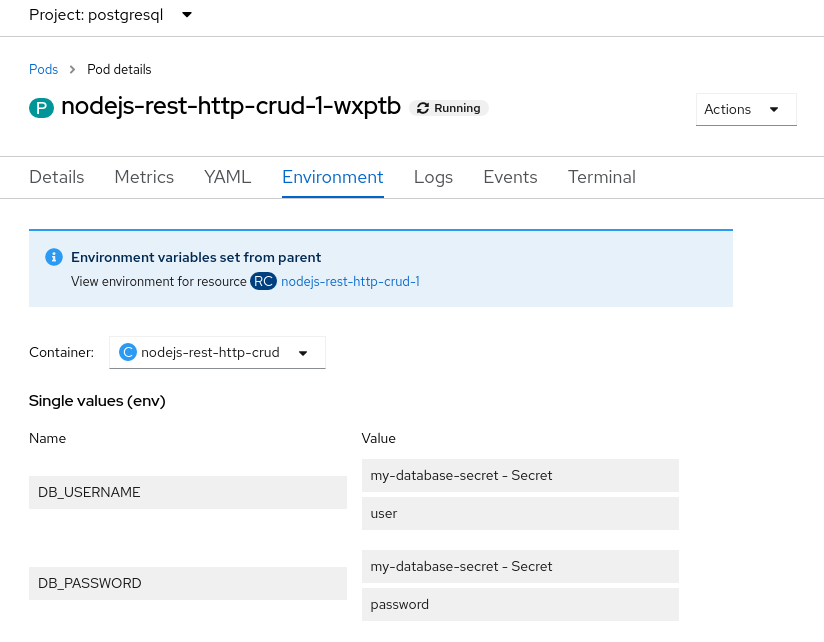
Unfortunately, using environment variables is not necessarily secure. If you set the environment variables from the command line, anybody with access to the environment can see them. Tools and frameworks also often make it easy to access environment variables for debugging purposes. For example, in OpenShift, you can view the environment variables from the console, as shown in Figure 1. So you need to find a way to provide connection credentials while keeping them hidden from interlopers.
Loading environment variables from dotenv
Instead of setting the credentials in the environment directly, a safer way is to use a package such as dotenv to get the credentials from a file and provide them to the Node.js application environment. The benefit of using dotenv is that the credentials don't show up in the environment outside of the Node.js process.
Although this approach is better, the credentials still might be exposed if you dump the Node.js environment for debugging through a Node.js diagnostic report. You are also left with the question of how to get the dotenv file securely to the application. If you are deploying to Kubernetes, you can map a file into deployed containers, but that will take some planning and coordination for deployments.
By this point, you are probably thinking that this seems like a lot of work and are wondering whether you need to configure the connection information for each type of service and set of credentials that are needed by an application. The good news is that for Kubernetes environments, this problem has already been solved. We cover the solution, service binding, in the next section.
Passing the credentials securely: Service binding in Kubernetes
Service binding is a standard approach to map a set of files into containers to provide credentials in a safe and scalable way. You can read more about the Service Binding specification for Kubernetes on GitHub.
The specification does not define what files are mapped in for a given service type. In OpenShift, binding to a PostgreSQL database instance (created using either the Crunchy or the Cloud Native PostgreSQL Operators, as described in an overview of the Service Binding Operator) results in mapping the following files into the application container:
$ SERVICE_BINDING_ROOT/<postgressql-instance-name>
├── user
├── host
├── database
├── password
├── port
├── ca.crt
└── tls.key
└── tls.crt
SERVICE_BINDING_ROOT is passed to the application through the environment.
The last three files contain the keys and certificates needed to connect over the widely used Transport Layer Security (TLS) standard and are present only if the database is configured to use TLS.
Consuming service bindings easily with kube-service-bindings
Now that you have the credentials available to the application running in the container, the remaining work is to read the credentials from those files and provide them to the PostgreSQL client used within your Node.js application. But wait—that still sounds like a lot of work, and it's also tied to the client you are using.
To make this easier, we've put together an npm package called kube-service-bindings, which makes it easy for Node.js applications to consume these secrets without requiring developers to be familiar with service bindings.
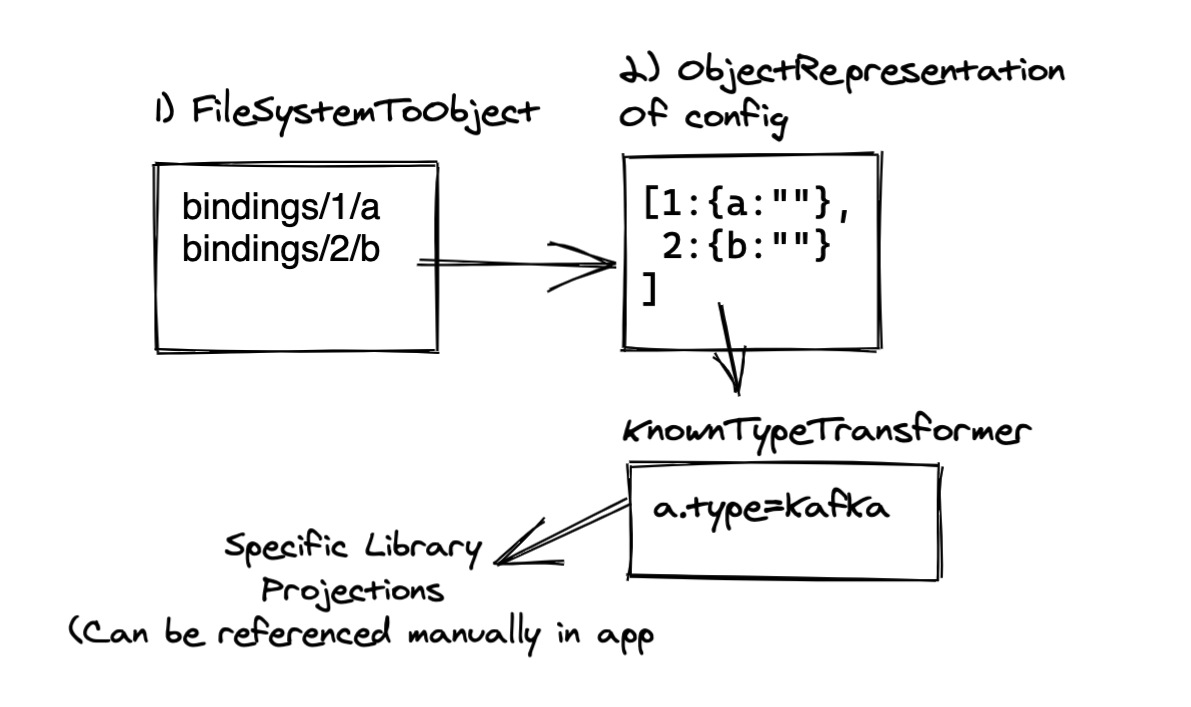
The package provides the getBinding() method, which does roughly the following:
- Look for the
SERVICE_BINDING_ROOTvariable in order to determine whether bindings are available. - Read the connection information from the files.
- Map the names of the files to the option names needed by the Node.js clients that will connect to the service.
Figure 2 shows the steps.
Let's assume you connect to PostgreSQL using the popular pg client, a library that provides all the basic commands to interact with the database. In this case you call the getBinding() method with POSTGRESQL and pg to tell kube-service-bindings which client the application is using, and then pass the object returned by getBinding()when you create a Pool object. Minus error checking, the code is as simple as this:
const serviceBindings = require('kube-service-bindings');
const { Pool } = require('pg');

let connectionOptions;
try {
  connectionOptions = serviceBindings.getBinding('POSTGRESQL', 'pg');
} catch (err) {
}

const pool = new Pool(connectionOptions);
The first parameter to getBindings() is POSTGRESQL, to specify that you are connecting to a PostgreSQL database. The second parameter, pg, tells kube-service-bindings that you are using the pg client so that the call will return the information as an object that can be passed when creating a pg Pool object.
The CRUD example, and more specifically the lib/db/index.js file, has been updated so that it can get the credentials from the environment, or automatically using kube-service-bindings when credentials are available through service bindings.
With kube-service-bindings, it's easy for Node.js developers to use credentials available through service bindings. The second part is to set up the service bindings themselves. The procedure is to install the Service Binding Operator as described in the overview article mentioned earlier, install an Operator to help you create databases, create the database for your application, and finally apply some YAML to tell the Service Binding Operator to bind the database to your application.
Setting up service bindings in OpenShift
With the release of OpenShift 4.8, you can use the OpenShift user interface (UI) to do the service binding. Thus, administrators and operators of a cluster can easily set up the PostgreSQL database instance for an organization. Developers can then connect their applications without needing to know the credentials. You can use the UI for convenience during initial development, and then YAML for more automated or production deployments.
The UI steps are quite simple:
-
Create a database using one of the PostgresSQL Operators.
-
Deploy your application to the same namespace using
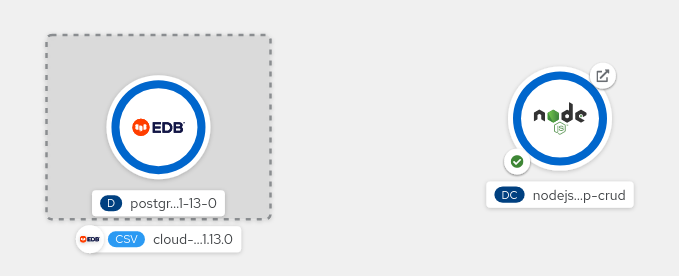
kube-service-bindings. Figure 3 shows the topology view of the namespace.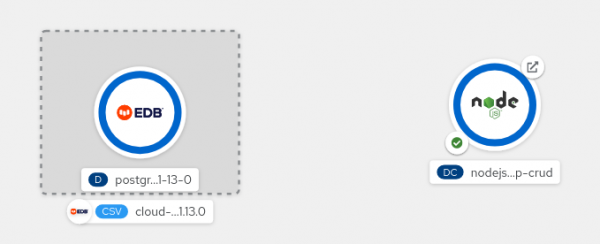
Figure 3: The namespace contains the PostgreSQL database and Node.js application. -
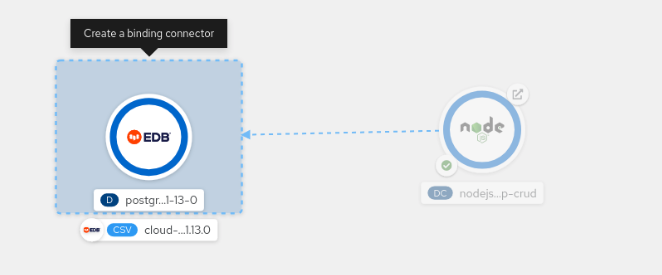
Drag a link from the application to the database until you see the "Create a binding connector" box pop up (Figure 4).
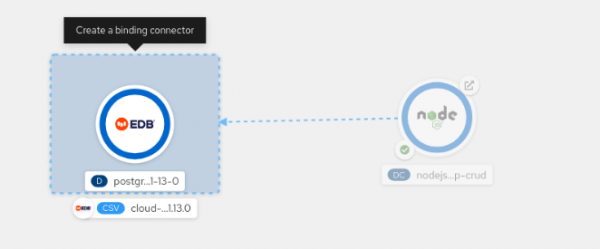
Figure 4: Create a binding from the Node.js application to the PostgreSQL database. -
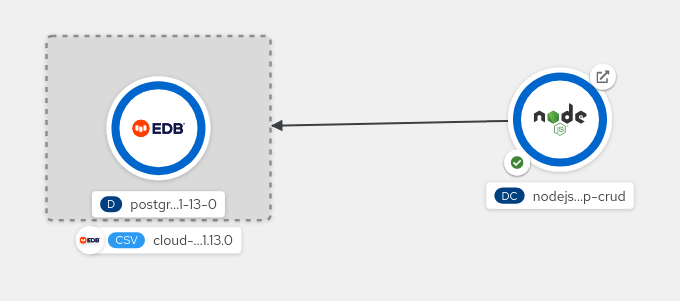
Finally, release the mouse button. The binding is created (Figure 5) and the credentials are automatically mapped into your application pods. If you've configured your application to retry the connection until service bindings are available, it should then get the credentials and connect to the database.
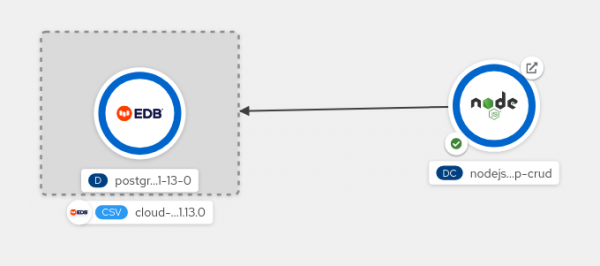
Figure 5: The binding is established.
Further resources
This article introduced you to the credentials needed to connect to a PostgreSQL database and how they can be safely provided to your Node.js applications. To learn more, try the following:
- Install and experiment with the CRUD example to explore the code and kube-service-bindings. (If you are really adventurous, you can create your own files and set
SERVICE_BINDING_ROOTto point to them.) - Work through how to set up service bindings for a PostgreSQL database using the instructions in the Service Binding Operator overview.
- Connect the CRUD example to the PostgreSQL database you created using the UI.
We hope you found this article informative. To stay up to date with what else Red Hat is up to on the Node.js front, check out our Node.js topic page.
Last updated: November 9, 2023
