The latest Red Hat build of Node.js 14 long-term support (LTS) release. This build brings new features such as diagnostic reporting, full-icu internationalization support, and Red Hat OpenShift integration. We've also included tech preview features such as the new AsyncLocalStorage class, and we've updated our documentation and interactive developer learning scenarios. Keep reading for an overview of what's new and how to get started with the Red Hat build of Node.js 14.
Get started with the Red Hat build of Node.js 14
If you are using OpenShift, start by importing the latest nodejs-14 image. Assuming you are already logged in via the oc command-line interface (CLI), enter the following in your terminal:
$ oc import-image rhel8/nodejs-14 --from=registry.redhat.io/rhel8/nodejs-14 --confirm
Next, you might want to build a simple nodejs-sample-app in OpenShift, as follows:
$ oc new-app nodejs:14~https://github.com/sclorg/nodejs-ex.git
You can use a Dockerfile to create your own image to package your application:
FROM ubi8/nodejs-14
# Add application sources
ADD app-src .

# Install the dependencies
RUN npm install

# Run script uses standard ways to run the application
CMD npm run -d start
If you want to pull and use one or more Red Hat Enterprise Linux (RHEL) images, enter the following:
$ docker login registry.redhat.io

Username: {REGISTRY-SERVICE-ACCOUNT-USERNAME}
Password: {REGISTRY-SERVICE-ACCOUNT-PASSWORD}

Login Succeeded!

$ docker pull registry.redhat.io/rhel8/nodejs-14
Built-in diagnostic reports
If you are running an application in production, you sometimes need to pull diagnostic data from it. Node.js uses first failure data capture (FFDC) technology to capture diagnostic data when the error occurs. As a developer, you can use diagnostic reports to analyze what's going on and troubleshoot the application landscape.
Previous releases required installing the Node.js reporting module separately. In the Red Hat build of Node.js 14, you can use the diagnostics reporting feature directly in your Node.js runtime. Here is an example of how to directly access diagnostic reports in this Node.js 14 build:
function test() {
    process.report.writeReport();
}

test();
console.log('Ready');
Here's an example of how to use the command line to dump reports:
$ node --report-uncaught-exception --report-on-signal --report-on-fatalerror app.js
You can generate diagnostic reports for anomalies such as performance issues, memory leaks, high CPU usage, and so on. Reports are in JSON format, making it easy to integrate the results into a broader reporting mechanism.
Full ICU internationalization support
Applications that serve customers across different geographies require internationalization support. Internationalization impacts various aspects of your application, including how data enters the system, the appearance of the user interface, and how the system's output is used. The Red Hat build of Node.js 14 provides full support for International Components for Unicode (full ICU). Selecting the full-icu option lets you write internationalized applications with a simplicity that's built into the runtime. For more information about full-icu in Node.js 14, see Internationalization support in the Node.js documentation.
Metering labels for images in Red Hat OpenShift Container Platform
Metering is a Red Hat OpenShift Container Platform tool that enables data analysis and reporting via Structured Query Language (SQL). You can use metering reports to analyze your application's intricate details while running on OpenShift. With this release, we have added metering labels for Node.js applications running on OpenShift. You can use metering labels to apply the benefits of metering in OpenShift to your own application domain.
For more information, see Metering in the Red Hat OpenShift Container Platform documentation.
V8 JavaScript engine updated to version 8.4
We've updated the V8 JavaScript engine to version 8.4 in this build. The engine contains new features such as optional chaining and API changes for improved localization support.
Tech preview features
The Red Hat build of Node.js 14 includes two new tech preview features and one improvement to an existing tech preview feature.
A new class for asynchronous local storage
If you have ever tried to propagate contextual information (such as logging) to your asynchronous processes, you know it's tedious. There should be a simpler way to handle those internal processes. In this Red Hat build of Node.js 14, we offer the AsyncLocalStorage class as a technical preview feature. AsyncLocalStorage creates an asynchronous state in callbacks and promise chains, as shown in this example:
const requestId = (req, res, next) => {
  asyncLocalStorage.run(customId, () => {
    asyncLocalStorage.getStore().set("requestId", uuid());
  });
};
The asyncLocalStorage.run() method takes two arguments: The first one is the store state, which can be anything you want. In our example, we are using a customId(customer Id). The second argument is a function. Our state will be retrievable and isolated inside of that function. In this example, we've called next() inside the function to have every other Express.js middleware instance run within the AsyncLocalStorage context.
New WebAssembly System Interface (WASI) APIs for Node.js
WebAssembly is a stack-based virtual machine built on the binary instruction format. The WebAssembly packages for Node.js improve performance and cross-platform support. The new WebAssembly System Interface (WASI) APIs provide an implementation of the WebAssembly System Interface specification. Developers can use this interface for sandboxed executions of WebAssembly applications. The interface provides the application with access to the underlying operating system.
No more warning message for using EcmaScript modules
In earlier releases of Node.js, developers received a warning message for using one or more EcmaScript modules in a Node.js application. The warning message indicated that the EcmaScript modules were experimental. We have removed the warning message from this Node.js 14 build forward. Note, however, that the EcmaScript modules are still available only in technology preview.
Developer resources
To support developers getting started with the Red Hat build of Node.js 14, we have updated the documentation and learning scenarios for this build.
Documentation
We have updated the Node.js 14 release notes and API documentation for this release. We've also added a new Node.js runtime guide.
Note: See the release notes' section "Support for Node.js Runtime on IBM Z" for more information regarding the Red Hat build of Node.js 14 on OpenShift running on the s390x platform and IBM Z infrastructure.
Developer interactive learning scenarios
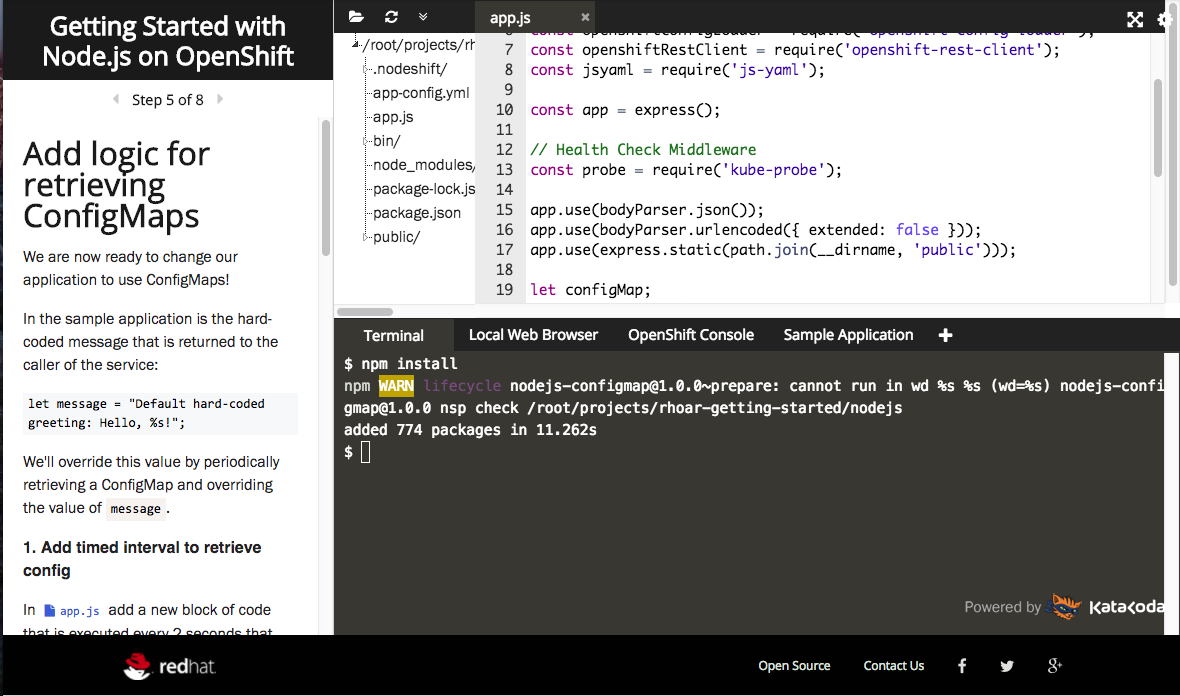
You can use self-paced developer interactive learning scenarios to experiment with Node.js or learn about other Red Hat Runtimes technologies. Each scenario provides you with a pre-configured OpenShift instance accessible from your browser without any downloads or configuration. As shown in Figure 1, you can use the OpenShift instance to explore Node.js 14 and see how it helps you solve real-world problems.
Kudos to the Red Hat Runtimes engineering team
The Red Hat Runtimes engineering team produced this release. Developing the Red Hat build of Node.js 14 involved many hours of development, testing, writing documentation, more testing, and working with the wider Red Hat community of customers, partners, and Node.js developers to incorporate both large and small contributions. We sincerely hope that this build meets or exceeds your expectations!
Last updated: February 11, 2024
