Redhat Developers  Logo
  • AI

    Get started with AI

    • Red Hat AI
      Accelerate the development and deployment of enterprise AI solutions.
    • AI learning hub
      Explore learning materials and tools, organized by task.
    • AI interactive demos
      Click through scenarios with Red Hat AI, including training LLMs and more.
    • AI/ML learning paths
      Expand your OpenShift AI knowledge using these learning resources.
    • AI quickstarts
      Focused AI use cases designed for fast deployment on Red Hat AI platforms.
    • No-cost AI training
      Foundational Red Hat AI training.

    Featured resources

    • OpenShift AI learning
    • Open source AI for developers
    • AI product application development
    • Open source-powered AI/ML for hybrid cloud
    • AI and Node.js cheat sheet

    Red Hat AI Factory with NVIDIA

    • Red Hat AI Factory with NVIDIA is a co-engineered, enterprise-grade AI solution for building, deploying, and managing AI at scale across hybrid cloud environments.
    • Explore the solution
  • Learn

    Self-guided

    • Documentation
      Find answers, get step-by-step guidance, and learn how to use Red Hat products.
    • Learning paths
      Explore curated walkthroughs for common development tasks.
    • See all learning

    Hands-on

    • Developer Sandbox
      Spin up Red Hat's products and technologies without setup or configuration.
    • Interactive labs
      Learn by doing in these hands-on, browser-based experiences.
    • Interactive demos
      Click through product features in these guided tours.

    Browse by topic

    • AI/ML
    • Automation
    • Java
    • Kubernetes
    • Linux
    • See all topics

    Training & certifications

    • Courses and exams
    • Certifications
    • Skills assessments
    • Red Hat Academy
    • Learning subscription
    • Explore training
  • Build

    Get started

    • Red Hat build of Podman Desktop
      A downloadable, local development hub to experiment with our products and builds.
    • Developer Sandbox
      Spin up Red Hat's products and technologies without setup or configuration.

    Download products

    • Access product downloads to start building and testing right away.
    • Red Hat Enterprise Linux
    • Red Hat AI
    • Red Hat OpenShift
    • Red Hat Ansible Automation Platform
    • See all products

    Featured

    • Red Hat build of OpenJDK
    • Red Hat JBoss Enterprise Application Platform
    • Red Hat OpenShift Dev Spaces
    • Red Hat Developer Toolset

    References

    • E-books
    • Documentation
    • Cheat sheets
    • Architecture center
  • Community

    Get involved

    • Events
    • Live AI events
    • Red Hat Summit
    • Red Hat Accelerators
    • Community discussions

    Follow along

    • Articles & blogs
    • Developer newsletter
    • Videos
    • Github

    Get help

    • Customer service
    • Customer support
    • Regional contacts
    • Find a partner

    Join the Red Hat Developer program

    • Download Red Hat products and project builds, access support documentation, learning content, and more.
    • Explore the benefits

Command-line cluster management with Red Hat OpenShift's new web terminal (tech preview)

October 1, 2020
Joshua Wood
Related topics:
DevOpsKubernetesLinuxOperators

    Red Hat OpenShift's web console simplifies many development and deployment chores to just a few clicks, but sometimes you need a command-line interface (CLI) to get things done on a cluster. Whether you're learning by cut-and-paste in a tutorial or troubleshooting a deep bug in production (also often done by cut-and-paste), you’ll likely need to enter at least a line or two at a command prompt.

    Starting with version 4.5.3, OpenShift users can try out a tech preview of the new Web Terminal Operator. The new OpenShift web terminal brings indispensable command-line tools right to the web console, and its Linux environment runs in a pod deployed on your OpenShift cluster. The web terminal eliminates the need to install software and configure connections and authentication for your local terminal. It also makes it easier to use OpenShift on devices like tablets and mobile phones, which might lack a native terminal.

    This article introduces the new OpenShift web terminal, including how to install and activate the Web Terminal Operator.

    An easier way to manage OpenShift clusters

    The new OpenShift web terminal includes key programs for working with clusters, including:

    • The oc tool for comprehensive OpenShift management.
    • odo, OpenShift's streamlined workflow utility for application development.
    • kubectl, the core Kubernetes API client.

    CLI client tools for the Tekton CI/CD framework, Helm application deployment charts, and Knative serverless workloads are also installed and ready to run. These OpenShift and Kubernetes tools are supported by the usual suspects of Unix-like, general-purpose text processing, and shell scripting.

    Once you've installed the Web Terminal Operator, you can access the web terminal from the command-prompt icon (>_) on the OpenShift web console masthead, as shown in Figure 1.
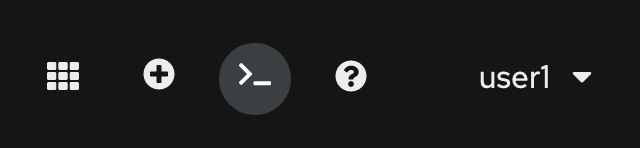
    A screenshot showing the command-prompt icon in the web console.
    Figure 1: The command prompt icon in the OpenShift web console.">

    Clicking the icon displays the web terminal frame at the bottom of the OpenShift web console, as shown in Figure 2. You can resize, reposition, or pop out the terminal into a new browser window or tab.

    A screenshot of the web terminal open in the web console.
    Figure 2: The new command-line terminal opens at the bottom of the OpenShift web console.">

    How to activate the OpenShift web terminal

    OpenShift versions 4.5.3 and later support the new Web Terminal Operator, which manages the terminal environment on the cluster. To activate the web terminal, visit the OperatorHub in the left sidebar of the Web Console Administrator Experience and search for Web Terminal. Install the Web Terminal Operator.

    Once you've deployed the Operator, log into the web console as a user without the cluster-admin role. Click the command-prompt icon in the top-right corner of your screen to start a web terminal. You’re ready to build, deploy, and manage your cluster workloads with your favorite oc or odo one-liners, without ever leaving your browser.

    Note: The web terminal's tech preview imposes a couple of limitations. First, cluster admins cannot use the web terminal, it is available only to less privileged roles. Second, the shell history feature works to recall previous commands with the up and down arrow keys and other bash mechanics, but this information is not preserved between terminal sessions.

    We appreciate your feedback

    Community feedback helps us continually improve the OpenShift developer experience. We really want to hear from you! Attend one of our office hours, or complete this survey to let us know your thoughts about the OpenShift web console and the new web terminal. You can also join the OpenShift Developer Experience Google Group to share your tips, get help with what doesn’t work so well for you, and shape the future of the OpenShift Developer Experience.

    Ready to get started? Try OpenShift today.

    Last updated: September 30, 2020

    Recent Posts

    • Tekton joins the CNCF as an incubating project

    • Federated identity across the hybrid cloud using zero trust workload identity manager

    • Confidential virtual machine storage attack scenarios

    • Introducing virtualization platform autopilot

    • Integrate zero trust workload identity manager with Red Hat OpenShift GitOps

    Red Hat Developers logo LinkedIn YouTube Twitter Facebook

    Platforms

    • Red Hat AI
    • Red Hat Enterprise Linux
    • Red Hat OpenShift
    • Red Hat Ansible Automation Platform
    • See all products

    Build

    • Developer Sandbox
    • Developer tools
    • Interactive tutorials
    • API catalog

    Quicklinks

    • Learning resources
    • E-books
    • Cheat sheets
    • Blog
    • Events
    • Newsletter

    Communicate

    • About us
    • Contact sales
    • Find a partner
    • Report a website issue
    • Site status dashboard
    • Report a security problem

    RED HAT DEVELOPER

    Build here. Go anywhere.

    We serve the builders. The problem solvers who create careers with code.

    Join us if you’re a developer, software engineer, web designer, front-end designer, UX designer, computer scientist, architect, tester, product manager, project manager or team lead.

    Sign me up

    Red Hat legal and privacy links

    • About Red Hat
    • Jobs
    • Events
    • Locations
    • Contact Red Hat
    • Red Hat Blog
    • Inclusion at Red Hat
    • Cool Stuff Store
    • Red Hat Summit
    © 2026 Red Hat

    Red Hat legal and privacy links

    • Privacy statement
    • Terms of use
    • All policies and guidelines
    • Digital accessibility

    Chat Support

    Please log in with your Red Hat account to access chat support.