Redhat Developers  Logo
  • AI

    Get started with AI

    • Red Hat AI
      Accelerate the development and deployment of enterprise AI solutions.
    • AI learning hub
      Explore learning materials and tools, organized by task.
    • AI interactive demos
      Click through scenarios with Red Hat AI, including training LLMs and more.
    • AI/ML learning paths
      Expand your OpenShift AI knowledge using these learning resources.
    • AI quickstarts
      Focused AI use cases designed for fast deployment on Red Hat AI platforms.
    • No-cost AI training
      Foundational Red Hat AI training.

    Featured resources

    • OpenShift AI learning
    • Open source AI for developers
    • AI product application development
    • Open source-powered AI/ML for hybrid cloud
    • AI and Node.js cheat sheet

    Red Hat AI Factory with NVIDIA

    • Red Hat AI Factory with NVIDIA is a co-engineered, enterprise-grade AI solution for building, deploying, and managing AI at scale across hybrid cloud environments.
    • Explore the solution
  • Learn

    Self-guided

    • Documentation
      Find answers, get step-by-step guidance, and learn how to use Red Hat products.
    • Learning paths
      Explore curated walkthroughs for common development tasks.
    • Guided learning
      Receive custom learning paths powered by our AI assistant.
    • See all learning

    Hands-on

    • Developer Sandbox
      Spin up Red Hat's products and technologies without setup or configuration.
    • Interactive labs
      Learn by doing in these hands-on, browser-based experiences.
    • Interactive demos
      Click through product features in these guided tours.

    Browse by topic

    • AI/ML
    • Automation
    • Java
    • Kubernetes
    • Linux
    • See all topics

    Training & certifications

    • Courses and exams
    • Certifications
    • Skills assessments
    • Red Hat Academy
    • Learning subscription
    • Explore training
  • Build

    Get started

    • Red Hat build of Podman Desktop
      A downloadable, local development hub to experiment with our products and builds.
    • Developer Sandbox
      Spin up Red Hat's products and technologies without setup or configuration.

    Download products

    • Access product downloads to start building and testing right away.
    • Red Hat Enterprise Linux
    • Red Hat AI
    • Red Hat OpenShift
    • Red Hat Ansible Automation Platform
    • See all products

    Featured

    • Red Hat build of OpenJDK
    • Red Hat JBoss Enterprise Application Platform
    • Red Hat OpenShift Dev Spaces
    • Red Hat Developer Toolset

    References

    • E-books
    • Documentation
    • Cheat sheets
    • Architecture center
  • Community

    Get involved

    • Events
    • Live AI events
    • Red Hat Summit
    • Red Hat Accelerators
    • Community discussions

    Follow along

    • Articles & blogs
    • Developer newsletter
    • Videos
    • Github

    Get help

    • Customer service
    • Customer support
    • Regional contacts
    • Find a partner

    Join the Red Hat Developer program

    • Download Red Hat products and project builds, access support documentation, learning content, and more.
    • Explore the benefits

Five OpenShift Development Environments in Five Minutes

July 11, 2017
jason meyer
Related topics:
Developer tools

    It’s been over a month since I spoke at the Red Hat Summit in Boston and now that the dust has settled, I thought you might be interested in reading a brief summary of my Lightning Talk on Five OpenShift Development Environments in Five Minutes.

    In the presentation, I spoke about five different ways that you can create an OpenShift development environment within minutes. This included oc cluster up, Vagrant All in One Box, Minishift, a Fabric8 technology, and the Red Hat Development Suite. My goal through the presentation was to get developers up and working with OpenShift very quickly.

    oc cluster up

    This is included in OpenShift Origin 3.3+ and Red Hat OpenShift Container Platform 3.3+, which allows you to create an OpenShift Container Platform environment in a containerized environment. It’s actually creating a containerized platform in a container. It has a lot of flexibility and runs on Windows, Linux, and macOS.

    This is the only option that we have here that allows you to use both Origin, which is the upstream version of OpenShift, and the Red Hat Enterprise version as well. It's very simple, and all you really need to run this is Docker and the OpenShift client tool (oc).  If you have those installed, it's a simple oc cluster up command and you have an environment ready to start running.

    $ oc cluster up --use-existing-config \
    --host-data-dir=/usr/data \
    --metrics=true \
    --image=registry.access.redhat.com/openshift3/ose \
    --version=latest

    Vagrant All-in-One Box

    This is a virtual machine, created by the OpenShift community using Vagrant. Vagrant's a tool for building and managing VMs. This was a very well received project and it’s one of the initial projects to be able to create these development environments for OpenShift. It's still very valid method if you have a Vagrant environment. However, the community is now shifting, pun intended, to Minishift, which we'll talk about next.

    If a user really wants to use Vagrant, this is still a valid method. It has to be understood that this specific Vagrant box is going to stay at version 3.3. It's not going to be upgraded, but there are other Vagrant boxes available.

    $ vagrant init openshift/origin-all-in-one
    $ vagrant up --provider=virtualbox

    Minishift

    This is gaining a lot of traction and where the community is heading. It doesn't matter if you're Windows, Linux, or Mac. This tool runs OpenShift locally using a single node OpenShift cluster in a virtual machine using a driver, such as virtualbox, kvm, xhyve, or Hyper-V, unlike oc cluster up, which uses a container. Many people found value with Minishift, as it provides parameters for customizing settings such as disk size, cpu, and memory.

    $ minishift start --cpus=2 --disk-size=20g --memory=2048

    Fabric8 Maven Plugin

    This is an open source microservices platform, utilizing Docker, Jenkins, and OpenShift, Kubernetes. In fact, through this microservice type of framework, you can create your own OpenShift environment easily. I was specifically calling out this Maven Plugin, mostly because I wanted to show that it's easy to spin up OpenShift inside a Maven project. In turn, this calls Minishift behind the scenes. You get all the functionality of Minishift within your Maven environment as well.

    $ mvn fabric8:cluster-start -Dfabric8.cluster.kind=openshift

    Red Hat Development Suite

    The Red Hat Development Suite is a product available through the Red Hat Developer subscription, which is free for developers and is currently only available for Windows and Macintosh. I spoke of the RH Development Suite as it had an extremely easy installer, which allows you to pick all the components that you don't have installed in your system and configures everything for you. Within minutes, you have your VirtualBox, your Vagrants, and your Red Hat Container Development Kit, all installed and ready for you to start using it as an OpenShift environment.
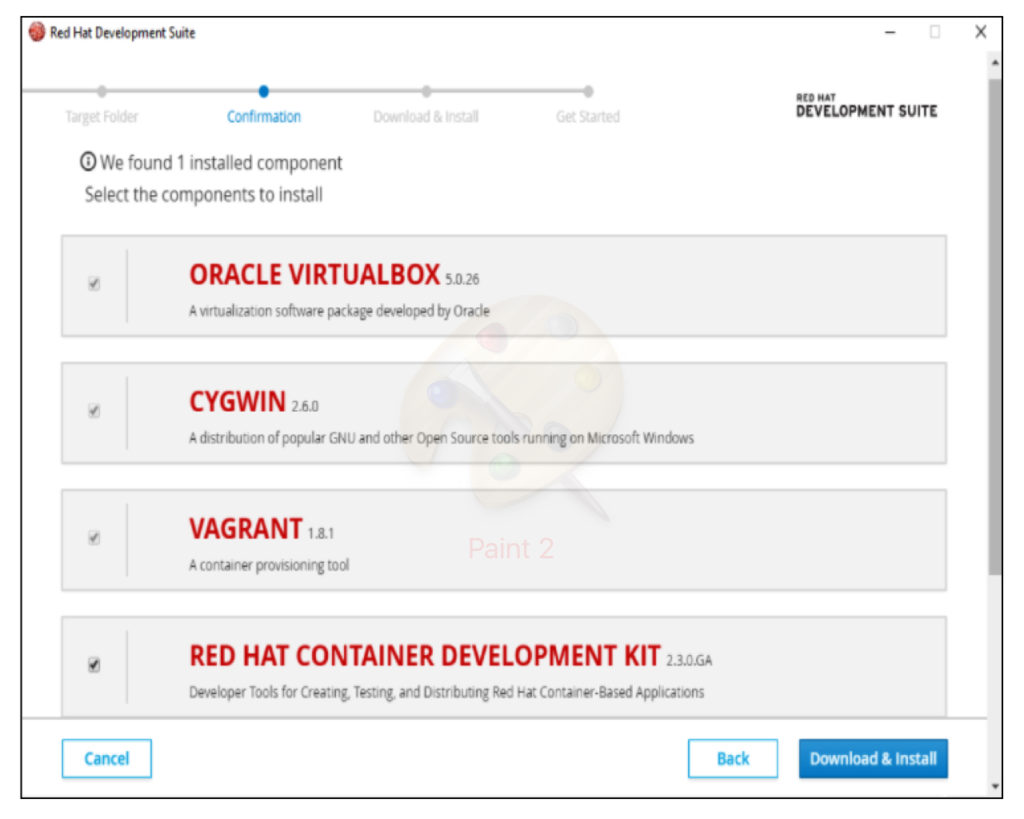
    If you're using Linux, you can still get the same functionality by using the Red Hat Container Development Kit, you just don't get the installer.

    I concluded my talk with a demo of my favorite option, oc cluster up, which required little upfront preparation, runs in a containerized environment and allows the usage of OpenShift Container Platform.


    Take advantage of your Red Hat Developers membership and download RHEL today at no cost.

    Last updated: July 10, 2017

    Recent Posts

    • Trusted software factory: Building trust in the agentic AI era

    • Build a zero trust AI pipeline with OpenShift and RHEL CVMs

    • Red Hat Hardened Images: Top 5 benefits for software developers

    • How EvalHub manages two-layer Kubernetes control planes

    • Tekton joins the CNCF as an incubating project

    Red Hat Developers logo LinkedIn YouTube Twitter Facebook

    Platforms

    • Red Hat AI
    • Red Hat Enterprise Linux
    • Red Hat OpenShift
    • Red Hat Ansible Automation Platform
    • See all products

    Build

    • Developer Sandbox
    • Developer tools
    • Interactive tutorials
    • API catalog

    Quicklinks

    • Learning resources
    • E-books
    • Cheat sheets
    • Blog
    • Events
    • Newsletter

    Communicate

    • About us
    • Contact sales
    • Find a partner
    • Report a website issue
    • Site status dashboard
    • Report a security problem

    RED HAT DEVELOPER

    Build here. Go anywhere.

    We serve the builders. The problem solvers who create careers with code.

    Join us if you’re a developer, software engineer, web designer, front-end designer, UX designer, computer scientist, architect, tester, product manager, project manager or team lead.

    Sign me up

    Red Hat legal and privacy links

    • About Red Hat
    • Jobs
    • Events
    • Locations
    • Contact Red Hat
    • Red Hat Blog
    • Inclusion at Red Hat
    • Cool Stuff Store
    • Red Hat Summit
    © 2026 Red Hat

    Red Hat legal and privacy links

    • Privacy statement
    • Terms of use
    • All policies and guidelines
    • Digital accessibility

    Chat Support

    Please log in with your Red Hat account to access chat support.