Redhat Developers  Logo
  • AI

    Get started with AI

    • Red Hat AI
      Accelerate the development and deployment of enterprise AI solutions.
    • AI learning hub
      Explore learning materials and tools, organized by task.
    • AI interactive demos
      Click through scenarios with Red Hat AI, including training LLMs and more.
    • AI/ML learning paths
      Expand your OpenShift AI knowledge using these learning resources.
    • AI quickstarts
      Focused AI use cases designed for fast deployment on Red Hat AI platforms.
    • No-cost AI training
      Foundational Red Hat AI training.

    Featured resources

    • OpenShift AI learning
    • Open source AI for developers
    • AI product application development
    • Open source-powered AI/ML for hybrid cloud
    • AI and Node.js cheat sheet

    Red Hat AI Factory with NVIDIA

    • Red Hat AI Factory with NVIDIA is a co-engineered, enterprise-grade AI solution for building, deploying, and managing AI at scale across hybrid cloud environments.
    • Explore the solution
  • Learn

    Self-guided

    • Documentation
      Find answers, get step-by-step guidance, and learn how to use Red Hat products.
    • Learning paths
      Explore curated walkthroughs for common development tasks.
    • Guided learning
      Receive custom learning paths powered by our AI assistant.
    • See all learning

    Hands-on

    • Developer Sandbox
      Spin up Red Hat's products and technologies without setup or configuration.
    • Interactive labs
      Learn by doing in these hands-on, browser-based experiences.
    • Interactive demos
      Click through product features in these guided tours.

    Browse by topic

    • AI/ML
    • Automation
    • Java
    • Kubernetes
    • Linux
    • See all topics

    Training & certifications

    • Courses and exams
    • Certifications
    • Skills assessments
    • Red Hat Academy
    • Learning subscription
    • Explore training
  • Build

    Get started

    • Red Hat build of Podman Desktop
      A downloadable, local development hub to experiment with our products and builds.
    • Developer Sandbox
      Spin up Red Hat's products and technologies without setup or configuration.

    Download products

    • Access product downloads to start building and testing right away.
    • Red Hat Enterprise Linux
    • Red Hat AI
    • Red Hat OpenShift
    • Red Hat Ansible Automation Platform
    • See all products

    Featured

    • Red Hat build of OpenJDK
    • Red Hat JBoss Enterprise Application Platform
    • Red Hat OpenShift Dev Spaces
    • Red Hat Developer Toolset

    References

    • E-books
    • Documentation
    • Cheat sheets
    • Architecture center
  • Community

    Get involved

    • Events
    • Live AI events
    • Red Hat Summit
    • Red Hat Accelerators
    • Community discussions

    Follow along

    • Articles & blogs
    • Developer newsletter
    • Videos
    • Github

    Get help

    • Customer service
    • Customer support
    • Regional contacts
    • Find a partner

    Join the Red Hat Developer program

    • Download Red Hat products and project builds, access support documentation, learning content, and more.
    • Explore the benefits

Scale testing image-based upgrades for single node OpenShift

June 28, 2024
Alex Krzos
Related topics:
Automation and managementEdge computingGitOpsKubernetesOperators
Related products:
Red Hat Advanced Cluster Management for KubernetesRed Hat OpenShift

    Image-based upgrades (IBU) are a developer preview feature in Red Hat OpenShift Container Platform 4.15 that reduce the time required to upgrade a single node OpenShift cluster. The image-based upgrade can perform both Z and Y stream upgrades, include operator upgrades in the image, and rollback to the previous version manually or automatically upon failure. Image-based upgrade can also directly upgrade OpenShift Container Platform 4.y to 4.y+2, whereas a traditional OpenShift upgrade would require two separate upgrades to achieve the same end result (4.Y to 4.Y+1 to 4.Y+2). 

    An image-based upgrade consists of several stages that the Lifecycle Agent will take a cluster through. Those stages are prep, upgrade, rollback, and idle. The prep stage can be completed outside a maintenance window and downloads the seed image and pre-caches additional images required to perform the upgrade. The upgrade stage performs the upgrade, and rollback can undo an upgrade which returns a cluster back to the previous version. The idle stage is achieved via a finalize policy which brings the cluster back to a state in which a new image-based upgrade can be started and can be initiated after an upgrade or rollback stage completes.

    As part of scale and performance testing, we run thousands of upgrades to find bugs, determine success rates, and generally stress test an environment. Scalability and performance testing will find bugs while a system is under immense stress, produce rare bugs such as race conditions, validate a system can complete a function at a specified scale, and determine resource requirements.

    Test goal

    The main goal of this round of scale testing image-based upgrades is to ensure that Red Hat Advanced Cluster Management for Kubernetes (RHACM) in combination with Topology Aware Lifecycle Manager (TALM) can orchestrate upgrades to 3,500 single node OpenShifts. The time spent per cluster upgrade will then be compared to traditional cluster upgrade data points from similar fleet upgrade tests that have been completed in RHACM Zero Touch Provisioning (ZTP) scale tests.

    Test method

    To accomplish this, a hybrid testbed that includes a 3-node bare metal OpenShift cluster with RHACM, TALM, and GitOps installed is set up. Another 136 machines serve as hypervisors to host virtual machine single node OpenShifts (SNOs). The hosted VMs are prepared with blank disks such that the Infrastructure Operator which is included with RHACM will install OpenShift via Virtual Media on the target VMs. The Hub cluster then deploys SNOs via a combination of GitOps and ZTP to 3,500 virtual machine single node OpenShifts across the hypervisors.

    Once initial deployment is complete, we can then use a PolicyGenTemplate to create RHACM Policies for image-based upgrades. These policies are orchestrated by TALM using a ClusterGroupUpgrade or CGU resource to perform image-based upgrades across the fleet of SNOs. To orchestrate the stages of IBU across 3,500 clusters, the fleet is initially split into 7 groups of 500 clusters. The groups are defined by the clusters selected in each prep CGU spec.clusters array and the additional stages will use labels applied via successful policies in the CGU. This allows the ability to keep failed clusters for analysis and opening bugs. When a cluster completes prep stage, it is labeled such that the associated upgrade CGU will select only the completed prep stage clusters via the CGU spec.clusterSelector.

    Each stage will be allowed to run to completion before moving to a new stage, this is to allow time to run diagnostic and data collection scripts to evaluate each stage. This means we will apply 7 CGUs to move all clusters into Prep stage, wait for completion before moving to the upgrade stage. After prep stage completes for all 3,500 clusters, then we begin upgrading the fleet with the upgrade CGUs. 

    To upgrade the fleet a rate of 1 upgrade CGU applied every 15 minutes was chosen with a 30 minute timeout. This means we expected all clusters in that CGU group to be upgraded or failed to upgrade in 30 minutes after the CGU was applied and enabled. Simply by the definition of the count of clusters (3,500) and the rate 1 CGU every 15 minutes along with the timeout, meant that the maximum amount of time during this entire fleet upgrade would be only 2 hours. Additionally, diagnostic data was collected off of every SNO that completed an upgrade to determine its individual upgrade time. 

    Test results

    After completing several iterations and gathering of IBU duration data, we observed 76 to 87.5% less time spent upgrading each individual cluster when compared across all statistics of 1,000s of upgrade durations. With IBU, while reviewing the 99 percentile of cluster upgrade times, our VM-based clusters completed an upgrade in less than 14 minutes. See Figure 1.
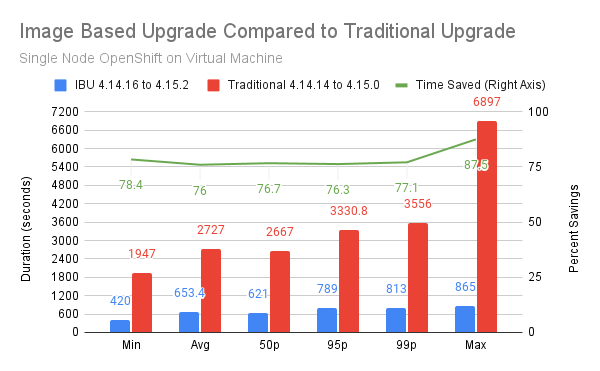
    Image Based Upgrade vs Traditional Upgrade
    Figure 1: IBU duration data test results.

    Conclusion

    In conclusion, we found that RHACM and TALM can upgrade 3,500 SNOs significantly faster via image based upgrades. IBU becomes even faster if you leverage the ability to skip Y-stream builds to achieve a 4.Y+2 upgrade and the fact you can include Operator upgrades in the image as well. This testing was artificially limited to 500 clusters every 15 minutes as a rate of IBU upgrades, thus we will continue to test larger groups to find the limits of IBU, RHACM, and TALM.

    Related Posts

    • Installing Red Hat Advanced Cluster Management (ACM) for Kubernetes

    • Deploy an Operator via GitOps using Advanced Cluster Management

    • Red Hat OpenShift Container Platform Load Testing Tips

    • Deploy Red Hat AMQ Streams and Fuse on OpenShift Container Platform 4

    • How to install single node OpenShift on AWS

    • How to install single node OpenShift on bare metal

    Recent Posts

    • Protect data offloaded to GPU-accelerated environments with OpenShift sandboxed containers

    • Case study: Measuring energy efficiency on the x64 platform

    • How to prevent AI inference stack silent failures

    • Preventing GPU waste: A guide to JIT checkpointing with Kubeflow Trainer on OpenShift AI

    • How to manage TLS certificates used by OpenShift GitOps operator

    What’s up next?

    Download the GitOps Cookbook to quickly get started with development cycles on Kubernetes following a GitOps approach.

    Get the e-book
    Red Hat Developers logo LinkedIn YouTube Twitter Facebook

    Platforms

    • Red Hat AI
    • Red Hat Enterprise Linux
    • Red Hat OpenShift
    • Red Hat Ansible Automation Platform
    • See all products

    Build

    • Developer Sandbox
    • Developer tools
    • Interactive tutorials
    • API catalog

    Quicklinks

    • Learning resources
    • E-books
    • Cheat sheets
    • Blog
    • Events
    • Newsletter

    Communicate

    • About us
    • Contact sales
    • Find a partner
    • Report a website issue
    • Site status dashboard
    • Report a security problem

    RED HAT DEVELOPER

    Build here. Go anywhere.

    We serve the builders. The problem solvers who create careers with code.

    Join us if you’re a developer, software engineer, web designer, front-end designer, UX designer, computer scientist, architect, tester, product manager, project manager or team lead.

    Sign me up

    Red Hat legal and privacy links

    • About Red Hat
    • Jobs
    • Events
    • Locations
    • Contact Red Hat
    • Red Hat Blog
    • Inclusion at Red Hat
    • Cool Stuff Store
    • Red Hat Summit
    © 2026 Red Hat

    Red Hat legal and privacy links

    • Privacy statement
    • Terms of use
    • All policies and guidelines
    • Digital accessibility

    Chat Support

    Please log in with your Red Hat account to access chat support.