Redhat Developers  Logo
  • AI

    Get started with AI

    • Red Hat AI
      Accelerate the development and deployment of enterprise AI solutions.
    • AI learning hub
      Explore learning materials and tools, organized by task.
    • AI interactive demos
      Click through scenarios with Red Hat AI, including training LLMs and more.
    • AI/ML learning paths
      Expand your OpenShift AI knowledge using these learning resources.
    • AI quickstarts
      Focused AI use cases designed for fast deployment on Red Hat AI platforms.
    • No-cost AI training
      Foundational Red Hat AI training.

    Featured resources

    • OpenShift AI learning
    • Open source AI for developers
    • AI product application development
    • Open source-powered AI/ML for hybrid cloud
    • AI and Node.js cheat sheet

    Red Hat AI Factory with NVIDIA

    • Red Hat AI Factory with NVIDIA is a co-engineered, enterprise-grade AI solution for building, deploying, and managing AI at scale across hybrid cloud environments.
    • Explore the solution
  • Learn

    Self-guided

    • Documentation
      Find answers, get step-by-step guidance, and learn how to use Red Hat products.
    • Learning paths
      Explore curated walkthroughs for common development tasks.
    • Guided learning
      Receive custom learning paths powered by our AI assistant.
    • See all learning

    Hands-on

    • Developer Sandbox
      Spin up Red Hat's products and technologies without setup or configuration.
    • Interactive labs
      Learn by doing in these hands-on, browser-based experiences.
    • Interactive demos
      Click through product features in these guided tours.

    Browse by topic

    • AI/ML
    • Automation
    • Java
    • Kubernetes
    • Linux
    • See all topics

    Training & certifications

    • Courses and exams
    • Certifications
    • Skills assessments
    • Red Hat Academy
    • Learning subscription
    • Explore training
  • Build

    Get started

    • Red Hat build of Podman Desktop
      A downloadable, local development hub to experiment with our products and builds.
    • Developer Sandbox
      Spin up Red Hat's products and technologies without setup or configuration.

    Download products

    • Access product downloads to start building and testing right away.
    • Red Hat Enterprise Linux
    • Red Hat AI
    • Red Hat OpenShift
    • Red Hat Ansible Automation Platform
    • See all products

    Featured

    • Red Hat build of OpenJDK
    • Red Hat JBoss Enterprise Application Platform
    • Red Hat OpenShift Dev Spaces
    • Red Hat Developer Toolset

    References

    • E-books
    • Documentation
    • Cheat sheets
    • Architecture center
  • Community

    Get involved

    • Events
    • Live AI events
    • Red Hat Summit
    • Red Hat Accelerators
    • Community discussions

    Follow along

    • Articles & blogs
    • Developer newsletter
    • Videos
    • Github

    Get help

    • Customer service
    • Customer support
    • Regional contacts
    • Find a partner

    Join the Red Hat Developer program

    • Download Red Hat products and project builds, access support documentation, learning content, and more.
    • Explore the benefits

Simplify AI data integration with RamaLama and RAG

How RamaLama makes sharing data with your AI model boring

April 3, 2025
Daniel Walsh
Related topics:
Artificial intelligenceContainersKubernetesOpen source
Related products:
Red Hat AI

    The RamaLama project makes it easy to run AI locally by combining AI models and container technology. The RamaLama project has prepared all software necessary to run an AI model in container images specific to the local GPU accelerators. Check out How RamaLama makes working with AI models boring for an overview of the project.

    The RamaLama tool figures out what accelerator is available on the user’s system and pulls the matching image. It then pulls the specified AI model to the local system and finally creates a container from the image with the AI model mounted inside of it. You can use the run command to activate a chatbot against the model, or serve the model via an OpenAI-compatible REST API.

    Integrating user-specific data into AI models with RAG

    Because everything is running in containers, RamaLama can generate code to put the REST API into production, either to run on edge devices using Quadlets or into a Kubernetes cluster. 

    This works great, but often the AI model was not trained on the user’s data and needs more data. In the AI world, adding user data to an AI model requires retrieval-augmented generation (RAG). This technique enhances large language models (LLMs) by enabling them to access and incorporate external knowledge sources before generating responses, leading to more accurate and relevant outputs. User data is often stored as PDF or DOCX files or as Markdown.  

    How do users translate these documents into something that the AI models can understand?

    IBM developed a helpful open source tool called Docling, which can parse most document formats into simpler JSON structured language. This JSON can then be compiled into RAG vector database format for AI models to consume. See Figure 1.

    Image of a duckling with PDF, DOCX, PPTX, and HTML files traveling through Docling to create a Docling DOC file. The DOC file has three arrows pointing to JSON, Markdown, and Figures; Chunking, LlamaIndex, and Langchain; and your gen AI app.
    Figure 1: Processing document formats with Docling.

    This sounds great, but it can be very complex to set up.

    Introducing RamaLama RAG

    RamaLama has added variants of the GPU-accelerated container images with a -rag postfix. These images layer on top of the existing images and add Docling and all of its requirements as well as code to create a RAG vector database. See Figure 2.
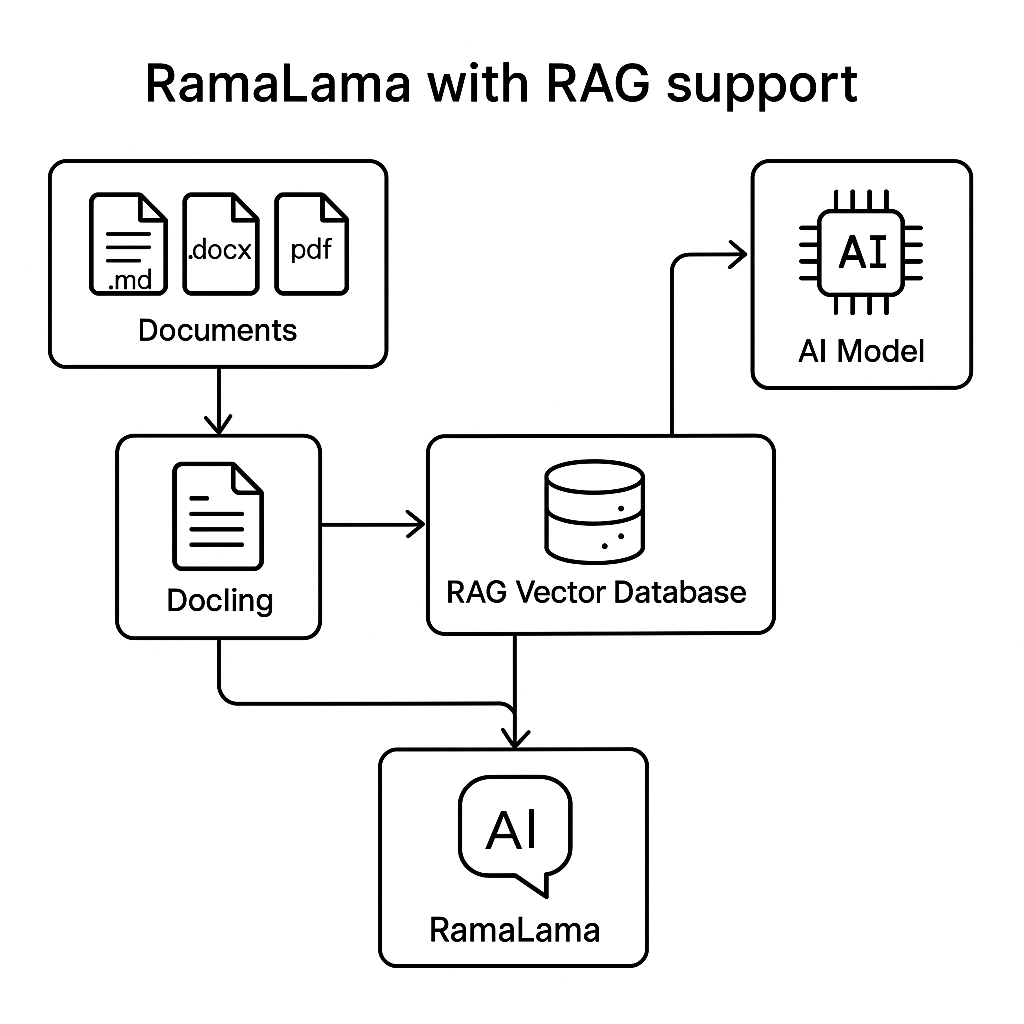
    Diagram of RAG support in RamaLama, with Docling routing documents to the RAG vector database.
    Figure 2: How a RAG vector database is created with RamaLama and Docling.

    RamaLama is currently compatible with the Qdrant vector database. (The RamaLama project welcomes PRs to add compatibility for other databases.)

    Simply execute:

    $ ramalama rag file.md document.docx https://example.com/mydoc.pdf quay.io/myrepository/ragdata

    This command generates a container, mounting the specified files into it and executing the doc2rag Python script. This script uses Docling and Qdrant to produce a vector.db based on the input files. 

    Once the container completes, RamaLama creates the specified OCI image (Artifact in the future) containing vectordb. This image can now be pushed to any OCI-compliant registry (quay.io, docker.io, Artifactory …) for others to consume.

    To serve up the model, execute the following command:

    $ ramalama run --rag quay.io/myrepository/ragdata MODEL

    RamaLama creates a container with the RAG vector database and the model mounted into it. Then it starts a chatbot that can interact with the AI model using the RAG data.

    Similarly, RamaLama can serve up the REST API with a similar command:

    $ ramalama serve  --rag quay.io/myrepository/ragdata MODEL

    Putting the RAG-served model into production

    In order to put the RAG model into production, you need to use an OCI-based model. If the model is from Ollama or Hugging Face, it is easy to convert it to an OCI format, as follows:

    $ ramalama convert MODEL quay.io/myrepository/mymodel

    Now push the models to the registries:

    $ ramalama push quay.io/myrepository/mymodel
    $ ramalama push quay.io/myrepository/myrag

    Use the ramalama serve command to generate Kubernetes format for running in a cluster or a quadlet to run on edge devices.

    For Quadlets:

    $ ramalama serve  –name myrag –generate quadlet --rag quay.io/myrepository/ragdata quay.io/myrepository/mymodel
    Generating quadlet file: myrag.volume
    Generating quadlet file: myrag.image
    Generating quadlet file: myrag-rag.volume
    Generating quadlet file: myrag-rag.image
    Generating quadlet file: myrag.container

    For Kubernetes:

    $ ramalama serve  –name myrag –generate kube --rag quay.io/myrepository/ragdata quay.io/myrepository/mymodel
    Generating Kubernetes YAML file: myrag.yaml

    Now install these quadlets on multiple edge services and just update the RAG data image or the model image and the edge devices will automatically get updated with the latest content.

    Similarly, use the Kubernetes YAML files and update the container image used to run the model and the RAG data independently, and Kubernetes will take care of updating the application and its content on restart.

    Summary

    RAG is a powerful capability, but one that can be complicated to set up. RamaLama has made it trivial.

    Follow these installation instructions to try RamaLama on your machine.

    Related Posts

    • How RamaLama makes working with AI models boring

    • How RamaLama runs AI models in isolation by default

    • Simplifying AI with RamaLama and llama-run

    • Deploy Llama 3 8B with vLLM

    • A practical guide to Llama Stack for Node.js developers

    • How to fine-tune Llama 3.1 with Ray on OpenShift AI

    Recent Posts

    • Tekton joins the CNCF as an incubating project

    • Federated identity across the hybrid cloud using zero trust workload identity manager

    • Confidential virtual machine storage attack scenarios

    • Introducing virtualization platform autopilot

    • Integrate zero trust workload identity manager with Red Hat OpenShift GitOps

    Red Hat Developers logo LinkedIn YouTube Twitter Facebook

    Platforms

    • Red Hat AI
    • Red Hat Enterprise Linux
    • Red Hat OpenShift
    • Red Hat Ansible Automation Platform
    • See all products

    Build

    • Developer Sandbox
    • Developer tools
    • Interactive tutorials
    • API catalog

    Quicklinks

    • Learning resources
    • E-books
    • Cheat sheets
    • Blog
    • Events
    • Newsletter

    Communicate

    • About us
    • Contact sales
    • Find a partner
    • Report a website issue
    • Site status dashboard
    • Report a security problem

    RED HAT DEVELOPER

    Build here. Go anywhere.

    We serve the builders. The problem solvers who create careers with code.

    Join us if you’re a developer, software engineer, web designer, front-end designer, UX designer, computer scientist, architect, tester, product manager, project manager or team lead.

    Sign me up

    Red Hat legal and privacy links

    • About Red Hat
    • Jobs
    • Events
    • Locations
    • Contact Red Hat
    • Red Hat Blog
    • Inclusion at Red Hat
    • Cool Stuff Store
    • Red Hat Summit
    © 2026 Red Hat

    Red Hat legal and privacy links

    • Privacy statement
    • Terms of use
    • All policies and guidelines
    • Digital accessibility

    Chat Support

    Please log in with your Red Hat account to access chat support.