The open source world provides numerous libraries for building applications. Finding the most appropriate one can be difficult. There are multiple criteria to consider when selecting a library for an application: Is the project well maintained by a healthy community? Does the library fit into the application stack? Will it work well on the target platform? The list of potential questions is large, and a negative response to any of them might lead you to reject a project and look for another one that provides similar functionality.
Project Thoth, a set of tools for building robust Python applications, is creating a database of information about available projects. This article is a progress report and an invitation to join project2vec, which is currently a proof of concept. The ideas behind this project can be applied to other language ecosystems, as well.
A data set of Python projects
First, let’s identify the types of information that could be used to build a database of Python projects. It's possible to analyze source code directly. But another source of valuable information is project documentation, especially what is exposed on projects' websites and repository pages. Currently, project2vec is relying on project descriptions to build the data set.
Python projects hosted on PyPI usually provide information in the form of a description in free text. For instance, the micropipenv site on PyPI starts with a simple phrase about the project, followed by a project description containing a more detailed project overview. Another valuable source of information for us is the metadata section, which lists keywords associated with the project and Python trove classifiers. All of this information is provided by the project maintainer.
Now, let’s extract keywords that can hold relevant data to associate features to a project. We can directly use keywords assigned to the given project with minimal processing: We simply take keywords associated with the project and assign them to the given project. Similarly, we can obtain relevant Python trove classifiers associated with the project and, with minimal processing, form a keyword from the relevant part of the classifier. For instance, from Topic :: Software Development :: Quality Assurance we can derive the quality-assurance keyword.
The project description requires additional processing to extract relevant keywords. With the help of natural language tools such as NLTK we can tokenize the text, remove stop words, and look for keywords. The keyword lookup can use a dictionary of keywords that we spot in the project metadata on PyPI, supplemented by keywords available in public data sets. One suitable data set for keywords consists of tags available on Stack Overflow. These tags are technical and often correspond to the features a project provides.
Once all this information is extracted, we have a data set where each project is linked to a set of keywords that describe the project in some sense. To get better results, we can adjust the associated keywords by reducing synonyms, filtering out keywords that do not differentiate projects (for instance, because the keywords are unique), and so on. We also can add additional sources and features to further expand the project2vec database.
Creating a searchable database
Now let’s use the aggregated data set to build a searchable database. The database contains pairs in the form of <project_name, vector>, where project_name is a string indicating the project and vector is a binary N-dimensional vector. Each bit in the vector indicates whether the project provides a specific feature based on the keyword. For example, the micropipenv project can have the corresponding bit in the binary vector for packaging set to 1, because the project is used to install Python packages. On the other hand, the bit that corresponds to mathematical-computation is set to zero, because micropipenv is not used for mathematical computations.
Querying the searchable database
After creating <project_name, vector> pairs for all available projects, we navigate the search space to find a project that meets our requirements. For example, if we're interested in projects that provide a packaging feature, we can mask all the bits in the binary vector to 0, except for the bit that corresponds to the packaging keyword. Masking out unwanted features is a logical and operation on vectors (Figure 1). Projects for which the resulting vectors are non-zero are known to be associated with packaging in some way, based on the keyword extraction done earlier.
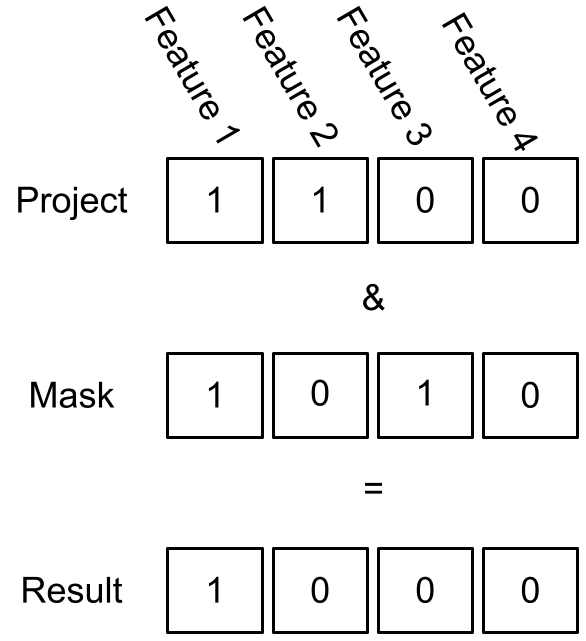
We can extend our search and ask for projects that provide multiple features we are interested in. For example, we can search for projects that have machine-learning and python3.9 features by setting those bits in the masking to 1 and setting all other bits to zero. Projects returned by the query provide machine learning on Python 3.9. This procedure can be repeated multiple times based on the features the developer is interested in.
Finding matching projects
Next, let's take a feature vector assigned to one project and apply it to find feature matches with other projects. Exact matches are rare, but we can find projects that are situated close to the selected one (for example, based on their Euclidean distance) to uncover similar projects.
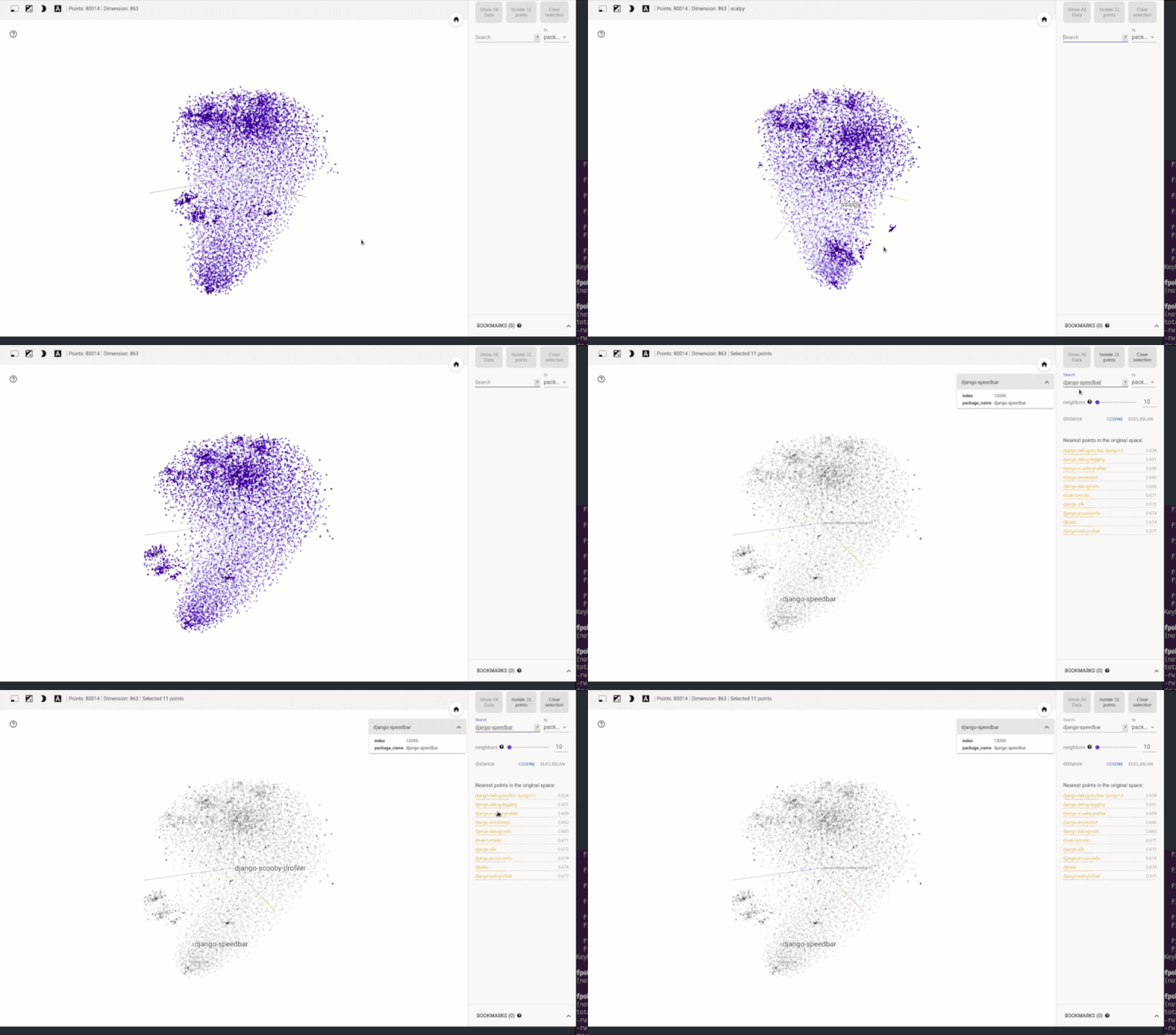
Directly visualizing the N-dimensional vector space might be tricky for N>3. However, thanks to space reduction techniques such as t-SNE, we can get a notion about the vector space structure and its characteristics. For instance, the following animated visualization shows a state space created for the Python ecosystem using the technique just described. The result is visualized in TensorBoard. As shown in the model (Figure 2) a simple lookup can reveal clusters that group similar projects.
Status of project2vec
The solution we've described in this article is available as a proof of concept in the thoth-station/isis-api repository. The repository provides an API service that can be used to query the vector space when looking for similar Python projects. The code related to keyword aggregation and search space creation can be found in the thoth-station/selinon-worker repository.
Project Thoth is accumulating knowledge to help Python developers create healthy applications. If you would like to follow updates to our work, feel free to subscribe to our YouTube channel or follow us on the @ThothStation Twitter handle.
Last updated: September 19, 2022
