Redhat Developers  Logo
  • AI

    Get started with AI

    • Red Hat AI
      Accelerate the development and deployment of enterprise AI solutions.
    • AI learning hub
      Explore learning materials and tools, organized by task.
    • AI interactive demos
      Click through scenarios with Red Hat AI, including training LLMs and more.
    • AI/ML learning paths
      Expand your OpenShift AI knowledge using these learning resources.
    • AI quickstarts
      Focused AI use cases designed for fast deployment on Red Hat AI platforms.
    • No-cost AI training
      Foundational Red Hat AI training.

    Featured resources

    • OpenShift AI learning
    • Open source AI for developers
    • AI product application development
    • Open source-powered AI/ML for hybrid cloud
    • AI and Node.js cheat sheet

    Red Hat AI Factory with NVIDIA

    • Red Hat AI Factory with NVIDIA is a co-engineered, enterprise-grade AI solution for building, deploying, and managing AI at scale across hybrid cloud environments.
    • Explore the solution
  • Learn

    Self-guided

    • Documentation
      Find answers, get step-by-step guidance, and learn how to use Red Hat products.
    • Learning paths
      Explore curated walkthroughs for common development tasks.
    • Guided learning
      Receive custom learning paths powered by our AI assistant.
    • See all learning

    Hands-on

    • Developer Sandbox
      Spin up Red Hat's products and technologies without setup or configuration.
    • Interactive labs
      Learn by doing in these hands-on, browser-based experiences.
    • Interactive demos
      Click through product features in these guided tours.

    Browse by topic

    • AI/ML
    • Automation
    • Java
    • Kubernetes
    • Linux
    • See all topics

    Training & certifications

    • Courses and exams
    • Certifications
    • Skills assessments
    • Red Hat Academy
    • Learning subscription
    • Explore training
  • Build

    Get started

    • Red Hat build of Podman Desktop
      A downloadable, local development hub to experiment with our products and builds.
    • Developer Sandbox
      Spin up Red Hat's products and technologies without setup or configuration.

    Download products

    • Access product downloads to start building and testing right away.
    • Red Hat Enterprise Linux
    • Red Hat AI
    • Red Hat OpenShift
    • Red Hat Ansible Automation Platform
    • See all products

    Featured

    • Red Hat build of OpenJDK
    • Red Hat JBoss Enterprise Application Platform
    • Red Hat OpenShift Dev Spaces
    • Red Hat Developer Toolset

    References

    • E-books
    • Documentation
    • Cheat sheets
    • Architecture center
  • Community

    Get involved

    • Events
    • Live AI events
    • Red Hat Summit
    • Red Hat Accelerators
    • Community discussions

    Follow along

    • Articles & blogs
    • Developer newsletter
    • Videos
    • Github

    Get help

    • Customer service
    • Customer support
    • Regional contacts
    • Find a partner

    Join the Red Hat Developer program

    • Download Red Hat products and project builds, access support documentation, learning content, and more.
    • Explore the benefits

Containerize .NET for Red Hat OpenShift: Linux containers and .NET Core

April 15, 2021
Don Schenck
Related topics:
ContainersKubernetesLinux.NET

    When .NET was released to the open source world (November 12, 2014—not that I remember the date or anything), it didn't just bring .NET to open source; it brought open source to .NET. Linux containers were one of the then-burgeoning, now-thriving technologies that became available to .NET developers. At that time, it was "docker, docker, docker" all the time. Now, it's Podman and Buildah, and Kubernetes, and Red Hat OpenShift, and serverless, and ... well, you get the idea. Things have progressed, and your .NET applications can progress, as well.

    This article is part of a series introducing three ways to containerize .NET applications on Red Hat OpenShift. I'll start with a high-level overview of Linux containers and .NET Core, then discuss a couple of ways to build and containerize .NET Core applications and deploy them on OpenShift.

    How Linux containers work

    To start, let's take a high-level look at how Linux containers work.

    A container is where you run your image. That is, you build an image, and when it runs, it runs in the container. The container runs on the host system and has access to the host's kernel, regardless of the host's Linux distribution (distro). For example, You might be running your container on a Red Hat Enterprise Linux (RHEL) server, but the image running in the container was built to include Debian as the runtime Linux distro. To go one step further, and make things more complicated, let's say the image was constructed (for instance, using podman build...) on a Fedora machine.

    For a high-level visualization, think of a container as a virtual machine (VM) running an application. (It's not, but the analogy might help.) Now, consider the diagram in Figure 1.
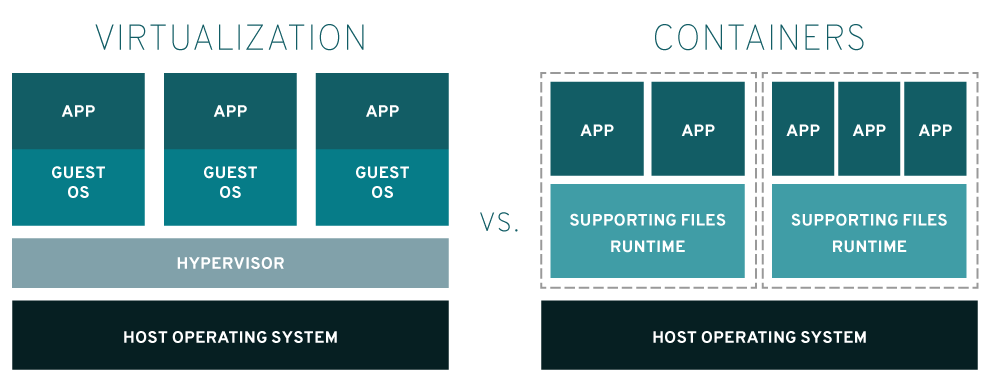
    diagram showing the difference between a VM and a container
    VM versus containers
    Figure 1: Virtual machines versus containers.

    What .NET Core allows you to do is build a .NET application that runs on a Linux distro. Your options include the RHEL with the Universal Base Images, or UBI, distro.

    Now, consider the code at this GitHub repository (repo): https://github.com/donschenck/qotd-csharp.

    In the file, "Dockerfile," we can see the following reference as our base image:

    FROM registry.access.redhat.com/ubi8/dotnet-31:3.1

    We're starting with the Red Hat UBI image, with .NET Core 3.1 already installed, but we could run the resulting image on a container hosted by a different Linux distro.

    Build here, run elsewhere

    The bottom line is, you can build .NET Core applications where you choose—Windows, Linux, macOS—and deploy the resulting image to OpenShift. This is my preferred way of developing .NET Core microservices. I like the idea of building and testing an image on my local machine, then distributing the image—unchanged in any way—to OpenShift. This approach gives me confidence in the fidelity of the bits being executed. It also eliminates the "but it worked on my machine" scenario.

    The "Build here, run elsewhere" approach is basically three steps:

    1. Build (and test) the image on your local machine.
    2. Push the image to an image registry.
    3. Deploy the image to your OpenShift cluster using the Container Image option.

    Remember: Because you are using .NET Core, you are building and running using Linux. You can build from your PC (macOS, Linux, or Windows), and the image will run on OpenShift.

    After building the image on my local machine and pushing it to my own image registry, Figure 2 shows what it looks like to create the application in my cluster.
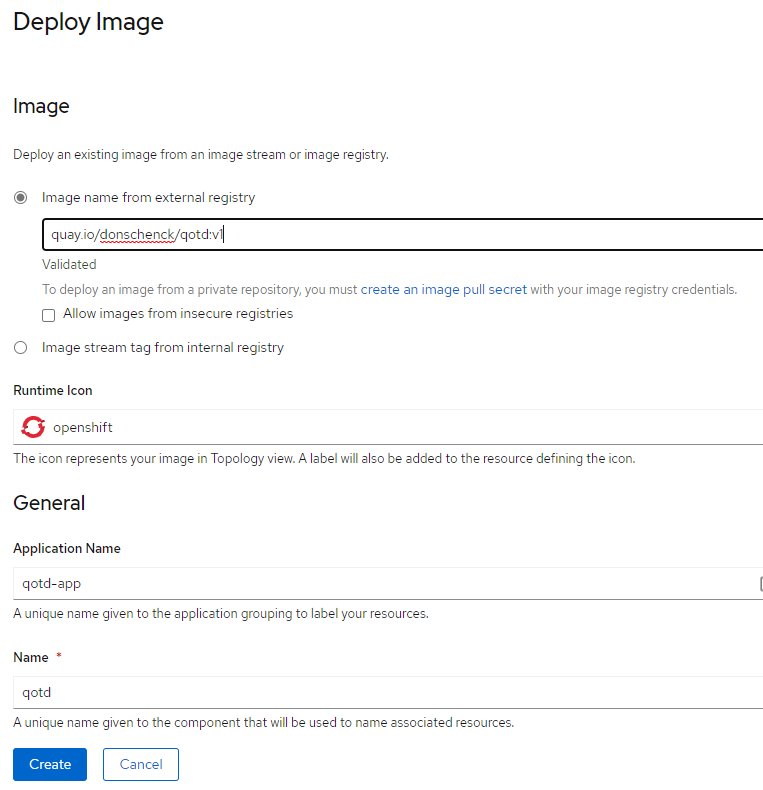
    Options for deploying an application using an image from an image registry
    Figure 1: Deploy image
    Figure 2: Options for deploying the image in OpenShift.

    Build there, run there

    Another option is to build your image using Red Hat OpenShift. Actually, OpenShift provides two ways to build your image: Source-to-Image (S2I) or building from a Dockerfile. A third option is building from a container image, which involves building the image outside of Red Hat OpenShift. We'll discuss that option in a future article. For now, take a look at the overview in Figure 3.
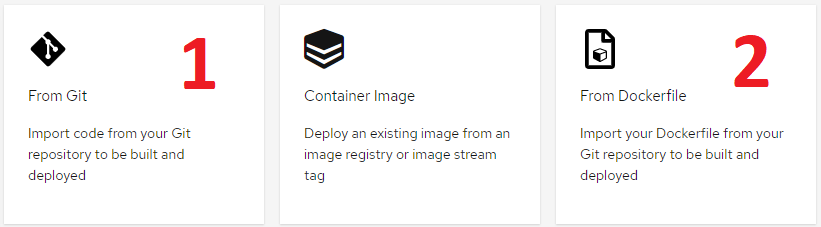
    Two ways to build from source
    Two ways to build from source
    Figure 3: Two ways to build from source.

    Building an image from Git

    This option uses OpenShift's S2I technology to fetch your source code, build it, and deploy it as an image (running in a container) to OpenShift. This option does not require you to create the build configuration (meaning, a Dockerfile); you simply create the code and let OpenShift take care of the rest. You are obviously denied the flexibility of using a build configuration, but it is a fast and easy way to build an image. This approach might work well for a good portion of your needs. And if it works, why mess with it?

    Building from a Dockerfile

    This "same but different" option relies on the docker build command inside your OpenShift cluster and uses the Dockerfile included with your source code as the build instructions. Basically, it's like running the build on your local machine. Figure 4 shows a screen capture of a project that includes the Dockerfile.
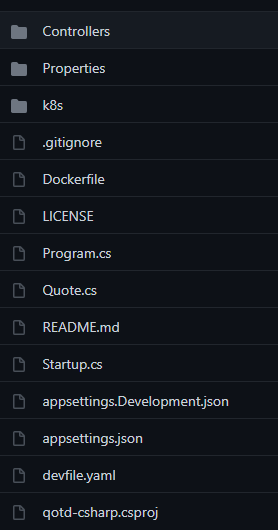
    list of files in the project
    Figure 4: A project including a Dockerfile.

    Here are the Dockerfile's contents:

    FROM registry.access.redhat.com/ubi8/dotnet-31:3.1
    USER 1001
    RUN mkdir qotd-csharp
    WORKDIR qotd-csharp
    ADD . .
    
    RUN dotnet publish -c Release
    
    EXPOSE 10000
    
    CMD ["dotnet", "./bin/Release/netcoreapp3.0/publish/qotd-csharp.dll"]
    

    Because we have a valid Dockerfile, we can use the Import from Dockerfile option. Note that we need to make sure we have the correct port—in this case, 10000, as shown in Figure 5.

    Dialog showing parameters needed to build an image from a Dockerfile
    Figure 5: Options for importing from a Dockerfile.

    Importing from the Dockerfile results in the image being built and deployed, and it creates a route to expose the application.

    Conclusion: It's just like any other language

    The truth is, using .NET Core with Linux is just like most any other development language. You build, test, push, and deploy. It's that simple. No special magic is needed. You are a first-class citizen in the world of Linux, containers, microservices, Kubernetes, Red Hat OpenShift, and so on. Welcome in.

    Note: Curious about moving existing .NET Framework code to .NET 5 (.NET Core)? Check out Microsoft's .NET Upgrade Assistant.

    Last updated: April 14, 2021

    Recent Posts

    • Protect data offloaded to GPU-accelerated environments with OpenShift sandboxed containers

    • Case study: Measuring energy efficiency on the x64 platform

    • How to prevent AI inference stack silent failures

    • Preventing GPU waste: A guide to JIT checkpointing with Kubeflow Trainer on OpenShift AI

    • How to manage TLS certificates used by OpenShift GitOps operator

    Red Hat Developers logo LinkedIn YouTube Twitter Facebook

    Platforms

    • Red Hat AI
    • Red Hat Enterprise Linux
    • Red Hat OpenShift
    • Red Hat Ansible Automation Platform
    • See all products

    Build

    • Developer Sandbox
    • Developer tools
    • Interactive tutorials
    • API catalog

    Quicklinks

    • Learning resources
    • E-books
    • Cheat sheets
    • Blog
    • Events
    • Newsletter

    Communicate

    • About us
    • Contact sales
    • Find a partner
    • Report a website issue
    • Site status dashboard
    • Report a security problem

    RED HAT DEVELOPER

    Build here. Go anywhere.

    We serve the builders. The problem solvers who create careers with code.

    Join us if you’re a developer, software engineer, web designer, front-end designer, UX designer, computer scientist, architect, tester, product manager, project manager or team lead.

    Sign me up

    Red Hat legal and privacy links

    • About Red Hat
    • Jobs
    • Events
    • Locations
    • Contact Red Hat
    • Red Hat Blog
    • Inclusion at Red Hat
    • Cool Stuff Store
    • Red Hat Summit
    © 2026 Red Hat

    Red Hat legal and privacy links

    • Privacy statement
    • Terms of use
    • All policies and guidelines
    • Digital accessibility

    Chat Support

    Please log in with your Red Hat account to access chat support.