Red Hat recently released the first Red Hat JBoss Enterprise Application Platform expansion pack (JBoss EAP XP) version 1.0. This version enables JBoss EAP developers to build Java microservices using Eclipse MicroProfile 3.3 APIs while continuing to also support Jakarta EE 8. This article goes into detail on the nature of this new offering and an easy way to get started.
Introduction to JBoss EAP expansion packs and Eclipse MicroProfile
Organizations that have already embarked on—or are thinking about starting—a digital transformation journey are assessing and looking for ways to leverage their Java EE/Jakarta EE expertise. IT development and operations have built Java expertise over years, and there is a challenge to balance their existing skill base with new technologies, such as microservices, APIs, container-based architectures, and reactive programming. Eclipse MicroProfile is an open source project and one of those technologies that enables and optimizes the development of microservices while using familiar Java EE technologies and APIs.
You can think of MicroProfile as a minimal standard profile for Java microservices. As with Jakarta EE, MicroProfile implementations across different vendors are fully interoperable. You can read more about MicroProfile in the free e-book Enterprise Java microservices with Eclipse MicroProfile.
By using this expansion pack with Red Hat JBoss Enterprise Application Platform, which is part of Red Hat Runtimes, developers can use JBoss EAP as a MicroProfile-compliant platform. This release simplifies the inherent complexity of developing cloud-native applications on JBoss EAP with MicroProfile. The expansion pack is a separate downloadable distribution that can be applied on top of existing JBoss EAP servers, or you can use the container images available for use with Red Hat OpenShift when deploying JBoss EAP on OpenShift.
Test driving a sample app
As outlined in the documentation, the expansion pack is distributed as a patch, which is applied using the JBoss EAP XP Patch Manager. To quickly see how this works, let's take a test drive. You'll need a few developer tools like OpenJDK 11, Git, Maven, a text editor, and utilities like curl, along with having your Red Hat Developer credentials ready for the first step:
- Download JBoss EAP 7.3.0: (You will need your Red Hat Developer credentials for this step.) Save it to your local desktop and unzip it into any folder you like, under which you'll find a new folder called
jboss-eap-7.3.0. I'll extract the zip file to the/tmpfolder for brevity:$ unzip -d /tmp ~/Downloads/jboss-eap-7.3.0.zip
- Download the JBoss EAP 7.3 Update 01 Patch: We'll use this file to patch our 7.3.0 to 7.3.1 (the required version for EAP XP). I'll save it to
/tmp/jboss-eap-7.3.1-patch.zip. - Download JBoss EAP XP 1.0.0 Manager: It's a JAR file. I'll also save this to
/tmp/jboss-eap-xp-1.0.0.GA-manager.jar.
- Download Cumulative Patch Release for the JBoss EAP XP 1.0.0 Runtime Distribution: I'll also save this to
/tmp/jboss-eap-xp-1.0.0-patch.zip.
With our downloads complete, let's apply the patches:
- Apply the patch to take EAP from 7.3.0 to 7.3.1 using the following command:
$ /tmp/jboss-eap-7.3/bin/jboss-cli.sh "patch apply /tmp/jboss-eap-7.3.1-patch.zip"
- Set up the JBoss EAP Patch Manager:
$ java -jar /tmp/jboss-eap-xp-1.0.0-manager.jar setup --jboss-home=/tmp/jboss-eap-7.3
- Apply the patch for JBoss EAP XP 1.0:
$ /tmp/jboss-eap-7.3/bin/jboss-cli.sh "patch apply /tmp/jboss-eap-xp-1.0.0-patch.zip"
- Start JBoss EAP using the MicroProfile configuration that was installed as part of the patch, and enable metrics on the server:
$ /tmp/jboss-eap-7.3/bin/standalone.sh -Dwildfly.statistics-enabled=true -c=standalone-microprofile.xml
With our new JBoss EAP plus MicroProfile server started, let's deploy a sample app. Open a separate terminal and:
- Use Git to clone the Quickstarts repository to your local machine (I'll put it in
/tmpas well):$ git clone https://github.com/jboss-developer/jboss-eap-quickstarts /tmp/jboss-eap-quickstarts
- Build and deploy the sample
helloworld-rs(a simple RESTful app using JAX-RS) to the running JBoss EAP:$ mvn clean install wildfly:deploy -f /tmp/jboss-eap-quickstarts/helloworld-rs
Now that our sample app is deployed, let's try to access the MicroProfile Metrics API to gather metrics about our app and the server:
$ curl -s http://localhost:9990/metrics

# HELP jboss_undertow_request_count_total The number of requests this listener has served
# TYPE jboss_undertow_request_count_total counter
jboss_undertow_request_count_total{https_listener="https",server="default-server",microprofile_scope="vendor"} 0.0
jboss_undertow_request_count_total{http_listener="default",server="default-server",microprofile_scope="vendor"} 3.0
jboss_undertow_request_count_total{deployment="helloworld-rs.war",servlet="org.jboss.as.quickstarts.rshelloworld.JAXActivator",subdeployment="helloworld-rs.war",microprofile_scope="vendor"} 0.0
You'll see lots of metrics in the OpenMetrics format that JBoss EAP exposes. This output could later be hooked up to Prometheus if you wanted to set up alerts on different metrics. We can filter based on scope and metric name to only show a subset for our app:
$ curl -s http://localhost:9990/metrics/vendor/jboss_undertow_request_count | grep helloworld-rs.war

jboss_undertow_request_count_total{deployment="helloworld-rs.war",servlet="org.jboss.as.quickstarts.rshelloworld.JAXActivator",subdeployment="helloworld-rs.war",microprofile_scope="vendor"} 0.0
This output shows us the metrics from the Undertow subsystem for our helloworld-rs app, showing that there have been zero requests.
Now access the actual app itself one time:
$ curl http://localhost:8080/helloworld-rs/rest/json

{"result":"Hello World!"}
Let's access the MicroProfile Metrics again, expecting that the request count should be 1.0:
$ curl -s http://localhost:9990/metrics/vendor/jboss_undertow_request_count | grep helloworld-rs.war

jboss_undertow_request_count_total{deployment="helloworld-rs.war",servlet="org.jboss.as.quickstarts.rshelloworld.JAXActivator",subdeployment="helloworld-rs.war",microprofile_scope="vendor"} 1.0
Indeed it is (look at the end of the line for 1.0. Previously it was 0.0). Note that in order for metrics to be generated, you must remember to enable statistics on the server using -Dwildfly.statistics-enabled=true.
Using MicroProfile APIs
In the previous example, we didn't actually type or use any MicroProfile APIs in the helloworld-rs application. Instead, the core MicroProfile capabilities of JBoss EAP XP were reporting on standard metrics. Let's actually use one of the MicroProfile APIs for OpenAPI in our app.
JBoss EAP XP can generate OpenAPI documentation for applications, even without using OpenAPI. Run this curl command to see what it generates for our app:
$ curl http://localhost:8080/openapi
---
openapi: 3.0.1
info:
  title: helloworld-rs.war
  version: "1.0"
servers:
- url: /helloworld-rs
paths:
  /rest/json:
    get:
      responses:
        "200":
          description: OK
          content:
            application/json:
              schema:
                type: string
  /rest/xml:
    get:
      responses:
        "200":
          description: OK
          content:
            application/xml:
              schema:
                type: string
This outputs the OpenAPI-formatted documentation for our example REST APIs. While this is useful, let's improve it with MicroProfile OpenAPI!
Before we do that, we'll need to add the dependencies to our pom.xml. First, add a <dependencyManagement> element to pull in the MicroProfile Bill of Materials (BOM). Add this to the pom.xml in the quickstart's base directory—in my case in /tmp/jboss-eap-quickstarts/helloworld-rs/pom.xml—right before the existing <dependency> block:
    <dependencyManagement>
        <dependencies>
            <dependency>
                <groupId>org.jboss.bom</groupId>
                <artifactId>jboss-eap-xp-microprofile</artifactId>
                <version>1.0.0.GA</version>
                <type>pom</type>
                <scope>import</scope>
            </dependency>
        </dependencies>
    </dependencyManagement>
Next, inside of the <dependency> block, add a new dependency for the MicroProfile OpenAPI:
<dependency>
  <groupId>org.eclipse.microprofile.openapi</groupId>
  <artifactId>microprofile-openapi-api</artifactId>
  <scope>provided</scope>
</dependency>
With our dependencies specified, we can now use the MicroProfile APIs. In the src/main/java/org/jboss/as/quickstarts/rshelloworld/HelloWorld.java file, look for the getHelloWorldJSON() method, and add the following line above the @GET annotation:
@Operation(description = "Get Helloworld as a JSON object")
This adds a simple OpenAPI annotation that will add the description in the /openapi output. You will also need to add a new import statement at the top of the file:
import org.eclipse.microprofile.openapi.annotations.Operation;
Save the file, and re-deploy the app with this command:
$ mvn clean install wildfly:deploy -f /tmp/jboss-eap-quickstarts/helloworld-rs
With the new OpenAPI-annotated app in place, access the OpenAPI endpoint once again:
$ curl  http://localhost:8080/openapi
---
openapi: 3.0.1
info:
  title: helloworld-rs.war
  version: "1.0"
servers:
- url: /helloworld-rs
paths:
  /rest/json:
    get:
      description: Get Helloworld as a JSON object
      responses:
        "200":
          description: OK
          content:
            application/json:
              schema:
                type: string
  /rest/xml:
    get:
      responses:
        "200":
          description: OK
          content:
            application/xml:
              schema:
                type: string
You can see the new description added in the docs for the /rest/json endpoint. You can further enhance/complete your OpenAPI documentation by adding additional MicroProfile OpenAPI annotations. You will need to rebuild/redeploy for those changes to be reflected in the OpenAPI document.
There are many other MicroProfile APIs you can use to enhance your applications, ranging from fault tolerance, security with JWT, REST clients, and more. The JBoss EAP XP Quickstarts illustrate how each is used to create Java microservices on JBoss EAP. Users of CodeReady Studio can also use MicroProfile APIs, as outlined in this article.
Using JBoss EAP XP on OpenShift
JBoss EAP XP is also available through OpenShift S2I images, just like JBoss EAP itself. Let's deploy an example. First, you'll need an OpenShift 4.x cluster that has access to registry.redhat.io, and the oc command line, and be logged into your cluster. Then:
-
- Create a new project to house our app:
$ oc new-project eap-demo
- Import the ImageStream definitions for XP on OpenJDK 11 (this requires cluster-admin privileges):
$ oc replace --force -n openshift -f https://raw.githubusercontent.com/jboss-container-images/jboss-eap-openshift-templates/eap-xp1/jboss-eap-xp1-openjdk11-openshift.json
- Import the Templates that define how apps are deployed (this requires cluster-admin privileges):
$ oc replace --force -n openshift -f https://raw.githubusercontent.com/jboss-container-images/jboss-eap-openshift-templates/eap-xp1/templates/eap-xp1-basic-s2i.json
- Create the app from the template:
$ oc new-app --template=eap-xp1-basic-s2i -p APPLICATION_NAME=eap-demo \
-p EAP_IMAGE_NAME=jboss-eap-xp1-openjdk11-openshift:1.0 \
-p EAP_RUNTIME_IMAGE_NAME=jboss-eap-xp1-openjdk11-runtime-openshift:1.0 \
-p IMAGE_STREAM_NAMESPACE=openshift \
-p SOURCE_REPOSITORY_URL=https://github.com/jboss-developer/jboss-eap-quickstarts \
-p SOURCE_REPOSITORY_REF=7.3.x \
-p CONTEXT_DIR="helloworld-rs"
- Two builds will run, one after the other, to build the app.
$ oc logs -f bc/eap-demo-build-artifacts && oc logs -f bc/eap-demo
- Create a new project to house our app:
-
- After both builds complete, watch the rollout with:
$ oc rollout status -w dc/eap-demo
The build and rollout will take some time to finish.
- Once the app is done building and deploying, access the same OpenAPI endpoint as before:
$ curl -k https://$(oc get route eap-demo -o jsonpath="{.spec.host}")/openapi
- After both builds complete, watch the rollout with:
You can also see the deployed app on the OpenShift Topology view in the OpenShift Console:
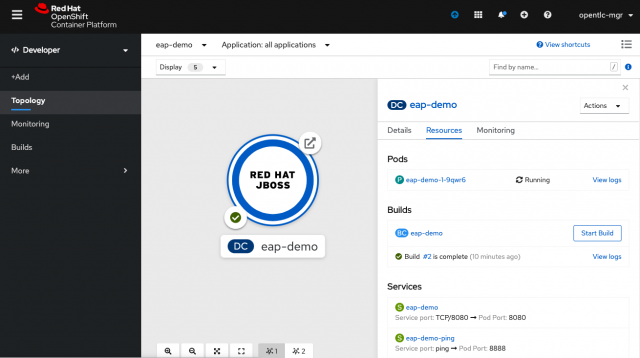
OpenShift Topology View with JBoss EAP Application">
Documentation
The new Using Eclipse MicroProfile in JBoss EAP guide can be found within the JBoss EAP documentation. The guide covers important details about MicroProfile and how developers can quickly get started using MicroProfile APIs in their JBoss projects. You can also find important information about the release itself in the Red Hat JBoss Enterprise Application Platform Expansion Pack 1.0 Release Notes.
Getting support for JBoss EAP XP
Support for expansion packs is available to Red Hat customers through a subscription to Red Hat Runtimes. Contact your local Red Hat representative or Red Hat Sales for details on how you can enjoy world-class support offered from Red Hat and its worldwide partner network.
JBoss Enterprise Application Platform expansion pack (JBoss EAP XP or EAP XP) is subject to its own separate support policy and life cycle for closer alignment with Eclipse MicroProfile specification release cadence. JBoss EAP server instances with the EAP XP setup will be covered in their entirety by the new EAP XP policy and life cycle.
By setting up EAP XP, your server will be subject to the EAP XP support and life cycle policy. Please refer to the JBoss Enterprise Application Platform expansion pack Life Cycle page for more details.
JBoss EAP XP resources
- Red Hat JBoss Enterprise Application Platform Expansion Pack 1.0 Release Notes
- Using Eclipse MicroProfile in JBoss EAP
- JBoss Enterprise Application Platform expansion pack Support and Life Cycle Policies
- MicroProfile Home
- MicroProfile on the Red Hat Blog
- JBoss EAP XP 1.0 on JBoss EAP 7.3.0 Release notes
- Installing JBoss EAP XP 1.0 on JBoss EAP 7.3.1

