Change Data Capture (CDC) is a pattern that enables database changes to be monitored and propagated to downstream systems. It is an effective way of enabling reliable microservices integration and solving typical challenges, such as gradually extracting microservices from existing monoliths.
With the release of Red Hat AMQ Streams 1.2, Red Hat Integration now includes a developer preview of CDC features based on upstream project Debezium.
This article explains how to make use of Red Hat Integration to create a complete CDC pipeline. The idea is to enable applications to respond almost immediately whenever there is a data change. We capture the changes as they occur using Debezium and stream it using Red Hat AMQ Streams. We then filter and transform the data using Red Hat Fuse and send it to Elasticsearch, where the data can be further analyzed or used by downstream systems.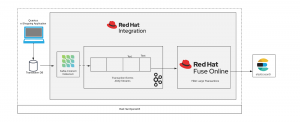
Overview of the architecture
In this example, as transaction data comes in from our shopping website, it is persisted to a transaction database (MySQL DB), Debezium then captures the data changes and sends it over to the AMQ Streams topic with the table name (in our case transaction). We then read the Apache Kafka topic using Red Hat Fuse and filter large transactions (transactions > 1000) and send it to Elasticsearch where the data can be used/analyzed by downstream systems. Fuse Online is an integration Platform-as-a-Service (iPaaS) solution that makes it easy for business users to collaborate with integration experts and application developers.
Preparing the demo environment
Let's install the necessary components for this demonstration on Red Hat OpenShift, which enables efficient container orchestration, allowing rapid container provisioning, deploying, scaling, and management. Red Hat Integration on OpenShift helps us rapidly create and manage the web-scale cloud-native applications with ease.
The OpenShift Container Platform CLI exposes commands for managing your applications, as well as lower-level tools to interact with each component of your system. We will be making use of the OC tool to create/deploy projects and applications. First, we will create a new project and provision a MySQL DB.
$oc new-project debezium-cdc
$oc new-app --name=mysql debezium/example-mysql:0.9
                        -e MYSQL_ROOT_PASSWORD=password
                        -e MYSQL_USER=testUser
                        -e MYSQL_PASSWORD=password
                        -e MYSQL_DATABASE=sampledb
We will also create a transaction database for the shopping website.
$oc get pods
$oc rsh <pod_name>
$mysql -u root -ppassword -h mysql sampledb

mysql> CREATE TABLE transaction (transaction_id serial PRIMARY KEY,userId integer NOT NULL,
amount integer NOT NULL,last_login TIMESTAMP);
Follow the Red Hat AMQ Streams documentation to provision Red Hat AMQ Streams using the AMQ Streams Operator. Next, we will deploy the Kafka Connect s2i. Next, download the necessary driver for MySQL along with the Debezium MySQL connector from the Debezium website. Make sure to copy the driver into the connector folder.
Now, we can configure the Kafka connect utility with the MySQL Debezium connector that we have downloaded.
$oc get buildconfigs
$oc start-build <build-config-name> --from-dir=<connector_dir>
We will now use a POST command to configure the Debezium connector with our MySQL DB configuration.
PUT <kafka-connect-pod-route-url>/connectors/debezium-connector-mysql/config

{
    "connector.class": "io.debezium.connector.mysql.MySqlConnector",
    "tasks.max": "1",
    "database.hostname": "mysql", → Database host name
    "database.port": "3306", → Port
    "database.user": "root", → Username
    "database.password": "password", → Password
    "database.server.id": "184054",
    "database.server.name": "sampledb", → Database name
    "database.whitelist": "sampledb",
    "database.history.kafka.bootstrap.servers": "my-cluster-kafka-bootstrap.svc:9092", → Kafka cluster url
    "database.history.kafka.topic": "changes-topic",
    "decimal.handling.mode" : "double",
    "transforms": "route",
    "transforms.route.type": "org.apache.kafka.connect.transforms.RegexRouter",
    "transforms.route.regex": "([^.]+)\\.([^.]+)\\.([^.]+)",
    "transforms.route.replacement": "$3"
}
Next, we'll spin up Red Hat Fuse Online. Follow the documentation to install Fuse Online on the OpenShift instance. Once the connectors are set up, we can create the integration.
Integration is a four-step process, where data is read from the Kafka topic, schema are mapped, filtered, and written on to an Elasticsearch end point.
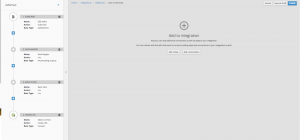
We will now need an Elasticsearch instance, which can be publicly hosted/ installed on OC. Create an index called transaction, and we'll push to this index from our Fuse Online Integration.
Finally, let's deploy an e-shopping web application. For this, we will be using Quarkus (supersonic, subatomic Java) to spin up a simple CRUD UI. Quarkus provides an effective solution for running Java in this new world of serverless, microservices, containers, Kubernetes, FaaS, and the cloud because it has been designed with these technologies in mind.
oc new-app quay.io/quarkus/ubi-quarkus-native-s2i:19.0.2~https://github.com/snandakumar87/quarkus-transaction-crud
oc cancel-build bc/quarkus-transaction-crud
oc patch bc/quarkus-transaction-crud -p '{"spec":{"resources":{"limits":{"cpu":"5", "memory":"6Gi"}}}}'
oc start-build bc/quarkus-transaction-crud
oc expose svc/quarkus-transaction-crud
CDC in action
https://youtu.be/uox8l1GtPSQ
Open up the Red Hat OpenShift console and go into the project (debezium-cdc). You should see Multiple Application pods listed. Look for the “quarkus-transaction-crud” pod and follow the external route to land on the e-shopping web page.
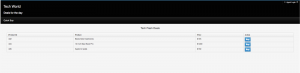
Click on buy for the Macbook Pro, then navigate back to the OpenShift console, and look for an application pod “mysql” and navigate to the terminal. We will now verify the transaction data in the MySQL database.
oc rsh <pod_name>)
mysql -u <username> -p<password> -h mysql <databasename>
Select * from transaction;
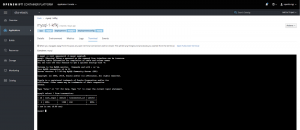
Now that the data is entered into the DB, we can quickly look at the Change Data Capture. Open up the logs for the Kafka-Connect pod.
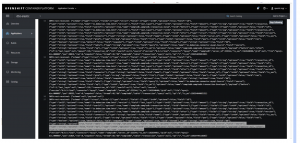
The change is captured and added to our Kafka topic. Now let's switch to the Red Hat Fuse online console.
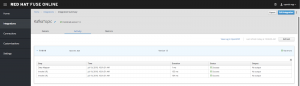
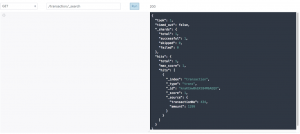
We can see that the transaction has been read from the Kafka topic, filtered, and sent to Elasticsearch. Let's do a simple GET on the elastic search REST endpoint to look for the new records that have been read from the Kafka topic.
GET <elastic-url>/transaction/_search
Summary
By harnessing the power of CDC features using Debezium, we can capture the data changes as they happen, which can now be streamed so that the downstream systems can make use of it. Red Hat Fuse unlocks the potential to connect several of these external systems, thereby completing the data pipeline.

