Redhat Developers  Logo
  • AI

    Get started with AI

    • Red Hat AI
      Accelerate the development and deployment of enterprise AI solutions.
    • AI learning hub
      Explore learning materials and tools, organized by task.
    • AI interactive demos
      Click through scenarios with Red Hat AI, including training LLMs and more.
    • AI/ML learning paths
      Expand your OpenShift AI knowledge using these learning resources.
    • AI quickstarts
      Focused AI use cases designed for fast deployment on Red Hat AI platforms.
    • No-cost AI training
      Foundational Red Hat AI training.

    Featured resources

    • OpenShift AI learning
    • Open source AI for developers
    • AI product application development
    • Open source-powered AI/ML for hybrid cloud
    • AI and Node.js cheat sheet

    Red Hat AI Factory with NVIDIA

    • Red Hat AI Factory with NVIDIA is a co-engineered, enterprise-grade AI solution for building, deploying, and managing AI at scale across hybrid cloud environments.
    • Explore the solution
  • Learn

    Self-guided

    • Documentation
      Find answers, get step-by-step guidance, and learn how to use Red Hat products.
    • Learning paths
      Explore curated walkthroughs for common development tasks.
    • See all learning

    Hands-on

    • Developer Sandbox
      Spin up Red Hat's products and technologies without setup or configuration.
    • Interactive labs
      Learn by doing in these hands-on, browser-based experiences.
    • Interactive demos
      Click through product features in these guided tours.

    Browse by topic

    • AI/ML
    • Automation
    • Java
    • Kubernetes
    • Linux
    • See all topics

    Training & certifications

    • Courses and exams
    • Certifications
    • Skills assessments
    • Red Hat Academy
    • Learning subscription
    • Explore training
  • Build

    Get started

    • Red Hat build of Podman Desktop
      A downloadable, local development hub to experiment with our products and builds.
    • Developer Sandbox
      Spin up Red Hat's products and technologies without setup or configuration.

    Download products

    • Access product downloads to start building and testing right away.
    • Red Hat Enterprise Linux
    • Red Hat AI
    • Red Hat OpenShift
    • Red Hat Ansible Automation Platform
    • See all products

    Featured

    • Red Hat build of OpenJDK
    • Red Hat JBoss Enterprise Application Platform
    • Red Hat OpenShift Dev Spaces
    • Red Hat Developer Toolset

    References

    • E-books
    • Documentation
    • Cheat sheets
    • Architecture center
  • Community

    Get involved

    • Events
    • Live AI events
    • Red Hat Summit
    • Red Hat Accelerators
    • Community discussions

    Follow along

    • Articles & blogs
    • Developer newsletter
    • Videos
    • Github

    Get help

    • Customer service
    • Customer support
    • Regional contacts
    • Find a partner

    Join the Red Hat Developer program

    • Download Red Hat products and project builds, access support documentation, learning content, and more.
    • Explore the benefits

Eclipse Che 7 is Coming and It's Really Hot (2/4)

December 19, 2018
Stevan Le Meur
Related topics:
Developer toolsIDEsKubernetes
Related products:
Developer Toolset

    With a new plugin model and compatibility with VSCode Extensions — Eclipse Che is on Fire!   In my last blog post, we highlighted the main focus areas of Eclipse Che 7. This blog post provides a deep dive on the new plugin model of Eclipse Che 7.

    New Plugin Model

    Eclipse Che is a great platform to build cloud-native tools. For Eclipse Che to be successful in its mission, it requires a strong extensibility model with an enjoyable developer experience for contributors.

    In the past, Eclipse Che’s extensibility was focused on white-labelling use cases. ISVs were able to customize Eclipse Che, building their own version by completely customizing it and distributing it to their own audiences. While that extensibility approach has been great for many partners, it has always been seen as complex, with a technology stack (especially GWT in the IDE) which resulted in a non-optimal developer experience. The lack of a dynamic extensibility also forced a Che Plugin to be packaged in a “Che assembly” in order to make it available to end users. There was no way to quickly build a plugin, package it so that it could be installed in a running Che and make it available without rebuilding all of Che.

    To address these issues we’ll be phasing out the GWT-based IDE in favour of another open Eclipse Foundation IDE project: Eclipse Theia. As introduced earlier, Eclipse Theia is a framework to build web IDEs. It is built in TypeScript and will give contributors a more enjoyable experience with a programming model that is more flexible and easier to use, and makes it faster to deliver their new plugins.

    Our main goal is to provide a dynamic plugin model. In Che, a user shouldn’t need to worry about the dependencies needed for the tools running in their workspace — they should just be available when needed. This means that a Che plugin provides its dependencies, its back-end services (which could be running in a sidecar container connected to the user’s workspace), and the IDE UI extension. By packaging all these elements together, the user’s impression is that Che “magically” provided language services and the developer tooling they need for their workspace.

    VSCode Extensibility Compatibility

    There is one more important aspect of the plugin model — we want to rationalize the effort for a contributor who is willing to build a plugin and distribute in to different developer communities and tools. For that purpose, we have introduced into Eclipse Theia plugins API to allow compatibility with the extension points from VS Code. As result, it becomes much easier to bring an existing plugin from VS Code onto Eclipse Che. The main difference is in the way the plugins are packaged. On Eclipse Che, the plugins are delivered with their own dependencies in their own container.

    See the video on the SonarSource VSCode plugin:

    https://youtu.be/HbTKDlOL1eo

    In order to expose these plugins and make them consumable we will build a plugin marketplace. This will be open to the community, but also allow private Che installs behind firewalls to create their own in-house marketplace with only the plugins which are appropriate for their users. Today, the plugins are under a plugin registry on a github repository

    Self Hosting

    Building plugins for Che must also be a fun experience and the turnarounds must be as fast as possible in the developer innerloop (the time spent between introducing a change and seeing/debugging the result. We needed to improve that from our previous GWT-based IDE, so we built a complete Hosted Mode to allow Che contributors to build Che directly from Che. It provides the complete lifecycle — from creating a new plugin, to coding it and debugging it. The team that is building that new capability is already using this and they love it. They also feel more productive than in the past ;)

    See this video on plugin development for Eclipse Che:

    https://youtu.be/1V1jLHqqsH4

    Try Eclipse Che 7 Now!

    Want to give a try to the new version of Eclipse Che 7? Try the following:

    Click on the following factory URL:

    https://che.openshift.io/f?id=factoryvbwekkducozn3jsn

    Or Create your account on che.openshift.io, create a new workspace and select “Che 7” stack.
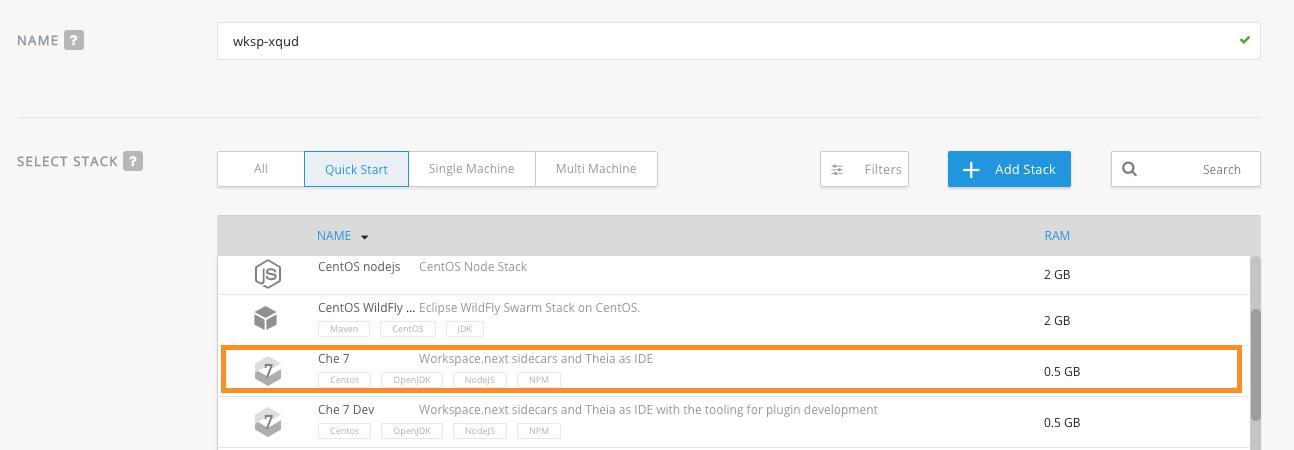
    Try Eclipse Che 7 on OpenShift

    You can also try it on your local machine by installing the latest version of Eclipse Che:  See Quick Start with Eclipse Che for more info.

    That’s it for the second blog post introducing Eclipse Che 7. The next blog post, will cover the new workspaces capability.

    For information about Che running on Red Hat OpenShift, see CodeReady WorkSpaces for OpenShift (currently in beta) and Doug Tidwell's article and videos, CodeReady Workspaces for OpenShift (Beta)–It works on their machines too. Doug covers stacks, workspaces, and factories to help  you get started with Che.

    Get Involved!

    Quick Start with Eclipse Che.

    Join the community:

    • Support: You can ask questions, report bugs, and request features using GitHub issues.
    • Public Chat: Join the public eclipse-che Mattermost channel to discuss with community and contributors.
    • Weekly Meetings: Join us in our Che community meeting every second monday.
    • Mailing list: che-dev@eclipse.org

    My articles about Eclipse Che 7:

    • Part 1—Eclipse Che 7 overview, and introducing the new IDE
    • Part 2—introducing the plugin model (this article)
    • Part 3—Kube-native developer workspaces
    • Part 4—Functionality for Enterprise Development Teams and release timing

    Last updated: November 8, 2023

    Recent Posts

    • Federated identity across the hybrid cloud using zero trust workload identity manager

    • Confidential virtual machine storage attack scenarios

    • Introducing virtualization platform autopilot

    • Integrate zero trust workload identity manager with Red Hat OpenShift GitOps

    • Best Practice Configuration and Tuning for Linux and Windows VMs

    Red Hat Developers logo LinkedIn YouTube Twitter Facebook

    Platforms

    • Red Hat AI
    • Red Hat Enterprise Linux
    • Red Hat OpenShift
    • Red Hat Ansible Automation Platform
    • See all products

    Build

    • Developer Sandbox
    • Developer tools
    • Interactive tutorials
    • API catalog

    Quicklinks

    • Learning resources
    • E-books
    • Cheat sheets
    • Blog
    • Events
    • Newsletter

    Communicate

    • About us
    • Contact sales
    • Find a partner
    • Report a website issue
    • Site status dashboard
    • Report a security problem

    RED HAT DEVELOPER

    Build here. Go anywhere.

    We serve the builders. The problem solvers who create careers with code.

    Join us if you’re a developer, software engineer, web designer, front-end designer, UX designer, computer scientist, architect, tester, product manager, project manager or team lead.

    Sign me up

    Red Hat legal and privacy links

    • About Red Hat
    • Jobs
    • Events
    • Locations
    • Contact Red Hat
    • Red Hat Blog
    • Inclusion at Red Hat
    • Cool Stuff Store
    • Red Hat Summit
    © 2026 Red Hat

    Red Hat legal and privacy links

    • Privacy statement
    • Terms of use
    • All policies and guidelines
    • Digital accessibility

    Chat Support

    Please log in with your Red Hat account to access chat support.