Redhat Developers  Logo
  • AI

    Get started with AI

    • Red Hat AI
      Accelerate the development and deployment of enterprise AI solutions.
    • AI learning hub
      Explore learning materials and tools, organized by task.
    • AI interactive demos
      Click through scenarios with Red Hat AI, including training LLMs and more.
    • AI/ML learning paths
      Expand your OpenShift AI knowledge using these learning resources.
    • AI quickstarts
      Focused AI use cases designed for fast deployment on Red Hat AI platforms.
    • No-cost AI training
      Foundational Red Hat AI training.

    Featured resources

    • OpenShift AI learning
    • Open source AI for developers
    • AI product application development
    • Open source-powered AI/ML for hybrid cloud
    • AI and Node.js cheat sheet

    Red Hat AI Factory with NVIDIA

    • Red Hat AI Factory with NVIDIA is a co-engineered, enterprise-grade AI solution for building, deploying, and managing AI at scale across hybrid cloud environments.
    • Explore the solution
  • Learn

    Self-guided

    • Documentation
      Find answers, get step-by-step guidance, and learn how to use Red Hat products.
    • Learning paths
      Explore curated walkthroughs for common development tasks.
    • Guided learning
      Receive custom learning paths powered by our AI assistant.
    • See all learning

    Hands-on

    • Developer Sandbox
      Spin up Red Hat's products and technologies without setup or configuration.
    • Interactive labs
      Learn by doing in these hands-on, browser-based experiences.
    • Interactive demos
      Click through product features in these guided tours.

    Browse by topic

    • AI/ML
    • Automation
    • Java
    • Kubernetes
    • Linux
    • See all topics

    Training & certifications

    • Courses and exams
    • Certifications
    • Skills assessments
    • Red Hat Academy
    • Learning subscription
    • Explore training
  • Build

    Get started

    • Red Hat build of Podman Desktop
      A downloadable, local development hub to experiment with our products and builds.
    • Developer Sandbox
      Spin up Red Hat's products and technologies without setup or configuration.

    Download products

    • Access product downloads to start building and testing right away.
    • Red Hat Enterprise Linux
    • Red Hat AI
    • Red Hat OpenShift
    • Red Hat Ansible Automation Platform
    • See all products

    Featured

    • Red Hat build of OpenJDK
    • Red Hat JBoss Enterprise Application Platform
    • Red Hat OpenShift Dev Spaces
    • Red Hat Developer Toolset

    References

    • E-books
    • Documentation
    • Cheat sheets
    • Architecture center
  • Community

    Get involved

    • Events
    • Live AI events
    • Red Hat Summit
    • Red Hat Accelerators
    • Community discussions

    Follow along

    • Articles & blogs
    • Developer newsletter
    • Videos
    • Github

    Get help

    • Customer service
    • Customer support
    • Regional contacts
    • Find a partner

    Join the Red Hat Developer program

    • Download Red Hat products and project builds, access support documentation, learning content, and more.
    • Explore the benefits

Building Containerized IoT solutions on OpenShift Lab

<p>&nbsp;</p> <quillbot-extension-portal></quillbot-extension-portal>

June 29, 2017
Ishu Verma
Related topics:
Kubernetes
Related products:
Red Hat OpenShift Container Platform

    As technology continues to disrupt the industries beyond the first wave (led by Netflix, Amazon, Uber etc.), the enterprises are embracing digital transformation to meet the challenge. One of the key technologies enabling digital transformation is Containers through its inherent advantages with packaging (Atomic, built for CI/CD), collaboration and runtime (lightweight, distributable, portable).

    At the Red Hat Summit in Boston, Andrew Block and I conducted a hands-on lab on how to build a containerized intelligent Internet-of-Things (IoT) gateway on Red Hat OpenShift. The application is deployed as a set of microservices inside containers on the containerize IoT workload using microservices running on Red Hat OpenShift Container Platform.

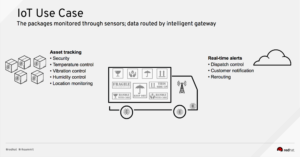
    IoT use case - Asset Tracking

    The use case for this lab represents a logistics company that wants to monitor high-value, fragile and time critical assets and take corrective actions in real time to protect these assets. Each package category (e.g. organs, delicate machine equipment etc) has its own threshold of optimum environmental conditions.

    The packages will be monitored for temperature, vibration, light, and location data. The sensors transmit the data to an intelligent IoT gateway that will transform, store, and forward this data for further processing.  If the threshold of the environmental condition is crossed for a package, an alert will be sent to trigger a corrective action.

    Companies looking to build a modern IoT solution on the enterprise-grade OpenShift container platform can use the methodology used in this lab.

    The core components of the lab include:

    • Red Hat JBoss Fuse Integration Services (FIS): Tools that facilitate integration, routing, and transformation of messages and protocols, by leveraging Apache Camel technology.
    • Red Hat JBoss A-MQ: Apache ActiveMQ-based message broker container image for receiving and storing telemetry from the sensor via the MQTT protocol.
    • Apache Zeppelin: Interactive data visualization and analytics.
    • PostgreSQL: Provides persistence for sensor data.
    • Simulated Software Sensor: A simple Spring Boot application that simulates temperature, vibration, light, and GPS sensor data.


    Lab Workflow

    In the lab exercises, the participants created the project in OpenShift, instantiated (using templates) and then deployed the applications. Once all the applications were running successfully, the Zeppelin visualization tool was configured to visualize the sensor data.
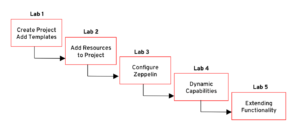
    Participants also learned how to use ConfigMap to dynamically enhance the functionality of the software sensor to enable a new sensor type.

    As the number of end devices or volume of sensor data increases over time, OpenShift can auto-scale the resources to keep the business functions running without human intervention.

    For those interested in recreating this lab, all the code and documentation is available on Github.

    Last updated: May 31, 2023

    Recent Posts

    • Every layer counts: Defense in depth for AI agents with Red Hat AI

    • Fun in the RUN instruction: Why container builds with distroless images can surprise you

    • Trusted software factory: Building trust in the agentic AI era

    • Build a zero trust AI pipeline with OpenShift and RHEL CVMs

    • Red Hat Hardened Images: Top 5 benefits for software developers

    What’s up next?


    Red Hat Developers logo LinkedIn YouTube Twitter Facebook

    Platforms

    • Red Hat AI
    • Red Hat Enterprise Linux
    • Red Hat OpenShift
    • Red Hat Ansible Automation Platform
    • See all products

    Build

    • Developer Sandbox
    • Developer tools
    • Interactive tutorials
    • API catalog

    Quicklinks

    • Learning resources
    • E-books
    • Cheat sheets
    • Blog
    • Events
    • Newsletter

    Communicate

    • About us
    • Contact sales
    • Find a partner
    • Report a website issue
    • Site status dashboard
    • Report a security problem

    RED HAT DEVELOPER

    Build here. Go anywhere.

    We serve the builders. The problem solvers who create careers with code.

    Join us if you’re a developer, software engineer, web designer, front-end designer, UX designer, computer scientist, architect, tester, product manager, project manager or team lead.

    Sign me up

    Red Hat legal and privacy links

    • About Red Hat
    • Jobs
    • Events
    • Locations
    • Contact Red Hat
    • Red Hat Blog
    • Inclusion at Red Hat
    • Cool Stuff Store
    • Red Hat Summit
    © 2026 Red Hat

    Red Hat legal and privacy links

    • Privacy statement
    • Terms of use
    • All policies and guidelines
    • Digital accessibility

    Chat Support

    Please log in with your Red Hat account to access chat support.