Redhat Developers  Logo
  • AI

    Get started with AI

    • Red Hat AI
      Accelerate the development and deployment of enterprise AI solutions.
    • AI learning hub
      Explore learning materials and tools, organized by task.
    • AI interactive demos
      Click through scenarios with Red Hat AI, including training LLMs and more.
    • AI/ML learning paths
      Expand your OpenShift AI knowledge using these learning resources.
    • AI quickstarts
      Focused AI use cases designed for fast deployment on Red Hat AI platforms.
    • No-cost AI training
      Foundational Red Hat AI training.

    Featured resources

    • OpenShift AI learning
    • Open source AI for developers
    • AI product application development
    • Open source-powered AI/ML for hybrid cloud
    • AI and Node.js cheat sheet

    Red Hat AI Factory with NVIDIA

    • Red Hat AI Factory with NVIDIA is a co-engineered, enterprise-grade AI solution for building, deploying, and managing AI at scale across hybrid cloud environments.
    • Explore the solution
  • Learn

    Self-guided

    • Documentation
      Find answers, get step-by-step guidance, and learn how to use Red Hat products.
    • Learning paths
      Explore curated walkthroughs for common development tasks.
    • Guided learning
      Receive custom learning paths powered by our AI assistant.
    • See all learning

    Hands-on

    • Developer Sandbox
      Spin up Red Hat's products and technologies without setup or configuration.
    • Interactive labs
      Learn by doing in these hands-on, browser-based experiences.
    • Interactive demos
      Click through product features in these guided tours.

    Browse by topic

    • AI/ML
    • Automation
    • Java
    • Kubernetes
    • Linux
    • See all topics

    Training & certifications

    • Courses and exams
    • Certifications
    • Skills assessments
    • Red Hat Academy
    • Learning subscription
    • Explore training
  • Build

    Get started

    • Red Hat build of Podman Desktop
      A downloadable, local development hub to experiment with our products and builds.
    • Developer Sandbox
      Spin up Red Hat's products and technologies without setup or configuration.

    Download products

    • Access product downloads to start building and testing right away.
    • Red Hat Enterprise Linux
    • Red Hat AI
    • Red Hat OpenShift
    • Red Hat Ansible Automation Platform
    • See all products

    Featured

    • Red Hat build of OpenJDK
    • Red Hat JBoss Enterprise Application Platform
    • Red Hat OpenShift Dev Spaces
    • Red Hat Developer Toolset

    References

    • E-books
    • Documentation
    • Cheat sheets
    • Architecture center
  • Community

    Get involved

    • Events
    • Live AI events
    • Red Hat Summit
    • Red Hat Accelerators
    • Community discussions

    Follow along

    • Articles & blogs
    • Developer newsletter
    • Videos
    • Github

    Get help

    • Customer service
    • Customer support
    • Regional contacts
    • Find a partner

    Join the Red Hat Developer program

    • Download Red Hat products and project builds, access support documentation, learning content, and more.
    • Explore the benefits

What's new in the Red Hat build of Quarkus 3.8

Supersonic, subatomic Java framework

May 17, 2024
Jeff Beck
Related topics:
JavaKubernetesQuarkus
Related products:
Red Hat build of Quarkus

    Continuing the mission of supporting enterprise developers to build cloud-native and Kubernetes-native Java applications, Red Hat has released version 3.8 of the Red Hat build of Quarkus. The latest release has some great features and performance improvements including tools to improve developer productivity.

    Let’s take a look at some highlights of this release. For a complete list of new features, check out the official Red Hat build of Quarkus 3.8 release notes.

    Improved developer productivity

    One of the founding principles of Quarkus is to provide joy to Java developers by creating a frictionless experience with a combination of tools, libraries, extensions, and more. In this release, developers can access local development and testing services easily using new tools and services, such as new Dev Services.

    Dev Services for OpenSearch and Elasticsearch

    The Red Hat build of Quarkus 3.8 now includes Dev Services for both Elasticsearch and OpenSearch search engines. This provides developers with even more options when utilizing search engines to build solutions for data-intensive applications.

    When you use Hibernate Search in your Quarkus application, Dev Services defaults to starting Elasticsearch or OpenSearch based on your Hibernate Search configuration.

    Learn more about Elasticsearch and OpenSearch Dev Services here. 

    Efficient framework performance

    Quarkus makes Java supersonic and subatomic with its fast startup times, low memory footprint, and small disk footprint. This release continues to improve the Quarkus framework's performance and efficiency with support for new Java capabilities.

    Virtual thread support

    Red Hat build of Quarkus 3.8 provides support for Java virtual threads that reduce the effort of writing, maintaining, and debugging high-throughput concurrent applications. Virtual threads provides a significant performance boost for a variety of applications including REST, gRPC, and messaging systems like Kafka and AMQ, as well as periodic task execution.

    Virtual threads:

    • Enhances the management of concurrent tasks, improving scalability and resource efficiency.
    • Enhances the imperative programming model by improving resource efficiency with virtual threads, which are inexpensive to block.
    • Simplifies the concurrency model, streamlining code base maintenance.
    • Reduces thread context switching overhead, resulting in lower latency and higher throughput.
    • Enables better multicore processor utilization, allowing more concurrent tasks without heavy context-switching penalties.
    • Limitations: libraries pinning the carrier thread might delay adoption until the Java ecosystem fully embraces virtual-thread compatibility.

    To learn more about Quarkus’ support of virtual threads, take a look at these blog posts or this guide on quarkus.io. 

    This video demonstrates how to integrate Loom in Quarkus.

    Community and standards

    Quarkus begins and ends with the community. Quarkus includes a vast extension ecosystem of over 400 extensions in addition to support for popular Java APIs and standards. This release continues that mission with new features and standards support.

    Java 21

    Red Hat build of Quarkus 3.8, Java 21 is now the recommended version with continued support of Java 17 as well. With this release, support for Java 11 has been removed completely.

    Upgrade today

    We want to make migrating to Red Hat build of Quarkus 3.8 seamless for our users. With that in mind, we have created a migration guide and automated tooling to facilitate this process.

    Support

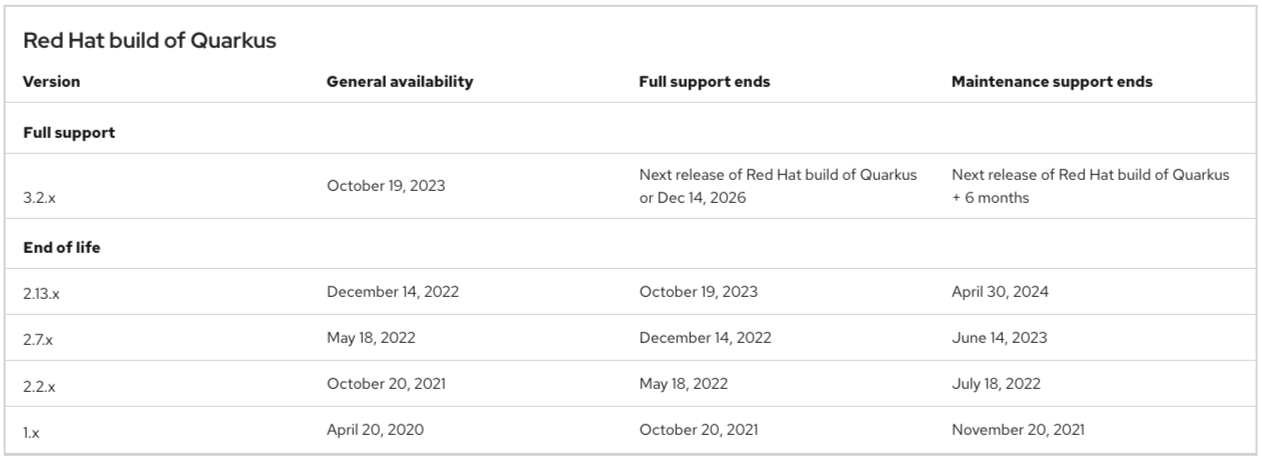
    Starting with the Red Hat build of Quarkus 3.2, Red Hat provides a 3-year life cycle for major releases. Red Hat build of Quarkus release version numbers are directly aligned with the Long-Term Support (LTS) versions of the Quarkus community project. See Figure 1.
    alt text
    Figure 1: Support for Red Hat build of Quarkus.

    Try Quarkus

    The best way to experience the new features of Quarkus is to start using it. You can generate your code at code.quarkus.redhat.com.

    You can find more Quarkus resources on Red Hat Developer:

    • Get started
    • Quarkus on OpenShift
    • Quarkus for Spring Developers e-book
    • Quarkus Cookbook
    Last updated: May 22, 2024

    Related Posts

    • What's new for developers in JDK 21

    • How to use LLMs in Java with LangChain4j and Quarkus

    • How to integrate Quarkus applications with OpenShift AI

    • Spring Boot to Quarkus migrations and more in Red Hat's migration toolkit for applications 5.1.0

    • Integrate your Quarkus application with GPT4All

    • Getting started with MongoDB and Quarkus

    Recent Posts

    • Protect data offloaded to GPU-accelerated environments with OpenShift sandboxed containers

    • Case study: Measuring energy efficiency on the x64 platform

    • How to prevent AI inference stack silent failures

    • Preventing GPU waste: A guide to JIT checkpointing with Kubeflow Trainer on OpenShift AI

    • How to manage TLS certificates used by OpenShift GitOps operator

    What’s up next?

    In this activity, discover how you can go from initial app idea to prototype code in as little as five minutes. You'll scaffold a Quarkus application, build a container image locally using Podman Desktop, and then see how to install, run, and test the application in the Developer Sandbox from the command line.

    Start the activity
    Red Hat Developers logo LinkedIn YouTube Twitter Facebook

    Platforms

    • Red Hat AI
    • Red Hat Enterprise Linux
    • Red Hat OpenShift
    • Red Hat Ansible Automation Platform
    • See all products

    Build

    • Developer Sandbox
    • Developer tools
    • Interactive tutorials
    • API catalog

    Quicklinks

    • Learning resources
    • E-books
    • Cheat sheets
    • Blog
    • Events
    • Newsletter

    Communicate

    • About us
    • Contact sales
    • Find a partner
    • Report a website issue
    • Site status dashboard
    • Report a security problem

    RED HAT DEVELOPER

    Build here. Go anywhere.

    We serve the builders. The problem solvers who create careers with code.

    Join us if you’re a developer, software engineer, web designer, front-end designer, UX designer, computer scientist, architect, tester, product manager, project manager or team lead.

    Sign me up

    Red Hat legal and privacy links

    • About Red Hat
    • Jobs
    • Events
    • Locations
    • Contact Red Hat
    • Red Hat Blog
    • Inclusion at Red Hat
    • Cool Stuff Store
    • Red Hat Summit
    © 2026 Red Hat

    Red Hat legal and privacy links

    • Privacy statement
    • Terms of use
    • All policies and guidelines
    • Digital accessibility

    Chat Support

    Please log in with your Red Hat account to access chat support.
