There's no question about the benefits of containers, including faster application delivery, resilience, and scalability. And with Red Hat OpenShift, there has never been a better time to take advantage of a cloud-native platform to containerize your applications.
Transforming your application delivery cycle and shifting from traditional infrastructure to cloud-native can be daunting, however. As with any path toward a solution, it helps to break down the process into segments to better understand how to get from point A to point B. This article provides a framework for approaching the conversation with your application team to ensure that your application is containerized and hosted on OpenShift as quickly and easily as possible.
Figure 1 is an overview of how to structure an effective containerization conversation. We'll go over each step in the next sections.
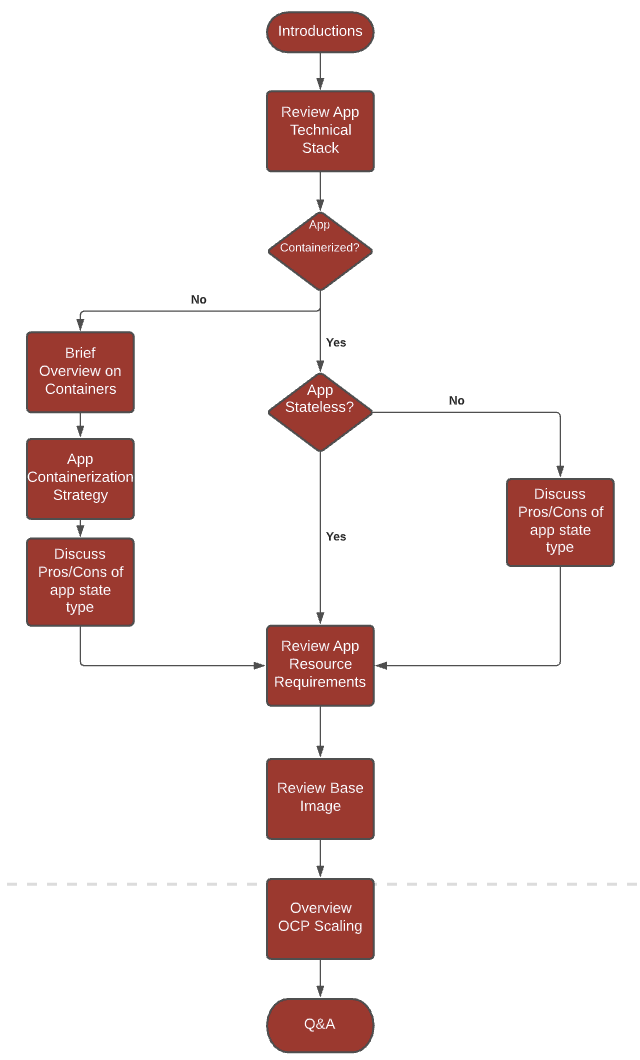
Introductions: Start by establishing trust
First impressions and friendliness can go a long way. Personally, I find that urging team members to ask questions when they feel unsure about a topic fosters a welcoming environment from the start. Summarizing your experience with the topic also builds credibility. Trust, positive reinforcement, and patience create the best setting for finding effective solutions, especially with a complicated subject like containerization.
Review the tech stack
This part of the conversation should revolve around a high-level description of what the application does, the language and middleware it uses, and other components that make up the application, such as databases and external services.
It is also important to note the application's overarching architecture: Are you working with a monolith that your team hopes to break down into a series of microservices, existing microservices that share common configuration patterns, or perhaps a series of services that should be separated because of non-dependencies?
The technical overview will dictate various aspects of the containerization strategy. It is important to cover every vital part of the application to determine which solution to pursue, but avoid spending too much time on the technical stack. You only need to know what technologies the application uses and how it runs; anything beyond that, and you risk discussing unnecessary facets of the application.
Is your application containerized?
Whether your application is containerized will likely become evident from the technical overview. If the answer is yes, you can jump right into discussing the application's state.
Application states refer to how application data is stored. Stateful applications require persistent storage, whereas stateless applications do not require storing server information or session data. There are benefits to both types of applications, and which architecture to use largely comes down to the application's purpose and how it functions. Luckily, containers are great for managing both stateful and stateless architectures. Talking to your team about each approach's costs and benefits is another opportunity to highlight the power of containers and how they can transform application delivery and maintenance.
If the application is not yet containerized, don't worry! Take this opportunity to introduce the concept of containers to your team and describe how using them could improve the application's deployment lifecycle and management on Red Hat OpenShift Container Platform. Your team is likely somewhat familiar with containers and OpenShift. If not, a simple analogy can help explain how OpenShift Container Platform and containers work together.
Think of OpenShift Container Platform as a giant cargo ship with three main parts:
- Shipping containers: Think of Docker containers as shipping containers. They're lightweight, standalone, executable software packages that include everything needed to run an application: source code, runtime, system tools, system libraries, and settings. A shipping container can contain a multitude of objects, just like a Docker container holds the various dependencies and source code an application needs to run.
- The crane: As we know, OpenShift Container Platform is built on Kubernetes. In this analogy, Kubernetes acts as our crane, managing, scaling, and orchestrating containers on the cargo ship.
- The ship: The cargo ship itself is OpenShift. The ship holds the containers and the crane together and provides the added benefits of an interface, security, and developer tools for creating efficient workflows for containerized applications.
Once the team has a high-level understanding of what containers are and how they are used with OpenShift, they can consider the containerization strategy. How to containerize is primarily based on the complexity of the application. If the application has many dependencies and requires many steps to build and run, it is best to use the Docker strategy. For simple, lightweight microservices, Source-To-Image (S2I) is a good option.
When discussing the containerization strategy, asking questions will help you identify a specific containerization method. Questions such as "What does the build process look like?" and "What scripts do we use for the application build process?" provide greater insight into which containerization method is most applicable to the situation. You can even begin exploring the concept of continuous integration (CI) pipelines to add a layer of automation and security.
Pathfinder may also be used to determine which applications can be containerized, the effort involved, and any impediments to containerization. Pathfinder can help you determine the order in which applications should migrate to containers based on factors such as business criticality, technical and execution risk, and the effort required.
Application resource requirements
Quite a few variables come into play when setting compute resources. The application's size and complexity will usually help determine how much CPU and memory your containers will need. It is also important to consider the resources allocated to the deployment environment. While your OpenShift cluster might work without initially setting resource requests and limits, you will encounter stability issues as the number of projects and teams on the cluster expands.
Tools such as resource quotas, which provide constraints for limiting resource consumption in a namespace, and limit ranges, which set resource usage limits for each type of resource, provide a foundation for successful resource requirement planning. You might perform preliminary tests to determine resource availability and requirements for each container and use this information as a basis for capacity planning and prediction. Remember, however, that resource usage analysis takes time, and your team will continue to fine-tune the application over its production lifecycle.
Base images
While there are many sources for base images, acquiring them from a known and trusted source can be challenging. It is important to use secure base images that are up to date and free of known vulnerabilities. If a vulnerability is discovered, you must update the base images. Luckily, you can use options such as Red Hat OpenShift Container Registry and Red Hat Quay to securely store and manage the base images for your applications.
OpenShift Container Registry runs on top of the existing cluster infrastructure and provides an out-of-the-box solution for users to manage the images that run their workloads. The added benefit of locally-managed images with OpenShift Container Registry is the speed at which developers can use stored images to quickly start their applications. Quay, on the other hand, is an enterprise-quality container image registry with advanced registry features, including geo-replication, image scanning, and the ability to roll-back images.
Using these tools as examples of how to safely deploy and store base images will help highlight the security that OpenShift provides. You could also explore using the freely redistributable Red Hat Universal Base Image based on Red Hat Enterprise Linux 8, a lightweight image with the benefits and security capabilities of enterprise Linux.
Scaling with OpenShift Container Platform
Many workloads have a dynamic nature that varies over time, making a fixed scaling configuration difficult to implement. Thankfully, you can use OpenShift's autoscaling feature to define varying application capacity that is not fixed but instead ensures just enough capacity to handle different loads.
When reviewing scaling with your team, it is important to note the many configurations that can occur—for example, horizontal scaling versus vertical scaling. Horizontal scaling is preferable to vertical scaling because it is less disruptive, especially for stateless services. That is not the case for stateful services, where you might prefer vertical scaling. Another scenario where vertical scaling is useful is when tuning a service's resource needs based on actual load patterns. There's also manual scaling versus automatic scaling—manual scaling should be viewed as an anticipatory solution to scaling with the circumstance of human interaction, whereas automated scaling is a more reactive approach.
Allow time for Q & A
The questions-and-answers (Q & A) portion of the conversation provides an opportunity to elaborate on any topics that could have otherwise detracted from the overall discussion flow. These topics are up to the discretion of the application team. Of course, your goal should be to ensure that the team feels comfortable with the concepts at hand. However, the purpose of your containerization discussion is to gather the necessary information to identify a suitable containerization strategy. Once a strategy is established, you can begin to teach the team in a more in-depth manner, ensuring that you efficiently use your valuable meeting time. For example, you could use the Q & A to explain the technical details of how S2I functions as a containerization strategy or how using secrets adds an additional layer of security to your workflow.
Conclusion
When exploring containerization with your application team, it is important to recognize that containers are not always the most beneficial method. For teams that are already practicing good containerization methods and are interested in more of a cloud-native approach, serverless might be a better alternative. Teams that can configure their environments easily, with a small resource footprint for application deployment, might not need to use containers, to begin with.
Containers are very powerful for improving an application's time-to-market delivery. When used alongside OpenShift, you can easily manage the maintenance, scaling, and lifecycle of your containers. As your team becomes more familiar with container foundations and OpenShift, consider continuous integration/continuous delivery (CI/CD) tools such as Tekton and ArgoCD to automate and improve the application delivery cycle.
Different variables are at play in every development environment. A well-constructed conversation about the utility of containers will help you identify the best application deployment approach for your team.
Last updated: September 19, 2023
