Kogito 0.9.1 has been released, bringing refined business automation documentation and examples. It's not yet 1.0, but 0.9.1 is a well-prepared milestone release. In this article, I introduce kogito-examples to help you experience what Kogito is like. First, clone the repo:
$ git clone https://github.com/kiegroup/kogito-examples.git
$ cd kogito-examples
Note: The default branch is "stable," which is the latest stable version (so it may be higher than 0.9.1 now).
There are many samples inside. Every sample has a README.md, which contains the execution command and the curl command for testing. Here are some examples for Quarkus, but you will also find examples for Spring Boot in the repo. These examples are nearly the same; only the startup command is different.
ruleunit-quarkus-example
The ruleunit-quarkus-example is a basic rule execution service. When you POST loan application facts (LoanApplication), you will receive approved applications back:
$ cd ruleunit-quarkus-example
$ mvn clean compile quarkus:dev
Once launched, you can test it with the following curl command:
$ curl -X POST -H 'Accept: application/json' -H 'Content-Type: application/json' -d '{"maxAmount":5000,"loanApplications":[{"id":"ABC10001","amount":2000,"deposit":100,"applicant":{"age":45,"name":"John"}}, {"id":"ABC10002","amount":5000,"deposit":100,"applicant":{"age":25,"name":"Paul"}}, {"id":"ABC10015","amount":1000,"deposit":100,"applicant":{"age":12,"name":"George"}}]}' http://localhost:8080/find-approved
The example's source code
Let's go over the source code, starting with RuleUnitQuery.drl, which is the DRL that describes the rule. The point is the declaration unit LoanUnit;, as shown here:
unit LoanUnit;
This code lets you combine rules with the LoanUnit class to generate an entire service.
The notation /loanApplications[] in this rule:
$l: /loanApplications[ applicant.age >= 20, deposit < 1000, amount <= 2000 ]
means to evaluate the facts (contained in LoanApplication.java) from the LoanUnit class's DataStore loanApplications:
public DataStore<LoanApplication> getLoanApplications() {
    return loanApplications;
}
which can be thought of as the same as the LoanApplication() pattern in the regular DRL.
Applicant information comes from Applicant.java, which is just a property of the LoanApplication.
There is also a query in the DRL. This will generate the REST endpoint used in the above test:
query FindApproved
    $l: /loanApplications[ approved ]
end

query FindNotApprovedIdAndAmount
    /loanApplications[ !approved, $id: id, $amount : amount ]
end
LoanUnit.java implements RuleUnitData. This is a rule unit mechanism that was not commonly used in Drools before. The mechanism is to tie the rules to the facts, and wrap the facts in a class called DataStore. Instead of writing this Java class, you may also use a declare notation in the DRL which will generate RuleUnitData class automatically.
The example's Quarkus-generated code
The rest of the necessary code is generated by quarkus:dev. It's interesting to see under the target/ directory.
README.md also describes non-dev execution and native builds with GraalVM.
You can find more details about running Kogito on Red Hat OpenShift/Red Hat CodeReady Containers in the document. I also wrote quick instructions here.
dmn-quarkus-example
This is a service that uses DMN instead of DRL. If you POST your traffic violation information, you will be informed if you were fined or have a suspended license:
$ cd dmn-quarkus-example
$ mvn clean compile quarkus:dev
Once it's activated, you can test it with:
$ curl -X POST -H 'Accept: application/json' -H 'Content-Type: application/json' -d '{"Driver":{"Points":2},"Violation":{"Type":"speed","Actual Speed":120,"Speed Limit":100}}' http://localhost:8080/Traffic%20Violation
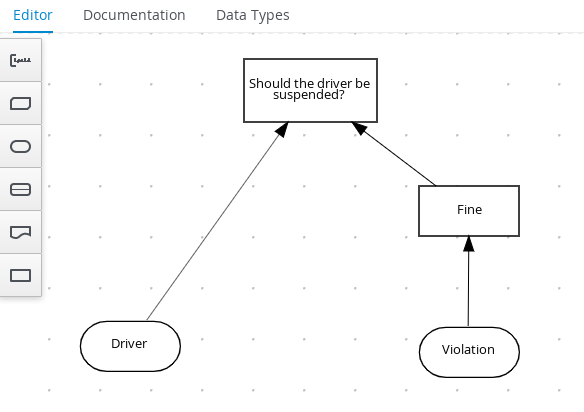
The source code is just one DMN file: Traffic Violation.dmn. This DMN can be viewed and edited in an editor: The VS Code extension is recommended. There is also a convenient online editor. When you open it, it's easy to see the structure of the decisions. The reason that no other classes are needed is that the DMN itself has type information defined, and the input/output is map-based, so no custom Java classes are needed (input/output using custom Java classes is also under development), as shown in Figure 1.
process-scripts-quarkus
A simple process service with Script Tasks only. As you may have noticed, names like Drools and jBPM are not in the foreground (although they do appear in the dependency library names). This is the idea of Kogito, which includes both rules and processes as a whole:
$ cd process-scripts-quarkus
$ mvn clean compile quarkus:dev
Once it's activated, you can test it with:
$ curl -X POST -H 'Content-Type:application/json' -H 'Accept:application/json' -d '{"name" : "john"}' http://localhost:8080/scripts
It's easy, isn't it? You might want to extend the process based on this. Here too, the source is a single BPMN file: scripts.bpmn. BPMNs can also be viewed and edited using the VS Code extension and the online editor, as shown in Figure 2.

Other examples
There are many other examples, such as decisiontable-quarkus-example for a decision table, process-business-rules-quarkus which combines rules and processes, process-optaplanner-springboot for planning, etc. The most serious example is kogito-travel-agency, where you can experience Infinispan persistence, Kafka message integration, GraphQL data retrieval, and more. See this section of the documentation to deploy it to OpenShift.
We keep releasing with a quick cycle (0.10.1 has already been released). If you've been waiting for a while, why not give it a try now?
Last updated: March 18, 2024
