Red Hat AMQ Streams is an enterprise-grade Apache Kafka (event streaming) solution, which enables systems to exchange data at high throughput and low latency. AMQ Streams is available as part of the Red Hat AMQ offering in two different flavors: one on the Red Hat Enterprise Linux platform and another on the OpenShift Container Platform. In this three-part article series, we will cover AMQ Streams on the OpenShift Container Platform.
To get the most out of these articles, it will help to be familiar with messaging concepts, Red Hat OpenShift, and Kubernetes.
When running on containers, AMQ Streams poses different challenges (see this talk by Sean Glover), such as:
- Upgrading Kafka
- Beginning deployment
- Managing ZooKeeper
- Replacing brokers
- Rebalancing topic partitions
- Decommissioning or adding brokers
These challenges are resolved using the Operator pattern from the Strimzi project.
Now that we have a basic background for Red Hat AMQ Streams, let's dive into how it all works.
Red Hat AMQ Streams deep dive
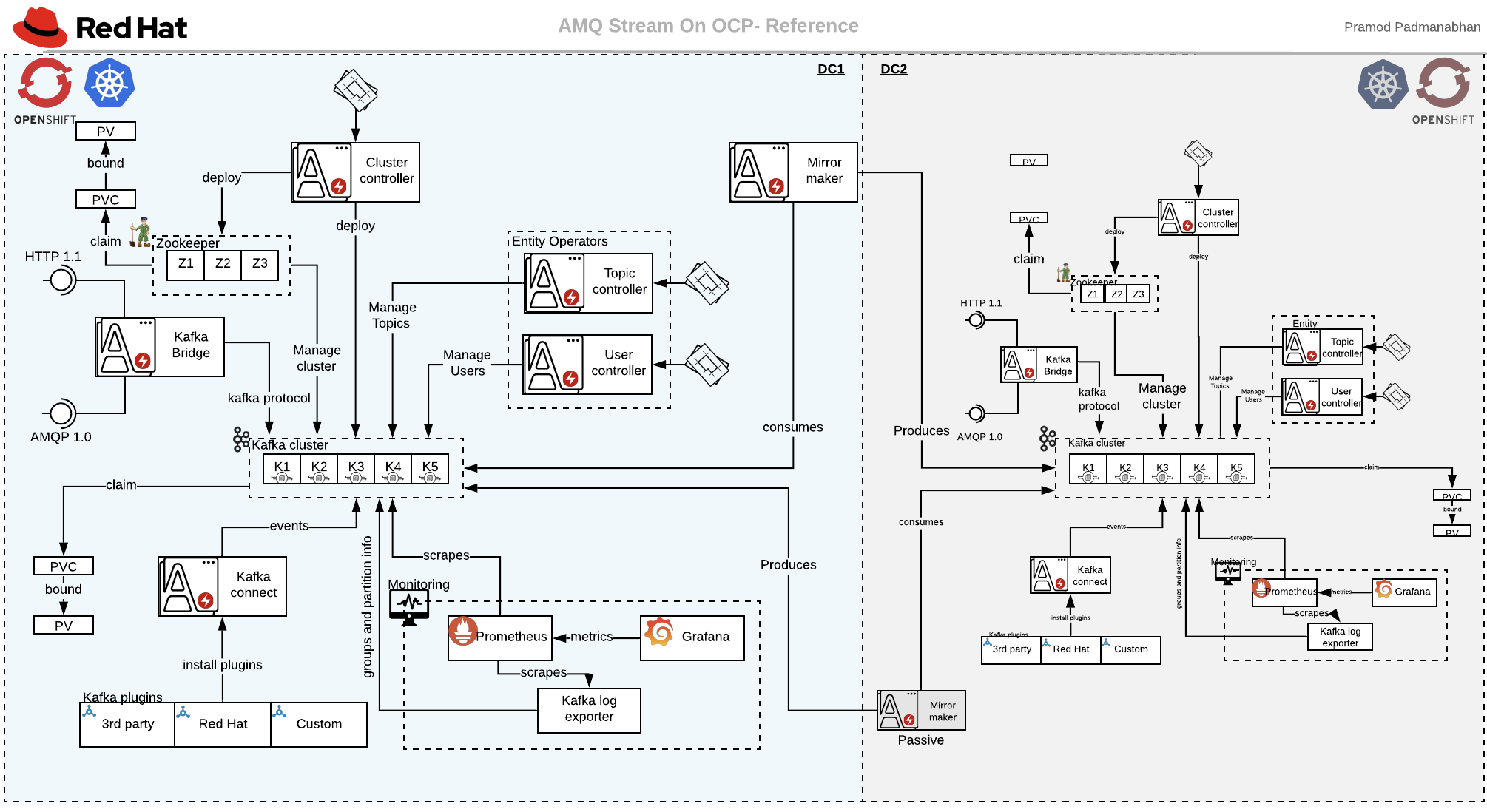
AMQ Streams has multiple Operators, which helps in solving the challenges of running AMQ Streams in the container world:
- Cluster Operator: Deploys and manages Kafka clusters on Enterprise containers.
- Entity Operator: Manages users and topics using two different sub-operators. The Topic Operator manages Kafka topics in your Kafka cluster, and the User Operator manages Kafka users on your Kafka cluster.
- Kafka Connect: Connects external systems to the Kafka cluster.
- Kafka Mirror Maker: Replicates data between Kafka clusters.
- Kafka Bridge: Acts as a bridge between different protocols and Kafka clusters. Currently supports HTTP 1.1 and AMQP 1.0.
Figure 1 shows a bird's view of Red Hat AMQ Streams on Red Hat OpenShift:
Now let's create a "hello world" program for all of these components. Due to the size of this walk-through, we will cover this topic in three articles, as follows:
- Part 1: Setting up ZooKeeper, Kafka, and the Entity Operator
- Part 2: Kafka Connect, Kafka Bridge, and Mirror Maker
- Part 3: Monitoring and administration
Setting up ZooKeeper, Kafka, and the Entity Operator
Before starting, you will need an OCP cluster with a Red Hat subscription to access the Red Hat container images, and cluster admin access. This walk-through uses Red Hat AMQ Streams 1.3.0:
- Download and extract Red Hat AMQ Streams 1.3.0 and the OpenShift Container Platform Images from the Red Hat AMQ Streams 1.3.o download page:
$ unzip amq-streams-1.3.0-ocp-install-examples.zip
There will be two folders: examples and install.
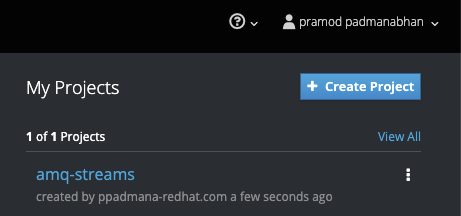
- Log in and create a new project and namespace for AMQ Streams (see Figure 2):
$ oc login -u admin_user -p admin_password https://redhat.ocp.cluster.url.com
$ oc new-project amq-streams
- Navigate to the
install/cluster-operatorfolder and modify the role-binding YAML files to useamq-streamsas their namespace:
$ sed -i 's/namespace: .*/namespace: amq-streams/' install/cluster-operator/*RoleBinding*.yaml
For macOS:
$ sed -i '' 's/namespace: .*/namespace: amq-streams/' install/cluster-operator/*RoleBinding*.yaml
- Create the Cluster Operator (see Figure 3):
$ oc apply -f install/cluster-operator
kafka_2.12-2.3.0.redhat-00003 pramod$ oc apply -f install/cluster-operator
serviceaccount/strimzi-cluster-operator created
clusterrole.rbac.authorization.k8s.io/strimzi-cluster-operator-namespaced created
rolebinding.rbac.authorization.k8s.io/strimzi-cluster-operator created
clusterrole.rbac.authorization.k8s.io/strimzi-cluster-operator-global created
clusterrolebinding.rbac.authorization.k8s.io/strimzi-cluster-operator created
clusterrole.rbac.authorization.k8s.io/strimzi-kafka-broker created
clusterrolebinding.rbac.authorization.k8s.io/strimzi-cluster-operator-kafka-broker-delegation created
clusterrole.rbac.authorization.k8s.io/strimzi-entity-operator created
rolebinding.rbac.authorization.k8s.io/strimzi-cluster-operator-entity-operator-delegation created
clusterrole.rbac.authorization.k8s.io/strimzi-topic-operator created
rolebinding.rbac.authorization.k8s.io/strimzi-cluster-operator-topic-operator-delegation created
customresourcedefinition.apiextensions.k8s.io/kafkas.kafka.strimzi.io created
customresourcedefinition.apiextensions.k8s.io/kafkaconnects.kafka.strimzi.io created
customresourcedefinition.apiextensions.k8s.io/kafkaconnects2is.kafka.strimzi.io created
customresourcedefinition.apiextensions.k8s.io/kafkatopics.kafka.strimzi.io created
customresourcedefinition.apiextensions.k8s.io/kafkausers.kafka.strimzi.io created
customresourcedefinition.apiextensions.k8s.io/kafkamirrormakers.kafka.strimzi.io created
customresourcedefinition.apiextensions.k8s.io/kafkabridges.kafka.strimzi.io created
deployment.apps/strimzi-cluster-operator created

- Ensure you have eight physical volumes. For the walk-through, we are using 5GB persistent volumes:
$ oc get pv | grep Available
kafka_2.12-2.3.0.redhat-00003 pramod$ oc get pv -o wide | grep Available
NAME   CAPACITY  ACCESS MODES  RECLAIM POLICY  STATUS     CLAIM  STORAGECLASS   REASON    AGE
pv14   5Gi       RWO           Recycle         Available                                  34m
pv19   5Gi       RWO           Recycle         Available                                  34m
pv20   5Gi       RWO           Recycle         Available                                  34m
pv21   5Gi       RWO           Recycle         Available                                  34m
pv23   5Gi       RWO           Recycle         Available                                  34m
pv3    5Gi       RWO           Recycle         Available                                  34m
pv5    5Gi       RWO           Recycle         Available                                  34m
pv9    5Gi       RWO           Recycle         Available                                  34m
- Create the persistent cluster config
amq-kafka-cluster.yml. The example file present inexamples/kafka/kafka-persistent.ymlwas used as a reference for this config:
apiVersion: kafka.strimzi.io/v1beta1
kind: Kafka
metadata:
  name: simple-cluster
spec:
  kafka:
    version: 2.3.0
    replicas: 5
    listeners:
      plain: {}
      tls: {}
    config:
      offsets.topic.replication.factor: 5
      transaction.state.log.replication.factor: 5
      transaction.state.log.min.isr: 2
      log.message.format.version: "2.3"
    storage:
      type: jbod
      volumes:
      - id: 0
        type: persistent-claim
        size: 5Gi
        deleteClaim: false
  zookeeper:
    replicas: 3
    storage:
      type: persistent-claim
      size: 5Gi
      deleteClaim: false
  entityOperator:
    topicOperator: {}
    userOperator: {}
- Create the AMQ Streams cluster (see Figure 4):
$ oc apply -f amq-kafka-cluster.yml
pramod$ oc get pv | grep Bound
pv12 5Gi RWO Recycle Bound ocplab/mongodb 38m
pv14 5Gi RWO Recycle Bound amq-streams/data-0-simple-cluster-kafka-4 38m
pv19 5Gi RWO Recycle Bound amq-streams/data-0-simple-cluster-kafka-3 38m
pv20 5Gi RWO Recycle Bound amq-streams/data-0-simple-cluster-kafka-2 38m
pv21 5Gi RWO Recycle Bound amq-streams/data-0-simple-cluster-kafka-1 38m
pv23 5Gi RWO Recycle Bound amq-streams/data-0-simple-cluster-kafka-0 38m
pv3 5Gi RWO Recycle Bound amq-streams/data-simple-cluster-zookeeper-2 38m
pv5 5Gi RWO Recycle Bound amq-streams/data-simple-cluster-zookeeper-0 38m
pv9 5Gi RWO Recycle Bound amq-streams/data-simple-cluster-zookeeper-3 38m

To test your cluster:
- Log into the OpenShift Container Platform (OCP) cluster, create a producer sample app, and push a few messages:
$ oc run kafka-producer -ti --image=registry.redhat.io/amq7/amq-streams-kafka-23:1.3.0 --rm=true --restart=Never -- bin/kafka-console-producer.sh --broker-list simple-cluster-kafka-bootstrap:9092 --topic redhat-demo-topics
If you don't see a command prompt, try pressing enter.
>hello world
>from pramod
Ignore the warning for now.
- Open another terminal and create a consumer sample app to listen to the messages:
$ oc run kafka-consumer -ti --image=registry.redhat.io/amq7/amq-streams-kafka-23:1.3.0 --rm=true --restart=Never -- bin/kafka-console-consumer.sh --bootstrap-server simple-cluster-kafka-bootstrap:9092 --topic redhat-demo-topics --from-beginning
You should see two messages, which were published using the producer terminal, as shown in Figure 5:

- Exit from both the producer and the consumer connections using Ctrl+C.
Conclusion
In this article, we explored Red Hat AMQ Streams basics and its components. We also showed how to create a basic Red Hat AMQ cluster on Red Hat OpenShift. In the next article, we will address Kafka Connect, the Kafka Bridge, and Mirror Maker.

