JShell was introduced in JDK 9 as part of Java Enhancement Proposal (JEP) 222 under project Kulla. Many programming languages, such as JavaScript, Python, Ruby, etc., provide easy-to-use, command-line tools for their execution, but Java was still missing such a utility. So, JDK 9 introduced the Java shell (JShell) tool.
I discussed the basics of JShell (which is a Read-Evaluate-Print-Loop; REPL) in a previous article. In this article, I'll cover advanced concepts in JShell that users should know for rapid development.
1. Re-declaration of variables
In Java, it is not possible to re-declare a variable. With the help of JShell, however, you can always re-declare the variable based on needs. Note that this is applicable for both primitive as well as for reference type variables. In fact users can re-declare any construct as many times as they want.
Example:
jshell> String str="Hello"
str ==> "JShell"
jshell> Integer str=10
str ==> 10
2. Scratch variables
Any expression evaluation from JShell command line is assigned to some variables if not explicitly assigned by user. Such variables are called scratch variables. Example:
jshell> "Hello"+"JShell"
$1 ==> "HelloJShell"
Note that in order to know the type of variable or more details about expression evaluation, we can set the feedback mode to verbose as below:
/set feedback verbose
jshell> 60+10
$2 ==> 70
|  created scratch variable $21 : int
To come out of verbose mode, set the feedback mode to normal:
/set feedback normal
3. Forward referencing in JShell
Forward referencing in JShell allows you to call constructs up front even though they do not exist. For example, suppose there is a method named greet() as below. Notice that greet() internally calls another method named greetHelloWorld(), which is not declared yet. Creation of greet() is successful, but it can't be invoked until greetHelloWorld() is declared. This is called forward referencing in JShell.
Example:
jshell> public void greet(){
...> greetHelloWorld();}
|  created method greet(), however, it cannot be invoked until method greetHelloWorld() is declared               jshell> greet()
|  attempted to call method greet() which cannot be invoked until method greetHelloWorld() is declared
jshell> public void greetHelloWorld(){
...> System.out.println("Hello World");}
|  created method greetHelloWorld()
jshell> greet()
Hello World
4. Exception Handling in JShell
Example:
jshell> int divide(int a,int b) throws IOException{
...> if(b==0){
...> throw new IOException();
...> }
...> return a/b;
...> }
|  created method divide(int,int)
jshell> divide(1,0)
|  java.io.IOException thrown:
|        at divide (#2:3)
|        at (#3:1)
Notice that we are not catching any exceptions thrown by divide method; JShell takes care of that. Also notice that we are not importing IOException class, but the code is compiled and executed just fine. The reason for this is that, for any JShell session, some packages are imported by default. To check all the packages that are by default imported in any JShell Session:
jshell> /imports
|    import java.io.*
|    import java.math.*
|    import java.net.*
|    import java.nio.file.*
|    import java.util.*
|    import java.util.concurrent.*
|    import java.util.function.*
|    import java.util.prefs.*
|    import java.util.regex.*
|    import java.util.stream.*
|    import java.io.IOException
5. Persistency behavior of instructions in JShell session
All instructions in JShell Session are not persistent by default. They are transient in nature and are lost when a user exits from a JShell session.
JShell, however, provides a way for users to save all the information in a particular JShell session and access that information in a different JShell session. This is very handy if users want to save the useful snippets from a JShell session and access them in a different JShell session.
Example:
jshell> String s="Hello"
s ==> "Hello"

jshell> int i=100;
i ==> 100
jshell> /save C:\data\mySession.jsh
jshell> /exit
|  Goodbye

λ jshell
|  Welcome to JShell -- Version 9.0.4
|  For an introduction type: /help intro
jshell> /vars
jshell> /open C:\Data\mySession.jsh
jshell> /vars
|    String s = "Hello"
|    int i = 100
6. Using external libraries
There are many useful third-party open source libraries. Typically, developers keep those libraries in class-path of project and use it. But, in the case of JShell, using third-party libraries is quite easy.
For example, suppose we want to use a String Utility class from a third-party library called Apache Commons Lang. Here is the syntax for keeping libraries in class-path:
shell> /env --class-path <Relative Path of lib from where JShell is run>
jshell> /env --class-path ../lib/commons-lang3-3.8.1.jar
|  Setting new options and restoring state.
import org.apache.commons.lang3.StringUtils;
jshell> System.out.println(StringUtils.isEmpty(""))
true
jshell> System.out.println(StringUtils.isEmpty("hello"))
false
7. Using JShell specific commands and tools for quick development
JShell comes with its own specific handy commands, which can be used for faster testing on the JShell Console. Below are some useful commands:
/history - Prints all commands executed on JShell (Java Commands+ JShell specific commands)
Example:
jshell> String s ="Hello"
s ==> "Hello"

jshell> class Employee{
...> }
|  created class Employee

jshell> /vars
|    String s = "Hello"

jshell> /history
String s ="Hello"
class Employee{
}
/vars
/history
/list - Prints all JAVA related commands executed in JShell. Notice that this list the command in Numerical order of each command identifier. This identifier can be used to execute certain construct again.
Example:
jshell> /list
1 : String s ="Hello";
2 : class Employee{
}
jshell> /1
String s ="Hello";
s ==> "Hello"
/reset - Resets the state of current JShell session.
CTRL+R - For searching a particular command
CTRL+S - Performing Forward Search
CTRL+C - To exit from JShell session
/exit - To exit from JShell session
/vars - To list all variables inside current JShell session
/imports - To list all imports inside current JShell session
/help - To know more about JShell specific commands
8. Tab completion in JShell
JShell allows developers to complete their code constructs automatically using the Tab key.
Example:

Along with this, user can also see documentation for relevant packages using JShell:
jshell> java.io
io
Signatures:
java.io
<press tab again to see documentation>
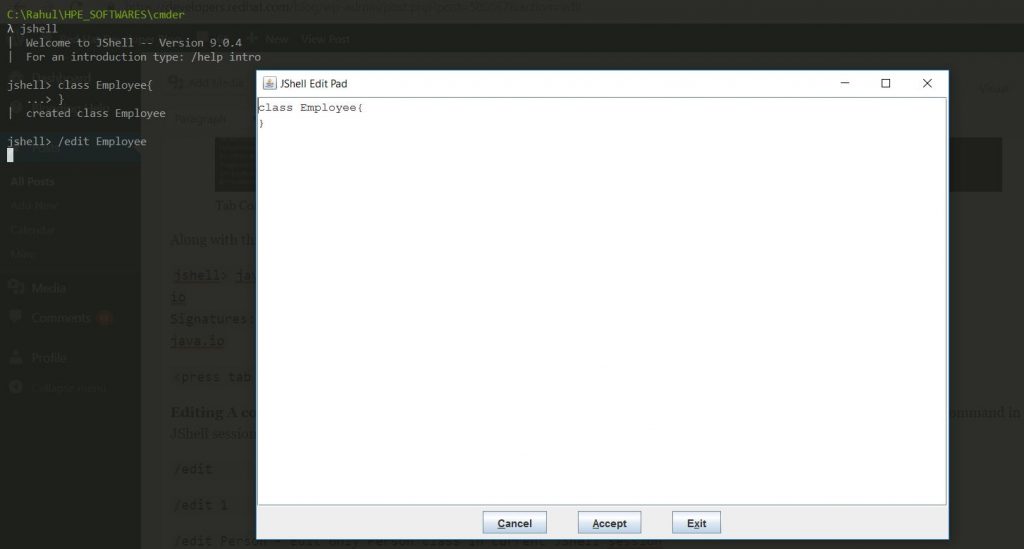
9. Editing a construct in JShell
It's very common during development to want to edit a previously executed command in JShell session. JShell provides a very handy command and editor for same.
Example:
/edit - Edit all constructs in current JShell session
/edit 1 - Edit only 1st construct (see from /list) in current JShell session
/edit Person - Edit only Person class in current JShell session
10. Using JShell programmatically
JDK offers an API for programmers to access JShell programmatically rather than by using REPL. Please refer to the corresponding Java docs for more details.
I've shown just a few advanced concepts in JShell in this article, and this is not the end. I also suggest readers go through the JShell docs for more information.
Last updated: June 8, 2021
