In Network Function Virtualization, there is a need to scale functions (VNFs) and infrastructure (NFVi) across multiple NUMA nodes in order to maximize resource usage.
In this blog, we'll show how to configure Open vSwitch using DPDK datapath (OVS-DPDK) parameters for multiple NUMA systems, based on OVS 2.6/2.7 using DPDK 16.11 LTS.
OVS-DPDK parameters are set through OVSDB and defaults are provided. Using defaults is a great way to get basic setups running with minimal effort but tuning is often desired and is required to take advantage of multiple NUMA systems.
Physical NICs or VMs accessed through DPDK interfaces have a NUMA node associated with them. It is important that their NUMA node is known and in the case of VMs set correctly so that OVS-DPDK parameters can be set to correspond.
For physical NICs, their NUMA node can be found from their PCI address with:
# lspci -vmms 01:00.0 | grep NUMANode
NUMANode:	0
For VMs, their NUMA node can be set with libvirt,
<cputune>
    <vcpupin vcpu='0' cpuset='2'/>
    <vcpupin vcpu='1' cpuset='4'/>
    <vcpupin vcpu='2' cpuset='6'/>
    <emulatorpin cpuset='8'/>
  </cputune>
and identified with numactl:
# numactl -H
available: 2 nodes (0-1)
node 0 cpus: 0 2 4 6 8 10 12 14
node 1 cpus: 1 3 5 7 9 11 13 15
dpdk-init
The dpdk-init is required in order to use DPDK interfaces with OVS-DPDK. In older versions of OVS-DPDK, DPDK was always initialized regardless of whether users wanted DPDK interfaces or not. Now, users can optionally choose to initialize DPDK by setting dpdk-init=true. This needs to be set either before any DPDK interfaces are setup (OVS 2.7) or before OVS-DPDK is started (OVS 2.6). By default, dpdk-init will be interpreted as false.
To initialize the DPDK
# ovs-vsctl --no-wait set Open_vSwitch . other_config:dpdk-init=true
pmd-cpu-mask
The pmd-cpu-mask is a core bitmask that sets which cores are used by OVS-DPDK for datapath packet processing.
If pmd-cpu-mask is set, OVS-DPDK will poll DPDK interfaces with a core of it that is on the same NUMA node as the interface. If there are no cores in pmd-cpu-mask for a particular NUMA node, physical NICs or VMs on that NUMA node cannot be used.
OVS-DPDK performance typically scales well with additional cores, so it is common that users set pmd-cpu-mask but if it is not set, the default is that the lowest core on each NUMA node will be used for datapath packet processing.
The pmd-cpu-mask is used directly in OVS-DPDK and it can be set at any time, even while traffic is already flowing.
As an example on a dual NUMA system where,
# numactl -H
available: 2 nodes (0-1)
node 0 cpus: 0 2 4 6 8 10 12 14
node 1 cpus: 1 3 5 7 9 11 13 15
to add core 4 and 6 on NUMA 0 and core 5 and 7 on NUMA 1 for datapath packet processing:
# ovs-vsctl set Open_vSwitch . other_config:pmd-cpu-mask=0xF0
dpdk-socket-mem
The dpdk-socket-mem sets how hugepage memory is allocated across NUMA nodes. It is important to allocate hugepage memory to all NUMA nodes that will have DPDK interfaces associated with them. If memory is not allocated on a NUMA node associated with a physical NIC or VM, they cannot be used.
Unfortunately, DPDK initialization has traditionally been unforgiving and trying to allocate hugepage memory to a NUMA node that does not exist results in OVS-DPDK exiting. This issue is now resolved in DPDK so it will disappear once OVS-DPDK is updated to use newer DPDK releases. For now, users should not try to allocate memory to a NUMA node that is not present on the system.
If dpdk-socket-mem is not set, a default of dpdk-socket-mem=1024,0 will be used, whereby hugepage memory is allocated to NUMA 0 only. If users want to set dpdk-socket-mem it should be set before dpdk-init is set to true (OVS 2.7) or OVS-DPDK is started (OVS 2.6).
As an example of a dual NUMA system where NUMA 0 and NUMA 1 are allocated 1024 MB each.
# ovs-vsctl --no-wait set Open_vSwitch . other_config:dpdk-socket-mem=1024,1024
Note that 0 MB (no value is also equivalent to 0 MB) can be set for NUMA nodes, which will not be used for OVS-DPDK.
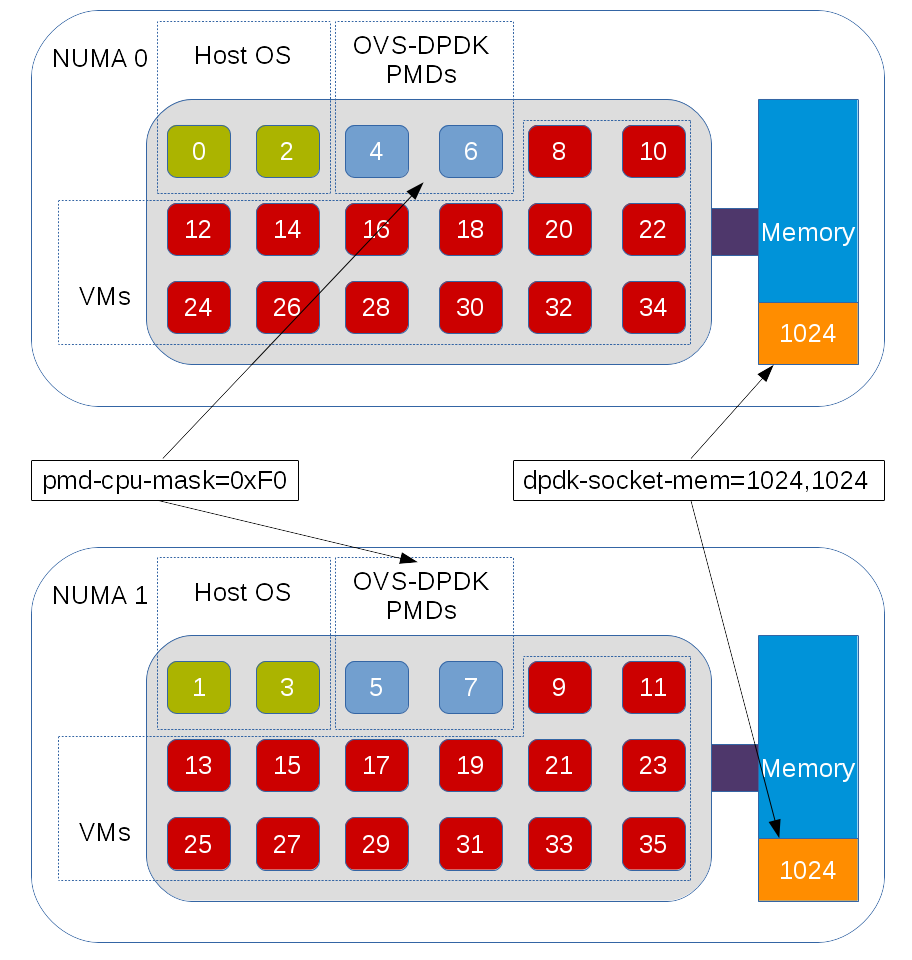
An example of OVS-DPDK configured for a dual NUMA system.
dpdk-lcore-mask
The dpdk-lcore-mask is a core bitmask that is used during DPDK initialization and it is where the non-datapath OVS-DPDK threads such as handler and revalidator threads run. As these are for non-datapath operations, the dpdk-lcore-mask does not have any significant performance impact on multiple NUMA systems. There is a nice default option when dpdk-lcore-mask is not set, in which the OVS-DPDK cpuset will be used for handler and revalidator threads. This means they can be scheduled across multiple cores by the Linux scheduler.
For DPDK initialization there is a requirement that the NUMA node associated with the least significant bit in the dpdk-lcore-mask (or OVS-DPDK cpuset in the default case) has hugepage memory allocated for it. This can be achieved with the dpdk-socket-mem parameter. If users want to set dpdk-lcore-mask, it should be set before dpdk-init is set to true (OVS 2.7) or OVS-DPDK is started (OVS 2.6).
As an example of setting dpdk-lcore-mask for DPDK initialization, handler and revalidator threads to run on core 2.
# ovs-vsctl --no-wait set Open_vSwitch . other_config:dpdk-lcore-mask=0x4
It is important to remember that pmd-cpu-mask and dpdk-lcore-mask are completely independent. In fact, it is best that there is no overlap in order that the handler or revalidator threads do not interrupt OVS-DPDK datapath packet processing.
Final Thoughts
We've seen that OVS-DPDK parameters give users the ability to scale across multiple NUMA nodes supporting increased use of system resources for NFV.

