Redhat Developers  Logo
  • AI

    Get started with AI

    • Red Hat AI
      Accelerate the development and deployment of enterprise AI solutions.
    • AI learning hub
      Explore learning materials and tools, organized by task.
    • AI interactive demos
      Click through scenarios with Red Hat AI, including training LLMs and more.
    • AI/ML learning paths
      Expand your OpenShift AI knowledge using these learning resources.
    • AI quickstarts
      Focused AI use cases designed for fast deployment on Red Hat AI platforms.
    • No-cost AI training
      Foundational Red Hat AI training.

    Featured resources

    • OpenShift AI learning
    • Open source AI for developers
    • AI product application development
    • Open source-powered AI/ML for hybrid cloud
    • AI and Node.js cheat sheet

    Red Hat AI Factory with NVIDIA

    • Red Hat AI Factory with NVIDIA is a co-engineered, enterprise-grade AI solution for building, deploying, and managing AI at scale across hybrid cloud environments.
    • Explore the solution
  • Learn

    Self-guided

    • Documentation
      Find answers, get step-by-step guidance, and learn how to use Red Hat products.
    • Learning paths
      Explore curated walkthroughs for common development tasks.
    • See all learning

    Hands-on

    • Developer Sandbox
      Spin up Red Hat's products and technologies without setup or configuration.
    • Interactive labs
      Learn by doing in these hands-on, browser-based experiences.
    • Interactive demos
      Click through product features in these guided tours.

    Browse by topic

    • AI/ML
    • Automation
    • Java
    • Kubernetes
    • Linux
    • See all topics

    Training & certifications

    • Courses and exams
    • Certifications
    • Skills assessments
    • Red Hat Academy
    • Learning subscription
    • Explore training
  • Build

    Get started

    • Red Hat build of Podman Desktop
      A downloadable, local development hub to experiment with our products and builds.
    • Developer Sandbox
      Spin up Red Hat's products and technologies without setup or configuration.

    Download products

    • Access product downloads to start building and testing right away.
    • Red Hat Enterprise Linux
    • Red Hat AI
    • Red Hat OpenShift
    • Red Hat Ansible Automation Platform
    • See all products

    Featured

    • Red Hat build of OpenJDK
    • Red Hat JBoss Enterprise Application Platform
    • Red Hat OpenShift Dev Spaces
    • Red Hat Developer Toolset

    References

    • E-books
    • Documentation
    • Cheat sheets
    • Architecture center
  • Community

    Get involved

    • Events
    • Live AI events
    • Red Hat Summit
    • Red Hat Accelerators
    • Community discussions

    Follow along

    • Articles & blogs
    • Developer newsletter
    • Videos
    • Github

    Get help

    • Customer service
    • Customer support
    • Regional contacts
    • Find a partner

    Join the Red Hat Developer program

    • Download Red Hat products and project builds, access support documentation, learning content, and more.
    • Explore the benefits

Automate integration CI/CD process

January 11, 2017
Christina Lin
Related topics:
CI/CDDevOpsMicroservices
Related products:
Red Hat Fuse

    Red Hat Fuse Integration Service 2.0 tech preview was released a few weeks ago and as it's based on Red Hat OpenShift 3.3, which has pipeline capability on top of it (tech preview on OpenShift as well), you are able to get one step closer to a more automated and agile continuous integration. As well as, a deployment one-stop platform for us, the integration developer.

    For the pipeline to work on OpenShift, you need Jenkins installed and running. OpenShift uses it to build, process and handle all the workflows. If you are familiar with developing in OpenShift, building the pipeline is pretty simple and straight-forward. The pipeline is defined as a build configuration in OpenShift, just create a build config then import it to the namespace you want it to be in. And that is it.
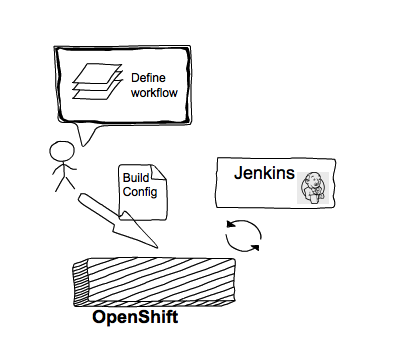
    Jenkins installed and running

    This is what the build config looks like, note the strategy type is called JenkinsPipeline.  This will trigger the interaction with Jenkins, and pushes the defined Jenkinsfile onto the server itself. The Jenkins Server will then interact with Openshift and start the automated CI/CD process.

    kind: BuildConfig
    apiVersion: v1
    metadata:
     name: pipelinename
     labels:
     name: pipelinename 
    spec:
     triggers:
     - type: GitHub
     github:
     secret: secret101
     - type: Generic
     generic:
     secret: secret101
     strategy:
     type: JenkinsPipeline
     jenkinsPipelineStrategy:
     jenkinsfile: "
     node('maven') { 
     stage('build') { 
     print 'build'
     openshiftBuild(buildConfig: 'buildconfigname', showBuildLogs: 'true')
     } 
     stage('staging') {
     print 'stage'
     openshiftDeploy(deploymentConfig: 'deploymentconfigame') 
     } 
     }"
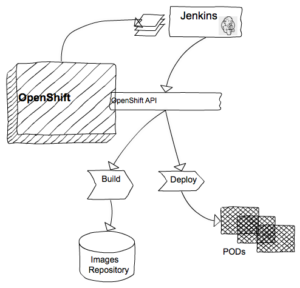
    As you can see on the above Jenkinsfile in the build configuration, it's interacting with OpenShift itself through the OpenShift and Jenkins plugin. For instance, you could trigger build an image, deploy the application through calling the deployment config, tag an image or even scale up and down the number of containers.
    OpenShift and Jenkins plugin

    This upper part of the blog is pretty generic to most of the applications running on OpenShift, and Fuse Integration Service is just another application running on top of it. But this application just simply contains PATTERN BASE integration technology that has 160+ built-in components in it, so we don't have to waste time and energy on repetitive stuff, no big deal. :)

    No matter what version you are using, this pipeline capability can help you automate your integration microservice.

    Here is a quick demo video that takes you through the entire process.


    Last updated: August 31, 2023

    Recent Posts

    • Federated identity across the hybrid cloud using zero trust workload identity manager

    • Confidential virtual machine storage attack scenarios

    • Introducing virtualization platform autopilot

    • Integrate zero trust workload identity manager with Red Hat OpenShift GitOps

    • Best Practice Configuration and Tuning for Linux and Windows VMs

    Red Hat Developers logo LinkedIn YouTube Twitter Facebook

    Platforms

    • Red Hat AI
    • Red Hat Enterprise Linux
    • Red Hat OpenShift
    • Red Hat Ansible Automation Platform
    • See all products

    Build

    • Developer Sandbox
    • Developer tools
    • Interactive tutorials
    • API catalog

    Quicklinks

    • Learning resources
    • E-books
    • Cheat sheets
    • Blog
    • Events
    • Newsletter

    Communicate

    • About us
    • Contact sales
    • Find a partner
    • Report a website issue
    • Site status dashboard
    • Report a security problem

    RED HAT DEVELOPER

    Build here. Go anywhere.

    We serve the builders. The problem solvers who create careers with code.

    Join us if you’re a developer, software engineer, web designer, front-end designer, UX designer, computer scientist, architect, tester, product manager, project manager or team lead.

    Sign me up

    Red Hat legal and privacy links

    • About Red Hat
    • Jobs
    • Events
    • Locations
    • Contact Red Hat
    • Red Hat Blog
    • Inclusion at Red Hat
    • Cool Stuff Store
    • Red Hat Summit
    © 2026 Red Hat

    Red Hat legal and privacy links

    • Privacy statement
    • Terms of use
    • All policies and guidelines
    • Digital accessibility

    Chat Support

    Please log in with your Red Hat account to access chat support.