A successful deployment of Red Hat OpenShift Virtualization requires careful planning and evaluation of its operating environment. One aspect to include in any planning activity is the storage used by the virtual machines (VMs).
In this article, we will analyze some of the high-level architectural approaches available and highlight the pros and cons of each option. Before beginning, we recommend reviewing the storage requirements of the VM use case.
Storage requirements
The following information summarizes the storage requirements that VMs and, in particular, the KubeVirt project (the upstream for OpenShift Virtualization) bring to Kubernetes:
- Live migration: For live migration, the storage requirement is ReadWriteMany (RWX) Volumes. RWX is easy for shared volumes, but it is not always available with block devices.
- VM provisioning: Volume Snapshot and Volume Clone are optional Container Storage Interface (CSI) capabilities and not implemented by all CSI rivers. The Containerized Data Importer (CDI) module of KubeVirt to provision populated VM Disks leverages them.
- VM disk expansion: Volume Expansion is an optional CSI capability that most CSI-compatible storage drivers implement.
- VM backups: Volume Snapshots and volume consistency groups (VolumeGroupSnapshot in CSI) take crash-consistent backups of a VM with multiple disks or a group of VMs. You need Change Block Tracking (CBT) for backups to work at scale as it allows capturing incremental backups. CBT is part of CSI, but it’s not widely adopted.
- VM disaster recovery (DR): Volume replication is not part of CSI. Therefore, at the moment, there is no standard way to request replicating a volume. The same applies to volume consistency groups for replicated volumes.
- Scalability: The storage requires the ability to scale to thousands of volumes and to attach/detach several hundreds of volumes at the same time. Larger bare metal clusters can run thousands of VMs. During planned or unplanned maintenance, hundreds of VMs may have to move between nodes or clusters.
Most of these requirements, of course, insist on the Container Storage Interface (CSI). So, when choosing a storage solution, it’s important to evaluate the capabilities supported by the associated CSI driver. There are other VM storage use cases that do not insist on CSI, including storage live migration, shared disks between VMs, hot pluggable disks, scsi-3 persistent reservations, and disk encryption. These use cases are out of scope for this article. However, they can also influence the choice of storage solution.
Keeping these requirements in mind when selecting a storage solution, it is important to consider the architecture related to how storage will be ultimately served to VMs.
Architectural approaches to storage
There are three major architectural approaches you can use to supply storage to VMs:
- External storage accessed directly via CSI drivers, typically hosted on Storage Area Network (SAN) arrays, but could also be Network Attached Storage (NAS) or external Software-Defined Storage (SDS).
- Internal storage made available via an SDS solution.
- Shared disk file systems.
External storage with direct CSI
In this architectural approach, storage is external to the Red Hat OpenShift cluster and accessed remotely. The storage vendor CSI drivers manage the provisioning and attach/detach operations of the volumes.
There are a few ways to provide external storage. In most cases, they will fall in the realm of either SAN (block storage) or NAS (file storage) topologies. For the purpose of virtual machines, organizations typically have invested in SAN storage arrays and dedicated storage networks (i.e., Fiber Channel networks).
Figure 1 depicts this architecture.
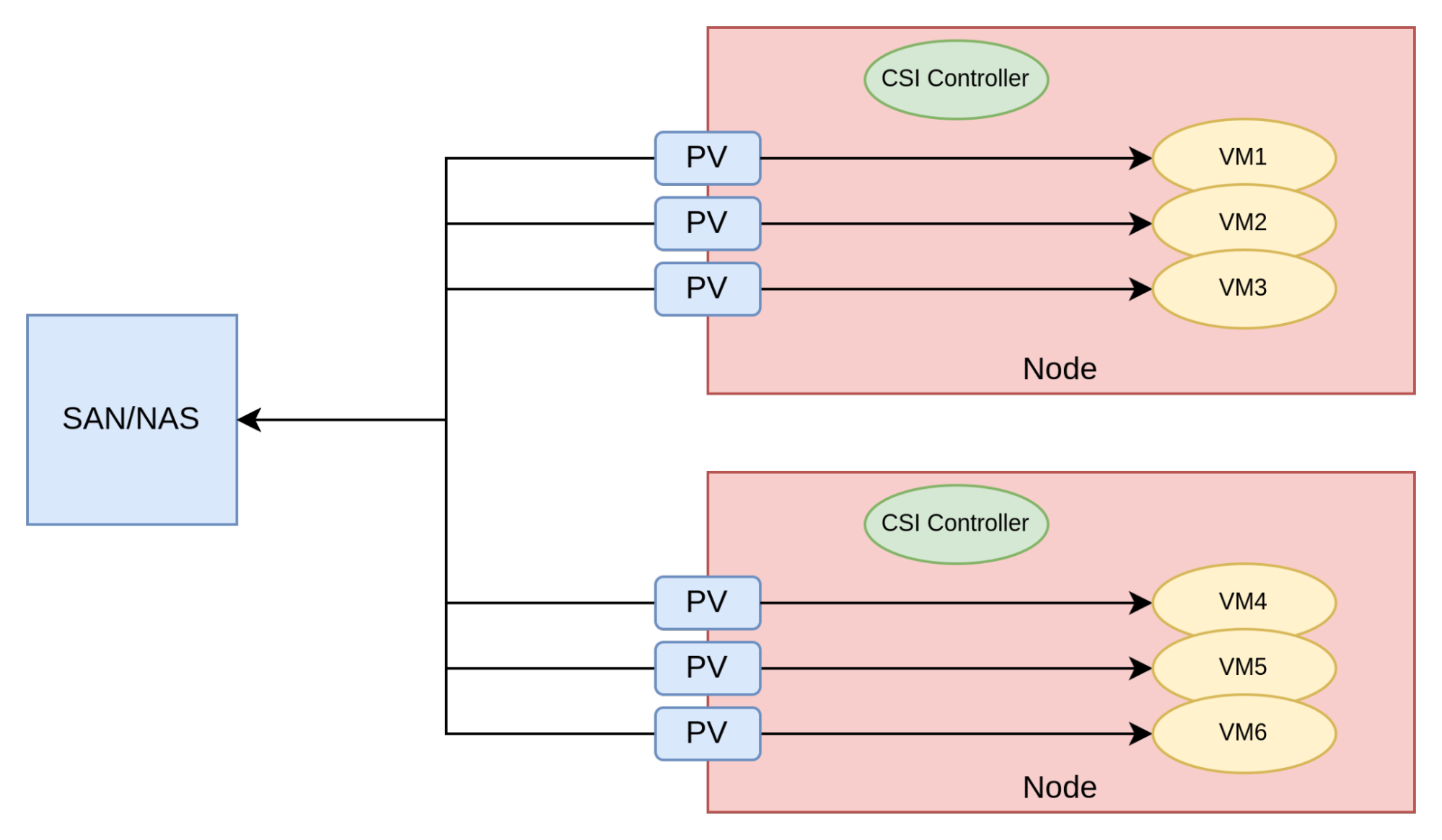
In this approach, the Persistent Volumes (PVs) associated with virtual machines have a corresponding logical unit number (LUN) (if SAN) or share (if NAS) created by the CSI driver.
This is a very efficient architectural approach, as VMs are essentially directly connected to the storage provider, thereby minimizing latency.
For this approach to be a viable solution, the CSI drivers published by the storage vendors must meet the requirements previously mentioned. The maturity of the SAN vendors CSI drivers is generally improving.
However, the following issues might prevent the adoption of this architectural approach:
- The CSI driver in use does not support RWX mode for block volumes or does not support some of the advanced capabilities (i.e., cloning, snapshots, volume expansion)
- The pattern of creating several small LUNs, one per VM disk, does not work well with the SAN product.
- Some storage teams do not want to give OpenShift the ability to dynamically provision volumes.
There are several storage vendors in the SAN space that offer CSI drivers. The following non-exhaustive list will take you to the vendor CSI documentation:
The storage vendor or Red Hat Services can help verify if the storage solution is viable for use with OpenShift Virtualization.
Internal storage with software-defined storage
In this architectural approach, storage exists inside the OpenShift cluster and is managed with an SDS product.
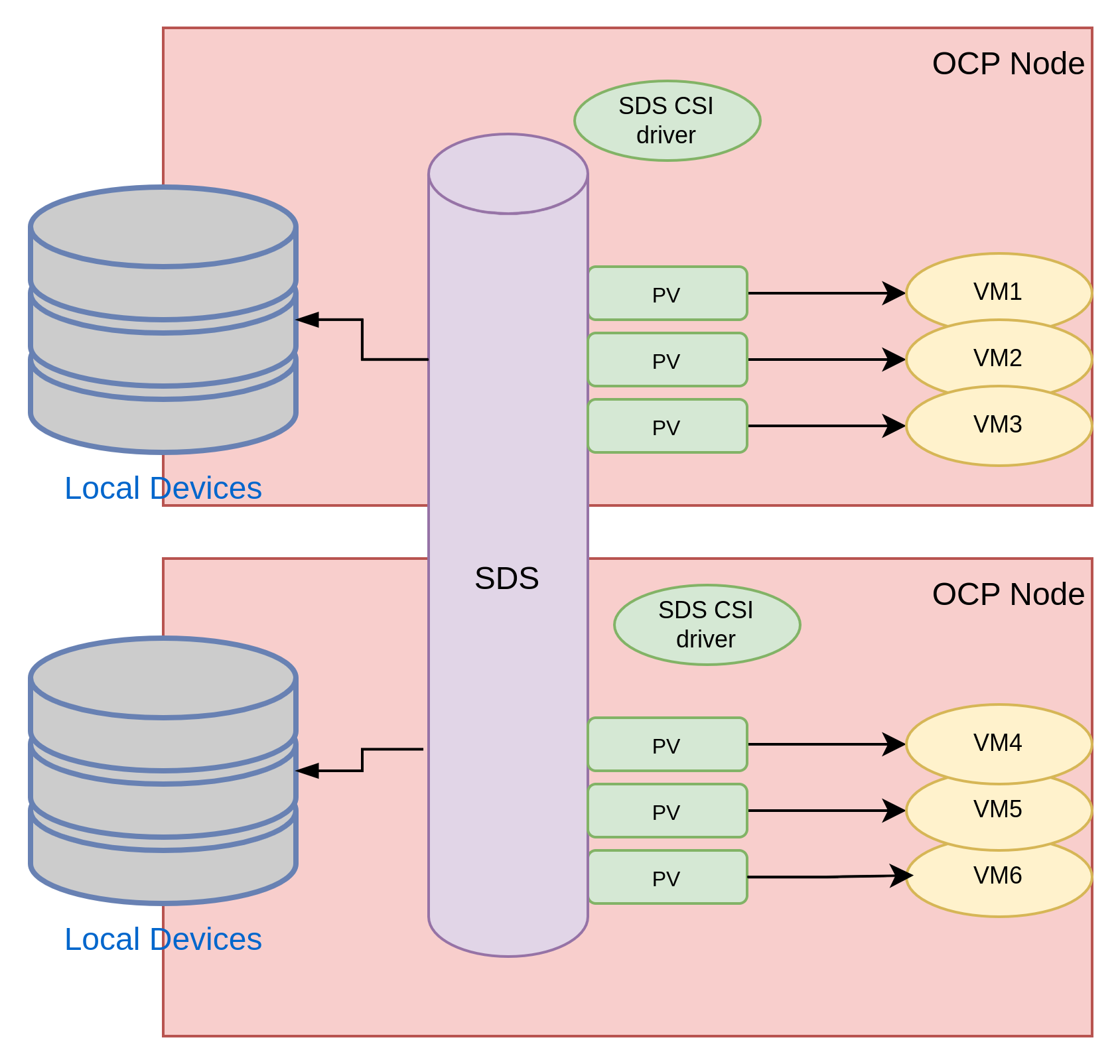
With SDS, some or all of the nodes of the OpenShift cluster are also storage nodes. Storage nodes have local storage devices managed by the SDS software. When all the nodes are also storage nodes, this is known as hyperconverged infrastructure. When only some of the nodes are storage nodes, this infrastructure style is known as partially converged infrastructure. Partially converged solutions seem to work better with containers and virtual machines as they provide the ability to grow storage and compute independently.
Figure 2 illustrates the architecture using this approach.
Software-defined storage works well with the virtual machines use case as long as the CSI drivers of the SDS product meet the aforementioned requirements.
There are several SDS products with excellent operators for Kubernetes and certifications for OpenShift Virtualization, including IBM Fusion Storage, Portworx, and Red Hat OpenShift Data Foundation.
It is important to note that when evaluating internal storage with SDS, the team managing OpenShift will be also in charge of managing storage. Storage products are one of the most complicated components within an enterprise and the overall management is a discipline within itself. As a result, the cognitive burden on the team managing OpenShift can be so heavy that it slows down the overall evolution and hinders the general health of the OpenShift platform. Feature-rich SDS operators can help offset this risk.
SDS over SAN
It’s possible to deploy SDS with LUNs provisioned by a SAN. Figure 3 depicts this architecture.
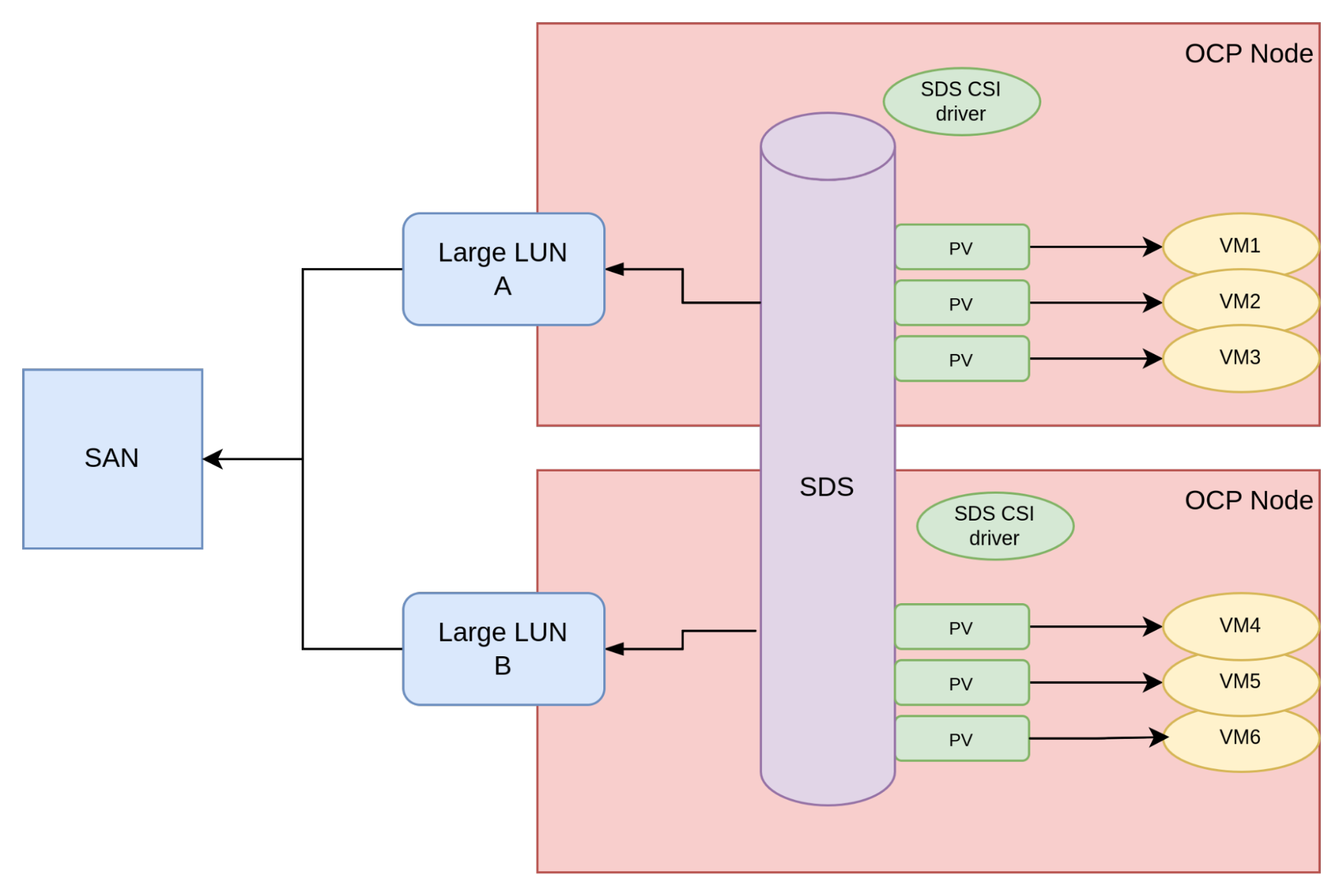
To support this approach, usually large LUNs are created in the storage arrays and made available to the OpenShift nodes. The SDS product takes over the management of these LUNs and uses them as devices to create its storage abstraction layer.
We have encountered this approach with customers a few times, so much so that we decided to dedicate a section to it. Architecturally speaking, using SDS over SAN is not ideal for the following reasons:
- The SDS is an additional software layer and introduces licensing and management costs.
- The SDS layer adds latency over direct access to the SAN.
- The SDS layer introduces write and space amplification (typically by multiplying the writes two or three times over) by virtue of its own data protection logic.
That being said, SDS over SAN can be considered as a fall back option when there are no other viable options.
Shared-disk file systems
Shared-disk file systems were invented to efficiently use SANs. They work by creating one large LUN that is shared across the nodes of the cluster, and then creating a file system on that LUN. This way, the file system is shared between the nodes of the cluster. With this setup, a VM orchestrator can create files in the shared-disk file system to represent VM disks. In an OpenShift deployment, this is the responsibility of the CSI driver. Figure 4 illustrates the architecture of a shared-disk file system augmented with a CSI driver to provision storage to the VMs.
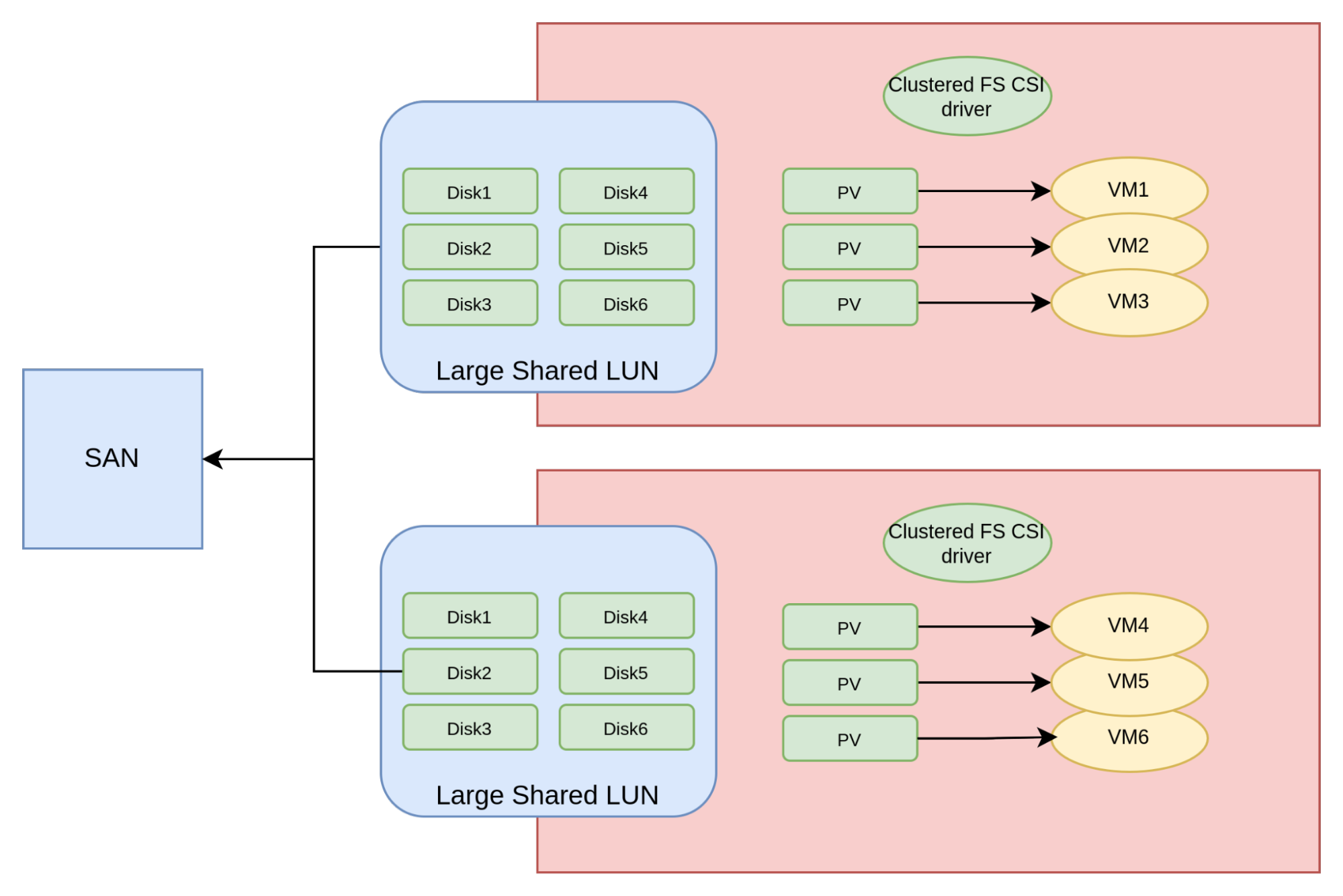
The CSI driver is responsible for ensuring that the VMs get the correct disk-file within the shared-disk filesystem. After that point, there is no software layer between the VM and the backing storage, making this approach theoretically as performant as the direct CSI driver approach.
Shared-disk files systems sometimes have limitations on the number of nodes that can be used due to how the inter-node locking mechanism works. Thus, this approach is suitable for OpenShift clusters of medium sizes (up to roughly 40 nodes).
As of this publication, two shared disk file system products have suitable CSI drivers: IBM Fusion Access for SAN and Arctera (Veritas) Infoscale Operator.
Pros and cons of the approaches
Each of the aforementioned approaches comes with both postives and negatives.
External storage with direct CSI
Pros:
- Efficient and Kubernetes native.
Cons:
- Not all vendors have mature CSI drivers.
- Some SAN are not designed to support several small LUNs.
- Not all organizations are willing to provide OpenShift the SAN credentials to dynamically provision volumes.
Internal storage with SDS:
Pros:
- Efficient and Kubernetes native.
Cons:
- Cognitive burden might overwhelm the platform team.
SDS over SAN:
Pros:
- Works with any SAN, including old models that do not support CSI direct access.
Cons:
- Higher latency.
- Higher costs (due to SDS software licenses and TCO).
- Write amplification.
- Higher cognitive burden.
Shared-disk file systems:
Pros:
- Works with any SAN, including old models that do not support CSI direct access.
Cons:
- May have scalability limits.
- Higher cost (due to shared-disk File system software license).
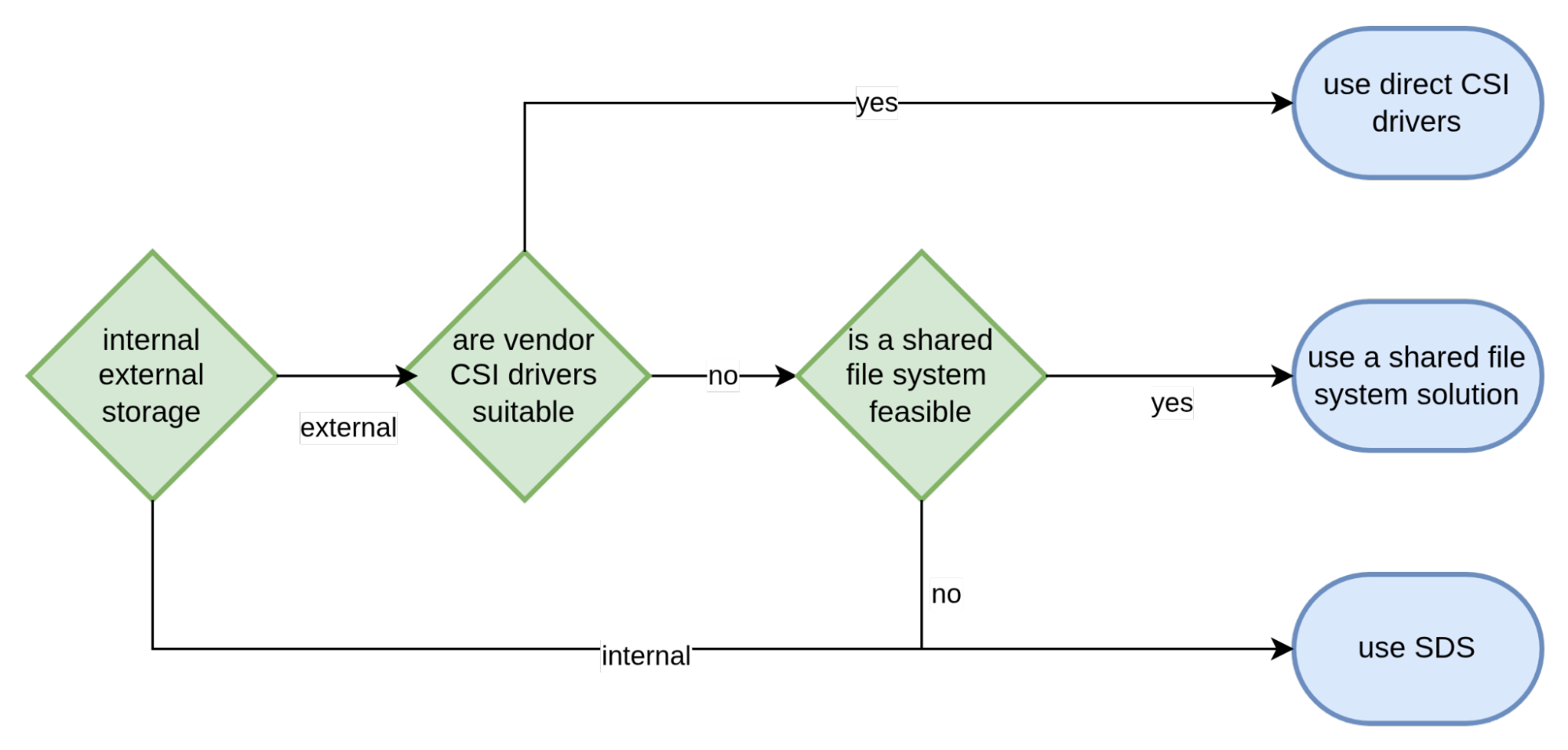
Based on these pro and con considerations, the following diagram in Figure 5 shows the recommended decision flow when choosing a storage architectural solution.
Conclusion
In this article, we examined the three major architectural approaches for supplying storage for virtual machines running in OpenShift Virtualization. We listed the pros and cons of each approach and concluded with a decision flow for making an informed decision to determine the appropriate storage solution. We hope you can use the information contained within this article to expedite this important architectural choice for any organization starting their journey with OpenShift Virtualization.
Last updated: July 14, 2025
