Redhat Developers  Logo
  • AI

    Get started with AI

    • Red Hat AI
      Accelerate the development and deployment of enterprise AI solutions.
    • AI learning hub
      Explore learning materials and tools, organized by task.
    • AI interactive demos
      Click through scenarios with Red Hat AI, including training LLMs and more.
    • AI/ML learning paths
      Expand your OpenShift AI knowledge using these learning resources.
    • AI quickstarts
      Focused AI use cases designed for fast deployment on Red Hat AI platforms.
    • No-cost AI training
      Foundational Red Hat AI training.

    Featured resources

    • OpenShift AI learning
    • Open source AI for developers
    • AI product application development
    • Open source-powered AI/ML for hybrid cloud
    • AI and Node.js cheat sheet

    Red Hat AI Factory with NVIDIA

    • Red Hat AI Factory with NVIDIA is a co-engineered, enterprise-grade AI solution for building, deploying, and managing AI at scale across hybrid cloud environments.
    • Explore the solution
  • Learn

    Self-guided

    • Documentation
      Find answers, get step-by-step guidance, and learn how to use Red Hat products.
    • Learning paths
      Explore curated walkthroughs for common development tasks.
    • Guided learning
      Receive custom learning paths powered by our AI assistant.
    • See all learning

    Hands-on

    • Developer Sandbox
      Spin up Red Hat's products and technologies without setup or configuration.
    • Interactive labs
      Learn by doing in these hands-on, browser-based experiences.
    • Interactive demos
      Click through product features in these guided tours.

    Browse by topic

    • AI/ML
    • Automation
    • Java
    • Kubernetes
    • Linux
    • See all topics

    Training & certifications

    • Courses and exams
    • Certifications
    • Skills assessments
    • Red Hat Academy
    • Learning subscription
    • Explore training
  • Build

    Get started

    • Red Hat build of Podman Desktop
      A downloadable, local development hub to experiment with our products and builds.
    • Developer Sandbox
      Spin up Red Hat's products and technologies without setup or configuration.

    Download products

    • Access product downloads to start building and testing right away.
    • Red Hat Enterprise Linux
    • Red Hat AI
    • Red Hat OpenShift
    • Red Hat Ansible Automation Platform
    • See all products

    Featured

    • Red Hat build of OpenJDK
    • Red Hat JBoss Enterprise Application Platform
    • Red Hat OpenShift Dev Spaces
    • Red Hat Developer Toolset

    References

    • E-books
    • Documentation
    • Cheat sheets
    • Architecture center
  • Community

    Get involved

    • Events
    • Live AI events
    • Red Hat Summit
    • Red Hat Accelerators
    • Community discussions

    Follow along

    • Articles & blogs
    • Developer newsletter
    • Videos
    • Github

    Get help

    • Customer service
    • Customer support
    • Regional contacts
    • Find a partner

    Join the Red Hat Developer program

    • Download Red Hat products and project builds, access support documentation, learning content, and more.
    • Explore the benefits

Getting Started with Microsoft SQL Server on Red Hat Enterprise Linux

<p>&nbsp;</p> <quillbot-extension-portal></quillbot-extension-portal>

December 14, 2016
Takayoshi Tanaka
Related topics:
Linux
Related products:
Microsoft SQL Server on Red Hat Enterprise LinuxRed Hat Enterprise Linux

    Microsoft announced SQL Server on Linux public preview, so now you can try SQL Server on your Red Hat Enterprise Linux server. I'll describe how to start SQL Server on RHEL.

    Install and connect with CLI on RHEL

    Microsoft publishes a step-by-step document how to Install SQL Server on Red Hat Enterprise Linux. It's only 7 steps to install and run.

    # systemctl status mssql-server
    ● mssql-server.service - Microsoft(R) SQL Server(R) Database Engine
       Loaded: loaded (/usr/lib/systemd/system/mssql-server.service; enabled; vendor preset: disabled)
       Active: active (running) since Wed 2016-11-16 20:59:33 EST; 1 weeks 1 days ago
     Main PID: 77982 (sqlservr)
       Memory: 753.6M
       CGroup: /system.slice/mssql-server.service
               ├─77982 /opt/mssql/bin/sqlservr
               └─77997 /opt/mssql/bin/sqlservr

    Now you can connect to SQL Server on RHEL. At first, let's connect with sqlcmd. You should have to install SQL Server tools even if you run sqlcmd on the same host as you installed mssql-server package with following the document. First connect to local SQL Server instance.

    $ sqlcmd -S localhost -U SA -P '&lt;YourPassword&gt;'

    When you connect to remote SQL Server instance, specify the host name.

    $ sqlcmd -S example.com -U SA -P '&lt;YourPassword&gt;'

    If SQL Server instance is lisetening the non default port, specify port with ".".

    $ sqlcmd -S example.com,8489 -U SA -P '&lt;YourPassword&gt;'

    After a succeedful login, sqlcmd is waiting for your commands. Here are commands for creating a new database with default setting and using this created database.

    1&gt; CREATE DATABASE testdb;
    2&gt; GO
    1&gt; USE testdb;
    2&gt; GO
    Changed database context to 'testdb'.

    Commands are case insensitive and each command can be ended with ";". Then when input "GO", SQL Server execute commands. So you can execute several commands at one time. Here are the commands for creating a table and inserting a record. This sample executes 3 commands at one time.

    1&gt; CREATE TABLE items (id INT, name NVARCHAR(50), quantity INT);
    2&gt; INSERT INTO items VALUES (1, 'box', 10);
    3&gt; INSERT INTO items VALUES (2, 'ball', 5);
    4&gt; GO
    
    (1 rows affected)
    
    (1 rows affected)
    1&gt; SELECT * FROM items WHERE quantity &gt; 6;
    2&gt; GO
    id          name                                               quantity
    ----------- -------------------------------------------------- -----------
              1 box                                                         10
    
    (1 rows affected)

    Connect from Visual Studio Code

    You can operate SQL Server graphically on Linux with Visual Studio Code and mssql extension. Here is a short video that explains how to install and run mssql extension for Visual Studio code.

    https://youtu.be/NrzHLcBO2F0


    To use mssql extension, please set a file type to "SQL".

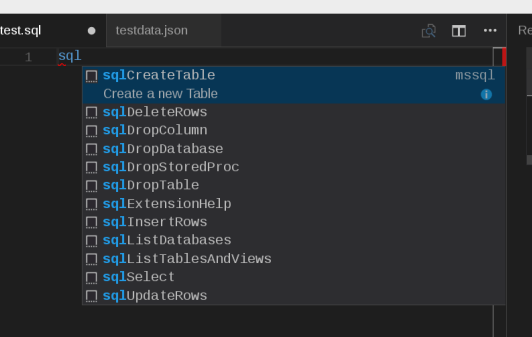
    Visual Studio Code has an IntelliSense for SQL syntax and sql code snippets.
    Connect from Visual Studio

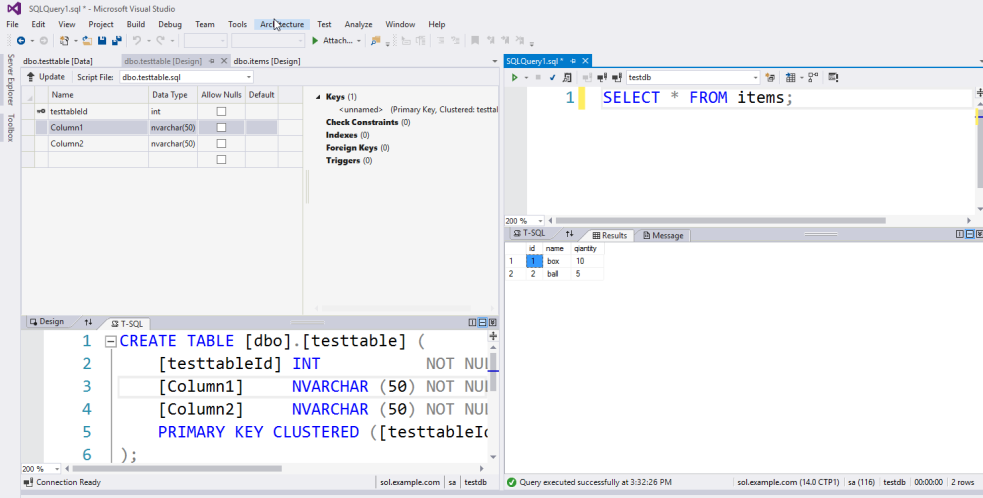
    If you're using Visual Studio on Windows, you can use this Visual Studio to manage SQL Server on Linux with SQL Server Data Tools(SSDT). Now SSDT can manage not only SQL Server on Windows but also SQL Server on Linux. You can see table definition, execute query and execute other operations graphically.

     

    Takayoshi Tanaka

    About the author:

    Takayoshi Tanaka is the Software Maintenance Engineer of Red Hat. He is mainly in charge of OpenShift, .NET Core on Red Hat Enterprise Linux and Red Hat solutions on Microsoft Azure. He is a Microsoft MVP for Visual Studio and Development Technologies. He writes many articles in his personal blog and web sites, and also he gives many technical session in community events.

    Last updated: November 14, 2023

    Recent Posts

    • Every layer counts: Defense in depth for AI agents with Red Hat AI

    • Fun in the RUN instruction: Why container builds with distroless images can surprise you

    • Trusted software factory: Building trust in the agentic AI era

    • Build a zero trust AI pipeline with OpenShift and RHEL CVMs

    • Red Hat Hardened Images: Top 5 benefits for software developers

    Red Hat Developers logo LinkedIn YouTube Twitter Facebook

    Platforms

    • Red Hat AI
    • Red Hat Enterprise Linux
    • Red Hat OpenShift
    • Red Hat Ansible Automation Platform
    • See all products

    Build

    • Developer Sandbox
    • Developer tools
    • Interactive tutorials
    • API catalog

    Quicklinks

    • Learning resources
    • E-books
    • Cheat sheets
    • Blog
    • Events
    • Newsletter

    Communicate

    • About us
    • Contact sales
    • Find a partner
    • Report a website issue
    • Site status dashboard
    • Report a security problem

    RED HAT DEVELOPER

    Build here. Go anywhere.

    We serve the builders. The problem solvers who create careers with code.

    Join us if you’re a developer, software engineer, web designer, front-end designer, UX designer, computer scientist, architect, tester, product manager, project manager or team lead.

    Sign me up

    Red Hat legal and privacy links

    • About Red Hat
    • Jobs
    • Events
    • Locations
    • Contact Red Hat
    • Red Hat Blog
    • Inclusion at Red Hat
    • Cool Stuff Store
    • Red Hat Summit
    © 2026 Red Hat

    Red Hat legal and privacy links

    • Privacy statement
    • Terms of use
    • All policies and guidelines
    • Digital accessibility

    Chat Support

    Please log in with your Red Hat account to access chat support.