Redhat Developers  Logo
  • Products

    Platforms

    • Red Hat Enterprise Linux
      Red Hat Enterprise Linux Icon
    • Red Hat AI
      Red Hat AI
    • Red Hat OpenShift
      Openshift icon
    • Red Hat Ansible Automation Platform
      Ansible icon
    • See all Red Hat products

    Featured

    • Red Hat build of OpenJDK
    • Red Hat Developer Hub
    • Red Hat JBoss Enterprise Application Platform
    • Red Hat OpenShift Dev Spaces
    • Red Hat OpenShift Local
    • Red Hat Developer Sandbox

      Try Red Hat products and technologies without setup or configuration fees for 30 days with this shared Red Hat OpenShift and Kubernetes cluster.
    • Try at no cost
  • Technologies

    Featured

    • AI/ML
      AI/ML Icon
    • Linux
      Linux Icon
    • Kubernetes
      Cloud icon
    • Automation
      Automation Icon showing arrows moving in a circle around a gear
    • See all technologies
    • Programming languages & frameworks

      • Java
      • Python
      • JavaScript
    • System design & architecture

      • Red Hat architecture and design patterns
      • Microservices
      • Event-Driven Architecture
      • Databases
    • Developer experience

      • Productivity
      • Tools
      • GitOps
    • Automated data processing

      • AI/ML
      • Data science
      • Apache Kafka on Kubernetes
    • Platform engineering

      • DevOps
      • DevSecOps
      • Red Hat Ansible Automation Platform for applications and services
    • Secure development & architectures

      • Security
      • Secure coding
  • Learn

    Featured

    • Kubernetes & cloud native
      Openshift icon
    • Linux
      Rhel icon
    • Automation
      Ansible cloud icon
    • AI/ML
      AI/ML Icon
    • See all learning resources

    E-books

    • GitOps cookbook
    • Podman in action
    • Kubernetes operators
    • The path to GitOps
    • See all e-books

    Cheat sheets

    • Linux commands
    • Bash commands
    • Git
    • systemd commands
    • See all cheat sheets

    Documentation

    • Product documentation
    • API catalog
    • Legacy documentation
  • Developer Sandbox

    Developer Sandbox

    • Access Red Hat’s products and technologies without setup or configuration, and start developing quicker than ever before with our new, no-cost sandbox environments.
    • Explore the Developer Sandbox

    Featured Developer Sandbox activities

    • Get started with your Developer Sandbox
    • OpenShift virtualization and application modernization using the Developer Sandbox
    • Explore all Developer Sandbox activities

    Ready to start developing apps?

    • Try at no cost
  • Blog
  • Events
  • Videos

Upgrade volume performance without downtime: VolumeAttributesClass on OpenShift

February 3, 2026
Cyril Ajieh Hemant Kumar
Related topics:
Automation and managementKubernetes
Related products:
Red Hat OpenShiftRed Hat OpenShift Container Platform

    In the Kubernetes and OpenShift ecosystem, you can think of a StorageClass as a blueprint for a house. It defines exactly how a volume is built and its initial characteristics. Historically, once a PersistentVolumeClaim (PVC) was live, tweaking performance metrics like input/output operations per second (IOPS) or throughput was a manual and often disruptive process. Upgrading storage usually required tearing down the volume, recreating it, or performing complex snapshot migrations.

    The VolumeAttributesClass (VAC), introduced in Red Hat OpenShift 4.21 as fully supported, offers a modern approach by making volume updates as smooth as initial provisioning.

    The key difference between a StorageClass and a VolumeAttributesClass lies in the life cycle:

    • StorageClass (provisioning): Defines how a new volume is provisioned. Once the PVC is live, the storageClassName is immutable.
    • VolumeAttributesClass (modification): Defines how an existing volume’s attributes can be modified. Unlike a StorageClass, the volumeAttributesClassName on a PVC is mutable and can be modified at any time.
    • While a StorageClass serves as the architectural blueprint for a volume, a VolumeAttributesClass acts as a renovation plan, allowing for utility upgrades without requiring you to move data or services.

    Hands-on demo: Modifying a live volume without downtime

    In this demo, we will use the AWS EBS CSI driver to switch a volume from a standard performance tier to a high performance tier while a pod is actively writing to it.

    Prerequisites

    • An OpenShift cluster (4.21 or later).
    • Supported CSI driver: A driver that supports the ModifyVolume capability.
      • AWS: EBS CSI driver v1.35.0+.
      • Google Cloud Platform: PD CSI driver (requires C3 or N4 instances; the default E2 cluster types do not support Hyperdisk VAC).
      • Third-party vendors: For CSI drivers not shipped with OpenShift, consult your storage vendor to confirm support for the VolumeAttributesClass feature.

    1. Define the performance tiers

    First, we’ll create two VolumeAttributesClass objects. These do not create storage themselves; they define the parameters for modification.

    Standard performance (Base IOPS)

    Navigate to Storage → VolumeAttributesClasses and click Create VolumeAttributesClass. Update the sample manifest with the following properties, as shown in Figure 1:

    name: base-iops-example
    driverName: ebs.csi.aws.com
    parameters:
      type: gp3
      iops: "3000"
      throughput: "125"
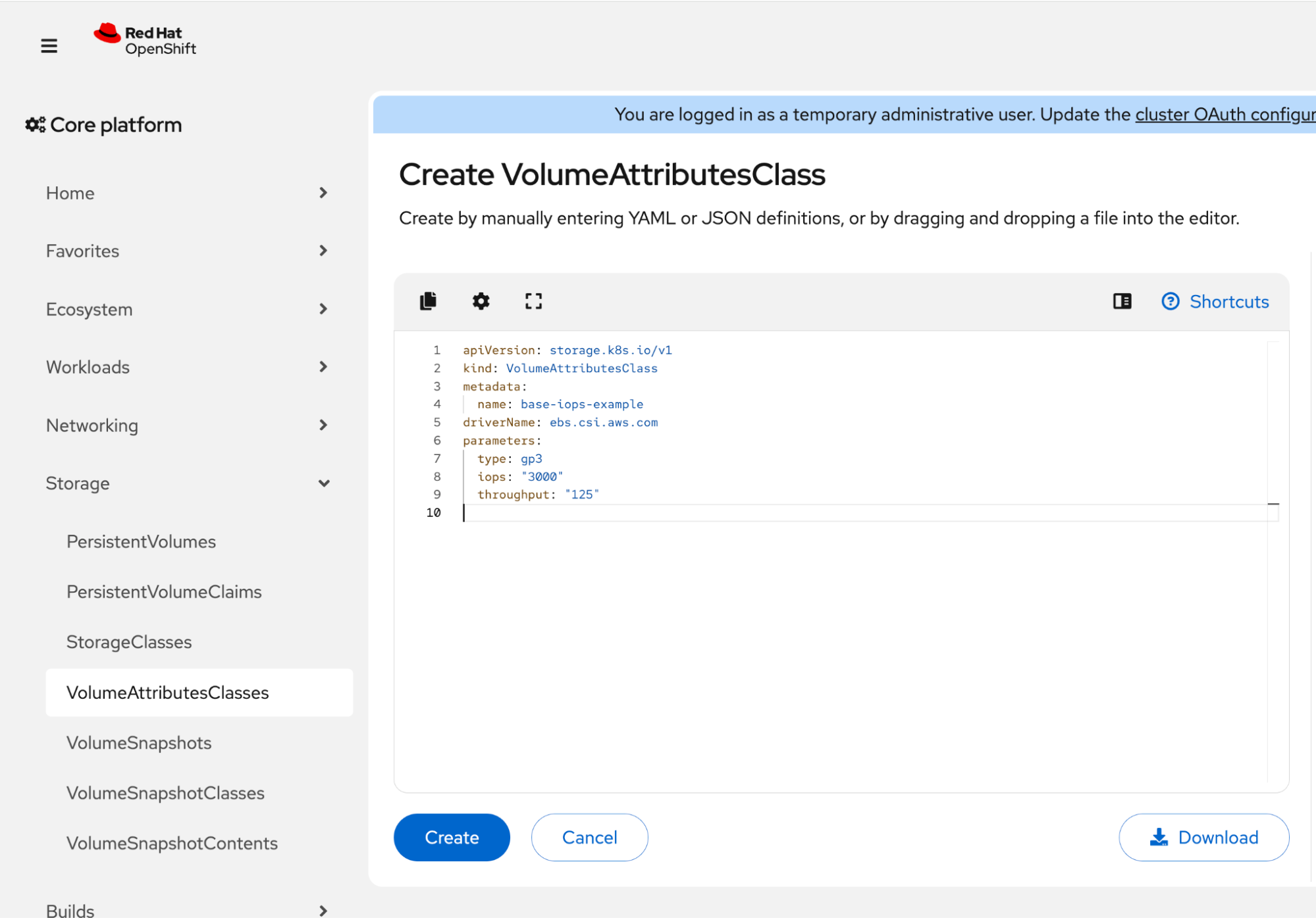
    Red Hat OpenShift web console showing a YAML editor for a VolumeAttributesClass named base-iops-example with AWS EBS driver parameters for 3000 IOPS and 125 throughput.
    Figure 1: The Create VolumeAttributesClass details page.

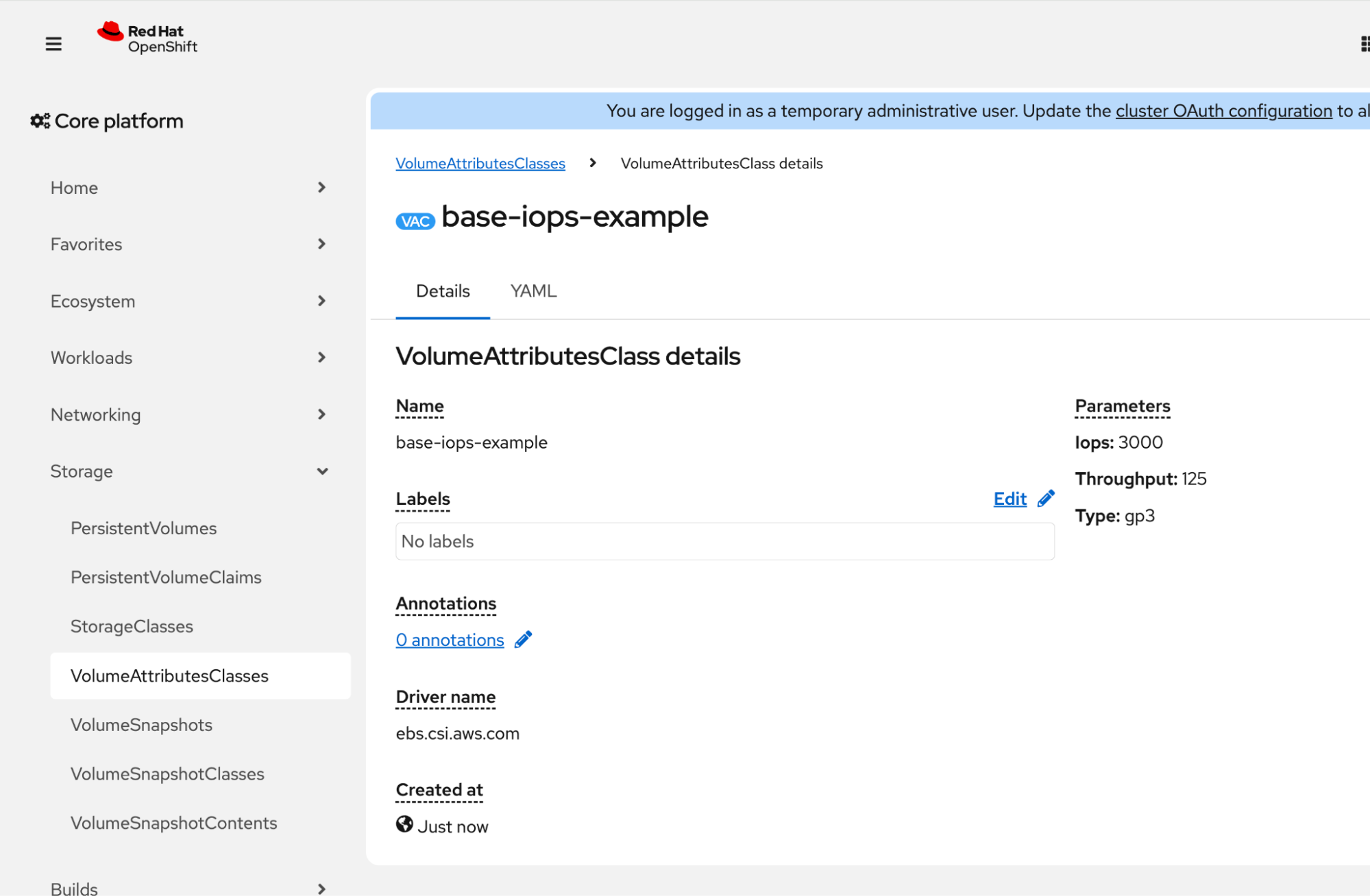
    Figure 2 shows the result.

    Red Hat OpenShift web console showing the VolumeAttributesClass details page for base-iops-example, displaying its AWS EBS driver name and gp3 parameters for 3000 IOPS and 125 throughput.
    Figure 2: The VolumeAttributesClass details page. Note: 3,000 IOPS is the gp3 baseline.

    High performance

    Repeat the previous steps using the following specific values to create the high-performance VAC:

    name: high-iops-example
    driverName: ebs.csi.aws.com
    parameters:
      type: gp3
      iops: "5000"
      throughput: "125"

    2. Create a Volume

    Create a PVC, referencing your StorageClass and the base-iops-example VAC as the starting baseline. Complete the form (Figure 3) and click Submit.
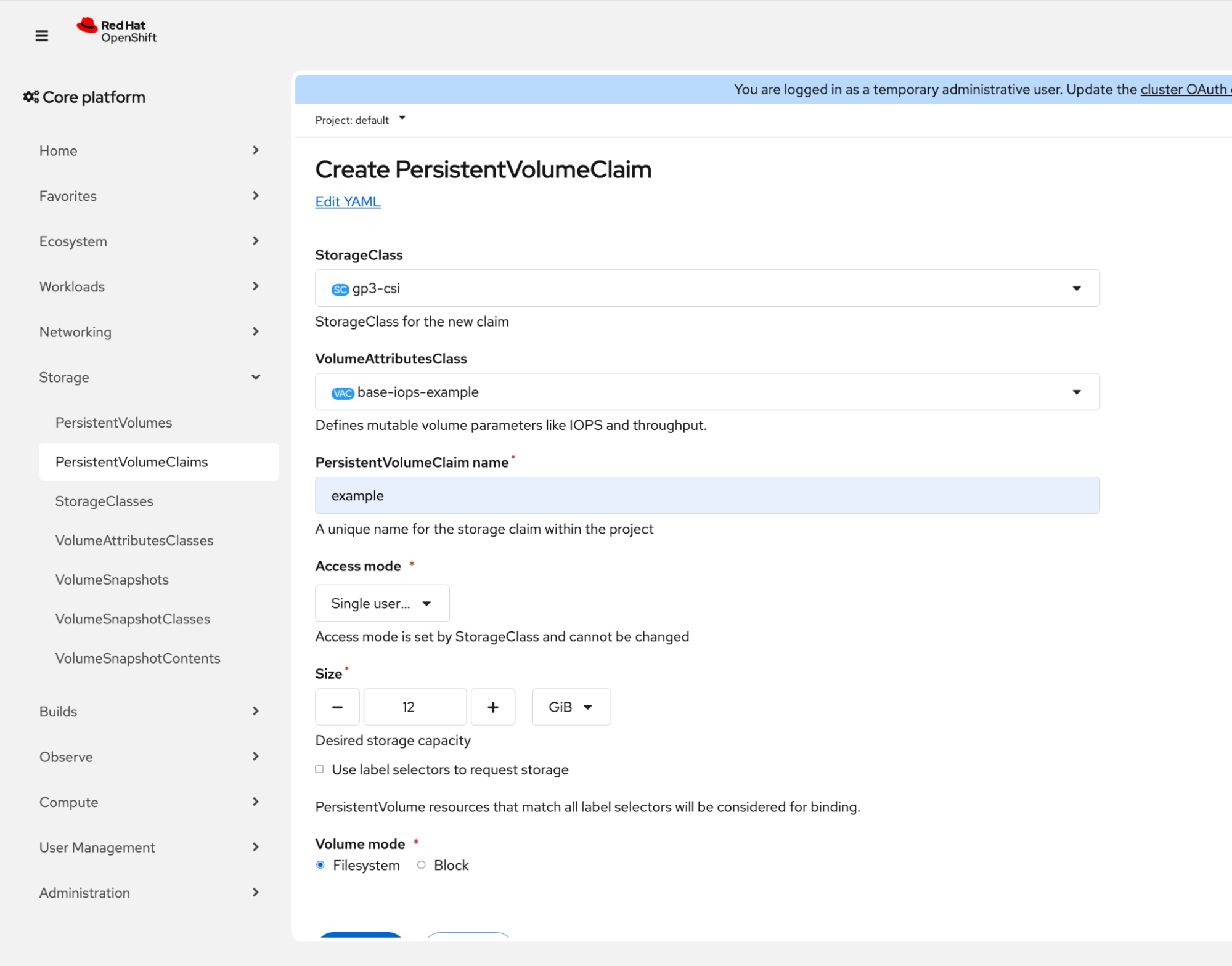
    Red Hat OpenShift web console showing the Create PersistentVolumeClaim form with the gp3-csi StorageClass and base-iops-example VolumeAttributesClass selected.
    Figure 3: Create PVC form page referencing the base performance tier.
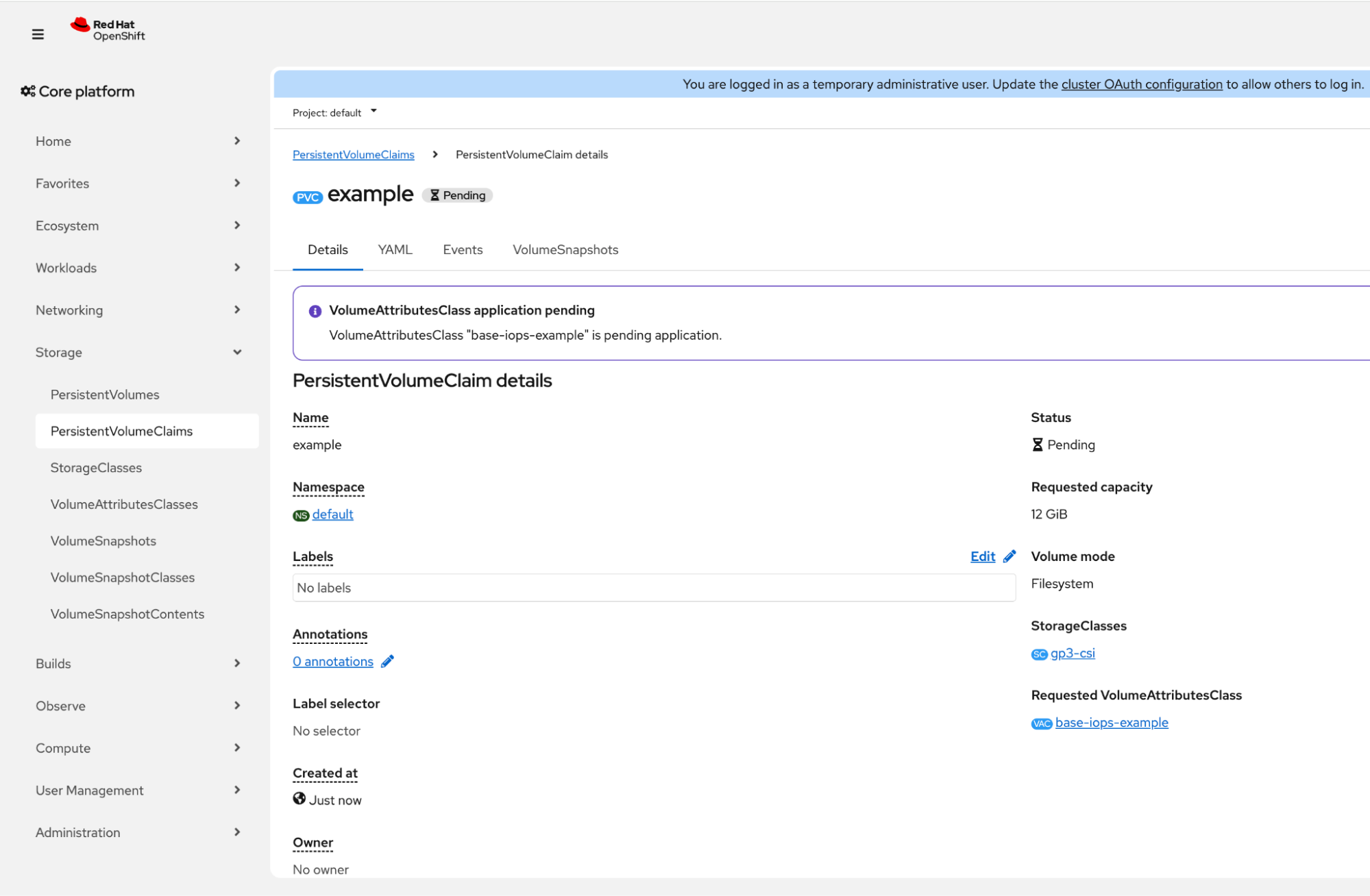
    Red Hat OpenShift web console showing the PersistentVolumeClaim details page for "example" in a Pending status, with an alert stating that the base-iops-example VolumeAttributesClass application is pending.
    Figure 4: PersistentVolumeClaim details page in a Pending state.

    Storage volumes often wait for the first consumer (Pod) to be bound. To move the process forward, create a Deployment that references this PVC.
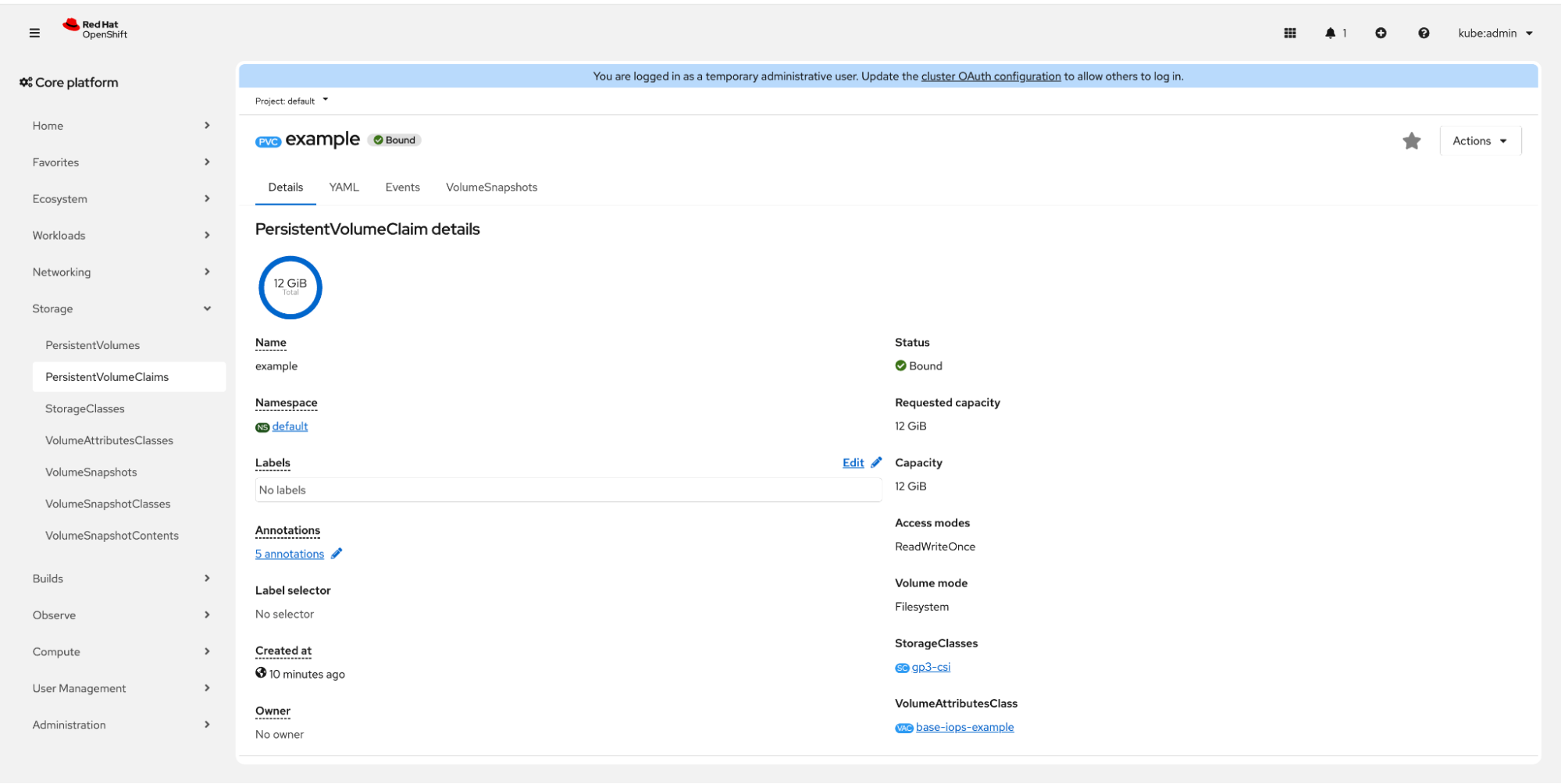
    Red Hat OpenShift web console showing the PersistentVolumeClaim details page for "example" in a Bound status, indicating the volume is successfully provisioned and connected to the base-iops-example VolumeAttributesClass.
    Figure 5: PersistentVolumeClaim details page in Bound state.

    As shown in Figure 5, the transition is complete. The PVC status has moved from Pending to Bound. The volume is now actively attached to the running pod within our Deployment. Additionally, because the base-iops-example was referenced during PVC creation, the VolumeAttributesClass is already applied as the performance baseline, which is 3,000 IOPS.

    3. The magic moment: Modifying the PVC without downtime

    You can upgrade the underlying performance of the volume and shift from the standard baseline to the high-performance tier without a single second of downtime. In the past, this would have required a maintenance window and a pod restart. With the VolumeAttributesClass, it is as simple as updating a reference.

    Steps to upgrade performance

    To trigger the modification, simply point the PVC to the high-iops-example VAC:

    1. Navigate to the PersistentVolumeClaim details page.
    2. Open the Actions menu (top right) and select Modify VolumeAttributesClass.
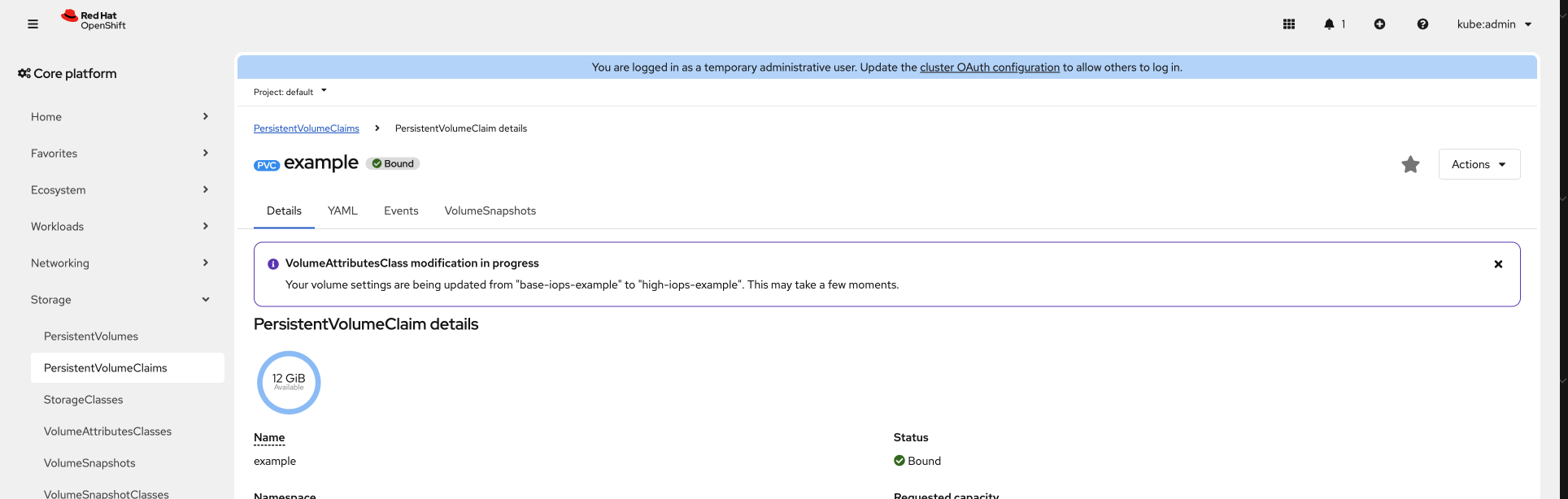
    3. Choose the new tier: Select high-iops-example from the drop-down menu (Figure 6) and click Save. This triggers the OpenShift reconciliation logic to communicate with the cloud provider (Figure 7). 
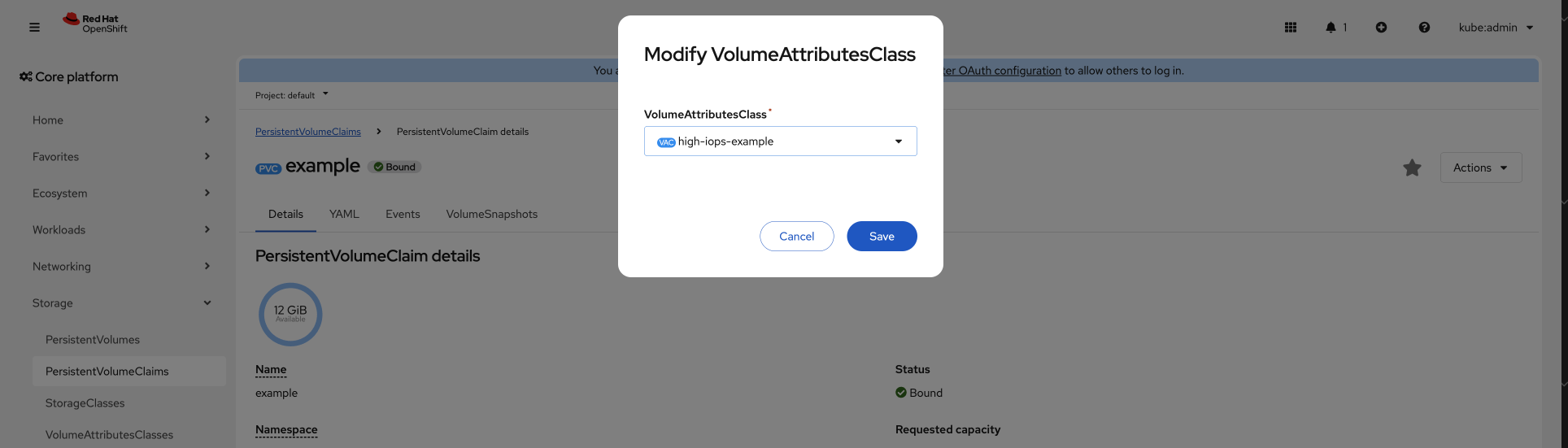
    Red Hat OpenShift web console showing the Modify VolumeAttributesClass modal with the high-iops-example class selected in a drop-down menu.
    Figure 6: The Modify VolumeAttributesClass modal used to switch between performance tiers.
    Red Hat OpenShift web console showing an info alert on a PersistentVolumeClaim details page stating that a VolumeAttributesClass modification is in progress.
    Figure 7: The In Progress alert reflecting that the CSI driver is actively reconciling the volume changes with the cloud provider.

    Figure 8 shows the successful update.
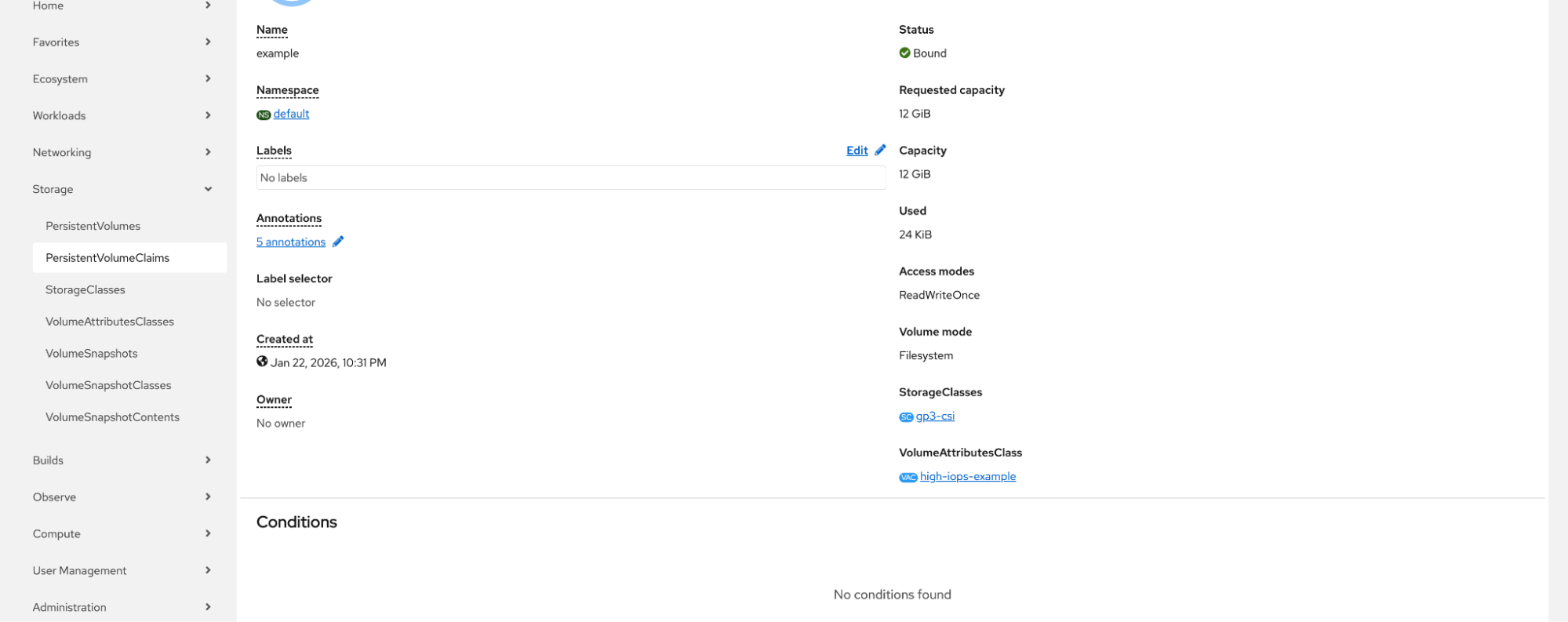
    Red Hat OpenShift web console showing the PersistentVolumeClaim details page successfully updated to use the high-iops-example VolumeAttributesClass.
    Figure 8: The Success state showing the PVC successfully updated to the high-performance configuration.

    What happens behind the scenes?

    Unlike a StorageClass, the VolumeAttributesClass is mutable. OpenShift immediately begins the reconciliation. While the cloud provider modifies the volume in the background, the Pod continues to read and write data normally. During this transition, note that parameters are "sticky." If you switch to a new VolumeAttributesClass, any attributes not explicitly defined in the new class will retain their previous values rather than reverting to a driver default.

    To ensure visibility into this process, OpenShift provides a specialized alert that identifies drivers with mismatching VAC attributes. This helps you quickly detect when a volume's physical state has drifted from its intended configuration or if a reconciliation is inconsistent.

    OpenShift handles the transition through three primary states:

    • Scenario 1: The "in progress" state: The CSI driver and cloud provider (for example, AWS) are executing the modification. An alert appears in the UI: "Waiting for VolumeAttributesClass modification..." The application remains fully operational.
    • Scenario 2: The "error" state: If the modification fails (for example, due to invalid provider limits), an error alert is displayed. Crucially, the volume continues to operate using its last known good configuration, ensuring the data is never at risk.
    • Scenario 3: The "success" state: Once the provider confirms the change, the UI reflects the new VAC. At this point, the underlying storage hardware has successfully adjusted its parameters. Whether the volume was scaled up for a performance spike or optimized for cost, the application immediately benefits from the updated performance characteristics (such as increased IOPS or throughput).

    Cloud provider cooldown periods

    While the VolumeAttributesClass makes the request to change performance instantaneous from an OpenShift perspective, the underlying cloud infrastructure (like Amazon EBS or Google Cloud Platform Persistent Disks) often enforces a "cooldown period" between modifications.

    For example, AWS EBS volumes typically allow only one modification every six hours. If you attempt to switch from base-iops-example to high-iops-example and then immediately try to switch back, the second request might stay in the In Progress state for a significant amount of time or return a provider-side error until that window has passed.

    Conclusion

    With the introduction of VolumeAttributesClass, OpenShift 4.21+ enables an elastic approach to persistent storage. By eliminating disruptive maintenance windows, you can now scale IOPS and throughput on demand to meet fluctuating traffic spikes or optimize infrastructure costs.

    The integration of VolumeAttributesClass within the OpenShift ensures that managing the data layer is as flexible as managing application pods. This allows the storage infrastructure to keep pace with the evolving demands of a modern production environment, ensuring high performance without sacrificing application availability.

    Learn more:

    • What's new for developers in OpenShift 4.21
    • Kubernetes documentation
    • Kubernetes v1.34: VolumeAttributesClass for Volume Modification GA
    • Modify Amazon EBS volumes on Kubernetes with Volume Attributes Classes

    Related Posts

    • Back up Kubernetes persistent volumes using OADP

    • Managing persistent volume access in Kubernetes

    • Persistent storage in action: Understanding Red Hat OpenShift's persistent volume framework

    • So you need more than port 80: Exposing custom ports in Kubernetes

    • A deep dive into OpenShift Container Platform 4.20 performance

    • How in-place pod resizing boosts efficiency in OpenShift

    Recent Posts

    • Upgrade volume performance without downtime: VolumeAttributesClass on OpenShift

    • What’s new for developers in OpenShift 4.21

    • Kafka Monthly Digest: January 2026

    • How Developer Hub simplifies Backstage configuration

    • AI-generated product review summaries with OpenShift AI

    What’s up next?

    Learn Red Hat OpenShift application development basics in this hands-on book, complete with practical recipes and tips to enhance your OpenShift experience.

    Get the e-book
    Red Hat Developers logo LinkedIn YouTube Twitter Facebook

    Platforms

    • Red Hat AI
    • Red Hat Enterprise Linux
    • Red Hat OpenShift
    • Red Hat Ansible Automation Platform
    • See all products

    Build

    • Developer Sandbox
    • Developer tools
    • Interactive tutorials
    • API catalog

    Quicklinks

    • Learning resources
    • E-books
    • Cheat sheets
    • Blog
    • Events
    • Newsletter

    Communicate

    • About us
    • Contact sales
    • Find a partner
    • Report a website issue
    • Site status dashboard
    • Report a security problem

    RED HAT DEVELOPER

    Build here. Go anywhere.

    We serve the builders. The problem solvers who create careers with code.

    Join us if you’re a developer, software engineer, web designer, front-end designer, UX designer, computer scientist, architect, tester, product manager, project manager or team lead.

    Sign me up

    Red Hat legal and privacy links

    • About Red Hat
    • Jobs
    • Events
    • Locations
    • Contact Red Hat
    • Red Hat Blog
    • Inclusion at Red Hat
    • Cool Stuff Store
    • Red Hat Summit
    © 2025 Red Hat

    Red Hat legal and privacy links

    • Privacy statement
    • Terms of use
    • All policies and guidelines
    • Digital accessibility

    Report a website issue