Red Hat OpenShift Pipelines offer a cloud-native CI/CD solution utilizing Tekton pipelines. To address concerns around running pipelines with elevated privileges, this article will discuss the usage of Red Hat OpenShift sandboxed containers, which isolate workloads using virtual machines.
For the case of pipelines executing in untrusted infrastructure, we will introduce OpenShift confidential containers (CoCo), which protect the pipeline data from admin users by deploying containers within isolated hardware enclaves. We will cover the various technologies, how they come together, and provide a demo.
An overview of OpenShift Pipelines
OpenShift Pipelines, built on Tekton, offer a cloud-native continuous integration and delivery (CI/CD) solution. The fundamental construct is a Tekton pipeline.
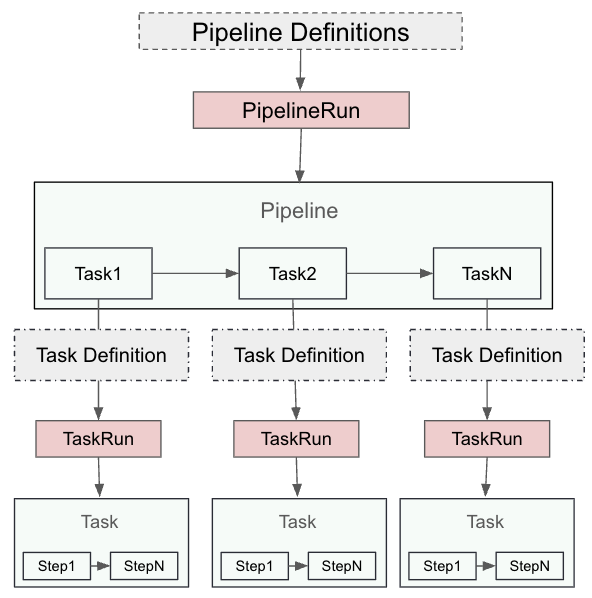
A Tekton pipeline is composed of tasks, each of which consists of multiple steps. Tasks are executed as Kubernetes pods, and each step runs as a separate container. A PipelineRun represents an instance of a pipeline, while a TaskRun is an instance of a task. Each TaskRun operates within a pod, and each step is a container within that pod that provides customization of resource requirements, runtime configuration, security policies, attached sidecar, and more.
Figure 1 depicts the relationship between pipeline, task, and steps.
Isolating pipelines with OpenShift sandboxed containers
Now that we have explained what pipelines are, let's look at a user requiring to run pipeline tasks with the following constraints:
- Running a task requiring elevated privileges.
- Running a step in the task with unsafe system call settings (i.e.,
kernel.msgmax) and capturing test data.
The primary concern of the cluster administration in this case is to ensure that pipeline tasks and steps don’t impact the cluster nodes or other pipelines (either unintentionally or maliciously). To address such requirements, we will introduce OpenShift sandboxed containers.
OpenShift sandboxed containers
OpenShift sandboxed containers provide pod sandboxing capabilities based on Kata containers runtime. Pod sandboxing isolates workloads using a virtual machine (VM). Each pod runs inside a VM. This allows you to safely run workloads that require elevated privileges, custom kernel parameters, or experimental code, without compromising other workloads or the hosting cluster node.
Essentially, sandboxed containers offer an extra layer of security and isolation for your workloads in OpenShift, which is particularly useful for workloads that require more control over the environment without impacting the broader cluster.
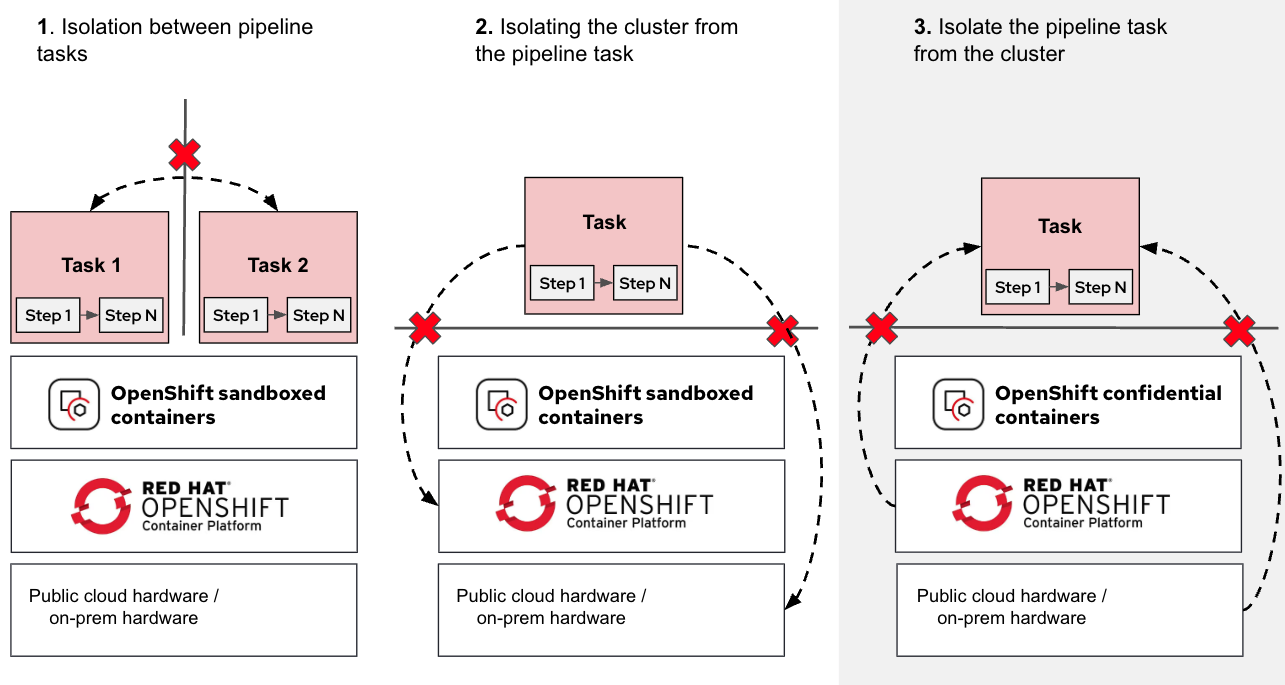
Figure 2 shows the use cases OpenShift sandboxed containers protect the workload from.
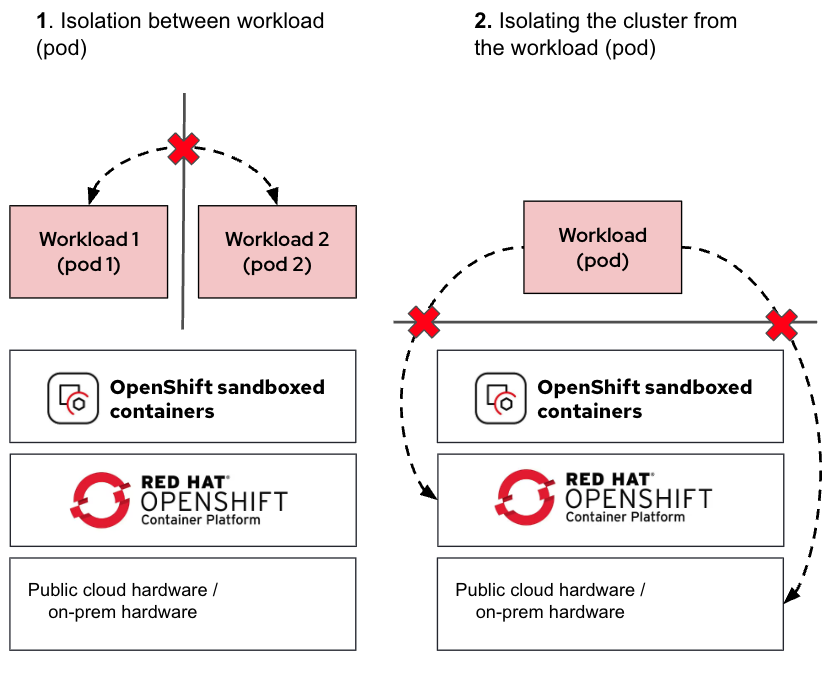
As shown in the diagram, the additional VM used for isolating the pod ensures that in the event of a pod escaping its namespace, it remains contained inside the VM. This containment in a VM prevents the pod from accessing the cluster nodes or other pods running on the same node.
Using pipelines with sandboxed containers
Combining the previously described pipeline task and task steps with OpenShift sandboxed containers, we get Figure 3.
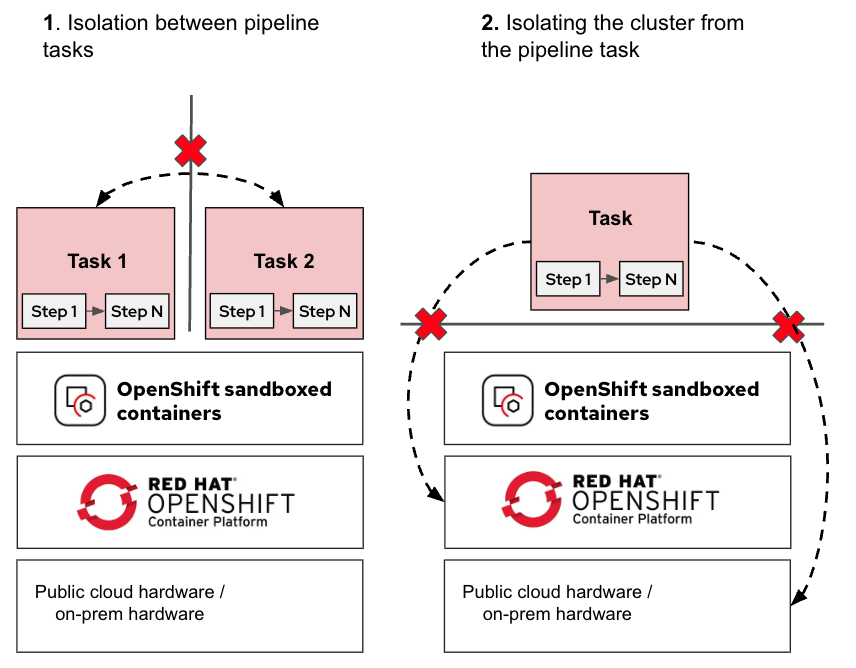
The tasks (pods) are now isolated, protecting the OpenShift nodes, pipelines, and tasks from each other (i.e., pipelines running by different tenants).
For additional details on using pipelines with OpenShift sandboxed containers, please refer to our previous article, Isolated CI/CD Pipelines With OpenShift Sandboxed Containers.
Pod sandboxing is a great step forward in workload isolation. However, this solution assumes the underlying infrastructure (be it cloud or on-premise) is trusted. What happens when this assumption is no longer valid? For that, we move on to OpenShift confidential containers.
Running pipelines on untrusted infrastructure
In many modern environments, pipelines are executed on third-party or shared infrastructure, such as public clouds, hosted CI systems, or internal multi-tenant clusters. These setups are great for scale and cost efficiency, but they come with a catch: you don’t fully control the infrastructure running your pipelines as a pipeline user.
Even if pipelines are isolated using pod sandboxing, privileged infrastructure administrators can still:
- View sensitive data in memory or storage.
- Extract signing keys and other secrets.
- Tamper with container images used for the pipelines.
- Tamper with build outputs.
If you’re building proprietary software, handling sensitive IP, or maintaining regulated systems, that’s a potential security risk.
OpenShift confidential containers
OpenShift sandboxed containers now provides the additional capability to run confidential containers (CoCo). Confidential containers brings confidential computing capabilities to the OpenShift platform. These are containers deployed within an isolated hardware enclave that help protect data and code from privileged users, such as cloud or cluster administrators.
The CNCF Confidential Containers project is the foundation of the OpenShift CoCo solution. It aims to standardize confidential computing at the pod level and simplify its consumption in Kubernetes environments. By standardizing confidential computing at the pod level, Kubernetes users can deploy CoCo workloads using their familiar workflows and tools without needing a deep understanding of the underlying confidential computing technologies.
When we compare CoCo with the OpenShift sandboxed containers solution, we are adding a third isolation use case, as shown in Figure 4.
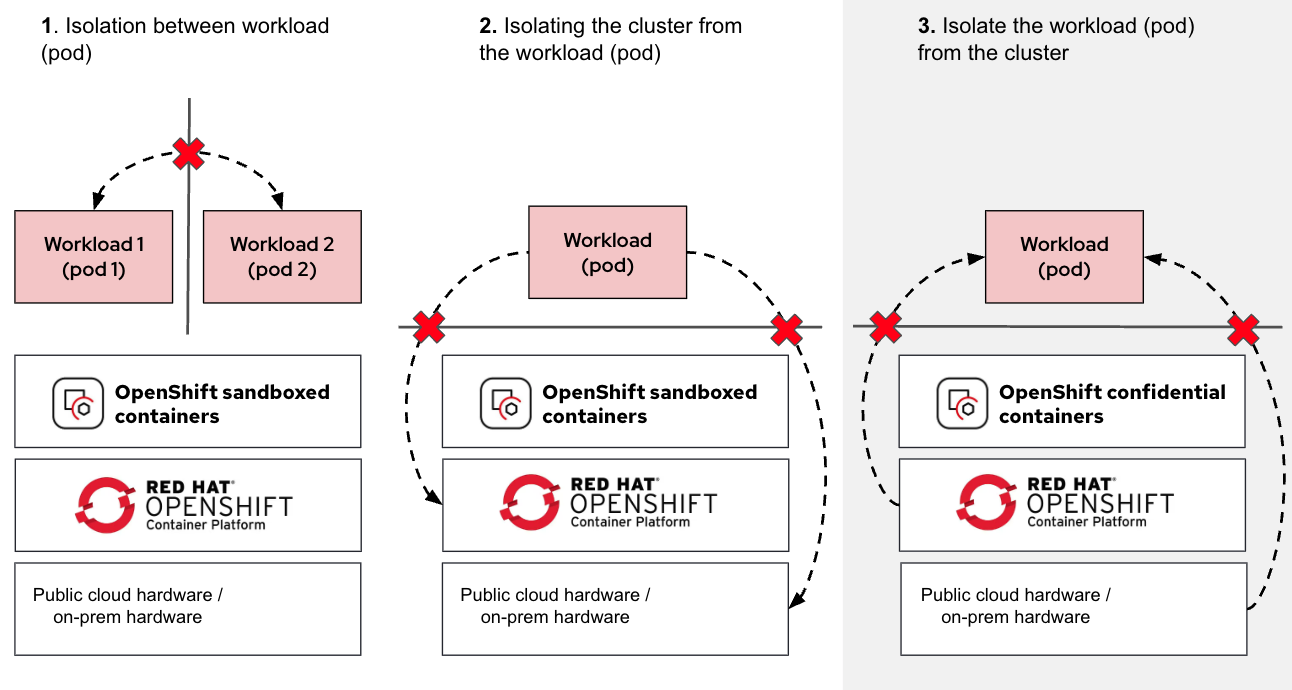
As shown in the diagram (use case 3), we are now adding the ability to isolate the workload from the cluster node, ensuring that the node (and any other entity running on the same infrastructure) has no access to the workload (via protecting the pod).
For additional details on CoCo, we recommend reading our previous article, Exploring the OpenShift confidential containers solution.
Keeping admins and cluster nodes out of the loop
Confidential containers extend the concept of pod sandboxing by running Pods in encrypted, hardware-isolated enclaves known as Trusted Execution Environments (TEE). Data and code become protected-in-use so even infrastructure admins, cloud providers, or compromised cluster nodes can’t see inside these environments. Further, with confidential containers, you can remotely verify if the container images used for the pipelines—including the commands they run—are what you expect.
For in-depth details on confidential containers, refer to our previous article series, Learn about Confidential Containers.
Figure 5 shows how OpenShift sandboxed containers and CoCo are used to protect pipeline tasks and steps.
By integrating OpenShift pipelines with confidential containers, you gain the ability to:
- Run your builds in trusted isolated enclaves on untrusted infrastructure.
- Protect signing keys and build secrets from admins in shared clusters.
- Ensure that every build task is tamper-proof and remotely verifiable.
This is the foundation for a trusted CI/CD pipeline, secure by design, even in untrusted environments.
With confidential containers, the TaskRuns are executed inside a hardware-isolated enclave, as shown in Figure 6.
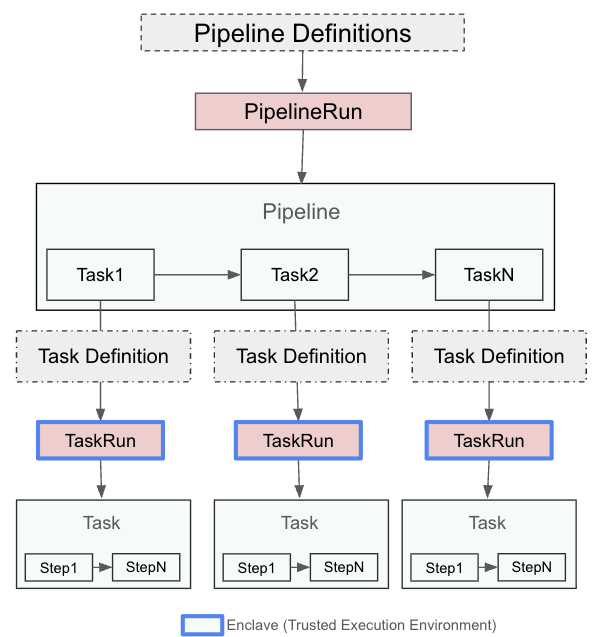
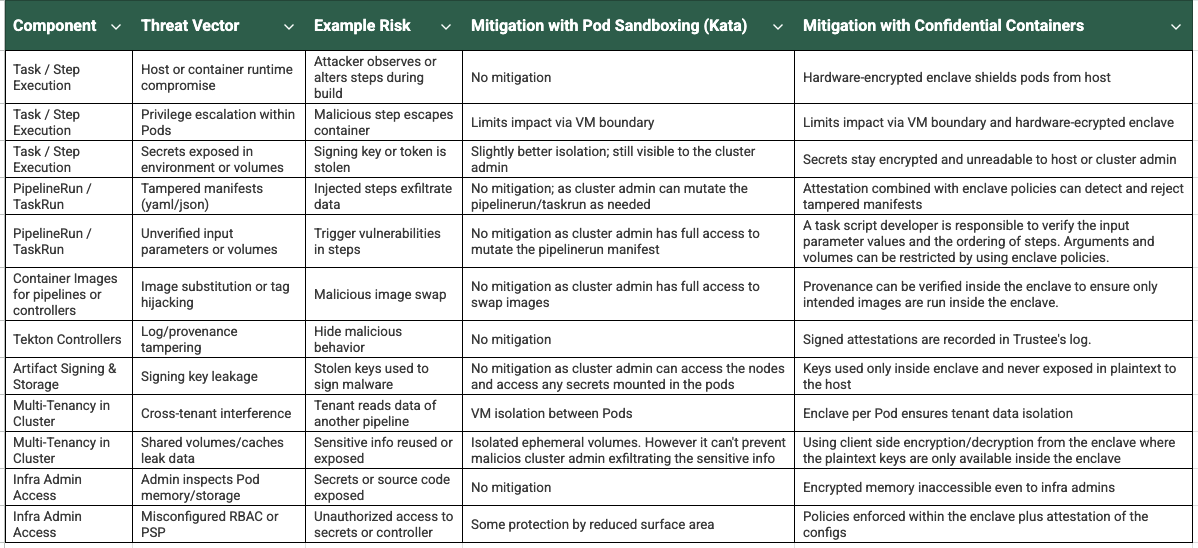
Figure 7 summarizes some of the threat vectors and how confidential containers address them to provide a trusted CI/CD pipeline.
Note:
The usage of confidential containers protects your pipeline from threats, but it will not address any vulnerabilities within the code you submit to the pipeline. Secure code development practices and testing are still required.
Pipelines with CoCo architecture
In the CoCo solution, the Trustee project (part of the CNCF Confidential Containers project) provides the capability for attestation. It’s responsible for performing the attestation operations and delivering secrets after successful attestation. For additional information on Trustee, we recommend reading our previous article Introducing Confidential Containers Trustee: Attestation Services Solution Overview and Use Cases.
The confidential containers solution (extending OpenShift sandboxed containers) relies on two operators:
- OpenShift sandboxed containers operator: This helps to deploy the necessary building blocks in the OpenShift cluster to support confidential containers.
- Red Hat build of Trustee operator: This helps to deploy and manage Trustee services in a trusted OpenShift cluster (typically a separate cluster from where the CoCo workloads run).
For additional details on these operators, we recommend reading our previous article Exploring the OpenShift confidential containers solution.
Figure 8 shows a typical deployment of the OpenShift sandboxed containers CoCo solution in an OpenShift cluster running on public cloud/on-premise, while the confidential compute attestation (Trustee) operator is deployed in a separate trusted environment.
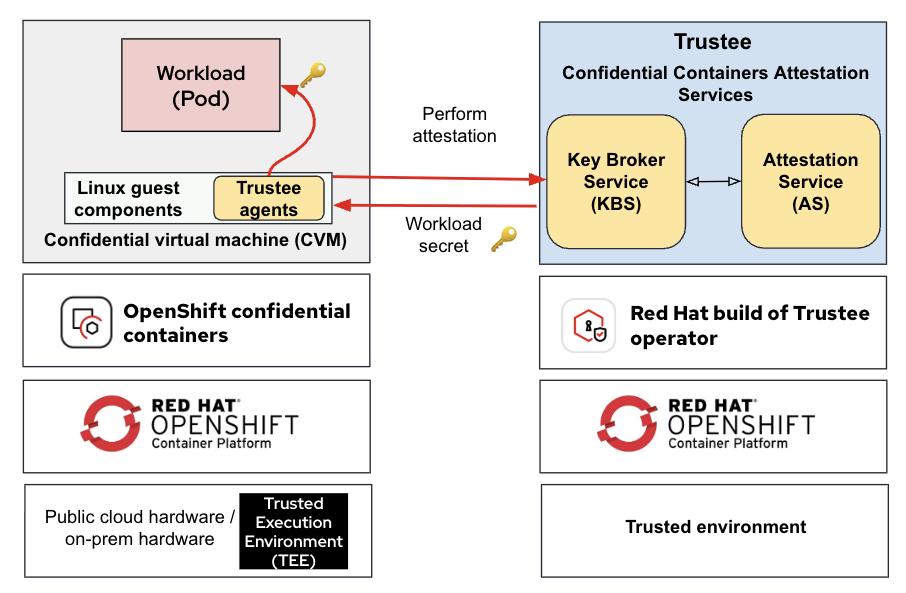
Figure 9 shows how pipeline tasks (TaskRun) run inside CoCo and attested via Trustee.
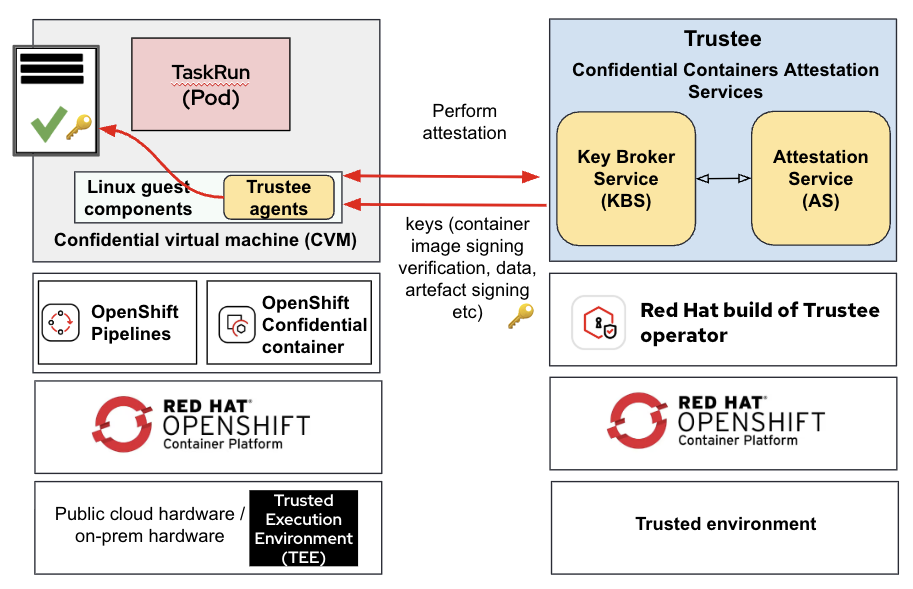
Note the following:
- The remote attestation services are running in your trusted environment, while the OpenShift Pipeline runs in an untrusted environment.
- The OpenShift Pipeline TaskRun is executed in a secure enclave (TEE) using confidential containers.
For detailed information on deployment considerations for confidential containers, refer to our previous article, Deployment considerations for Red Hat OpenShift Confidential Containers solution.
Figure 10 shows a detailed schematic view of a sample TaskRun when deployed as a confidential container.
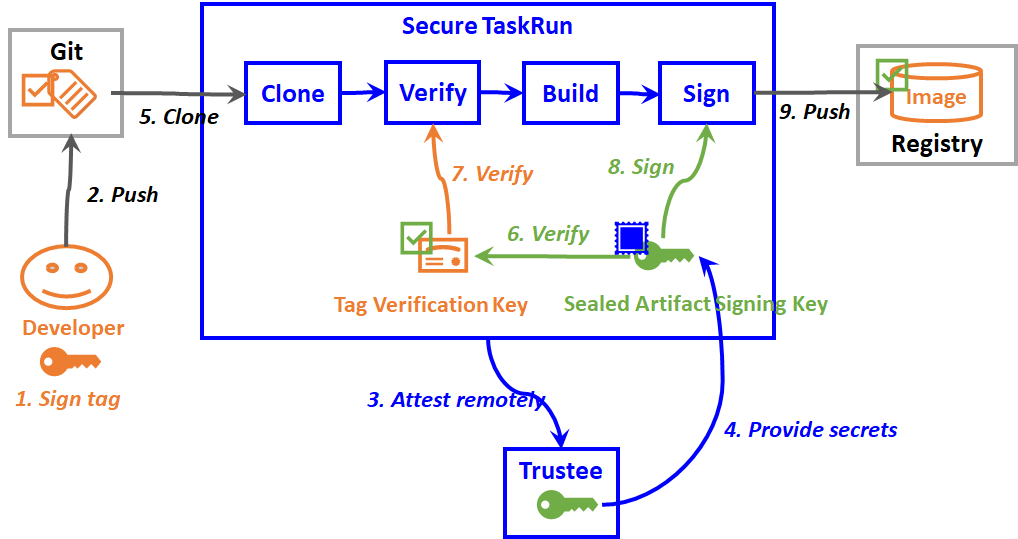
The following are the steps performed:
- The application developer signs a tag by using a signing private key.
- The developer pushes the signed tag into a source code repository, which triggers the creation of a secure TaskRun pod in a trusted execution environment (TEE).
- The secure TaskRun pod initiates a remote attestation request to the Trustee.
- Trustee verifies evidence of the secure TaskRun pod. If valid, it sends back a secret resource, such as an artifact signing key to the secure TaskRun pod.
- The clone step clones the source code repository into the TEE.
- The verify step verifies the tag verification key of the application developer by using the artifact signing key.
- The verify step then verifies the tag by using the tag verification key. A container image is built from the verified tag by the succeeding build step.
- The sign step signs the container image using the artifact signing key.
- The sign step then pushes the signed container image into a container image registry, which will be verified and deployed by succeeding delivery pipelines.
Here is an end-to-end demo showing a trusted CI/CD pipeline: Building Trusted CI/CD Pipelines with OpenShift Pipelines and Confidential Containers
Final thoughts
Modern CI/CD pipelines powered by Tekton provide flexibility and scalability. However, when these pipelines are deployed on third-party or public cloud infrastructure, protecting sensitive workloads and secrets becomes a concern, especially from infrastructure-level threats (i.e., privileged administrators).
We looked at the threat vectors for the Tekton pipelines and where pod sandboxing and confidential containers come in:
- Pod sandboxing adds a layer of isolation for each pipeline task, reducing the blast radius of any potential compromise.
- Confidential containers take this further by executing pipeline tasks inside a hardware-backed secure enclave, ensuring that even infrastructure admins can’t access runtime data or secrets.
- With remote attestation, you can cryptographically verify the integrity of the pipeline task and the runtime environment before execution, helping build trust across teams and organizational boundaries.
By combining Tekton pipelines with confidential computing, platform teams can confidently scale CI/CD on untrusted infrastructure using OpenShift, without sacrificing security or control over their most critical assets.

