New projects require some help. Imagine you are getting ready to start that new feature your business has been asking for the last couple of months. Your team is ready to start coding to implement the new awesome thing that would change your business.
To achieve it, the team will need to interact with the current existing software components of your organization. Your developers will need to interact with API services and event endpoints already available in your architecture. Before being able to send and process information, developers need to be aware of the structure or schema expected by those services.
Red Hat announced the Technical Preview of the Red Hat Integration service registry to help teams to govern their services schemas. The service registry is a store for schema (and API design) artifacts providing a REST API and a set of optional rules for enforcing content validity and evolution. Teams can now use the service registry to query for the schemas required by each service endpoint or register and store new structures for future use.
Service registry overview
The Red Hat Integration service registry is a datastore for standard event schemas and API designs. It enables developers to decouple the structure of their data from their applications and to share and manage their data structure using a REST interface. Red Hat service registry is built on the Apicurio Registry open source community project.
The service registry handles the following data formats:
- Apache Avro
- JSON Schema
- Protobuf (protocol buffers)
- OpenAPI
- AsyncAPI
You can configure rules for each artifact added to the registry to govern content evolution. All rules configured for an artifact must pass before a new version can be uploaded to the registry. The goal of these rules is to prevent invalid content from being added to the registry.
Using the service registry with Apache Kafka
As Apache Kafka handles the actual messages value content as an opaque byte array, the usage of serialization systems is strongly suggested. Apache Avro is one of the commonly used data formats to encode Kafka data. Avro is a data serialization system that relies on schemas defined with JSON and supports schema versioning. Then Avro can convert our data based on our schema into byte arrays to send then to Kafka. Consumers can use the Avro schemas to correctly deserialize the data received.
The Red Hat Integration service registry provides full Kafka schema registry support to store Avro schemas. Also, the provided maven repository includes a custom Kafka client serializer/deserializer (SerDe). These utilities can be used by Kafka client developers to integrate with the registry. These Java classes allow Kafka client applications to push/pull their schemas from the service registry at runtime.
Running Kafka and Registry
For this example, we will use a local docker-compose Kafka cluster based on Strimzi and the service registry. Service registry uses Kafka as the main data store but you can also use in-memory or JPA (currently unsupported) based stores. We will use the in-memory store to simplify the usage process. As I mentioned before, neither docker-compose nor the in-memory storage is recommended for use in production.
To begin with, download my preconfigured docker-compose.yaml file and start the services for running locally.
$ docker-compose -f docker-compose.yaml up
Kafka will be running on localhost:9092 and the registry in localhost:8081
Creating network "post_default" with the default driver
Pulling zookeeper (strimzi/kafka:0.11.3-kafka-2.1.0)...
…
zookeeper_1  | [2019-12-09 16:56:55,407] INFO Got user-level KeeperException when processing sessionid:0x100000307a50000 type:multi cxid:0x38 zxid:0x1d txntype:-1 reqpath:n/a aborting remaining multi ops. Error Path:/admin/preferred_replica_election Error:KeeperErrorCode = NoNode for /admin/preferred_replica_election (org.apache.zookeeper.server.PrepRequestProcessor)
kafka_1      | [2019-12-09 16:56:55,408] INFO [KafkaServer id=0] started (kafka.server.KafkaServer)
Creating a new Quarkus project
Now, that we started the required infrastructure, we need to create a simple client to send and consume messages to the Kafka cluster. In this scenario, I will create a simple Quarkus application using the MicroProfile reactive messaging extension for Kafka.
First, open a new terminal window and create a new Maven project using the Quarkus plugin:
mvn io.quarkus:quarkus-maven-plugin:1.4.2.Final:create \
    -DprojectGroupId=com.redhat \
    -DprojectArtifactId=kafka-registry \
    -Dextensions="kafka"
After Maven downloads all the required artifacts you will see the “Build Success”:
…
[INFO]
[INFO] ------------------------------------------------------------------------
[INFO] BUILD SUCCESS
[INFO] ------------------------------------------------------------------------
[INFO] Total time:  01:07 min
[INFO] Finished at: 2019-12-09T12:17:51-05:00
[INFO] ------------------------------------------------------------------------
Open the newly created project in your preferred code editor; in my case, I will use VS Code. My editor has already installed useful extensions, like Java and Quarkus.
Open the pom.xml and remove the quarkus-resteasy dependency and add these:
<dependency>
     <groupId>org.jboss.resteasy</groupId>
     <artifactId>resteasy-jackson2-provider</artifactId>
   </dependency>
   <dependency>
     <groupId>io.apicurio</groupId>
     <artifactId>apicurio-registry-utils-serde</artifactId>
     <version>1.2.1.Final</version>
   </dependency>
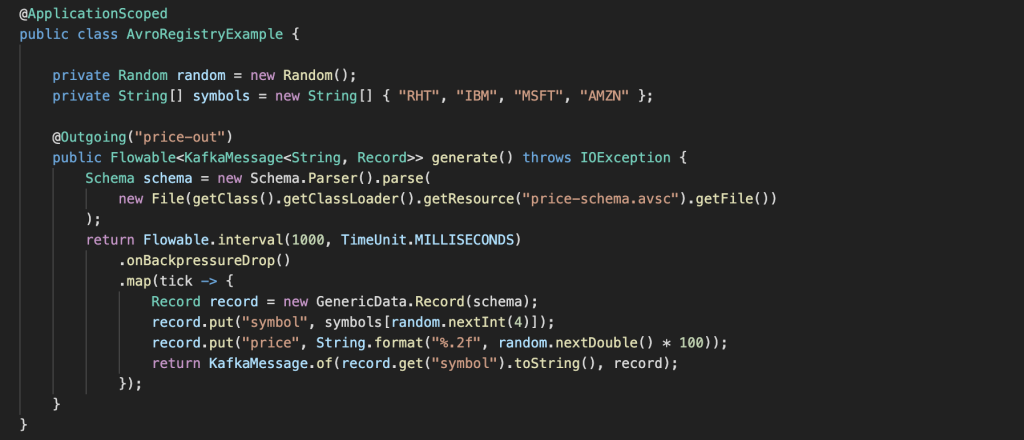
Create the following Java class under src/main/java/com/redhat/kafka/registry/AvroRegistryExample.java and add the following code:
package com.redhat.kafka.registry;

import java.io.File;
import java.io.IOException;
import java.util.Random;
import java.util.concurrent.TimeUnit;

import javax.enterprise.context.ApplicationScoped;

import org.apache.avro.Schema;
import org.apache.avro.generic.GenericData;
import org.apache.avro.generic.GenericData.Record;
import org.eclipse.microprofile.reactive.messaging.Outgoing;

import io.reactivex.Flowable;
import io.smallrye.reactive.messaging.kafka.KafkaRecord;

@ApplicationScoped
public class AvroRegistryExample {

   private Random random = new Random();
   private String[] symbols = new String[] { "RHT", "IBM", "MSFT", "AMZN" };

   @Outgoing("price-out")
   public Flowable<KafkaRecord<String, Record>> generate() throws IOException {
       Schema schema = new Schema.Parser().parse(
           new File(getClass().getClassLoader().getResource("price-schema.avsc").getFile())
       );
       return Flowable.interval(1000, TimeUnit.MILLISECONDS)
           .onBackpressureDrop()
           .map(tick -> {
               Record record = new GenericData.Record(schema);
               record.put("symbol", symbols[random.nextInt(4)]);
               record.put("price", String.format("%.2f", random.nextDouble() * 100));
               return KafkaRecord.of(record.get("symbol").toString(), record);
           });
   }
}
In the code, we are instructing the reactive messaging extension to send items from the stream to the price-out through the Outgoing annotation. The stream out is a Flowable RX Java 2 stream emitting new stock prices every 1 second.
Working with Schemas
As you might notice we need the Avro schema for this stock ticker to correctly format the message, so we will create a simple one under src/main/resources/price-schema.avsc with the following content:
{
   "type": "record",
   "name": "price",
   "namespace": "com.redhat",
   "fields": [
       {
           "name": "symbol",
           "type": "string"
       },
       {
           "name": "price",
           "type": "string"
       }
   ]
}
In the previous file, we specified the symbol and the price fields to be included in the Avro record.
We need to let the registry know that this is the schema we will be validating to every time we send a message to the Kafka Topic. To archive this, we will use the REST API provided by the registry to add the schema.
First, we will create a new artifact with type AVRO by doing a POST call to the API using cURL. Remove spaces and format from the avro schema file to have a canonical version.
curl -X POST -H "Content-type: application/json; artifactType=AVRO" -H "X-Registry-ArtifactId: prices-value" --data '{"type":"record","name":"price","namespace":"com.redhat","fields":[{"name":"symbol","type":"string"},{"name":"price","type":"string"}]}' http://localhost:8081/api/artifacts -s | jq
This call will create a new artifact with prices-value as id. The rest of the headers are used to identify the schema as an AVRO schema and to indicate we are using JSON as the payload type.
{
  "createdOn": 1575919739708,
  "modifiedOn": 1575919739708,
  "id": "prices-value",
  "version": 1,
  "type": "AVRO",
  "globalId": 4
}
Configuration
Next, we need to configure the Kafka connector. This is done in the application properties file. So open the file under src/main/resources/application.properties and fill it out with the following configurations:
# Configuration file
kafka.bootstrap.servers=localhost:9092

mp.messaging.outgoing.price-out.connector=smallrye-kafka
mp.messaging.outgoing.price-out.client.id=price-producer
mp.messaging.outgoing.price-out.topic=prices
mp.messaging.outgoing.price-out.key.serializer=org.apache.kafka.common.serialization.StringSerializer
mp.messaging.outgoing.price-out.value.serializer=io.apicurio.registry.utils.serde.AvroKafkaSerializer

mp.messaging.outgoing.price-out.apicurio.registry.url=http://localhost:8081/api
mp.messaging.outgoing.price-out.apicurio.registry.artifact-id=io.apicurio.registry.utils.serde.strategy.TopicIdStrategy
In the previous file we indicate that we will be connecting to the localhost Kafka cluster running on port 9092, and configured the messaging outgoing channel price-out connector using smallrye-kafka extension with a StringSerializer for the key and a io.apicurio.registry.utils.serde.AvroKafkaSerializer class for the value.
This configuration will enable us to use the Apicurio SerDe for managing access to the registry to validate the schema for our Avro record.
The last two rows indicate where the registry is listening and the type of strategy used for the schema retrieval. In our example, we are using a TopicIdStrategy meaning we will search for artifacts with the same name as the Kafka topic we are sending our messages to.
Running the application
If you are ready is time to get the application running. For that, you just need to run the following command:
./mvnw compile quarkus:dev
You will see in the log that your application is now sending messages to Kafka.
2019-12-09 14:30:58,007 INFO  [io.sma.rea.mes.ext.MediatorManager] (main) Initializing mediators
2019-12-09 14:30:58,203 INFO  [io.sma.rea.mes.ext.MediatorManager] (main) Connecting mediators
2019-12-09 14:30:58,206 INFO  [io.sma.rea.mes.ext.MediatorManager] (main) Connecting method com.redhat.kafka.registry.AvroRegistryExample#generate to sink price-out
2019-12-09 14:30:58,298 INFO  [io.quarkus] (main) Quarkus 1.0.1.Final started in 1.722s.
2019-12-09 14:30:58,301 INFO  [io.quarkus] (main) Profile dev activated. Live Coding activated.
2019-12-09 14:30:58,301 INFO  [io.quarkus] (main) Installed features: [cdi, smallrye-context-propagation, smallrye-reactive-messaging, smallrye-reactive-messaging-kafka, smallrye-reactive-streams-operators]
2019-12-09 14:30:58,332 INFO  [org.apa.kaf.cli.Metadata] (kafka-producer-network-thread | price-producer) Cluster ID: B2U0Vs6eQS-kjJG3_L2tCA
2019-12-09 14:30:59,309 INFO  [io.sma.rea.mes.kaf.KafkaSink] (RxComputationThreadPool-1) Sending message io.smallrye.reactive.messaging.kafka.SendingKafkaMessage@12021771 to Kafka topic 'prices'
2019-12-09 14:31:00,083 INFO  [io.sma.rea.mes.kaf.KafkaSink] (vert.x-eventloop-thread-0) Message io.smallrye.reactive.messaging.kafka.SendingKafkaMessage@12021771 sent successfully to Kafka topic 'prices'
2019-12-09 14:31:00,297 INFO  [io.sma.rea.mes.kaf.KafkaSink] (RxComputationThreadPool-1) Sending message io.smallrye.reactive.messaging.kafka.SendingKafkaMessage@5e5f389a to Kafka topic 'prices'
2019-12-09 14:31:00,334 INFO  [io.sma.rea.mes.kaf.KafkaSink] (vert.x-eventloop-thread-0) Message io.smallrye.reactive.messaging.kafka.SendingKafkaMessage@5e5f389a sent successfully to Kafka topic 'prices'
2019-12-09 14:31:01,301 INFO  [io.sma.rea.mes.kaf.KafkaSink] (RxComputationThreadPool-1) Sending message io.smallrye.reactive.messaging.kafka.SendingKafkaMessage@5a403106 to Kafka topic 'prices'
2019-12-09 14:31:01,341 INFO  [io.sma.rea.mes.kaf.KafkaSink] (vert.x-eventloop-thread-0) Message io.smallrye.reactive.messaging.kafka.SendingKafkaMessage@5a403106 sent successfully to Kafka topic 'prices'
2019-12-09 14:31:02,296 INFO  [io.sma.rea.mes.kaf.KafkaSink] (RxComputationThreadPool-1) Sending message io.smallrye.reactive.messaging.kafka.SendingKafkaMessage@3bb2aac0 to Kafka topic 'prices'
2019-12-09 14:31:02,323 INFO  [io.sma.rea.mes.kaf.KafkaSink] (vert.x-eventloop-thread-0) Message io.smallrye.reactive.messaging.kafka.SendingKafkaMessage@3bb2aac0 sent successfully to Kafka topic 'prices'
The messages you are sending to Kafka are using the Apicurio serializer to validate the record schema using Red Hat Integration service registry. If you want to take a closer look at the code and see how to implement the Incoming pattern for Quarkus, take a took at the full example in my amq-examples GitHub repository.
To make it easy to transition from Confluent, the service registry also adds compatibility with the Confluent Schema Registry REST API. This means that applications using Confluent client libraries can replace Schema Registry and use Red Hat Integration service registry instead.
Summary
The Red Hat Integration service registry is a central data store for schemas and API artifacts. Developers can query, create, read, update, and delete service artifacts, versions, and rules to govern the structure of their services. Developer teams can work with popular formats like Avro or Protobuf schemas as well as OpenAPI and AsyncAPI definitions. The service registry could be also used as a drop-in replacement for Confluent registry with Apache Kafka clients by using the included serializer and deserializer classes.
See also:
Last updated: July 1, 2020
