Redhat Developers  Logo
  • AI

    Get started with AI

    • Red Hat AI
      Accelerate the development and deployment of enterprise AI solutions.
    • AI learning hub
      Explore learning materials and tools, organized by task.
    • AI interactive demos
      Click through scenarios with Red Hat AI, including training LLMs and more.
    • AI/ML learning paths
      Expand your OpenShift AI knowledge using these learning resources.
    • AI quickstarts
      Focused AI use cases designed for fast deployment on Red Hat AI platforms.
    • No-cost AI training
      Foundational Red Hat AI training.

    Featured resources

    • OpenShift AI learning
    • Open source AI for developers
    • AI product application development
    • Open source-powered AI/ML for hybrid cloud
    • AI and Node.js cheat sheet

    Red Hat AI Factory with NVIDIA

    • Red Hat AI Factory with NVIDIA is a co-engineered, enterprise-grade AI solution for building, deploying, and managing AI at scale across hybrid cloud environments.
    • Explore the solution
  • Learn

    Self-guided

    • Documentation
      Find answers, get step-by-step guidance, and learn how to use Red Hat products.
    • Learning paths
      Explore curated walkthroughs for common development tasks.
    • Guided learning
      Receive custom learning paths powered by our AI assistant.
    • See all learning

    Hands-on

    • Developer Sandbox
      Spin up Red Hat's products and technologies without setup or configuration.
    • Interactive labs
      Learn by doing in these hands-on, browser-based experiences.
    • Interactive demos
      Click through product features in these guided tours.

    Browse by topic

    • AI/ML
    • Automation
    • Java
    • Kubernetes
    • Linux
    • See all topics

    Training & certifications

    • Courses and exams
    • Certifications
    • Skills assessments
    • Red Hat Academy
    • Learning subscription
    • Explore training
  • Build

    Get started

    • Red Hat build of Podman Desktop
      A downloadable, local development hub to experiment with our products and builds.
    • Developer Sandbox
      Spin up Red Hat's products and technologies without setup or configuration.

    Download products

    • Access product downloads to start building and testing right away.
    • Red Hat Enterprise Linux
    • Red Hat AI
    • Red Hat OpenShift
    • Red Hat Ansible Automation Platform
    • See all products

    Featured

    • Red Hat build of OpenJDK
    • Red Hat JBoss Enterprise Application Platform
    • Red Hat OpenShift Dev Spaces
    • Red Hat Developer Toolset

    References

    • E-books
    • Documentation
    • Cheat sheets
    • Architecture center
  • Community

    Get involved

    • Events
    • Live AI events
    • Red Hat Summit
    • Red Hat Accelerators
    • Community discussions

    Follow along

    • Articles & blogs
    • Developer newsletter
    • Videos
    • Github

    Get help

    • Customer service
    • Customer support
    • Regional contacts
    • Find a partner

    Join the Red Hat Developer program

    • Download Red Hat products and project builds, access support documentation, learning content, and more.
    • Explore the benefits

What is a Socket?

October 17, 2017
Roshan V Sharma
Related topics:
Kubernetes
Related products:
Red Hat OpenShift Container Platform

    Recently, while reviewing the FAQ, I came across the question "What's a Socket?" For those who are not familiar, I shall explain.

    In brief, a Unix Socket (technically, the correct name is Unix domain socket, UDS) allows communication between two different processes on either the same machine or different machines in client-server application frameworks. To be more precise, it’s a way of communicating among computers using a standard Unix descriptors file.

    Every UNIX systems Input/Output action is executed by writing or reading the descriptor file. A Descriptor file is an open file, which is associated with an integer. It can be a network connection, text file, terminal or something else. It looks and behaves much like a low-level file descriptor. This happens because the commands like read () and write () works with the same way they do with the files and pipes.

    Types of Sockets

    There are four types of sockets.

    The first 2 are more commonly used than the second 2 types :

    Stream Sockets

    Delivery in a networked environment is guaranteed. These use TCP (Transmission Control Protocols) for data transmission.

    A stream socket is a type of interprocess communication socket or network socket, which provides a connection-oriented, sequenced, and unique flow of data without record boundaries, with well-defined mechanisms for creating and destroying connections and for detecting an error.

    A stream socket transmits data reliably, in order and with out-of-band capabilities. If you send three items "A, B, C" then the receiver will receive it in the same order.

    Datagram Sockets

    Delivery in a networked environment is not guaranteed. These UDP (User Datagram Protocols) for data transmission.

    Raw Sockets

    These provide user access to the underlying communication protocols, which support socket abstractions. They are not intended for general use.

    Sequenced Packet Sockets (SPS)

    Sequenced Packet Sockets similar to Stream Sockets, with the exception that record boundaries are preserved. SPP interface is only provided as part of the network system socket abstraction and is very important in most serious network system applications.

    It allows the user to modify the SP Protocols header on a packet or a group of packets, either by writing a prototype header along whatever data is to be sent or by specifying a default header to be used with all outgoing data.

    SPS allows the user to receive the header on incoming packets.

    The process defined above is to communicate between the same types of sockets. But there is no restriction in communicating  between the different types of socket.

    Communication
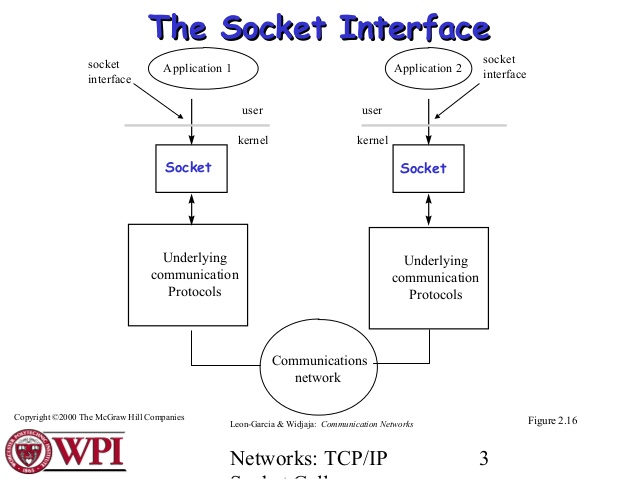
    The socket interface


    You can find more general information about Unix Sockets here.


    Whether you are new to Containers or have experience, downloading this cheat sheet can assist you when encountering tasks you haven’t done lately.

    Last updated: August 10, 2023

    Recent Posts

    • Every layer counts: Defense in depth for AI agents with Red Hat AI

    • Fun in the RUN instruction: Why container builds with distroless images can surprise you

    • Trusted software factory: Building trust in the agentic AI era

    • Build a zero trust AI pipeline with OpenShift and RHEL CVMs

    • Red Hat Hardened Images: Top 5 benefits for software developers

    Red Hat Developers logo LinkedIn YouTube Twitter Facebook

    Platforms

    • Red Hat AI
    • Red Hat Enterprise Linux
    • Red Hat OpenShift
    • Red Hat Ansible Automation Platform
    • See all products

    Build

    • Developer Sandbox
    • Developer tools
    • Interactive tutorials
    • API catalog

    Quicklinks

    • Learning resources
    • E-books
    • Cheat sheets
    • Blog
    • Events
    • Newsletter

    Communicate

    • About us
    • Contact sales
    • Find a partner
    • Report a website issue
    • Site status dashboard
    • Report a security problem

    RED HAT DEVELOPER

    Build here. Go anywhere.

    We serve the builders. The problem solvers who create careers with code.

    Join us if you’re a developer, software engineer, web designer, front-end designer, UX designer, computer scientist, architect, tester, product manager, project manager or team lead.

    Sign me up

    Red Hat legal and privacy links

    • About Red Hat
    • Jobs
    • Events
    • Locations
    • Contact Red Hat
    • Red Hat Blog
    • Inclusion at Red Hat
    • Cool Stuff Store
    • Red Hat Summit
    © 2026 Red Hat

    Red Hat legal and privacy links

    • Privacy statement
    • Terms of use
    • All policies and guidelines
    • Digital accessibility

    Chat Support

    Please log in with your Red Hat account to access chat support.