Reactive, what an overloaded word. Many things turn out to become magically Reactive these days. In this post, we are going to talk about Reactive Programming, i.e. a development model structured around asynchronous data streams.
I know you are impatient to write your first reactive application, but before doing it, there are a couple of things to know. Using reactive programming changes how you design and write your code. Before jumping on the train, it’s good to know where you are heading.
In this post, we are going to explain 5 things about reactive programming to see what it changes for you.
1. Reactive Programming is programming with asynchronous data streams.
When using reactive programming, data streams are going to be the spine of your application. Events, messages, calls, and even failures are going to be conveyed by a data stream. With reactive programming, you observe these streams and react when a value is emitted.
So, in your code, you are going to create data streams of anything and from anything: click events, HTTP requests, ingested messages, availability notifications, changes on a variable, cache events, measures from a sensor, literally anything that may change or happen. This has an interesting side-effect on your application: it’s becoming inherently asynchronous.
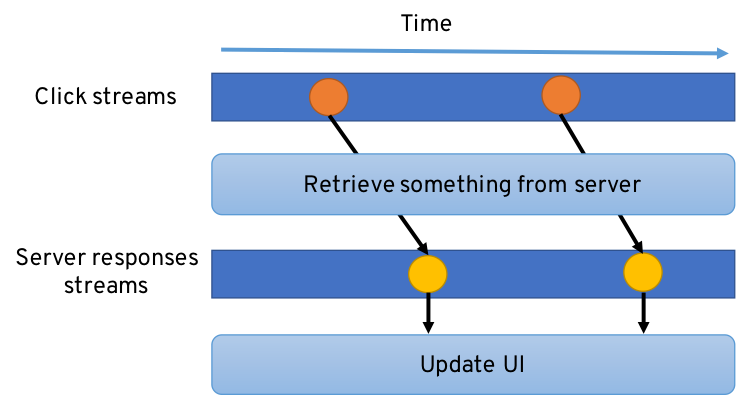
Reactive eXtension (http://reactivex.io, a.ka. RX) is an implementation of the reactive programming principles to “compose asynchronous and event-based programs by using observable sequence”. With RX, your code creates and subscribes to data streams named Observables. While Reactive Programming is about the concepts, RX provides you an amazing toolbox. By combining the observer and iterator patterns and functional idioms, RX gives you superpowers. You have an arsenal of functions to combine, merge, filter, transform and create the data streams. The next picture illustrates the usage of RX in Java (using https://github.com/ReactiveX/RxJava).
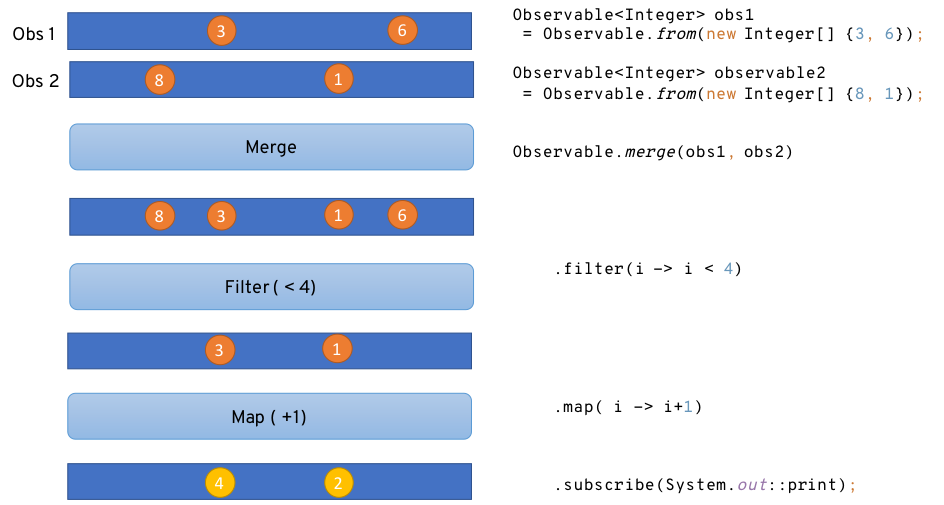
While RX is not the only implementation of the reactive programming principles (for instance we can cite BaconJS - http://baconjs.github.io), it’s the most commonly used Today. In the rest of this post, we are going to use Rx Java.
2. Observables can be cold or hot – and it matters.
At this point, you are trying to see what are the different streams (or observables) you are going to deal with in your program. But there are two classes of streams: hot and cold. Understanding the difference is key to successfully use reactive programming.
Cold observables are lazy. They don’t do anything until someone starts observing them (subscribe in RX). They only start running when they are consumed. Cold streams are used to represent asynchronous actions, for example, that it won’t be executed until someone is interested in the result. Another example would be a file download. It won’t start pulling the bytes if no one is going to do something with the data. The data produced by a cold stream is not shared among subscribers and when you subscribe you get all the items.
Hot streams are active before the subscription like a stock ticker, or data sent by a sensor or a user. The data is independent of an individual subscriber. When an observer subscribes to a hot observable, it will get all values in the stream that are emitted after it subscribes. The values are shared among all subscribers. For example, even if no one has subscribed to a thermometer, it measures and publishes the current temperature. When a subscriber registers to the stream, it automatically receives the next measure.
Why it’s so important to understand whether your streams are hot or cold? Because it changes how your code consumes the conveyed items. If you are not subscribed to a hot observable, you won’t receive the data, and this data is lost.
3. Misused asynchrony bites
There is one important word in the reactive programming definition: asynchronous. You are notified when data is emitted in the stream asynchronously – meaning independently to the main program flow. By structuring your program around data streams, you are writing asynchronous code: you write code invoked when the stream emits a new item. Threads, blocking code and side-effects are very important matters in this context. Let’s start with side-effects.
Functions without side-effects interact with the rest of the program exclusively through their arguments and return values. Side-effects can be very useful and are unavoidable in many cases. But they also have pitfalls. When using reactive programming, you should avoid unnecessary side-effects, and have a clear intention when they do use them. So, embrace immutability, and side-effect free functions. While some cases are justified, abusing side-effects leads to thunderstorms: thread safety.
That’s the second important point: threads. It’s nice to observe streams and be notified when something interesting happens, but you must never forget who is calling you, or more precisely on which thread your functions are executed. It is heavily recommended to avoid using too many threads in your program. Asynchronous programs relying on multiple threads becomes a tough synchronization puzzle often ending as a deadlock hunt.
That’s the third point: never block. Because you don’t own the thread calling you, you must be sure to never block it. If you do you may avoid the other items to be emitted, they will be buffered until … the buffer is full (back-pressure can kick in in this case, but this is not the topic of this post). By combining RX and asynchronous IO you have everything you need to write non-blocking code, and if you want more, look at Eclipse Vert.x, a reactive toolkit ting reactiveness and asynchrony. For instance, the following code shows the Vert.x Web Client and it's RX API to retrieve a JSON document from the server and display the name entry:
client.get("/api/people/4")
.rxSend()
.map(HttpResponse::bodyAsJsonObject)
.map(json -> json.getString("name"))
.subscribe(System.out::println, Throwable::printStackTrace);
Notice the subscribe method in this last snippet. It takes a second method called when one of the processing stages throws an exception. Always catch the exceptions. If you don’t you will spend hours trying to understand what’s going wrong.
4. Keep things simple
As you know, “With great power comes great responsibility.” RX provides lots of very cool functions, and it’s easy to lean toward the dark side. Chaining flapmap, retry, debounce, and zip makes you feel like a ninja… BUT, never forget that good code needs to be readable by someone else.
Let’s take some code...
manager.getCampaignById(id)
  .flatMap(campaign ->
    manager.getCartsForCampaign(campaign)
      .flatMap(list -> {
        Single<List<Product>> products = manager.getProducts(campaign);
        Single<List<UserCommand>> carts = manager.getCarts(campaign);
        return products.zipWith(carts,
            (p, c) -> new CampaignModel(campaign, p, c));
      })
     .flatMap(model -> template
        .rxRender(rc, "templates/fruits/campaign.thl.html")
        .map(Buffer::toString))
    )
    .subscribe(
      content -> rc.response().end(content),
     err -> {
      log.error("Unable to render campaign view", err);
      getAllCampaigns(rc);
    }
);
Given an example like this is can be hard to understand no? It chains several asynchronous operations (flatmap), join another set of operations (zip). Reactive programming code first requires a mind-shift. You are notified of asynchronous events. Then, the API can be hard to grasp (just look at the list of operators). Don’t abuse, write comments, explain, or draw diagrams (I’m sure you are an asciiart artist). RX is powerful, abusing it or not explaining it will make your coworkers grumpy.
5. Reactive programming != Reactive system
Probably the most confusing part. Using reactive programming does not build a reactive system. Reactive systems, as defined in the reactive manifesto, are an architectural style to build responsive distributed systems. Reactive Systems could be seen as distributed systems done right. A reactive system is characterized by four properties:
- Responsive: a reactive system needs to handle requests in a reasonable time (I let you define reasonable).
- Resilient: a reactive system must stay responsive in the face of failures (crash, timeout, 500 errors… ), so it must be designed for failures and deal with them appropriately.
- Elastic: a reactive system must stay responsive under various loads. Consequently, it must scale up and down, and be able to handle the load with minimal resources.
- Message driven: components from a reactive system interacts using asynchronous message passing.
Despite the simplicity of these fundamental principles of reactive systems, building one of them is tricky. Typically, each node needs to embrace an asynchronous non-blocking development model, a task-based concurrency model and uses non-blocking I/O. If you don’t think about these points first, it’s quickly going to be a spaghetti plate.
Reactive Programming and Reactive eXtension provides a development model to tame the asynchronous beast. By using it wisely, your code is going to stay readable, and understandable. However, using reactive programming does not transform your system into a Reactive System. Reactive Systems are the next level.
Conclusion
We finally reach the end of this post. If you want to go further and are interested in reactive, I recommend you have a look to Eclipse Vert.x – a toolkit to build reactive and distributed systems (http://vertx.io), and to the Reactive Microservices in Java minibook available from https://developers.redhat.com/books/building-reactive-microservices-java. Combining Vert.x and Reactive eXtension unleashes your reactive superpower. You can not only use reactive programming but also build reactive systems and have access to a thrilling and growing ecosystem.
Happy coding!
Download the Eclipse Vert.x cheat sheet, this cheat sheet provides step by step details to let you create your apps the way you want to.
Last updated: May 31, 2024
