Since I've learned about nftables, I heard numerous times that it would provide better performance than its designated predecessor, iptables. Yet, I have never seen actual figures of performance comparisons between the two and so I decided to do a little side-by-side comparison.
Basically, my idea was to find out how much certain firewall setups affect performance. In order to do that, I simply did a TCP stream test between two network namespaces on the same system and then added (non-matching) firewall rules to the ingress side, observing how bandwidth would drop due to them being traversed for each packet. This adds the dimension of scalability to the tests - an interesting detail since it's one of the concerns with iptables and many of the new syntax features nftables aims to improve.
For good extensibility, I created a simple test framework, which I can I can feed a number of setup snippets, which it will then cycle through. To test scalability, these snippets are designed to take an input parameter SCALE in a range from 0 to 100. The test script will run the snippets once for each possible value of SCALE, and each time the value equals a multiple of five a benchmark is performed and then repeated nine more times. This allows the plotting of graphs with error bars to visualize the min and max values at each measuring point. The snippets are created in a way that SCALE == 0 serves as an initial setup state and allows for a "baseline" measurement, showing the setup's performance without any rules added to it.
The First Test
For starters, I created a simple test adding rules, each matching a single source address. Here is the setup snippet used for iptables:
if [[ $SCALE -eq 0 ]]; then
        iptables -N test
        iptables -A INPUT -j test
        iptables -A INPUT -j ACCEPT
else
        for j in {1..10}; do
                iptables -A test -s 10.11.$SCALE.$j -j DROP
        done
fi
Since each call after the initial setup will add ten rules to the setup, the resulting graph will show performance between 0 and 1000 (= 100 * 10) rules. The equivalent script for nftables looks like this:
if [[ $SCALE -eq 0 ]]; then
	nft add table ip t
	nft add chain ip t c '{ type filter hook input priority 0; }'
	nft add chain ip t test
	nft add rule ip t c jump test
	nft add rule ip t c accept
else
	for j in {1..10}; do
		nft add rule ip t test ip saddr 10.11.$SCALE.$j drop
	done
fi
The major difference is that nftables come without a fixed set of tables, so an equivalent to iptables' INPUT chain has to be created explicitly. Here is the resulting plot:
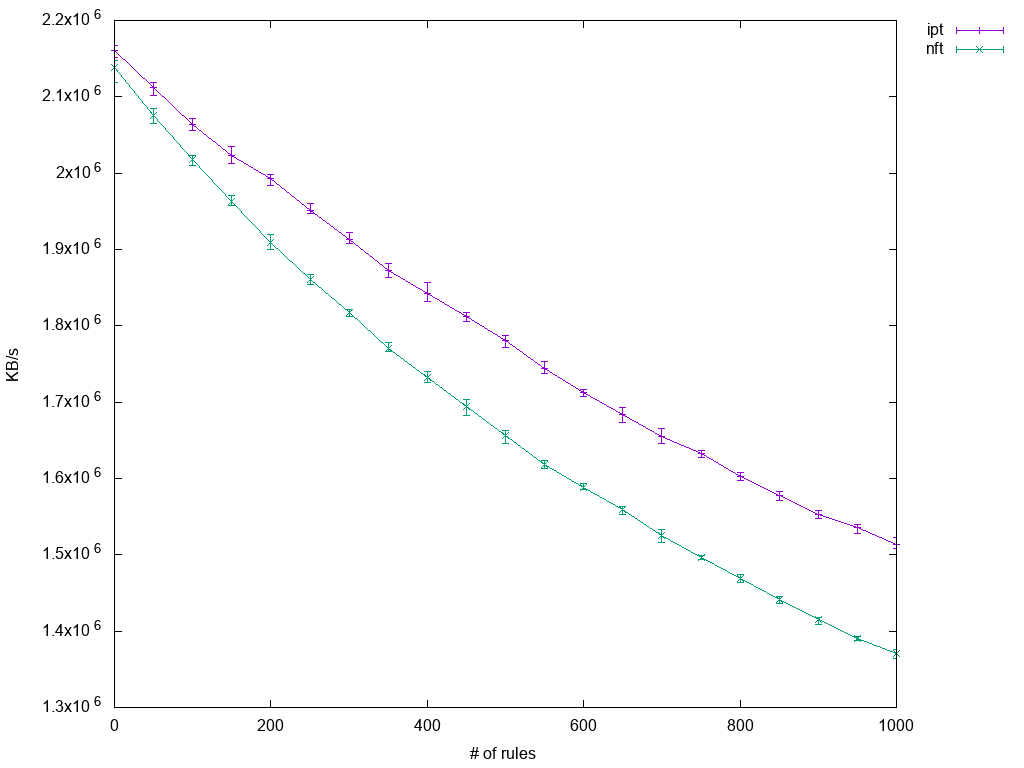
It clearly shows how performance suffers as the number of rules increases. Interestingly, the decrease in throughput is not linear with rule count, so the overhead introduced with adding rules becomes less and less significant the more rules there are already. In practical boundaries though, one can assume a linear regression. Also worth noting is that iptables performs slightly better.
Matching Multiple Ports
Next, I compiled a test using iptables' multiport module. Here things start to become interesting, as multiport supports at most 15 ports to be specified at once while nftables allow using a named set containing an arbitrary number of ports and referencing it in a single match statement. In theory, an anonymous set would have been sufficient, but these are read-only and I wanted to extend it instead of replacing it.
The setup implementation for iptables looks vey similar to the previous test:
if [[ $SCALE -eq 0 ]]; then
        iptables -N test
        iptables -A INPUT -j test
        iptables -A INPUT -j ACCEPT
else
        sep=""
        ports=""
        for ((j = 100; j < 1600; j += 100)); do
                ports+="${sep}$((SCALE + j))"
                sep=","
        done
        iptables -A test -p tcp -m multiport --dports $ports -j DROP
fi
So, for every iteration, a new iptables rule is added matching a series of 15 ports. The nftables setup is more interesting:
if [[ $SCALE -eq 0 ]]; then
        nft add table ip t
        nft add chain ip t c '{ type filter hook input priority 0; }'
        nft add chain ip t test
        nft add rule ip t c jump test
        nft add rule ip t c accept
        nft add set ip t ports '{ type inet_service; }'
        nft add rule ip t test tcp dport @ports drop
else
        sep=""
        ports=""
        for ((j = 100; j < 1600; j += 100)); do
                ports+="${sep}$((SCALE + j))"
                sep=","
        done
        nft add element ip t ports '{' $ports '}'
fi
Let's break it down: In the initial setup stage, a set named ports is created along with the single rule matching it. So apart from the set's contents, nothing will change anymore in further adjustments to the setup. Just like for iptables above then, each iteration extends the set by 15 ports.
Here are the results:

Just like with the previous test, iptables' performance degrades as the number of rules increases. This time, the degradation is even quite linear. The baseline performance of nftables is a bit lower than that of iptables, but that is expected since the single match rule is already in place and so setups differ at that point. The remaining nftables graph though shows how well the set lookup performs: Irrelevant of item count, the lookup time seems to be stable allowing for constant throughput over the whole test range. So at this stage of nftables development, one could say that as soon as more than about 120 ports have to be matched individually, nftables is clearly in advance.
Matching a Combination of Address and Port
The nice thing about sets is that each element may be comprised of multiple types. Here is how to have a set containing address and port pairs:
nft add set ip t saddr_port '{ type ipv4_addr . inet_service; }'
In order to use it, one has to provide a concatenation of matches on the left-hand side:
nft add rule ip t test ip saddr . tcp dport @saddr_port drop
This concatenation support allows having the same single rule benefit as before but for matching multiple criteria at once. I tested this feature against equivalent setups not using a set, i.e. adding a single rule per each address and port pair to match. So first, the intuitive iptables setup:
if [[ $SCALE -eq 0 ]]; then
        iptables -N test
        iptables -A INPUT -j test
        iptables -A INPUT -j ACCEPT
else
        for j in {1..10}; do
                iptables -A test -s 10.11.$SCALE.$j -p tcp --dport $j -j DROP
        done
fi
It is effectively just the first test's setup with other criteria added to the rule, namely the TCP destination port match. Here is the very similar nftables equivalent:
if [[ $SCALE -eq 0 ]]; then
        nft add table ip t
        nft add chain ip t c '{ type filter hook input priority 0; }'
        nft add chain ip t test
        nft add rule ip t c jump test
        nft add rule ip t c accept
else
        for j in {1..10}; do
                nft add rule ip t test ip saddr . tcp dport \
		               '{' 10.11.$SCALE.$j . $j '}' drop
        done
fi
Note that it already uses a concatenation to match both packet details. I could have used two completely separate matches in the same rule like this as well:
nft add rule ip t test ip saddr 10.11.$SCALE.$j tcp dport $j drop
However, the former syntax provides a nice transition to the advanced setup using a named set:
if [[ $SCALE -eq 0 ]]; then
        nft add table ip t
        nft add chain ip t c '{ type filter hook input priority 0; }'
        nft add chain ip t test
        nft add rule ip t c jump test
        nft add rule ip t c accept
        nft add set ip t saddr_port '{ type ipv4_addr . inet_service; }'
        nft add rule ip t test ip saddr . tcp dport @saddr_port drop
else
        for j in {1..10}; do
                nft add element ip t saddr_port '{' 10.11.$SCALE.$j . $j '}'
        done
fi
This feature is not completely unique amongst nftables, though: With help of the ipset utility, one may achieve the same using iptables. It is a bit limited in functionality as usually just combinations of addresses, ports, interfaces and netfilter marks may be contained in such a set while nftables supports nearly arbitrary element types (and counts). Yet, for this application it serves well so let's use it for comparison:
if [[ $SCALE -eq 0 ]]; then
        iptables -N test
        iptables -A INPUT -j test
        iptables -A INPUT -j ACCEPT
        ipset create saddr_port hash:ip,port
        iptables -A test -m set ! --update-counters \
	            --match-set saddr_port src,src -j DROP
else
        for j in {1..10}; do
                ipset add saddr_port 10.11.$SCALE.$j,$j
        done
fi
Similar to the nftables named set example, baseline setup contains the single drop rule already and scalability test means just adding more elements to the existing set. The results are quite as expected:

As before, the intuitive nftables setup performs worse than iptables, though this time the margin is much bigger. Nftables using a named set though scales perfectly well just like before, as does the combination of iptables and ipset. The latter provides for slightly more throughput, but the difference is quite negligible.
Measuring Chain Jumps
Another fancy nftables feature are verdict maps: They allow the combining of an arbitrary right-hand side value with a terminating action like drop, accept or (in this case) jump:
nft add map ip t testmap '{ type ipv4_addr : verdict; }'
nft add rule ip t test ip saddr vmap @testmap
for j in {1..254}; do
	nft add chain ip t test_${SCALE}_$j
	nft add rule ip t test_${SCALE}_$j drop
	nft add element ip t testmap \
	               '{' 10.11.$SCALE.$j : jump test_${SCALE}_$j '}'
done
So the above example effectively maps a given source address to a custom chain. Iptables do not provide an elegant alternative to this, even if not using ipset. So there, it all boils down to having a new rule for each added custom chain:
if [[ $SCALE -eq 0 ]]; then
        iptables -N test
        iptables -A INPUT -j test
        iptables -A INPUT -j ACCEPT
else
        for j in {1..10}; do
                iptables -N test_${SCALE}_$j
                iptables -A test_${SCALE}_$j -j DROP
                iptables -A test -s 10.11.$SCALE.$j -j test_${SCALE}_$j
        done
fi
The results are obvious:
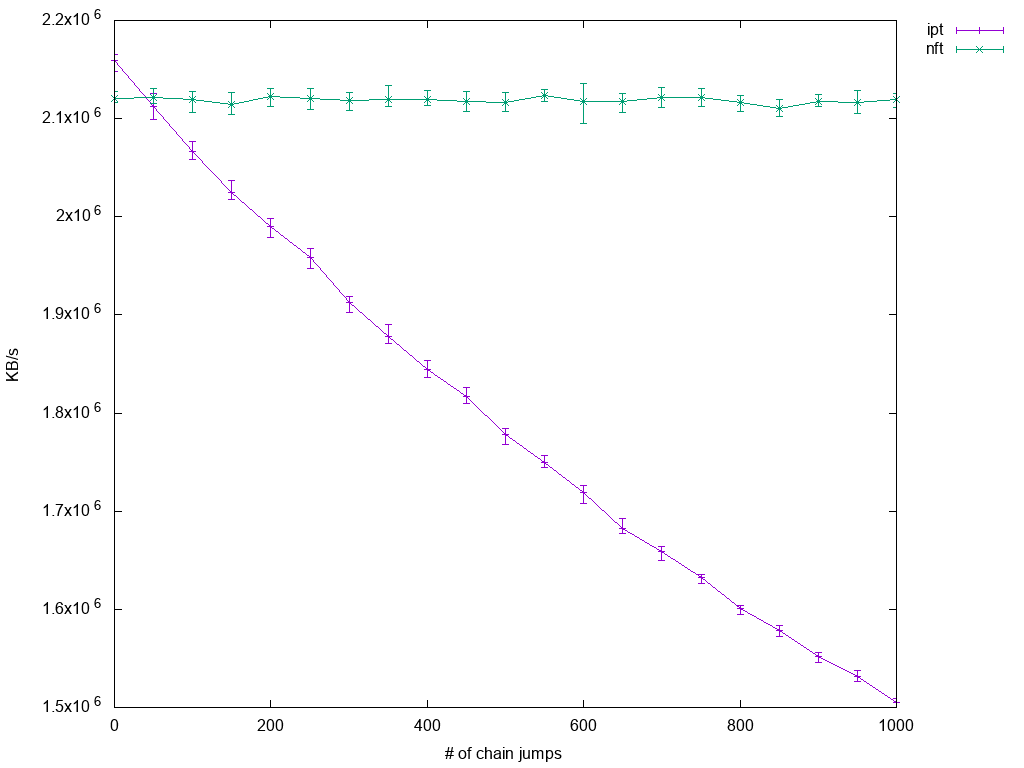
While iptables performance suffers quite linearly with number of custom chains, nftables performance scales perfectly. Here, nftables even starts to become beneficial a little earlier as before: With 50 rule jumps in place, mean performance of nftables is already a little ahead of iptables'.
Performing DDoS Protection
For a final test setup, I decided to look at a scenario, which might happen in productive environments, namely dealing with distributed denial of service attacks. The problem with them is that there is often not an easy way to match all malicious packets at once, so the only thing to fall back to is establishing a blacklist for all the different source IP addresses. And here's also the connection to the previous setups: Matching many unrelated IP addresses is likely to turn into large numbers of rules packets have to traverse.
I tried to collect as many different ways of performing the task at hand as possible. So, for iptables, I had the option to either use ipset or not and in both cases, I could drop packets in either INPUT chain or PREROUTING (in mangle table). For nftables, options are similar: Either use a named set or not and hook the created table into filter or prerouting - but there's a third option, namely using the netdev table (which uses the ingress hook of an interface which has to be specified). In order to keep the number of setups at a sane level, I decided to sacrifice nftables tests for input hook though. Sometimes, tc is mentioned as high performance alternative to using any netfilter-based approach, so I included that as well.
Since both the tc based setup and nftables' netdev table focus on a specific interface, I assumed it's only fair to enhance all other setups by matching on incoming interface as well. Most setups are obvious as the difference to previous tests is just marginal, so let's just have a look at tc and netdev table:
if [[ $SCALE -eq 0 ]]; then
        tc qd add dev enp3s0 handle ffff: ingress
else
        for j in {1..10}; do
                tc filter add dev $iface parent ffff: protocol ip \
                        u32 match ip src 10.11.$SCALE.$j action drop
        done
fi
Blacklisting individual source IP addresses with tc means having an ingress qdisc and then for each address a filter matching it with attached drop action. Not exactly intuitive, it seems to scale badly and (what's worst) the number of filters per qdisc is limited to a little more than 1000.
To make use of nftables' netdev table, one just has to use 'ingress' as a hook value and specify the interface name:
if [[ $SCALE -eq 0 ]]; then
        nft add table netdev t
        nft add chain netdev t c \
	         '{ type filter hook ingress device enp3s0 priority 0; }'
        nft add chain netdev t test
        nft add rule netdev t c jump test
        nft add rule netdev t c accept
else
        for j in {1..10}; do
                nft add rule netdev t test ip saddr 10.11.$SCALE.$j drop
        done
fi
One more note regarding how testing was done: Benchmarking using just iperf as before wouldn't make a difference regarding the point at which packets were dropped - since the test setup would see only packets which were accepted anyway, it doesn't make a difference whether they traverse rules a little earlier or later. The difference comes when a considerable amount of traffic is actually blacklisted: In this case, the earlier the drop happens, the less CPU cycles should be consumed by it. So in order to simulate this, I created a stream of 100k packets per second using pktgen, which match the blacklist criteria.
Finally, here are the plotted results:
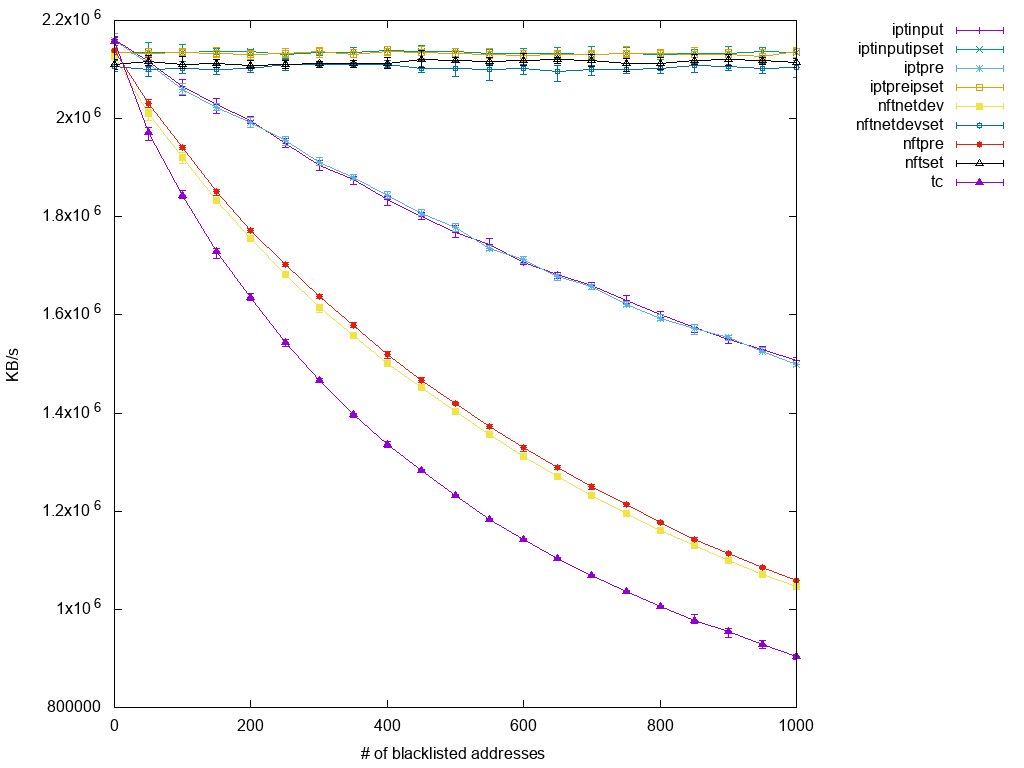
The picture is a bit overcrowded since it contains nine graphs at once, so let's examine it from bottom up:
The lowest graph is the one for tc. To my surprise, it's performance is so bad that at the first point of measurement, namely with just 50 blacklisted IP addresses, it already undercuts all other test setups. Slightly better (but still with very bad scalability) follow two nftables graphs, namely those that forwent to use a set. Their performance being worse than iptables is already known and displayed here as well, as the next higher two graphs are those for native iptables setups, i.e. not using ipset helper. The margin between those is quite considerable, so iptables seem to perform better under higher base CPU load. On the other hand, we see that there is no difference whether rules are applied to prerouting, input or even netdev hooks. This might be a bug in my setup, or the way I test simply doesn't expose the difference enough. Anyway, what's left are the scalable setups on top: nftables using a named set and iptables with ipset. Again, iptables just slightly ahead of nftables and virtually no difference between prerouting/netdev and input.
Conclusion
To me, the most prominent information to draw from this little experiment is that similar iptables and nftables setups are comparable in performance. Yes, nftables is usually a bit behind, but given that development focus at this point is still on functionality rather than performance, I'm sure this is subject to change in the near future.
Regarding scalability, ipset is a blessing to any iptables set up. Nftables follow the path with their native implementation of sets and take the concept to a higher level by extending the list of supported data types and allowing it to be used in further applications using (verdict) maps.
Although I am not fully convinced of my last test's results, I think it still proves that there is no point in breaking a leg over implementing something in tc if the same is possible in netfilter. At least when it just results in a qdisc with many filters attached, the worst implementation in netfilter still outperforms it.
Whether you are new to Linux or have experience, downloading this cheat sheet can assist you when encountering tasks you haven’t done lately.
Last updated: February 6, 2024
