Maybe you have so much memory in your computer that you never have to worry about it --- then again, maybe you find that some C or C++ application is using more memory than expected. This could be preventing you from running as many containers on a single system as you expected, it could be causing performance bottlenecks, and it could even be forcing you to pay for more memory in your servers.
You do some quick "back of the envelope" calculations to estimate the amount of memory your application should be using, based on the size of each element in some key data structures, and the number of those data structures in each array. You think to yourself, "That doesn't add up! Why is the application using so much more memory?" The reason it doesn't add up is that you didn't take into account the memory space being wasted in the layout of the data structures.
Wasted Memory
Memory in modern computers is addressable as bytes (eight binary digits). Groups of bytes are used in C (and other languages) to form basic types such as short, int, long, float, and double. However, to allow the processor to more quickly quickly access data stored in these basic types, the datum is placed on a natural alignment.
Natural alignment describes the practice in which the address of the data type is a multiple of the size of the data type. Using natural alignment allows the processor to avoid doing multiple memory operations to access a single value. This natural alignment has a cost, and it can lead to larger data structures.
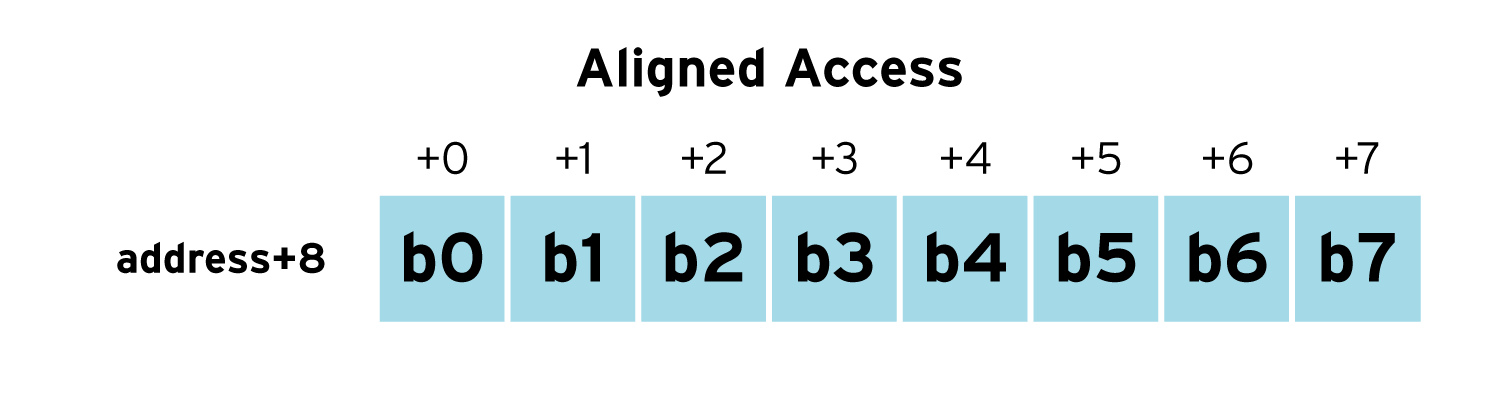
To improve the speed of memory accesses and processor performance, each memory access on modern processors deals with a larger group of bits than a single eight bit byte, typically, 64 bits (eight bytes) or 128 bits (16 bytes). For example, a double precision floating point value is made up of eight bytes (b0 through b7) and we assume the memory width is eight bytes. If the double precision floating point number is naturally aligned, the entire value starting at address+0 can be read with a single memory access (as can be seen in the diagram below.)
However, if the floating point number is not aligned (unaligned), it straddles two words in memory and two read must be performed (one read for b0 through b3 and another read for b4 through b7). Additionally, the processor needs to paste the bits from the two reads into a single 64-bit value which also takes time.
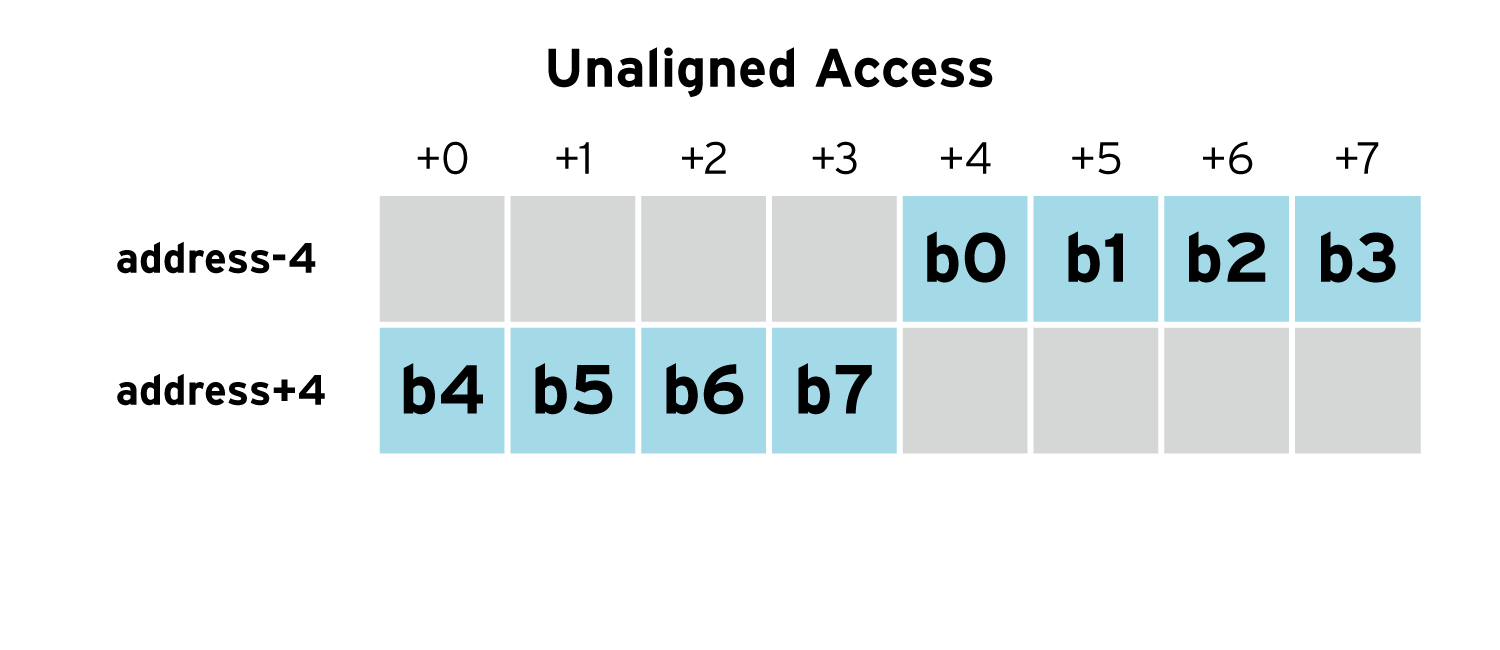
To avoid overhead due to the unaligned memory accesses, C and C++ place data at locations such that the values are naturally aligned in memory. The compiler wastes a few bytes here and there to ensure the each value is naturally aligned --- CPU time is saved, but memory is wasted.
This padding in the layout can make data structures significantly larger. For example, lets assume we have a simple data structure used to map road segments "from" one place "to" another place, including and the "distance" between the two points. This data structure could be stored in an array and used in a shortest path algorithm to determine how to get from point "a" to point "b".
struct edge {
 int from;
 double distance;
 int to;
} edge;
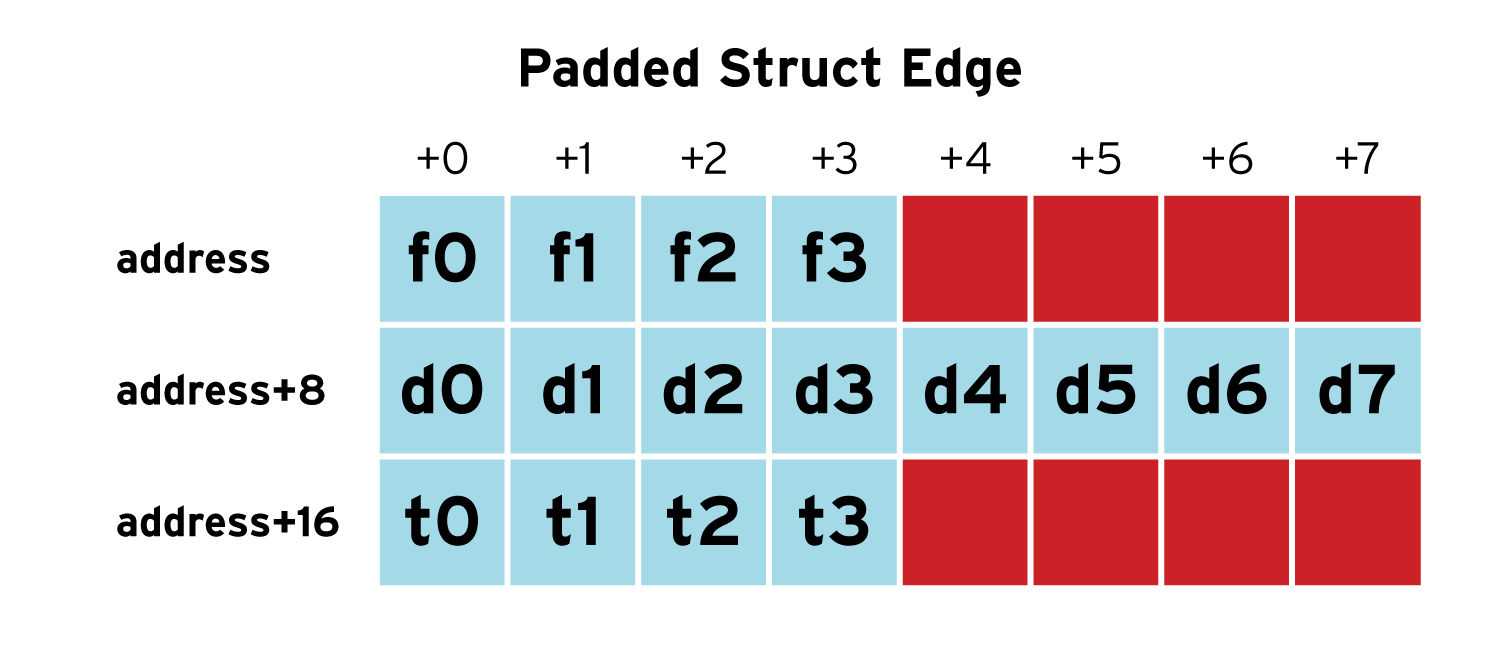
On an x86_64 machine, an int is four bytes and double is eight bytes. Thus, the above data structure ends up requiring padding between the from and distance fields to ensure that the distance field is naturally aligned. The data structure needs to be aligned on eight byte boundaries, so there are an additional four bytes of padding after the to field. This results in a total size for the data structure of 24 bytes. Each element in an array made up of edge data structures are naturally aligned.
The padded struct edge below is a visual representation of the struct edge, with f0-f3, d0-d7, and t0-t3 the bytes for from, distance, and to fields respectively. The unused bytes are marked in red. As we can see, one entire third of the data structure (eight of the 24 bytes) is wasted space! If we have a very complicated road system for a country that has 100 million road segments, it would require 2.4GB of space in memory where 800MB of that is wasted due to padding in the data structure. Memory bandwidth performance waste is also a downside --- this occurs when, rather than reading or writing useful data, the processor is reading or writing the unused padding.
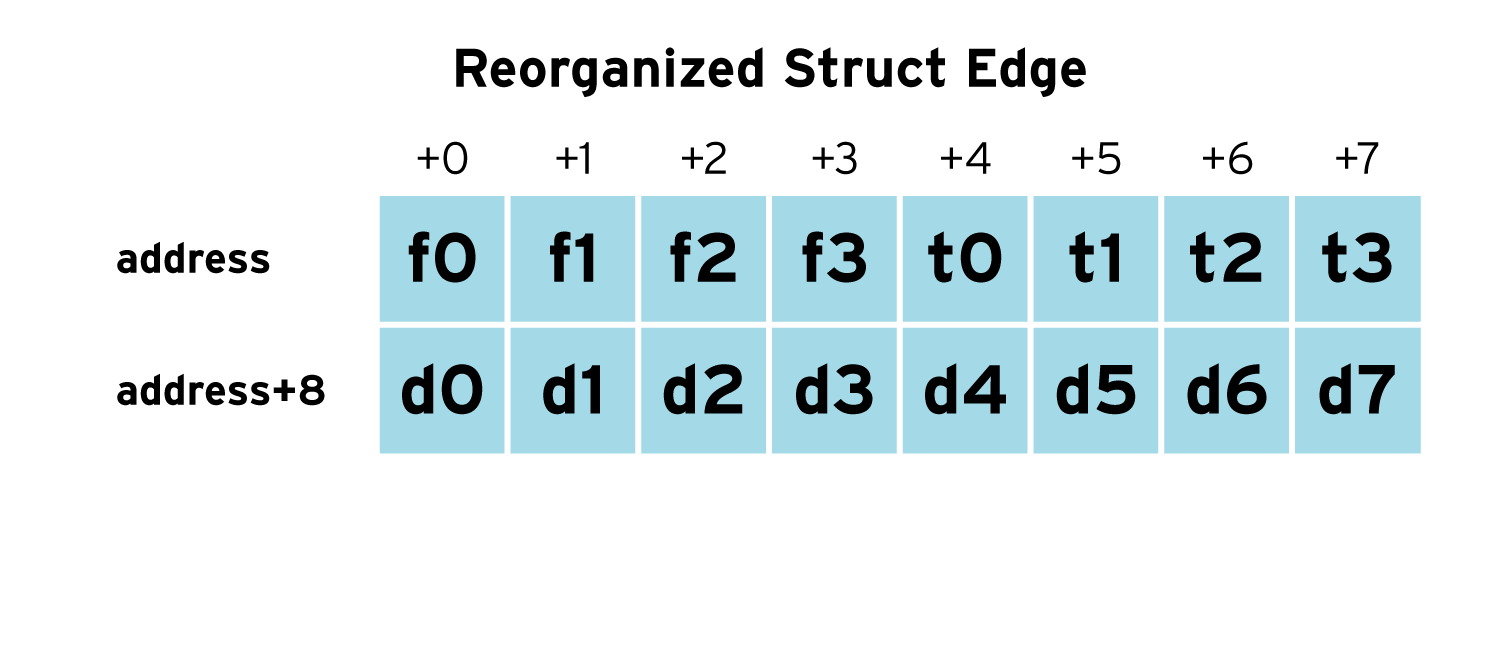
With knowledge about the size and natural alignment requirements of the types we can reorder the data structure to avoid the padding. The following edge data structure requires no padding on the x86_64 and reduces it size to 16 bytes as show by the diagram below. For a 100 million entry array it would require 1.6GB of space, 800MB less than the previous version of the data structure that required padding --- this is achieved simply by re-ordering the elements in the data structure.
struct edge {
 int from;
 int to;
 double distance;
};
Cautions
One needs to be careful when reordering the data structures to avoid padding. Not all processors have the same layout constraints for data types. Also software Application Binary Interface (ABI) compatibility might limit changes in layout. Blindly changing the layout may not reduce the use of padding, or worse yet it may cause code to fail.
Different processors have different sizes and alignment constraints for each of the primitive data types. For example, 32-bit processors have four-byte pointers aligned on four-byte boundaries while 64-bit processors have pointers have eight-byte pointers aligned on eight-byte boundaries. A layout that requires no padding on a 32-bit processor may require padding on a 64-bit processor. Conversely, a layout that requires no padding on a 64-bit processor might require padding on a 32-bit processors.
Often code makes use of existing libraries functions and kernel system calls. The data structures passed to those separately compiled pieces of code form Application Binary Interfaces (ABIs). The layout of those data structures need to remain the same, and you will be unable to change the layout of the data structures.
Tools
There are some tools to help identify these problems. The GCC compiler has the "-Wpadded" option to notify you when padding in present in the data structures. Compiling code with the wasteful version of the edge data structure yields:
$ gcc -g -o edge edge.c -Wpadded
edge.c:6:10: warning: padding struct to align ‘distance’ [-Wpadded]
 double distance;
 ^
edge.c:8:1: warning: padding struct size to alignment boundary [-Wpadded]
 } edge;
 ^
There is also the pahole (Poke-a-hole) tool in the dwarves package available in EPEL 6 and Fedora that reads the debug information generated when code is compiled with the "-g" option. Below is example output. It shows the starting offset and size of each element in the data structure, where padding is placed in the data structure, the total size of the structure, and the total padding. pahole also provides information about the how the data structure would be layout out in cache lines. This cache line information can be used to group related fields in the data structure together to improve cache performance.
$ pahole -a -V ./edge
struct edge {
 int from; /* 0 4 */

/* XXX 4 bytes hole, try to pack */

double distance; /* 8 8 */
 int to; /* 16 4 */

/* size: 24, cachelines: 1, members: 3 */
 /* sum members: 16, holes: 1, sum holes: 4 */
 /* padding: 4 */
 /* last cacheline: 24 bytes */
};
Fixing the reorganizing the data structure and analysing with pahole yields:
$ pahole -a -V ./edge
struct edge {
 int from; /* 0 4 */
 int to; /* 4 4 */
 double distance; /* 8 8 */

/* size: 16, cachelines: 1, members: 3 */
 /* last cacheline: 16 bytes */
};
Use Memory Efficiently
You might not be able to eliminate every instance of memory waste due to padding in data structures, but minimizing the padding can significantly reduce the waste. This blog entry just provides a very small introduction to the issue. You should check out the further reading links for more details about the issues of data structure layout.
Further Reading
The Lost Art of C Structure Packing by Eric S. Raymond
64-bit and Data Size Neutrality
Porting Linux applications to 64-bit systems by Harsha S. Adiga
GCC Warning Options
The 7 dwarves: debugging information beyond gdb by Arnaldo Carvalho de Melo
Poka-a-hole and friends by Goldwyn Rodrigues

