Redhat Developers  Logo
  • AI

    Get started with AI

    • Red Hat AI
      Accelerate the development and deployment of enterprise AI solutions.
    • AI learning hub
      Explore learning materials and tools, organized by task.
    • AI interactive demos
      Click through scenarios with Red Hat AI, including training LLMs and more.
    • AI/ML learning paths
      Expand your OpenShift AI knowledge using these learning resources.
    • AI quickstarts
      Focused AI use cases designed for fast deployment on Red Hat AI platforms.
    • No-cost AI training
      Foundational Red Hat AI training.

    Featured resources

    • OpenShift AI learning
    • Open source AI for developers
    • AI product application development
    • Open source-powered AI/ML for hybrid cloud
    • AI and Node.js cheat sheet

    Red Hat AI Factory with NVIDIA

    • Red Hat AI Factory with NVIDIA is a co-engineered, enterprise-grade AI solution for building, deploying, and managing AI at scale across hybrid cloud environments.
    • Explore the solution
  • Learn

    Self-guided

    • Documentation
      Find answers, get step-by-step guidance, and learn how to use Red Hat products.
    • Learning paths
      Explore curated walkthroughs for common development tasks.
    • Guided learning
      Receive custom learning paths powered by our AI assistant.
    • See all learning

    Hands-on

    • Developer Sandbox
      Spin up Red Hat's products and technologies without setup or configuration.
    • Interactive labs
      Learn by doing in these hands-on, browser-based experiences.
    • Interactive demos
      Click through product features in these guided tours.

    Browse by topic

    • AI/ML
    • Automation
    • Java
    • Kubernetes
    • Linux
    • See all topics

    Training & certifications

    • Courses and exams
    • Certifications
    • Skills assessments
    • Red Hat Academy
    • Learning subscription
    • Explore training
  • Build

    Get started

    • Red Hat build of Podman Desktop
      A downloadable, local development hub to experiment with our products and builds.
    • Developer Sandbox
      Spin up Red Hat's products and technologies without setup or configuration.

    Download products

    • Access product downloads to start building and testing right away.
    • Red Hat Enterprise Linux
    • Red Hat AI
    • Red Hat OpenShift
    • Red Hat Ansible Automation Platform
    • See all products

    Featured

    • Red Hat build of OpenJDK
    • Red Hat JBoss Enterprise Application Platform
    • Red Hat OpenShift Dev Spaces
    • Red Hat Developer Toolset

    References

    • E-books
    • Documentation
    • Cheat sheets
    • Architecture center
  • Community

    Get involved

    • Events
    • Live AI events
    • Red Hat Summit
    • Red Hat Accelerators
    • Community discussions

    Follow along

    • Articles & blogs
    • Developer newsletter
    • Videos
    • Github

    Get help

    • Customer service
    • Customer support
    • Regional contacts
    • Find a partner

    Join the Red Hat Developer program

    • Download Red Hat products and project builds, access support documentation, learning content, and more.
    • Explore the benefits

.NET Entity Framework Core 1.0 RC2

May 24, 2016
Don Schenck
Related topics:
.NETLinux
Related products:
Red Hat Enterprise Linux

    As .NET Core matures into a production-ready software product, more and more information is becoming available regarding what to expect. While the changes haven't been too big to understand, there are breaking changes and they do require that developers get some education before forging ahead.

    That applies to Entity Framework Core 1.0 (EF Core) as much as any other component of what is broadly termed ".NET Core". Granted, EF Core is not a part of .NET Core -- and neither is ASP.NET, nor MVC -- but all the parts work together and are moving forward. In other words, you need to learn about the .NET Framework and ASP.NET and MVC and EF Core -- not to mention your ongoing education with the today's newest JavaScript framework -- if you wish to remain a leading web developer.

    A Short History Of The (EF) World

    Entity Framework started with version 3.5, which is a neat trick if you think about it. The first two versions, 3.5 and 4, were built into the .NET Framework --- meaning you had to wait until a new Framework release if you wanted any improvements or (shudder) bug fixes. It was the very model of a monolithic framework --- did Gilbert & Sullivan write that? Any tooling for EF was built into Visual Studio.

    Versions 4.x through 5 were a bit of an improvement; the core functions were still baked into the .NET Framework, but new components were available on NuGet. Again, the tooling was available in Visual Studio.

    Version 6.x saw EF completely removed from the .NET Framework --- can you see an evolution here? --- and were made available from NuGet, with any tooling available from the download center. Finally, things were separated and available more quickly.

    With EF Core, things are not just separate, they're even more specific. You don't even get relational database support "out of the box" any more.

    (Seriously; when did you last get software in a box?)

    What does this mean? You write code to get what you want --- I've heard it referred to as "pay to play" --- and you get speed. I've seen decent real-world demos that were 80 percent faster. As Colin Chapman said, "Add lightness". MOAR SPEED!

    Less memory and less CPU usage, too. That's great for mobile applications, sure, but it's also great for cloud-based applications where you pay for CPU cycles.

    What's Missing?

    As you might expect, with a version 1.0 of anything, some things aren't quite ready. Doing without lazy loading, stored procedure mapping, and a robust LINQ translator are prices to be paid for being on the cutting edge. Basic LINQ expressions work fine, but those full-page LINQ queries won't fly just yet.

    You can see a roadmap for EF Core on the EF Core wiki page.

    "Yeah, yeah, let's see some code."

    Example Code: Using a SQL Server Database
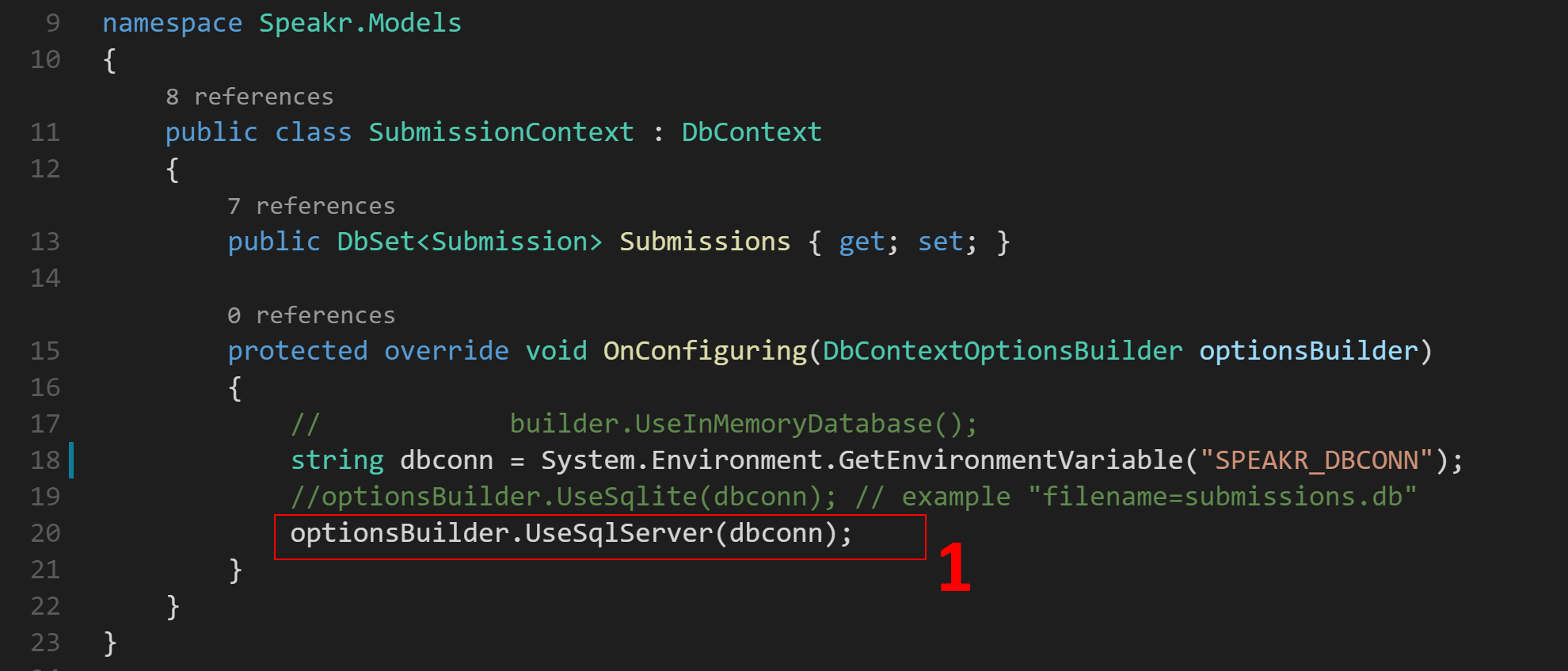
    Notice in note 1, you now specifically call out your database provider. In this case, SQL Server with a connection string. This could just as easily have been <code>.UseSqlite(dbconn) to use a SQLite database, as noted in the comments. Again, bits are added only as you need them, saving memory and CPU cycles and improving performance.

    Another performance improvement involves improved SQL statement generation by EF Core. In EF 6.x, if you were writing several records to a database, EF would create an INSERT statement for each record. With EF Core, that's been reduced to one (albeit lengthy) SQL statement. One round trip now, versus N trips before. You can even, if you wish, set the "batch size" for batched commands.

    (Side note: I wanted to capture the generated SQL for a large insert in EF Core, but the Context.Database.Log function is not available in EF Core --- just more evidence of the newness of a version 1.)

    There are other, more in-depth improvements and changes in EF Core; I've provided enough here to get you started. I suggest following along at the github repo to keep up-to-date.

    Finally, you can run this on Windows, sure, but you can really push the envelope if you want to: Grab a zero-dollar, developer's copy of Red Hat Enterprise Linux to run in a Virtual Machine and start writing #dotNETonLinux.

    All The Best,

    -- Don

    For additional information and articles on .NET Core visit our .NET Core web page for more on this topic.


    Last updated: March 15, 2023

    Recent Posts

    • Debugging image mode with Red Hat OpenShift 4.20: A practical guide

    • EvalHub: Because "looks good to me" isn't a benchmark

    • SQL Server HA on RHEL: Meet Pacemaker HA Agent v2 (tech preview)

    • Deploy with confidence: Continuous integration and continuous delivery for agentic AI

    • Every layer counts: Defense in depth for AI agents with Red Hat AI

    Red Hat Developers logo LinkedIn YouTube Twitter Facebook

    Platforms

    • Red Hat AI
    • Red Hat Enterprise Linux
    • Red Hat OpenShift
    • Red Hat Ansible Automation Platform
    • See all products

    Build

    • Developer Sandbox
    • Developer tools
    • Interactive tutorials
    • API catalog

    Quicklinks

    • Learning resources
    • E-books
    • Cheat sheets
    • Blog
    • Events
    • Newsletter

    Communicate

    • About us
    • Contact sales
    • Find a partner
    • Report a website issue
    • Site status dashboard
    • Report a security problem

    RED HAT DEVELOPER

    Build here. Go anywhere.

    We serve the builders. The problem solvers who create careers with code.

    Join us if you’re a developer, software engineer, web designer, front-end designer, UX designer, computer scientist, architect, tester, product manager, project manager or team lead.

    Sign me up

    Red Hat legal and privacy links

    • About Red Hat
    • Jobs
    • Events
    • Locations
    • Contact Red Hat
    • Red Hat Blog
    • Inclusion at Red Hat
    • Cool Stuff Store
    • Red Hat Summit
    © 2026 Red Hat

    Red Hat legal and privacy links

    • Privacy statement
    • Terms of use
    • All policies and guidelines
    • Digital accessibility

    Chat Support

    Please log in with your Red Hat account to access chat support.