In our previous article, we described the Software Catalog and Software Template components of Red Hat Developer Hub at a high level. This article will go deeper into these concepts to reveal how these components are constructed and how Red Hat Developer Hub uses them to populate the internal and promote discovery.
Common fields
Entities in Red Hat Developer Hub follow common schemas similar to resource definitions in Kubernetes. All entities have common fields and metadata, while the specific kinds have various specifications.
The following is an example of the component entity’s common fields.
apiVersion: backstage.io/v1alpha1
kind: Component
metadata:
  name: quarkus-app-openshift
  title: quarkus-app-openshift
  description: "A quickstart Quarkus app"
  annotations:
    github.com/project-slug: rhdh-beginners-guide/quarkus-app-openshift
    backstage.io/kubernetes-id: quarkus-app-openshift
    argocd/app-name: quarkus-app-openshift-rhdh
  tags:
    - quarkus
    - java
    - maven
Each manifest will define an apiVersion and kind to define the type of entity it represents. With these two fields, Developer Hub can match with a schema internally and know how to act on the entity. The metadata fields define general information about the entity and its relationship to various plug-ins.
The name field is a unique string used to identify the entity and meant to easy for humans to parse. Note that names only have to be unique within namespaces. An entity with no defined namespace uses "default" as the namespace. Names can only contain the characters [0-9], [a-zA-Z], with [-_.] as potential separators.
The title field is a display name of the entity which will be displayed in the Developer Hub UI. This may be a more natural language version of the component name with spaces or special characters. This field is intended for human eyes, not for referencing by Developer Hub or its extensions.
The description field allows entry of a concise, human readable description of the entity. Longer descriptions should be delegated to documentation.
Annotations provide non-identifying metadata important to the entity. These annotations work in the same way as Kubernetes object annotations. In this example, annotations are provided showing the GitHub repository of the component, the backstage id, as well as the ArgoCD app-name used by an ArgoCD extension. These show details related to the entity, but do not classify it in any fashion. Annotations with extensions can also control which tabs display in the Developer Hub UI for an entity.
Labels provide metadata that classify the current entity and often are used in queries or filters.
Tags are a list of single valued strings that classify the entity based on its makeup. Tags could reference languages, frameworks, specific technologies, or any usage of tools. For example, our example component is a Quarkus application, so we add tags for Quarkus, Java, and Maven. If a Template creates this component as well as supporting Tekton pipelines and create an ArgoCD application, we might add tags for “quarkus, java, maven, tekton, argocd.” This allows users to filter entities by tag when using the UI based on the technologies and frameworks they are interested in using.
Refer to the documentation for more details.
Anatomy of a component
A component is a representation of a piece of software in Developer Hub. The YAML manifest describes the piece of software using the common fields as well as specifications for information on type, lifecycle, owner, and other items specific to a component.
apiVersion: backstage.io/v1alpha1
kind: Component
metadata:
  name: quarkus-app-openshift
  title: quarkus-app-openshift
  annotations:
    github.com/project-slug: rhdh-skillz/quarkus-app-openshift
    backstage.io/kubernetes-id: quarkus-app-openshift
    argocd/app-name: quarkus-app-openshift
  tags:
    - quarkus
    - java
    - maven
spec:
  type: service
  lifecycle: experimental
  owner: fruitdevs
  dependsOn:
    - resource:default/fruit-db
  dependencyOf:
    - component:default/fruit-web-lookup
  providesApis:
    - fruit-api
The type field defines the function of the component. Values for this field could include “service” for backend services that provide apis or “library” for components representing an npm module or Java library. This field does not restrict values, so organizations can customize entities as fit by their development model.
The lifecycle field is a string that defines the state of the component. A new microservice may use “experimental” to denote that it is not ready for use, while a mature component may use “production.” A component which is being sunset may use "deprecated" or other enterprise specific terms.
The owner field denotes a specific entity in Developer Hub that bears responsibility for the component. The owner can be a reference to a specific user or group. In the provided example, the component is owned by the fruitdevs group.
The dependsOn and dependencyOf fields denote resources and components this component relies upon and consumed by respectively. Additionally, the consumesApi and providesApi fields allow more granular information on dependencies for this component. These fields are optional, but help fill in a high-level picture of a component and where it fits in a dependency mapping.
Anatomy of a resource
A resource is a representation of infrastructure related to components registered in Developer Hub. These resources could include dependent databases, S3 buckets, content delivery networks, or any external dependency that may be required. The YAML manifest describes the piece of software using the common fields as well as specifications for information on type, lifecycle, owner, and other items specific to a resource.
apiVersion: backstage.io/v1alpha1
kind: Resource
metadata:
  name: fruit-db
spec:
  type: database
  owner: fruitdevs
  dependencyOf:
    - component:default/quarkus-app-openshift
The type field broadly defines what infrastructure a resource represents. The resource could represent something specific like a database or an "s3-bucket" or more general such as a "kubernetes-cluster."
The owner field denotes a specific entity in Developer Hub that bears responsibility for the resource. The owner can be a reference to a specific user or group. In the provided example, the group fruitdevs owns the resource.
You can use the dependsOn and dependencyOf fields to tie the resource to other specific components and resources. This will allow a high level view of components to show how the resource may be used throughout the enterprise or across teams.
Anatomy of an API
An API describes an interface that can be exposed by a component in Developer Hub. The YAML manifest provides the definition of an API document which can be viewed and searched for in the Developer Hub UI.
apiVersion: backstage.io/v1alpha1
kind: API
metadata:
  name: fruit-api
  description: Retrieve fruit data
spec:
  type: openapi
  lifecycle: production
  owner: fruitdevs
  definition: |
    openapi: "3.0.0"
    info:
      version: 1.0.0
      title: Fruit API
    servers:
      - url: http://fruitplanetexample.com/v1
    paths:
      /fruits:
        get:
          summary: List all fruits
The type field specifies the type of API document provided. You can use any string value, but the Developer Hub UI tools use common types such as "openapi" or "grpc" to display the document in a human readable form.
The lifecycle field is a string that defines the state of the component. A new API may use "experimental" to denote that it is not ready for use and constantly changing, while a mature API may use "production" to denote stability. An API which is being sunset may use "deprecated" or other enterprise specific terms.
The owner field denotes a specific entity in Developer Hub that bears responsibility for the API. The owner can be a reference to a specific User or group. In the provided example, the API is owned by the fruitdevs group.
The definition field is the definition of the API. The format of this varies depending on which type of API is displayed. For example, if the API follows the openapi specification, the entire OpenAPI document should be placed in the definition to be parsed and displayed to users in the Developer Hub UI.
Software Templates
As in Kubernetes, Developer Hub uses the fields apiVersion and kind to define what type of file we are creating. These will generally only change between versions of Backstage.
The metadata section allows you to define the name of the template, a title to display in the UI, a description of what the template does, and tags containing the technologies used in the template. These fields are useful in the UI to filter out different types of runtimes or capabilities of a template.
apiVersion: scaffolder.backstage.io/v1beta3
kind: Template

metadata:
  name: quarkus-on-openshift-template
  title: Create a Quarkus app for OpenShift
  description: Create a Quarkus app for OpenShift
  tags:
    - quarkus
    - java
    - maven
    - openshift
    - argocd

spec:
  owner: group:superusers

  type: service

  steps:

…
The owner field denotes a specific entity in Developer Hub that bears responsibility for the API. The owner can be a reference to a specific User or group. In the provided example, the API is owned by the fruitdevs group.
The type field defines the type of component the template will create such as a backend service, frontend, library, etc. This should match the type given in the template’s component. This can be used to filter Templates in the Developer Hub UI.
Steps
Steps are the "work" done for the template, such as creating a new GitHub repository based on a template. The step will contain the following:
- Id: Internal ID that other steps can reference.
- Name: Display name for the UI.
- Actions: Instantiation of a plug-in to do various functions. Basic plug-ins are available in Developer Hub by default. Other plug-ins are available, but must be enabled through the Developer Hub configuration such as built-in dynamic plug-ins. External plug-ins can also be installed, see the documentation for details.
- Input: The input requirements of the plug-in. You can view installed plug-ins in the Developer Hub UI. at Administration -> Extensions. Available actions can be in the Developer Hub UI by clicking self-service (+ beside your user) -> three dots on the right side of the window -> Installed Actions.
spec:
  .......
  steps:
    - id: sourceCodeTemplate
      name: Generating the Source Code Component
      action: fetch:template
      input:
        url: ./skeleton
        values:
          orgName: ${{ parameters.orgName }}
          appName: ${{ parameters.appName }}
          domainName: ${{ parameters.domainName }}
          groupId: ${{ parameters.groupId }}
          javaPackage: ${{ parameters.javaPackage }}
          apiPath: ${{ parameters.apiPath }}
          namespace: ${{ parameters.namespace }}

    - id: publish
      name: Publishing to the Source Code Repository
      action: publish:github
      input:
        allowedHosts: ['github.com']
        description: ${{ parameters.description }}
        repoUrl: github.com?owner=${{ parameters.orgName }}&repo=${{ parameters.appName }}
        defaultBranch: ${{ parameters.repoBranchName }}
        protectDefaultBranch: false
        repoVisibility: public
    - id: register
      name: Registering the Catalog Info Component
      action: catalog:register
      input:
        repoContentsUrl: ${{ steps.publish.output.repoContentsUrl }}
        catalogInfoPath: /catalog-info.yaml
These first steps take parameters and use a skeleton (templated set of files) to generate files, then the second step uses the github plugin to push it to a new github repository. Finally, the third step registers the catalog item for the repo in Developer Hub. Note that the third step references the output of the second step.
Refer to the documentation for more information.
Output
Output allows the display of important information from the Template execution to a user. Template variables and step results are referenced to display important information in the scaffolder frontend (Figure 1) where the user can easily view. Commonly, this may be information such as locations of source code repositories or references to generated entities.
spec:

…
  output:
    links:
      - title: Open the Source Code Repository
        url: ${{ steps.publish.output.remoteUrl }}
      - title: Open the IaC Repository
        url: ${{ steps.publish-config.output.remoteUrl }}
      - title: Open the Catalog Info Component
        icon: catalog
        entityRef: ${{ steps.register.output.entityRef }}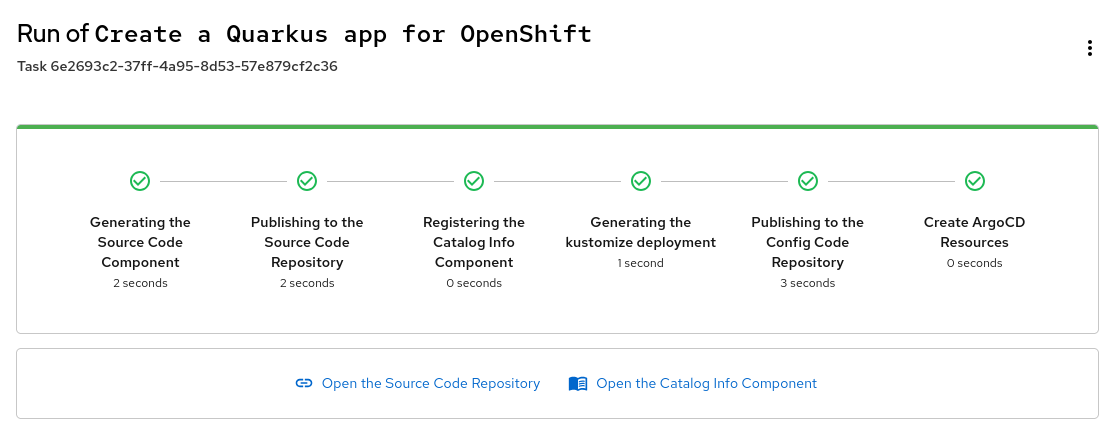
Refer to the documentation for more details about these outputs.
Action: Skeleton template
A skeleton is a sample application modified with variables important to the specific project. This template is used by the fetch:template action in concert with input variables to create final output. For a Quarkus application, you may set up variables for things like the org name, branch name, java path, etc. You can specify the variables within files or in the file structures themselves (Figure 2). This skeleton is consumed by Steps in the Template to create the final application structure as a sample application.
Note: The skeleton does not need to be a full application. It could be something you wish to add to a git repository such as sample kubernetes manifests, application pipeline configurations, etc.
Example of using variables in a Quakrus resource:
package ${{ values.groupId}};

import jakarta.ws.rs.GET;
import jakarta.ws.rs.Path;
import jakarta.ws.rs.Produces;
import jakarta.ws.rs.core.MediaType;

@Path("${{ values.apiPath }}")
public class GreetingResource {

    @GET
    @Produces(MediaType.TEXT_PLAIN)
    public String hello() {
        return "Hello from Quarkus REST";
    }
}
Example of using variables in a folder structure
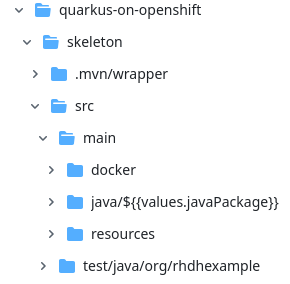
It is likely that a component entity should be defined alongside most application template skeletons.
You can review a full example.
Conclusion
This deep dive has described the details of components, APIs, resources, and Templates, showing how they are used to describe your enterprise applications and create new workflows. Red Hat Developer Hub uses these entities to promote discoverability of services and cataloging of your enterprise software, empowering teams with greater knowledge of your service offerings.
In the next article, we will describe how to install a simplified instance of Red Hat Developer Hub for testing and evaluation. In the meantime, take advantage of the free trial to explore Red Hat Developer Hub.

