We have recently announced the Tech Preview of Red Hat Trusted Libraries, focused on the python ecosystem (expansion to other languages later), providing python libraries that have been built from source, signed & attested - in Red Hat’s trusted, SLSA Level 3 compliant build system, based on Konflux.
In this article, we’d like to drill down and explain the security and integrity features - basically, how using the Red Hat python index enhances your overall security posture.
We’ll start with an overview of the various components and how they work together to provide integrity and proof.
In the second part, we’ll get hands-on, so summon your python-fu.
Before we start - if you’re interested and you’d like to become part of the journey and help shape the outcome, use this simple sign up form. We look forward to working with early adopters to shape the future of trusted open source!
Part I - Trust and Integrity
“Trust? Well, yeah. In an ideal world maybe - but what about Zero Trust principles?” I hear you say.
And - you are right.
In the IT world - you shouldn’t implicitly trust anyone, not even Red Hat or our Red Hat Trusted Libraries Python index - unless we can provide attestations to prove integrity:
“Think of it this way—integrity is the quality of a system being secure, while attestation is the act of proving it with undeniable, cryptographic evidence.”
Applied from the broader context - the “system” is our usage of Python libraries in our programs and services. So where is the “undeniable, cryptographic evidence”?
For Red Hat Trusted Libraries,
- All Python wheels are built from source, according to the python distribution format and PEP 427
- The build system generates the SLSA build attestation and signs it using Red Hat Trusted Artifact Signer (Red Hat’s production version of the sigstore project) and the Red Hat release3 key , then wraps it into a Python attestation bundle
- The attestation bundle is distributed alongside the wheel (as per PEP 740)
How does this build trust and integrity?
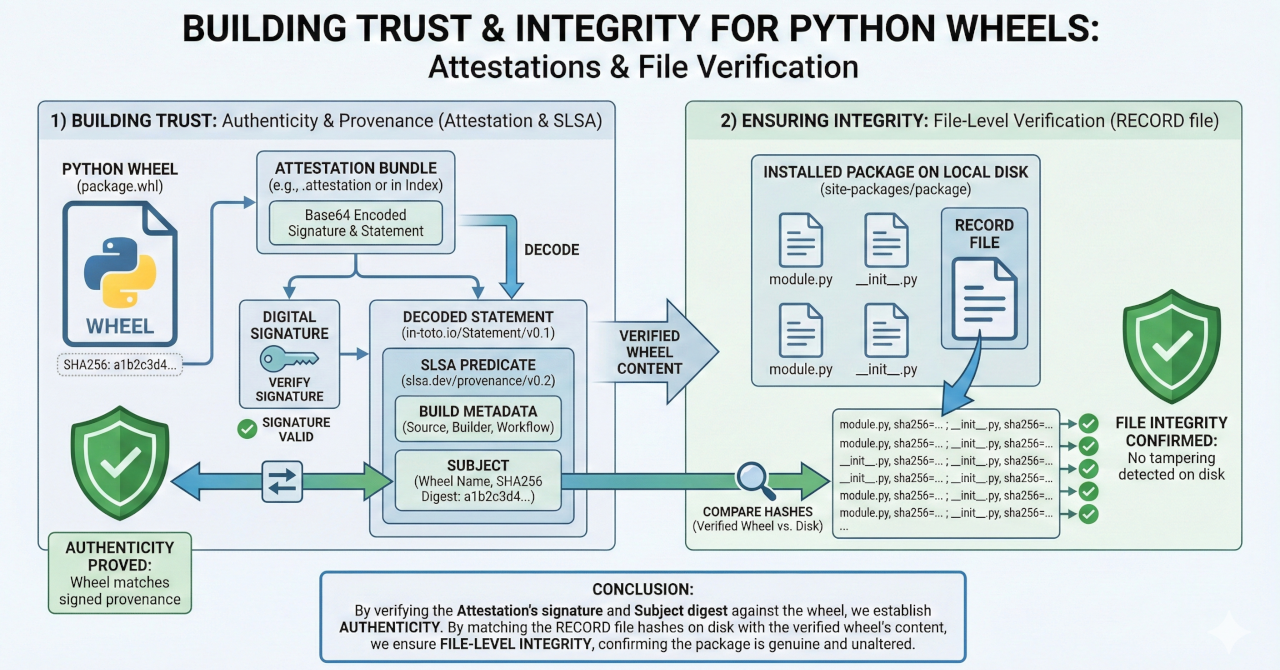
- For any wheel, the Python wheel attestation bundle contains at least one signature and statement in base64 encoded format
- The decoded statement (of type https://in-toto.io/Statement/v0.1 ) contains a SLSA predicate (of type https://slsa.dev/provenance/v0.2 ) that lists recorded build metadata, as well as the subject.
- The subject (listed both with sha256 digest and name) is the wheel that this signed predicate statement refers to
So, if we can verify the attestation’s statement signature and the sha256 digest matches the wheel’s sha256 fingerprint, we can prove authenticity and integrity
- Each wheel contains a RECORD of all files it contains, including their sha256 fingerprints.
If we can match each file in the current Python environment on disk (for the package in question) with the sha256 fingerprint of the (already verified) wheel from the index, we also know that the files on disk haven’t been tampered with.
Part II - Using the Index and verifying attestations and integrity
Using the Index
NOTE: At the time of writing, we’re currently targeting Python 3.12. While it is always recommended to run in a Python venv (virtual environment), we specifically require 3.12.x - as the Tech Preview continues, we will expand this to other versions (let us know if you require a specific version by sending us an email: RHTL-support@redhat.com )
TIP: For managing different Python versions across your environment, use e.g. pyenv
We’re in Tech Preview, so there is no https://docs.redhat.com product documentation yet, but our github repository has a good Getting Started guide.
In short, you need to create a Registry Service Account to get a username and token (used as password) from here, using a Red Hat account, which is free - if you don’t have one yet.
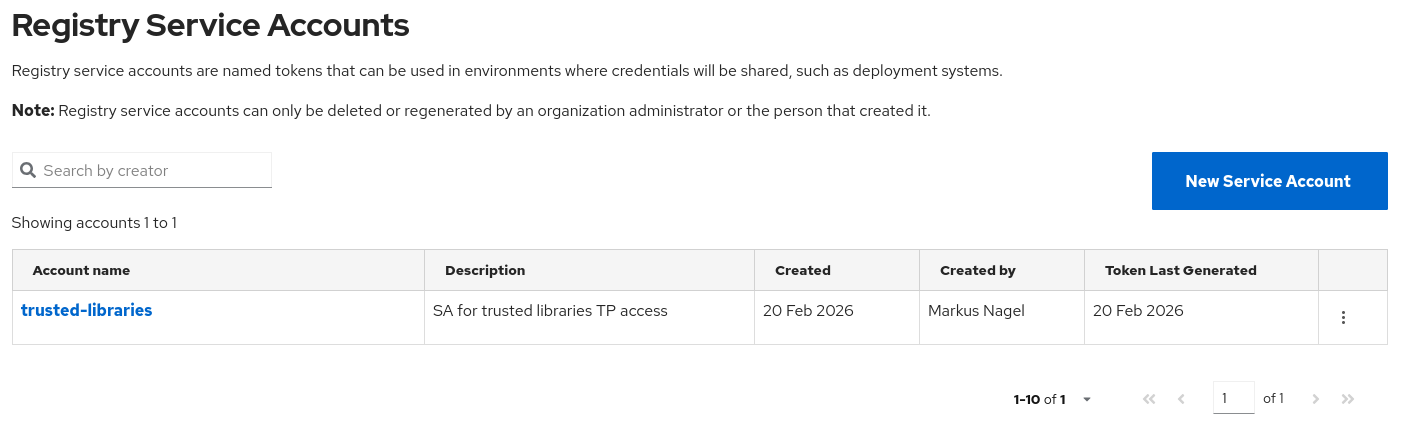
Once you have your Service Account, click on it to get your username and token.
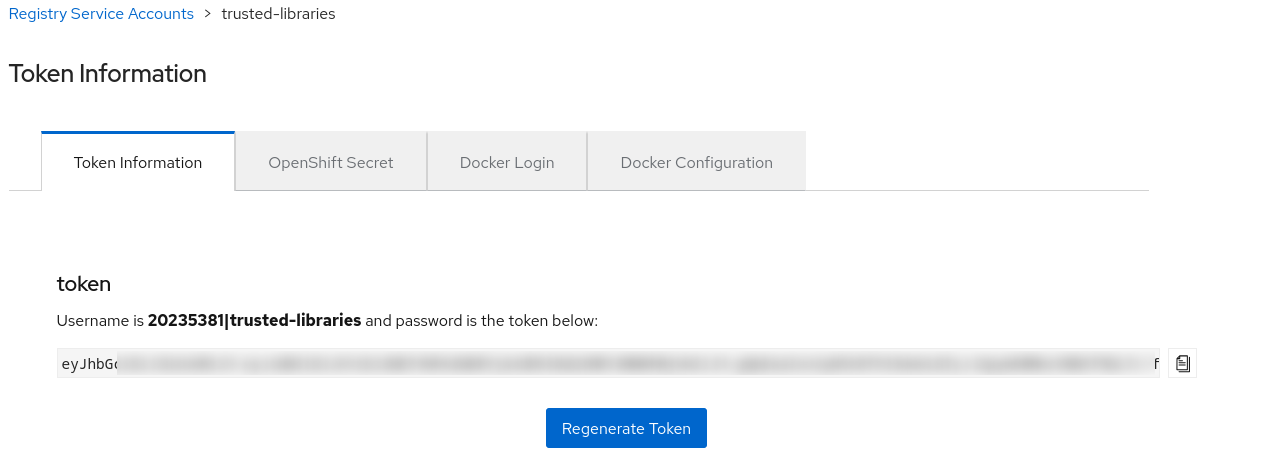
Following the readme, add the Python Index under https://packages.redhat.com/trusted-libraries/python to your pip.conf like this
global.index-url='https://<username>:<password>@packages.redhat.com/trusted-libraries/python'
And you’re good to go.
TIP: Since we're continuously building out the package index with more and more packages being onboarded and built from source, you might wonder if your favourite package is already available. You can check https://packages.redhat.com/trusted-libraries/python/ in a browser for a quick view of packages available in the index.
You can test your configuration by (re-)installing an arbitrary package, bypassing any cache you might have and logging verbose (-v) output
pip install --no-cache-dir --force-reinstall -v pymysql
Using pip 26.0 from /home/mnagel/.pyenv/versions/3.12.12/lib/python3.12/site-packages/pip (python 3.12)
Looking in indexes: https://20235381%7Ctrusted-libraries:****@packages.redhat.com/trusted-libraries/python
Collecting pymysql
 Obtaining dependency information for pymysql from https://packages.redhat.com/api/pulp-content/trusted-libraries/main/pymysql-1.1.2-0-py3-none-any.whl.metadata
 Downloading https://packages.redhat.com/api/pulp-content/trusted-libraries/main/pymysql-1.1.2-0-py3-none-any.whl.metadata (4.3 kB)
Downloading https://packages.redhat.com/api/pulp-content/trusted-libraries/main/pymysql-1.1.2-0-py3-none-any.whl (46 kB)
Installing collected packages: pymysql
 Attempting uninstall: pymysql
   Found existing installation: PyMySQL 1.1.2
   Uninstalling PyMySQL-1.1.2:
     Removing file or directory /home/mnagel/.pyenv/versions/3.12.12/lib/python3.12/site-packages/pymysql-1.1.2.dist-info/
     Removing file or directory /home/mnagel/.pyenv/versions/3.12.12/lib/python3.12/site-packages/pymysql/
     Successfully uninstalled PyMySQL-1.1.2
Successfully installed pymysql-1.1.2
Verifying Attestations and Wheel Integrity
The overall flow of an end-to-end verification follows these steps:
- Fetch the attestation from the “Integrity API” (in our case using pulp).
- Verify the attestation’s signature
- Verify that the attestation statement’s “
subject” matches the wheel’s hash (proving the link between the attestation and the wheel, as well as the wheel’s integrity) - Verify that library files on disk match the wheel’s list of files and their respective hashes (from the wheel’s RECORD).
All of these steps can be implemented using the language and tooling of your choice - but since we’re in the Python ecosystem, we have built scripts for you to use and adapt to your needs:
https://github.com/redhat-tssc-tmm/trusted-libraries/tree/main/blog/scripts
There are detailed explanations of what each script does in the /blog/scripts/docs directory for each respective script.
Also, each script contains a lot of comments, documenting what each step does and why.
For educational purposes, we have
Script | Purpose |
Fetch and display raw + decoded attestation | |
Verify attestation signature with cosign (DSSE PAE) NOTE: Requires the | |
Verify wheel hash matches attestation subject | |
Verify installed files against wheel's RECORD |
And an end-to-end script that combines all these tasks (but also has a lot of comments in its source to learn from)
NOTE: All of the scripts assume you have a pip configuration that lists username and password (token) along with the Red Hat Trusted Libraries index when issuing a
pip config list
like this
global.index-url='https://<username>:<token/password>@packages.redhat.com/trusted-libraries/python'
If you are using a different authentication method (e.g. via netrc ), you can either
- Adapt the
get_index_config()function that extracts and returns the username/password for subsequent calls (e.g. to the Integrity API) Create a local
pip.confin your virtual environment for testing
Here is an excerpt of the end-to-end script output, listing all the steps and their respective output
NOTE: Same as verify_signature.py , this requires the cosign binary in your PATH for signature verification
python verify_package_provenance.py --verbose pyyaml


============================================================
Verifying package: pyyaml
============================================================

Installed: PyYAML 6.0.3
Location: /home/mnagel/.pyenv/versions/3.12.12/lib/python3.12/site-packages
[1/5] Locating wheel for PyYAML==6.0.3
 Not found in cache, downloading...
 Downloading PyYAML==6.0.3...
 Downloaded to: /tmp/pip_verify_mcxaza2w/pyyaml-6.0.3-0-cp312-cp312-manylinux2014_x86_64.manylinux_2_17_x86_64.manylinux_2_28_x86_64.whl

[2/5] Computing wheel SHA256
 Wheel: pyyaml-6.0.3-0-cp312-cp312-manylinux2014_x86_64.manylinux_2_17_x86_64.manylinux_2_28_x86_64.whl
 SHA256: df088c59bcc2fc6a1ed21fb2db644f9890782f4fe658518756886833286a60b6

[3/5] Fetching Red Hat Trusted Libraries metadata and attestations
 Index SHA256: df088c59bcc2fc6a1ed21fb2db644f9890782f4fe658518756886833286a60b6
 ✓ Wheel hash matches published hash

 --- Raw Attestation ---
{
 "version": 1,
 "attestation_bundles": [
   {
     "publisher": {
       "prn": "prn:auth.user:111",
       "kind": "Pulp User"
     },
     "attestations": [
       {
         "version": 1,
         "envelope": {
           "signature": "X07…qg=",
           "statement": "eyJf…19fQ=="
         },
         "verification_material": null
       }
     ]
   }
 ]
}

 --- Decoded Statement ---
{
 "_type": "https://in-toto.io/Statement/v0.1",
 "predicateType": "https://slsa.dev/provenance/v0.2",
 "subject": [
   {
     "name": "pyyaml-6.0.3-0-cp312-cp312-manylinux2014_x86_64.manylinux_2_17_x86_64.manylinux_2_28_x86_64.whl",
     "digest": {
       "sha256": "df088c59bcc2fc6a1ed21fb2db644f9890782f4fe658518756886833286a60b6"
     }
   }
 ],
 "predicate": {
   "_type": "https://in-toto.io/Statement/v0.1",
   "predicate": {
     "buildType": "https://konflux-ci.dev/PythonWheelBuild@v1",
     "builder": {
       "id": "https://konflux-ci.dev/calunga"
     },
     "metadata": {
       "buildFinishedOn": "2026-02-19T21:51:09Z",
       "completeness": {
         "environment": true,
         "materials": true,
         "parameters": true
       },
       "reproducible": true
     }
   },
   "predicateType": "https://slsa.dev/provenance/v0.2",
   "subject": [
     {
       "digest": {
         "sha256": "df088c59bcc2fc6a1ed21fb2db644f9890782f4fe658518756886833286a60b6"
       },
       "name": "pyyaml-6.0.3-0-cp312-cp312-manylinux2014_x86_64.manylinux_2_17_x86_64.manylinux_2_28_x86_64.whl"
     }
   ]
 }
}

 Attestation subject SHA256: df088c59bcc2fc6a1ed21fb2db644f9890782f4fe658518756886833286a60b6
 ✓ Attestation matches wheel hash

[4/5] Verifying attestation signature with cosign
 Public key: /home/mnagel/Documents/appServices/calunga/pulp-index/redhat-release3.pub
 ✓ Signature verified successfully

[5/5] Verifying installed files against wheel's RECORD
 (Using RECORD from verified wheel, not from disk)
   ✓ /home/mnagel/.pyenv/versions/3.12.12/lib/python3.12/site-packages/_yaml/__init__.py
   ✓ /home/mnagel/.pyenv/versions/3.12.12/lib/python3.12/site-packages/pyyaml.libs/libyaml-0-40b3dddf.so.2.0.5
   ✓ /home/mnagel/.pyenv/versions/3.12.12/lib/python3.12/site-packages/yaml/__init__.py
   [...]
/home/mnagel/.pyenv/versions/3.12.12/lib/python3.12/site-packages/pyyaml-6.0.3.dist-info/pyyaml-6.0.3-0.spdx.json
 Files verified: 31/31
 ✓ All installed files match wheel's RECORD

============================================================
✓ VERIFICATION PASSED for PyYAML 6.0.3
===========================================================
We hope this helps you understand and adapt the use of Red Hat Trusted Libraries in your environments to strengthen your Python development security posture.
If you’d like to be kept in the loop, please consider submitting the sign-up form. If you have technical questions or face a problem (since we’re in Tech Preview), don’t hesitate to contact us via email at RHTL-support@redhat.com

