Enterprises are moving from experimentation toward customized, production-grade models. Every organization has unique data requirements, compliance standards, and performance goals. The path from a base model to a fine-tuned asset should be a flexible, repeatable process rather than a rigid "black box."
To support this need for flexibility, we introduced new example AI pipelines for fine tuning in Red Hat OpenShift AI 3.3. These AI pipelines offer a modular, automated framework for model fine-tuning. They use Kubeflow Trainer to distribute workloads and support both supervised fine-tuning (SFT) and orthogonal supervised fine-tuning (OSFT) techniques via Training Hub.
The challenge: Moving beyond manual one-offs
Direct model training or fine-tuning, often called the fast path, is excellent for quick iterations. However, it often lacks the governance and reproducibility required for enterprise production. Conversely, fixed, manual end-to-end scripts can quickly become stale and are difficult to extend as project needs change.
Enterprises need a way to:
- Maintain governance: Create reproducible workflows where every fine-tuned model can be traced back to its specific run, code, and dataset.
- Achieve precision: Go beyond general knowledge to achieve high-performance, custom behavior tailored to specific business data.
- Avoid "shadow AI": Provide AI engineers with a centralized, easy-to-use platform that mitigates the risk of teams adopting non-compliant external solutions.
Composable AI pipelines and reusable components help you streamline OpenShift AI capabilities.
AI pipelines allow users to build portable, scalable workflows using a Python-centric SDK. Complementing this, our new reusable components repository acts as a centralized hub for workflow building blocks. This repository helps you connect different OpenShift AI capabilities.
Fine-tuning pipeline: Data preparation, fine-tuning, evaluation, and model registration
The sample fine-tuning pipelines and associated reusable components provide a baseline workflow for model customization that includes the following steps, as illustrated in Figure 1.

- Download and validate the dataset: Download a dataset from Amazon S3, Hugging Face, or an HTTP URL. The component validates the dataset to ensure it’s in a suitable format for the fine-tuning algorithm. You can optionally split the dataset for training and evaluation. The component passes the dataset to the model training stage and optionally the evaluation stage.
Train the model with Kubeflow Trainer: This component simplifies SFT and OSFT techniques. It downloads a base model and fine-tunes it based on your dataset and algorithm. You can download models from Amazon S3, Hugging Face, or an OCI registry, including the internal Openshift AI model catalog. The step outputs a fine-tuned model, training loss graph (see Figure 2), and training metrics.
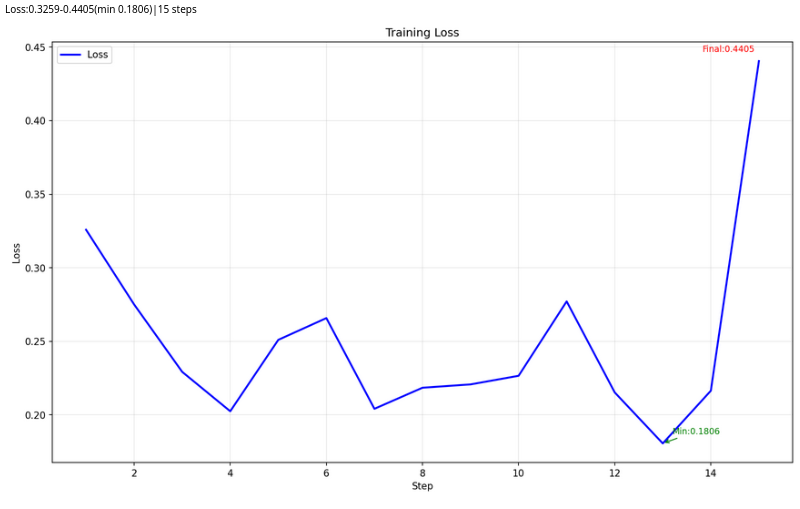
Figure 2: Training loss chart generated by the training step. Evaluate the model: The LM-eval component runs benchmark tasks and ensures the new model meets performance requirements (Figure 3). You can select from a list of benchmark tasks and use the split dataset from step one for deeper evaluation.
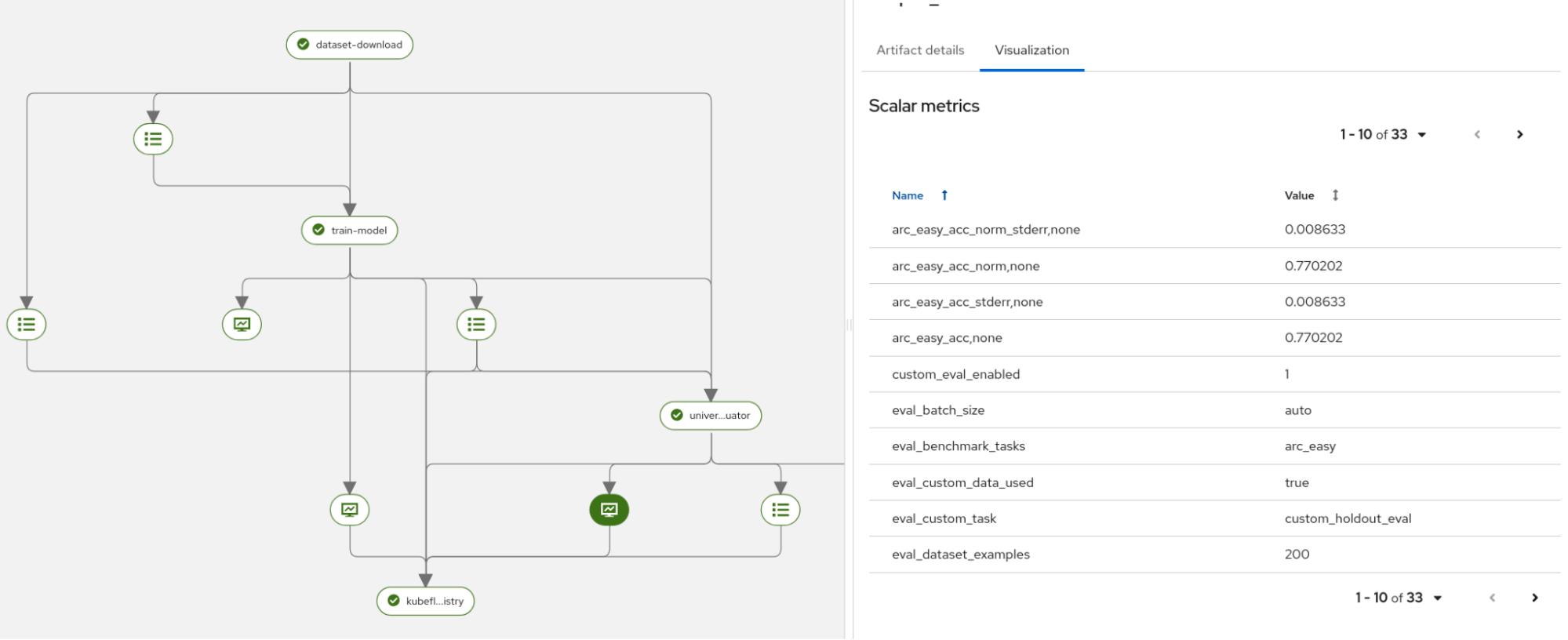
Figure 3: Part of evaluation generated metrics. Register the model: The fine-tuned model and its metrics are registered in the OpenShift AI model registry (Figure 4). This centralizes model lineage and artifacts. From here, you can serve the model for inference.
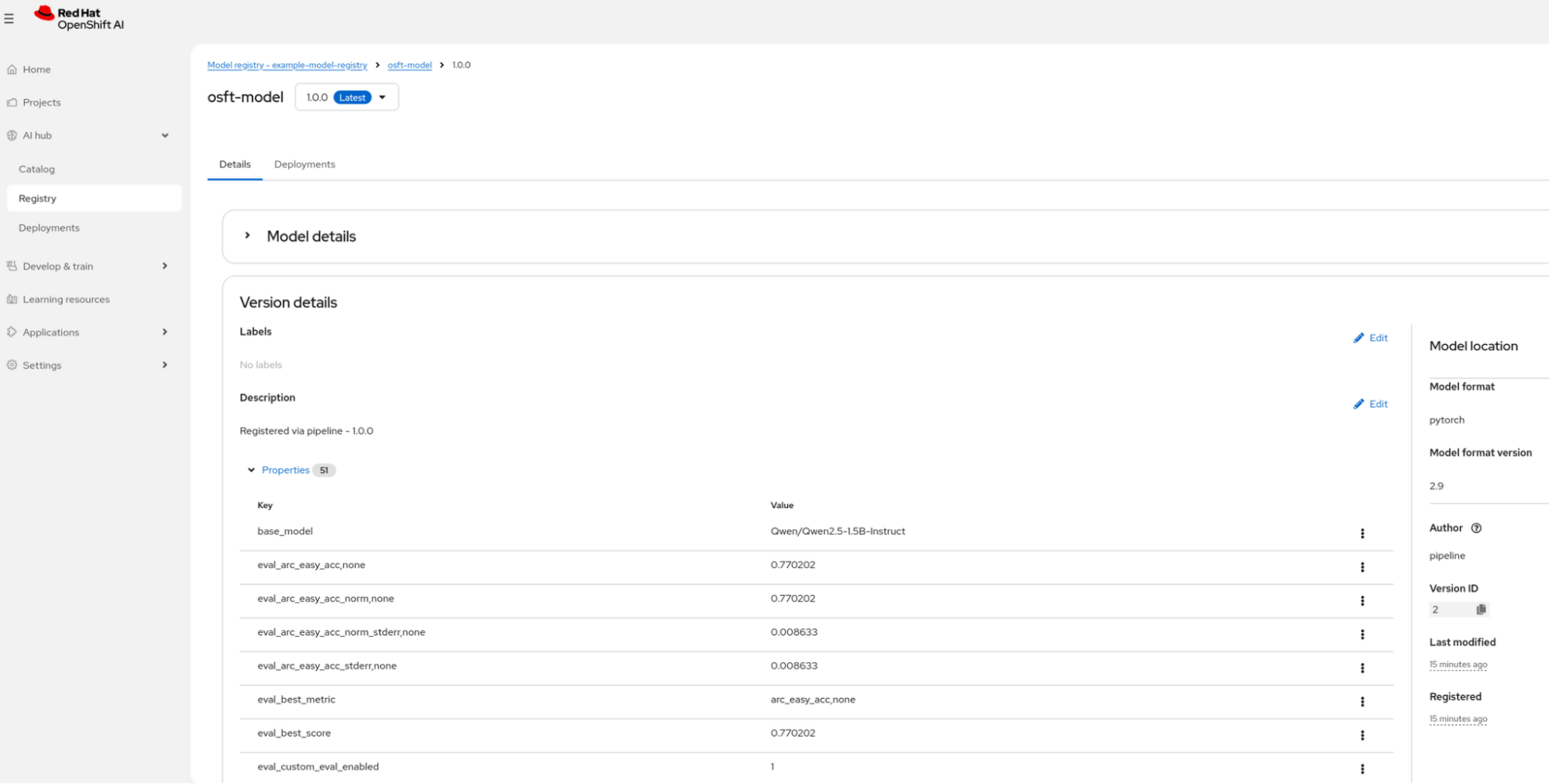
Figure 4: Model registry with saved model.


Together, these four steps create a complete, auditable pipeline from raw data to a production-ready model.
Choosing the right path: Our new pipeline options
To support both rapid experimentation and deep customization, we are providing four distinct pipeline versions. These allow you to choose between a "ready-to-go" experience and a fully configurable environment.
- The minimal pipelines (
sft_minimal_pipelineandosft_minimal_pipeline): Designed for initial trials, these versions include multiple defaults and only expose the most critical top-level input parameters. They are perfect for users who want to see results quickly without navigating complex configurations. - The full pipelines (
sft_pipelineandosft_pipeline): These provide granular control over every aspect of the fine-tuning process, from specific hardware resource mapping to detailed algorithm presets.
Customize the pipelines for your environment
The new sample fine-tuning AI pipelines serve as a validated pattern focused on core model customization, fine-tuning, and governance steps. Designed for flexibility, these validated patterns can be cloned and modified to suit your specific architectural needs.
To start using the fine-tuning AI pipelines, visit the guided example. It walks you through OSFT-based fine-tuning using the reusable pipelines.
The guided example also provides information on:
- Reusing components in your own pipelines.
- Customizing the existing pipelines.
- Adding and removing parameters.
- Running the pipeline on the OpenShift AI platform.
To build your own pipeline using a combination of the dataset, fine-tune, eval, or register components or any other custom component:
- Clone the pipelines-components repository.
- Import the components you need.
- Compose them into your custom pipeline.
- Add any additional custom steps (e.g., data preprocessing, model conversion, deployment).
Why this approach matters: Your pipeline, your way
Shifting from fixed solutions to modular building blocks in Red Hat OpenShift AI 3.3 helps you customize workflows at scale. Modular components ensure the pipeline is not a fixed solution. You can share and adapt them across different teams and use cases. The example fine-tuning pipelines provide a baseline for automating model customization in your AI scenarios.
As you explore these new capabilities in OpenShift AI 3.3, remember that these are your building blocks—designed to be adapted into the specific workflows that drive your business forward

