The next evolution of hosted control planes (HCP) is all about intelligent scaling, which reduces costs without compromising performance. Running Kubernetes at scale has always involved trade-offs between performance guarantees and cost efficiency. Provision too much, and you're paying for idle resources. Provision too little, and you risk degraded performance when load spikes. For organizations running Red Hat OpenShift through HCP, these trade-offs directly impact both operational costs and cluster reliability.
OpenShift 4.21 introduces two complementary features that fundamentally change this equation: dynamic control plane scaling and autoscaling from/to zero for node pools. Together, they represent a shift toward truly intelligent resource management where your control plane and data plane adapt automatically to actual workload demands. These advanced resource management features represent the next evolution of HyperShift technology. Because these capabilities are most critical for large-scale management clusters hosting many control planes, we are introducing them first on Red Hat OpenShift Service on AWS with hosted control planes.
The problem: Static sizing in a dynamic world
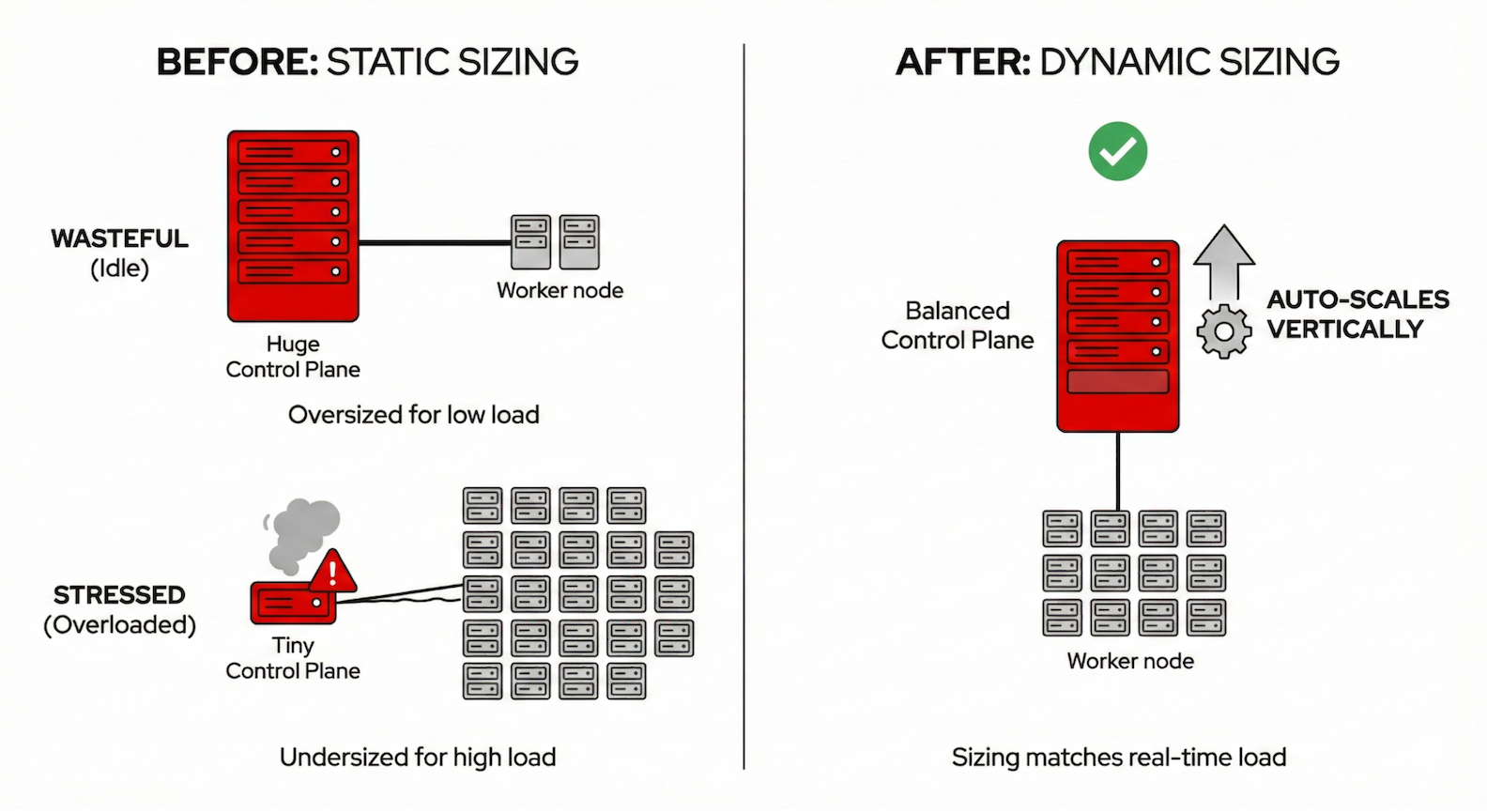
Traditional Kubernetes cluster management often relies on static or over-provisioned resources.
Hosted control planes sizing is based on node count. Previously, HyperShift determined control plane size primarily based on the number of worker nodes. This approach misses a critical reality: a cluster with 50 nodes running lightweight workloads has very different API server demands than a cluster with 10 nodes running a CI/CD pipeline generating thousands of API calls per minute. The result? Clusters were frequently either over-provisioned (wasting resources) or under-provisioned (risking performance degradation under load).
Worker nodes are always on. Cluster autoscaling could scale down to minimize waste, but never to zero. Development environments, batch processing pools, and specialized GPU node pools had to maintain at least one running node even during nights, weekends, or periods of complete inactivity. For expensive instance types like GPU nodes used for AI/ML workloads, this minimum floor represented significant unnecessary spend.
The solution: Dynamic control plane scaling
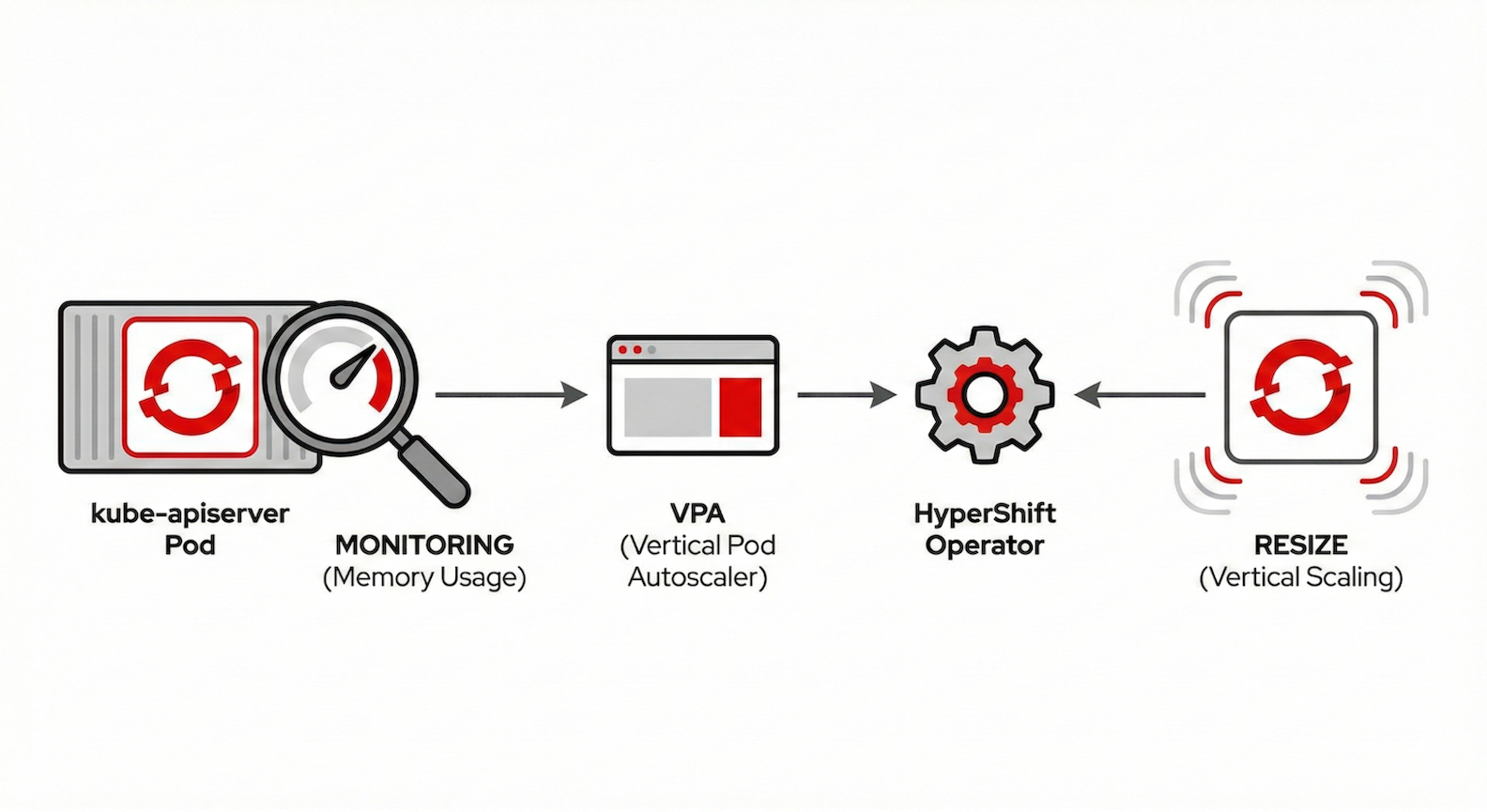
The new resource-based control plane autoscaler takes a fundamentally different approach. Instead of inferring load from node counts, it observes actual resource consumption—specifically, the memory usage of the kube-apiserver (Figure 1).
How it works:
- Real-time monitoring: A vertical pod autoscaler (VPA) continuously monitors kube-apiserver memory usage.
- Intelligent recommendations: The VPA generates recommendations based on observed usage patterns.
- Automatic adjustment: The HyperShift operator translates these recommendations into control plane sizing decisions.
- Smooth transitions: The system prevents thrashing by stabilizing recommendations over time.
This results in control planes that automatically grow when your workload demands it, and shrink when it doesn't without manual intervention.
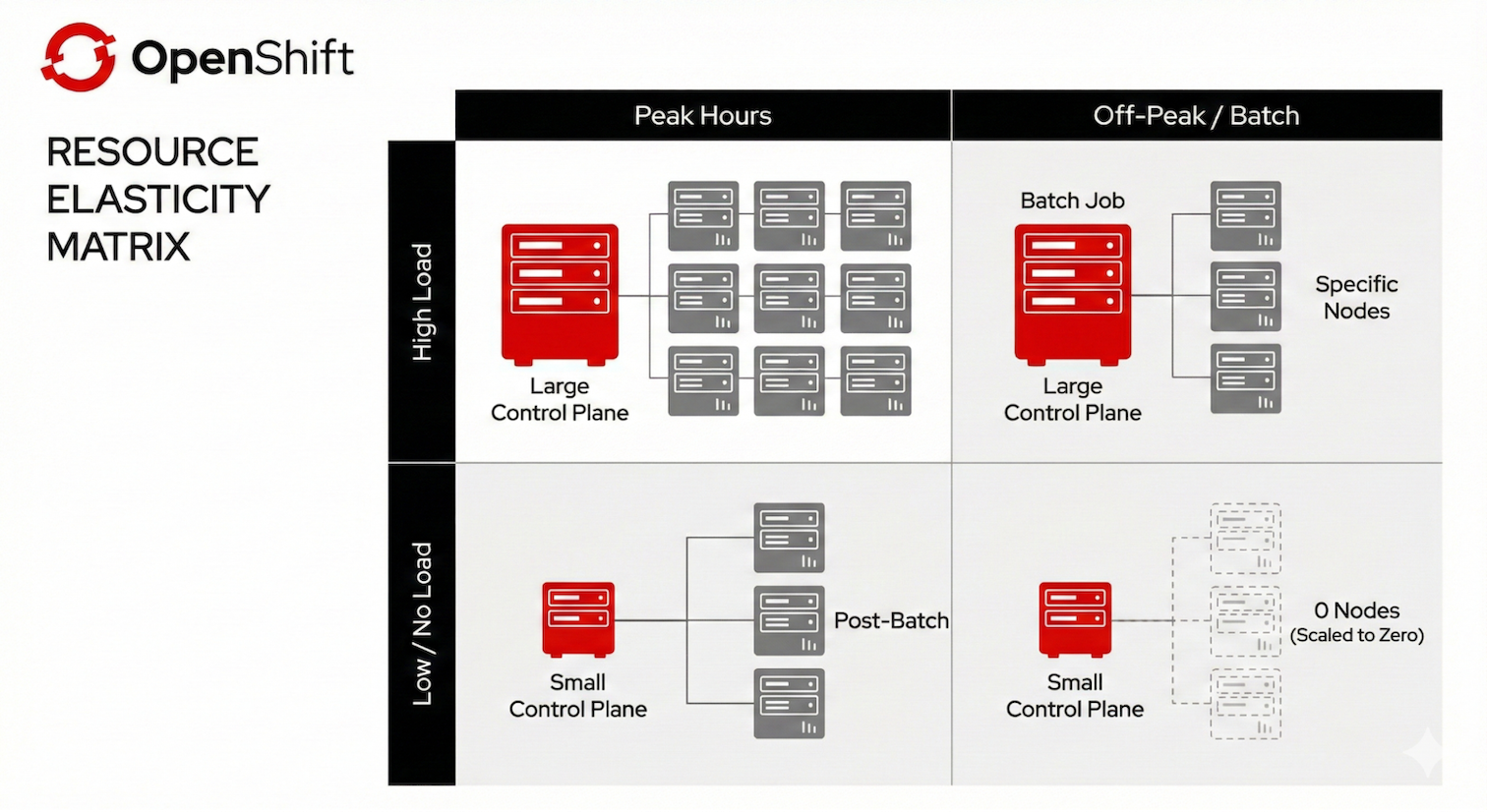
Consider a real-world scenario. Your cluster runs standard web workloads during business hours, but at 2 AM, a batch job kicks off that generates 10x the normal API server load. Previously, you'd either:
- Over-provision the control plane for peak load (paying for unused capacity most of the day).
- Risk API server degradation during the batch job.
- Wake up an SRE to manually resize.
With dynamic scaling, the control plane automatically scales up when the batch job increases memory pressure, then scales back down when it completes (Figure 2).
Autoscaling from/to Zero: Pay for what you use
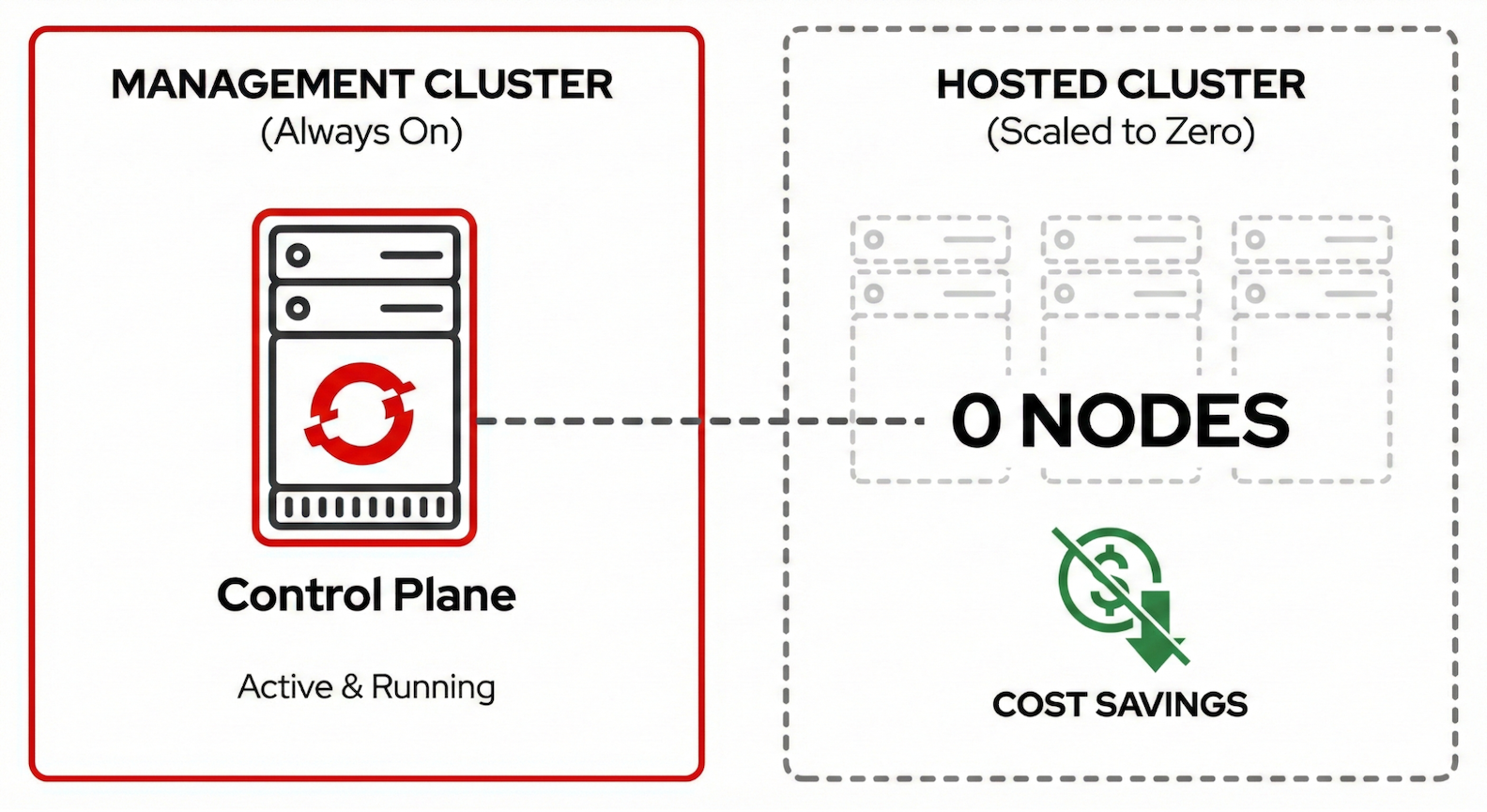
The second piece of the efficiency puzzle addresses the data plane. Node pools can now be configured with min: 0 replicas while autoscaling remains enabled. When workloads are removed, the cluster autoscaler drains and terminates all nodes in the pool. When pods are pending and need to be scheduled, the autoscaler automatically provisions nodes in the appropriate pool.
This works intelligently with multiple node pools. The autoscaler examines pending pods and selects the right node pool based on taints, node selectors, and resource requirements. However, Red Hat OpenShift Service on AWS with hosted control planes clusters run in HighlyAvailable mode, where OpenShift platform operators (ingress controller, console, monitoring) deploy with two replicas and pod anti-affinity rules to ensure resilience, which means you need a minimum of two baseline worker nodes at any time. With only one node, operators can't schedule their second replica, and the cluster version operator reports the cluster as degraded (Figure 3).
Key use cases:
- GPU/AI workloads: Provision expensive GPU instances only when ML training or inference jobs are scheduled.
- Development environments: Scale team clusters to zero outside working hours.
- Batch processing: Spin up capacity for scheduled jobs, scale down to zero between runs.
- Burst capacity: Maintain zero-cost standby capacity that activates during traffic spikes.
The implementation required solving a non-obvious technical challenge: how does the cluster autoscaler decide to provision nodes when there are zero nodes to observe? The answer lies in the metadata. The autoscaler uses instance type specifications (CPU, memory, GPU capacity) to determine which pending pods can be satisfied by provisioning new nodes.
The combined effect: Efficiency at every layer
Together, these features move OpenShift beyond using node counts to guess load toward true resource-based intelligence. By combining vertical control plane adaptation with horizontal data plane scaling (from and to zero), the infrastructure becomes a living system that right-sizes itself in real-time. This synergy eliminates the cost of idle resources without sacrificing performance, ensuring you only pay for the exact management and compute capacity your workloads actually consume (Figure 4).
For SREs managing the management cluster, dynamic control plane scaling offers:
- Fewer manual overrides for cluster sizing.
- Better resource utilization across hosted clusters.
- Reduced risk of performance degradation from undersized control planes.
- Lower infrastructure costs from right-sized control planes.
For cluster users, autoscaling from/to zero means:
- Zero compute costs during idle periods.
- On-demand capacity for specialized workloads.
- Simplified management of development and staging environments.
- Better cost attribution and predictability.
What this means for users
There are significant benefits of Red Hat OpenShift Service on AWS with hosted control planes for customers.
There are direct cost savings. Red Hat OpenShift Service on AWS with HCP billing is based on running resources. When your GPU node pool scales to zero, you stop paying for those GPU instances. When your control plane right-sizes based on actual load rather than worst-case estimates, you're not paying for unused capacity.
There are maintained SLAs. The control plane remains fully operational even when data plane node pools are at zero. Your cluster API is always available, authentication works, and the cluster is ready to scale up when workloads arrive.
It provides operational simplicity. These features work automatically once enabled. No cron jobs to scale down clusters, no manual capacity planning, no 2 AM pages because the control plane is undersized for an unexpected load spike.
Platform availability and roadmap
Red Hat OpenShift Service on AWS with HCP is currently the premier environment to experience the future of efficient OpenShift management. We are actively working to bring these innovations to additional platforms, such as Microsoft Azure Red Hat OpenShift and on-premises deployments, in upcoming releases.
Dynamic control plane scaling uses the dedicated request-serving topology in OpenShift 4.21. Autoscaling from/to zero is initially available for Red Hat OpenShift Service on AWS with HCP. The Red Hat OpenShift Service on AWS-first approach reflects the technical requirement for instance type metadata, the cluster autoscaler needs to know node capacity before nodes exist. Support for additional platforms (Azure, AWS, bare metal, KubeVirt) will follow.
Both features represent the beginning of HCP's evolution toward intelligent resource management. Future enhancements under consideration include:
- CPU-based scaling in addition to memory for control planes
- Extended platform support for scale-from-zero
- Integration with predictive scaling based on historical patterns
- Enhanced observability for scaling decisions
The bigger picture
These features reflect a broader trend in how we think about Kubernetes infrastructure. The question is shifting from "how much capacity do I need to provision?" to "how can my infrastructure automatically adapt to what I actually need?"
Intelligent scaling provides:
- Lower costs without sacrificing performance headroom.
- Better reliability through proactive, resource-aware scaling.
- Reduced toil for platform teams managing cluster infrastructure.
- Improved sustainability through elimination of idle resources.
HCP is evolving to make these benefits automatic, observable, and reliable. The goal isn't just to run Kubernetes—it's to run it efficiently, at whatever scale your workloads demand, paying only for what you actually use.

