Redhat Developers  Logo
  • AI

    Get started with AI

    • Red Hat AI
      Accelerate the development and deployment of enterprise AI solutions.
    • AI learning hub
      Explore learning materials and tools, organized by task.
    • AI interactive demos
      Click through scenarios with Red Hat AI, including training LLMs and more.
    • AI/ML learning paths
      Expand your OpenShift AI knowledge using these learning resources.
    • AI quickstarts
      Focused AI use cases designed for fast deployment on Red Hat AI platforms.
    • No-cost AI training
      Foundational Red Hat AI training.

    Featured resources

    • OpenShift AI learning
    • Open source AI for developers
    • AI product application development
    • Open source-powered AI/ML for hybrid cloud
    • AI and Node.js cheat sheet

    Red Hat AI Factory with NVIDIA

    • Red Hat AI Factory with NVIDIA is a co-engineered, enterprise-grade AI solution for building, deploying, and managing AI at scale across hybrid cloud environments.
    • Explore the solution
  • Learn

    Self-guided

    • Documentation
      Find answers, get step-by-step guidance, and learn how to use Red Hat products.
    • Learning paths
      Explore curated walkthroughs for common development tasks.
    • Guided learning
      Receive custom learning paths powered by our AI assistant.
    • See all learning

    Hands-on

    • Developer Sandbox
      Spin up Red Hat's products and technologies without setup or configuration.
    • Interactive labs
      Learn by doing in these hands-on, browser-based experiences.
    • Interactive demos
      Click through product features in these guided tours.

    Browse by topic

    • AI/ML
    • Automation
    • Java
    • Kubernetes
    • Linux
    • See all topics

    Training & certifications

    • Courses and exams
    • Certifications
    • Skills assessments
    • Red Hat Academy
    • Learning subscription
    • Explore training
  • Build

    Get started

    • Red Hat build of Podman Desktop
      A downloadable, local development hub to experiment with our products and builds.
    • Developer Sandbox
      Spin up Red Hat's products and technologies without setup or configuration.

    Download products

    • Access product downloads to start building and testing right away.
    • Red Hat Enterprise Linux
    • Red Hat AI
    • Red Hat OpenShift
    • Red Hat Ansible Automation Platform
    • See all products

    Featured

    • Red Hat build of OpenJDK
    • Red Hat JBoss Enterprise Application Platform
    • Red Hat OpenShift Dev Spaces
    • Red Hat Developer Toolset

    References

    • E-books
    • Documentation
    • Cheat sheets
    • Architecture center
  • Community

    Get involved

    • Events
    • Live AI events
    • Red Hat Summit
    • Red Hat Accelerators
    • Community discussions

    Follow along

    • Articles & blogs
    • Developer newsletter
    • Videos
    • Github

    Get help

    • Customer service
    • Customer support
    • Regional contacts
    • Find a partner

    Join the Red Hat Developer program

    • Download Red Hat products and project builds, access support documentation, learning content, and more.
    • Explore the benefits

How to deploy multiple OpenStack environments on OpenShift

August 5, 2025
Gil Rosenberg
Related topics:
ContainersObservability
Related products:
Red Hat OpenShift

    The deployment architecture of Red Hat OpenStack Services on OpenShift is a modern way to set up an OpenStack Infrastructure-as-a-Service (IaaS) environment. This new architecture brings novel capabilities and opportunities. One of those new capabilities is our distributed control plane services, running in pods. More importantly, these services consume a fraction of the resources the monolithic control plane did in previous versions.

    For example, look at the following taken from the Red Hat OpenShift namespace, running a full HA (all services running x3 replicas) OpenStack Services on OpenShift control plane:

     root@mobile-bison:~# kubectl top pods -n openstack-dev --sum
    ...
    470m         15410Mi
    
    root@mobile-bison:~# kubectl top pods -n openstack-dev0 --sum
    ...
    457m         15255Mi  

    That got us thinking. What if we could do more with less?

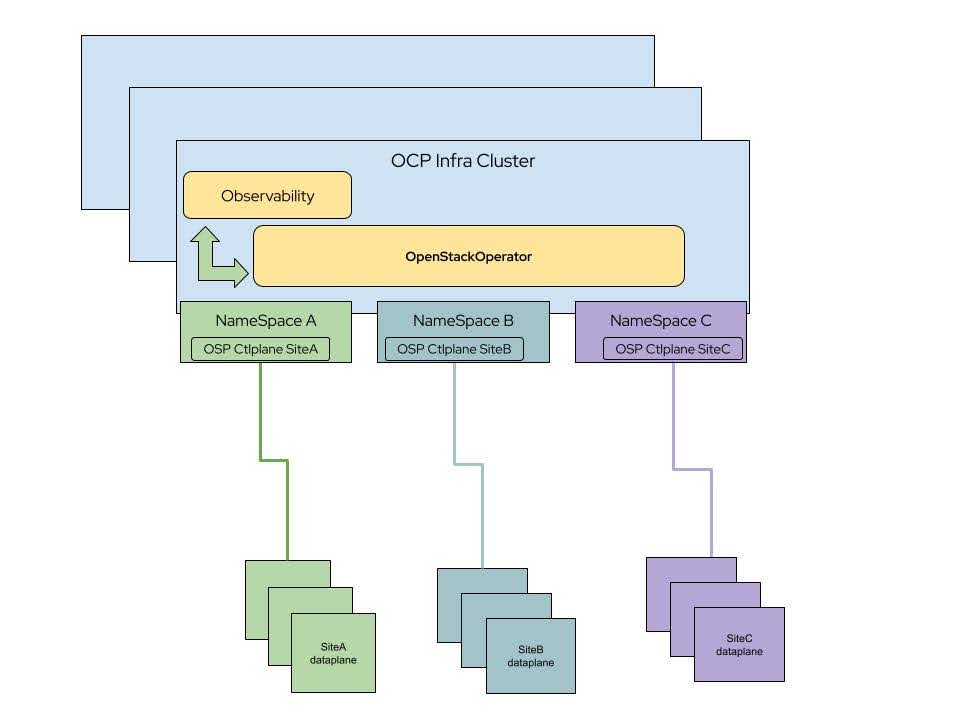
    So, we decided to do something about it. In OpenStack Services on OpenShift—Feature Release 3 we will introduce the ability to run multiple OpenStack Services on OpenShift deployments under the same OpenShift infrastructure and in different namespaces (Figure 1).

    This is a massive benefit for those who need to run multiple environments for:

    • Development
    • Staging
    • Testing
    • Training
    OCP Infra Cluster
    Figure 1: OCP Infra Cluster.

    How does it work?

    The OpenStack operator controller is listening to all namespaces in the cluster by default, thus enabling the creation of OpenStack resources per namespace.

    In a nutshell, we can follow the greenfield deployment documentation, picking a different project on which to deploy. We just need to make sure of the following:

    • The nmstate profile for the worker node carries the relevant VLANs for multiple environments:

      apiVersion: nmstate.io/v1
      kind: NodeNetworkConfigurationPolicy
      metadata:
        name: osp-ng-nncp-worker1
      spec:
        desiredState:
          interfaces:
          - description: internalapi vlan prod
            ipv4:
              address:
              - ip: 172.17.0.24
                prefix-length: 24 
              enabled: true
              dhcp: false
            ipv6:
              enabled: false
            name: enp10s0.20
            state: up
            type: vlan
            vlan:
              base-iface: enp10s0
              id: 20
          - description: storage vlan prod
            ipv4:
              address:
              - ip: 172.18.0.24
                prefix-length: 24 
              enabled: true
              dhcp: false
            ipv6:
              enabled: false
            name: enp10s0.30
            state: up
            type: vlan
            vlan:
              base-iface: enp10s0
              id: 30
          - description: tenant vlan prod
            ipv4:
              address:
              - ip: 172.19.0.24
                prefix-length: 24 
              enabled: true
              dhcp: false
            ipv6:
              enabled: false
            name: enp10s0.50
            state: up
            type: vlan
            vlan:
              base-iface: enp10s0
              id: 50
          - description: ctlplane vlan stage
            ipv4:
              address:
              - ip: 192.168.140.24
                prefix-length: 24 
              enabled: true
              dhcp: false
            ipv6:
              enabled: false
            name: enp10s0.140
            state: up
            type: vlan
            vlan:
              base-iface: enp10s0
              id: 140
          - description: internalapi vlan stage
            ipv4:
              address:
              - ip: 172.17.1.24
                prefix-length: 24 
              enabled: true
              dhcp: false
            ipv6:
              enabled: false
            name: enp10s0.21
            state: up
            type: vlan
            vlan:
              base-iface: enp10s0
              id: 21
          - description: storage vlan stage
            ipv4:
              address:
              - ip: 172.18.1.24
                prefix-length: 24
              enabled: true
              dhcp: false
            ipv6:
              enabled: false
            name: enp10s0.31
            state: up
            type: vlan
            vlan:
              base-iface: enp10s0
              id: 31
          - description: tenant vlan stage
            ipv4:
              address:
              - ip: 172.19.1.24
                prefix-length: 24 
              enabled: true
              dhcp: false
            ipv6:
              enabled: false
            name: enp10s0.51
            state: up
            type: vlan
            vlan:
              base-iface: enp10s0
              id: 51
    • Network attachments for network isolation are present in each target namespace.
    • We use dedicated bare metal resources for each deployment.

    As we can see in the following example, all are part of a greenfield deployment:

    root@mobile-bison:~# oc get network-attachment-definitions.k8s.cni.cncf.io -n openstack-dev
    NAME          AGE
    ctlplane      30d
    external      30d
    internalapi   30d
    storage       30d
    tenant        30d
    root@mobile-bison:~# oc get network-attachment-definitions.k8s.cni.cncf.io -n openstack-dev0
    NAME          AGE
    ctlplane      45d
    external      45d
    internalapi   45d
    storage       45d
    tenant        45d
    root@mobile-bison:~# oc get l2advertisements.metallb.io -n metallb-system 
    NAME                              IPADDRESSPOOLS        IPADDRESSPOOL SELECTORS   INTERFACES
    l2advertisement-ctlplane          ["ctlplane"]                                    ["enp10s0.140"]
    l2advertisement-ctlplane-dev      ["ctlplane-dev"]                                ["enp10s0.141"]
    l2advertisement-internalapi       ["internalapi"]                                 ["enp10s0.21"]
    l2advertisement-internalapi-dev   ["internalapi-dev"]                             ["enp10s0.22"]
    l2advertisement-storage-stating   ["storage-dev"]                                 ["enp10s0.31"]
    l2advertisement-tenant            ["tenant"]                                      ["enp10s0.51"]
    l2advertisement-tenant-dev        ["tenant-dev"]                                  ["enp10s0.52"]
    root@mobile-bison:~# oc get bmh -A
    NAMESPACE               NAME                     STATE         CONSUMER                ONLINE   ERROR   AGE
    openshift-machine-api   openshift-master-0       provisioned   bm-ipi-84cx2-master-0   true             63d
    openshift-machine-api   openshift-master-1       provisioned   bm-ipi-84cx2-master-1   true             63d
    openshift-machine-api   openshift-master-2       provisioned   bm-ipi-84cx2-master-2   true             63d
    openstack-dev           rhoso18-dev-compute-0    provisioned   rhoso-bmp-dev-0-2       true             59d
    openstack-dev           rhoso18-dev-compute-1    provisioned   rhoso-bmp-dev-0-2       true             59d
    openstack-dev           rhoso18-dev-compute-2    provisioned   rhoso-bmp-dev-0-2       true             59d
    openstack-dev0          rhoso18-dev0-compute-0   provisioned   rhoso-bmp-dev0-2        true             45d
    openstack-dev0          rhoso18-dev0-compute-1   provisioned   rhoso-bmp-dev0-2        true             45d
    openstack-dev0          rhoso18-dev0-compute-2   provisioned   rhoso-bmp-dev0-2        true             45d

    It is important to mention that since this is the same OpenShift cluster, we have one set of operators governing all of the namespaces. That means we are using the same top level CustomResourceDefinitions (CRDs) to create all of the resources. When the operators update, it will be to the same version. So when the administrator wants to update a OpenStack Services on OpenShift deployment, it will always be the versions the operators are in.

    That being said, each Namespace would be able to update individually and in the time convenient to the organization, so they can use multiple maintenance windows for different environments. 

    Recap

    To recap, with multi-OpenStack Services on OpenShift, it is possible to deploy multiple, independent OpenStack environments, each with its own data plane. This new functionality offers unprecedented resource consolidations for OpenStack control planes, and we have more to come. Stay tuned for the next one!

    Related Posts

    • Installing debugging tools into a Red Hat OpenShift container with oc-inject

    • How incident detection simplifies OpenShift observability

    • Building an observability stack for automated performance tests on Kubernetes and OpenShift (part 2)

    • Improved observability signal correlation for Red Hat OpenShift

    Recent Posts

    • Debugging image mode with Red Hat OpenShift 4.20: A practical guide

    • EvalHub: Because "looks good to me" isn't a benchmark

    • SQL Server HA on RHEL: Meet Pacemaker HA Agent v2 (tech preview)

    • Deploy with confidence: Continuous integration and continuous delivery for agentic AI

    • Every layer counts: Defense in depth for AI agents with Red Hat AI

    What’s up next?

    Download the OpenShift command-line essentials cheat sheet for developers to discover the most useful commands for working with the oc CLI.

    Get the cheat sheet
    Red Hat Developers logo LinkedIn YouTube Twitter Facebook

    Platforms

    • Red Hat AI
    • Red Hat Enterprise Linux
    • Red Hat OpenShift
    • Red Hat Ansible Automation Platform
    • See all products

    Build

    • Developer Sandbox
    • Developer tools
    • Interactive tutorials
    • API catalog

    Quicklinks

    • Learning resources
    • E-books
    • Cheat sheets
    • Blog
    • Events
    • Newsletter

    Communicate

    • About us
    • Contact sales
    • Find a partner
    • Report a website issue
    • Site status dashboard
    • Report a security problem

    RED HAT DEVELOPER

    Build here. Go anywhere.

    We serve the builders. The problem solvers who create careers with code.

    Join us if you’re a developer, software engineer, web designer, front-end designer, UX designer, computer scientist, architect, tester, product manager, project manager or team lead.

    Sign me up

    Red Hat legal and privacy links

    • About Red Hat
    • Jobs
    • Events
    • Locations
    • Contact Red Hat
    • Red Hat Blog
    • Inclusion at Red Hat
    • Cool Stuff Store
    • Red Hat Summit
    © 2026 Red Hat

    Red Hat legal and privacy links

    • Privacy statement
    • Terms of use
    • All policies and guidelines
    • Digital accessibility

    Chat Support

    Please log in with your Red Hat account to access chat support.