Redhat Developers  Logo
  • AI

    Get started with AI

    • Red Hat AI
      Accelerate the development and deployment of enterprise AI solutions.
    • AI learning hub
      Explore learning materials and tools, organized by task.
    • AI interactive demos
      Click through scenarios with Red Hat AI, including training LLMs and more.
    • AI/ML learning paths
      Expand your OpenShift AI knowledge using these learning resources.
    • AI quickstarts
      Focused AI use cases designed for fast deployment on Red Hat AI platforms.
    • No-cost AI training
      Foundational Red Hat AI training.

    Featured resources

    • OpenShift AI learning
    • Open source AI for developers
    • AI product application development
    • Open source-powered AI/ML for hybrid cloud
    • AI and Node.js cheat sheet

    Red Hat AI Factory with NVIDIA

    • Red Hat AI Factory with NVIDIA is a co-engineered, enterprise-grade AI solution for building, deploying, and managing AI at scale across hybrid cloud environments.
    • Explore the solution
  • Learn

    Self-guided

    • Documentation
      Find answers, get step-by-step guidance, and learn how to use Red Hat products.
    • Learning paths
      Explore curated walkthroughs for common development tasks.
    • Guided learning
      Receive custom learning paths powered by our AI assistant.
    • See all learning

    Hands-on

    • Developer Sandbox
      Spin up Red Hat's products and technologies without setup or configuration.
    • Interactive labs
      Learn by doing in these hands-on, browser-based experiences.
    • Interactive demos
      Click through product features in these guided tours.

    Browse by topic

    • AI/ML
    • Automation
    • Java
    • Kubernetes
    • Linux
    • See all topics

    Training & certifications

    • Courses and exams
    • Certifications
    • Skills assessments
    • Red Hat Academy
    • Learning subscription
    • Explore training
  • Build

    Get started

    • Red Hat build of Podman Desktop
      A downloadable, local development hub to experiment with our products and builds.
    • Developer Sandbox
      Spin up Red Hat's products and technologies without setup or configuration.

    Download products

    • Access product downloads to start building and testing right away.
    • Red Hat Enterprise Linux
    • Red Hat AI
    • Red Hat OpenShift
    • Red Hat Ansible Automation Platform
    • See all products

    Featured

    • Red Hat build of OpenJDK
    • Red Hat JBoss Enterprise Application Platform
    • Red Hat OpenShift Dev Spaces
    • Red Hat Developer Toolset

    References

    • E-books
    • Documentation
    • Cheat sheets
    • Architecture center
  • Community

    Get involved

    • Events
    • Live AI events
    • Red Hat Summit
    • Red Hat Accelerators
    • Community discussions

    Follow along

    • Articles & blogs
    • Developer newsletter
    • Videos
    • Github

    Get help

    • Customer service
    • Customer support
    • Regional contacts
    • Find a partner

    Join the Red Hat Developer program

    • Download Red Hat products and project builds, access support documentation, learning content, and more.
    • Explore the benefits

Scaling OpenShift Network Policies: Our Journey in Developing a Robust Workload Testing Tool

August 11, 2025
Venkata Anil Kommaddi
Related topics:
Developer productivityDeveloper toolsKubernetes
Related products:
Developer ToolsetRed Hat OpenShift Dev SpacesRed Hat OpenShiftRed Hat OpenShift Container Platform

    In today's cloud-native environments, network security is paramount. OpenShift, with its powerful network policy capabilities, allows for granular control over pod-to-pod communication. But how do you ensure these policies scale effectively under load? At the Red Hat Performance & Scale team, we've developed a comprehensive network policy workload to generate unique Access Control List (ACL) flows when network policies are created at scale and measure the latency associated with enforcing these policies.


    Understanding the Challenge of Network Policy Scale Testing

    Network policies in OpenShift define ingress and egress traffic rules between pods, both within the same namespace and across different namespaces. These policies can involve complex selectors, CIDR blocks, and port ranges, leading to a vast number of possible configurations. For scale testing, it's crucial to create a workload that generates unique Access Control List (ACL) flows to accurately simulate real-world scenarios.


    Introducing Our Unified Template Configuration

    Our journey began by developing a unified ingress and egress template that encompasses all possible network policy configuration parameters. These templates allowusers to specify the desired number of each option, such as remote namespaces, pods, CIDRs, and port ranges as job object input variables.

    For example, executing the command:

    kube-burner-ocp network-policy --iterations 50 --pods-per-namespace 10 --netpol-per-namespace 10 --local-pods 2 --single-ports 2 --port-ranges 2 --remotes-namespaces 2 --remotes-pods 2 --cidrs 2

    passes these parameters to the templates

        objects:
          - objectTemplate: ingress-np.yml
            replicas: 10
            inputVars:
              namespaces: 50
              pods_per_namespace: 10
              netpols_per_namespace: 10
              local_pods: 2
              pod_selectors: 1
              single_ports: 2
              port_ranges: 2
              peer_namespaces: 2
              peer_pods: 2
              cidr_rules: 2

    In this scenario, the first namespace would have 10 network policies from ‘ingress-0-1’ to ‘ingress-0-10’. Kube-burner then selects different configuration options for each policy. For example, the ‘ingress-0-1’ and ‘ingress-0-2’ policies might look like this:

    ingress-0-1

    ingress-0-2

      ingress:

      - from:

        - namespaceSelector:

            matchExpressions:

            - key: kubernetes.io/metadata.name

              operator: In

              values:

              - network-policy-perf-1

              - network-policy-perf-2

          podSelector:

            matchExpressions:

            - key: num

              operator: In

              values:

              - "1"

              - "2"

        ports:

        - port: 8080

          protocol: TCP

        - port: 8081

          protocol: TCP

      - from:

        - ipBlock:

            cidr: 1.0.6.0/24

        ports:

        - port: 1001

          protocol: TCP

        - port: 1002

          protocol: TCP

      - from:

        - ipBlock:

            cidr: 1.0.7.0/24

        ports:

        - port: 1001

          protocol: TCP

        - port: 1002

          protocol: TCP

      podSelector:

        matchExpressions:

        - key: num

          operator: In

          values:

          - "1"

          - "2"

      ingress:

      - from:

        - namespaceSelector:

            matchExpressions:

            - key: kubernetes.io/metadata.name

              operator: In

              values:

              - network-policy-perf-3

              - network-policy-perf-4

          podSelector:

            matchExpressions:

            - key: num

              operator: In

              values:

              - "1"

              - "2"

        ports:

        - port: 8080

          protocol: TCP

        - port: 8081

          protocol: TCP

      - from:

        - ipBlock:

            cidr: 1.0.8.0/24

        ports:

        - port: 1001

          protocol: TCP

        - port: 1002

          protocol: TCP

      - from:

        - ipBlock:

            cidr: 1.0.9.0/24

        ports:

        - port: 1001

          protocol: TCP

        - port: 1002

          protocol: TCP

      podSelector:

        matchExpressions:

        - key: num

          operator: In

          values:

          - "1"

          - "2"

    Note: Please note that for the sake of clarity, certain details have been omitted from the network policy example depicted in the preceding table.

     This flexibility ensures that our workload can adapt to various testing requirements.


    Key Design Principles for Scale Testing

    To achieve realistic scale testing, we focused on several key principles:

    • Round-Robin Assignment: We employ a round-robin strategy for distributing remote namespaces across ingress and egress rules. This prevents the overuse of the same remote namespaces in a single iteration and ensures diverse traffic patterns.
    • Unique Namespace and Pod Combinations: Our templating system generates unique combinations of remote namespaces and pods for each network policy. This eliminates redundant flows and creates distinct ACL entries.
    • CIDRs and Port Range Diversity: Similar to namespaces and pods, we apply the round-robin and unique combination logic to CIDRs and port ranges, further enhancing the variety of network policy configurations.


    Connection Testing and Latency Measurement

    Our workload also includes connection testing capabilities to measure the latency associated with enforcing network policies. Here’s a breakdown of how it works:

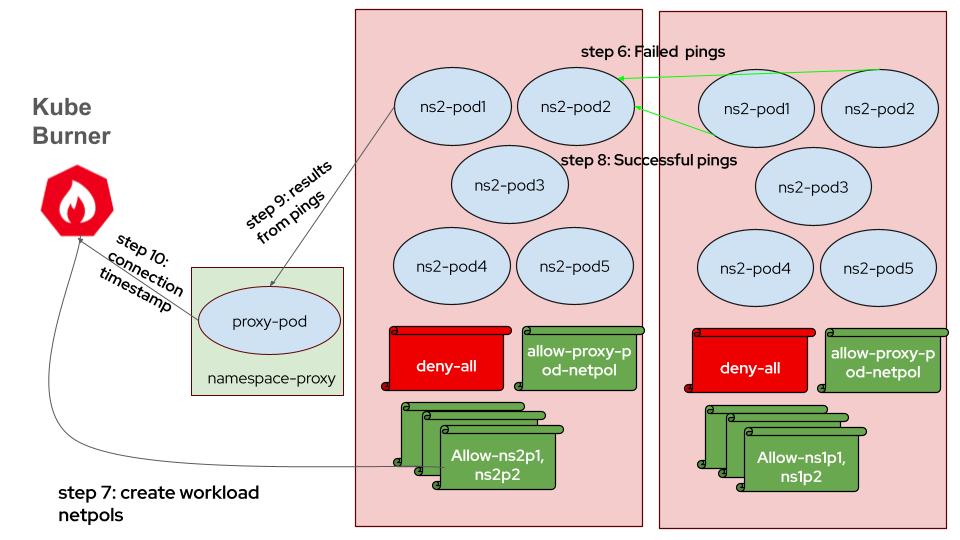
    1. Proxy Pod Initialization: A proxy pod, `network-policy-proxy`, is created to distribute connection information to client pods.
    2. Job Execution: Two separate jobs are executed. The first creates namespaces and pods, while the second applies network policies and tests connections. The advantages with this approach are:
    • OVN components are dedicated only to network policy processing
    • CPU & memory usage metrics captured are isolated for only network policy creation
    • Network policy latency calculation doesn’t include pod readiness as pods already exist
    Steps depicting workload pods and proxy pod creation

                           (I greatly appreciate Mohit Sheth for creating all the diagrams.)

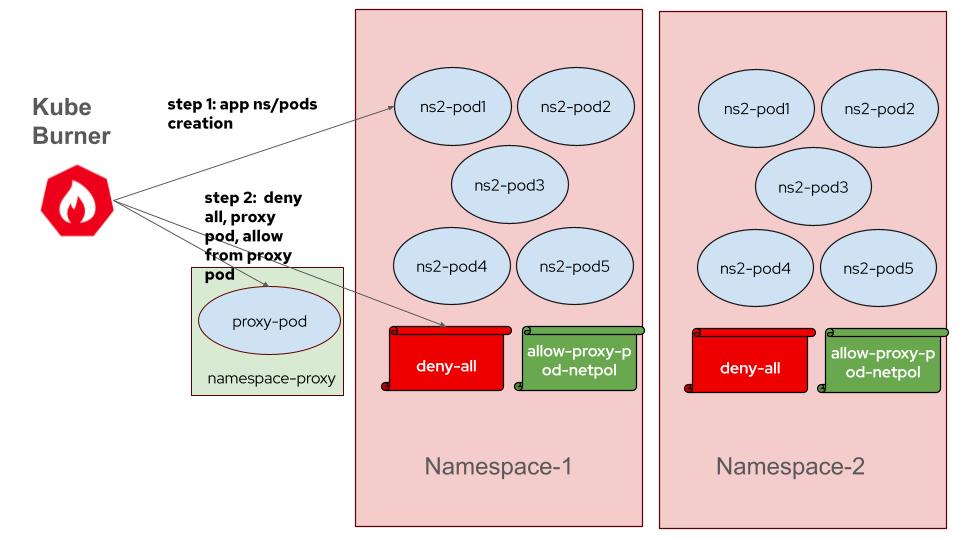
    1. Connection List Preparation: The workload parses the network policy template to prepare a list of connection details for each client pod, including remote IP addresses and ports.

    For example, client pod1 in ns3 (10.128.10.53) has to ping client pod1 in ns2 (10.131.2.47) and client pod1 in ns1(10.130.2.209), then it receives below map, 

    10.128.10.53:[{[10.131.2.47 10.130.2.209] [8080] ingress-0-1}

    1. Sending Connection Information:  Kube-burner passes the prepared connection information to the client pods via the `network-policy-proxy` pod and waits until the proxy pod confirms that all client pods have received the information.
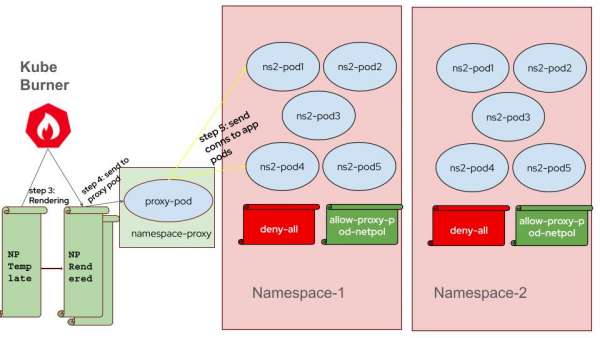
      steps depicting preparing and sending connection information
    2. HTTP Requests and Network Policy Creation: Client pods initially send failing HTTP requests. Once network policies are applied, these requests succeed, and the client pods record timestamps of successful connections.
    3. Latency Calculation: Latency is calculated by comparing the recorded connection timestamps with the timestamps of when network policies were created, representing the time for network policy enforcement.
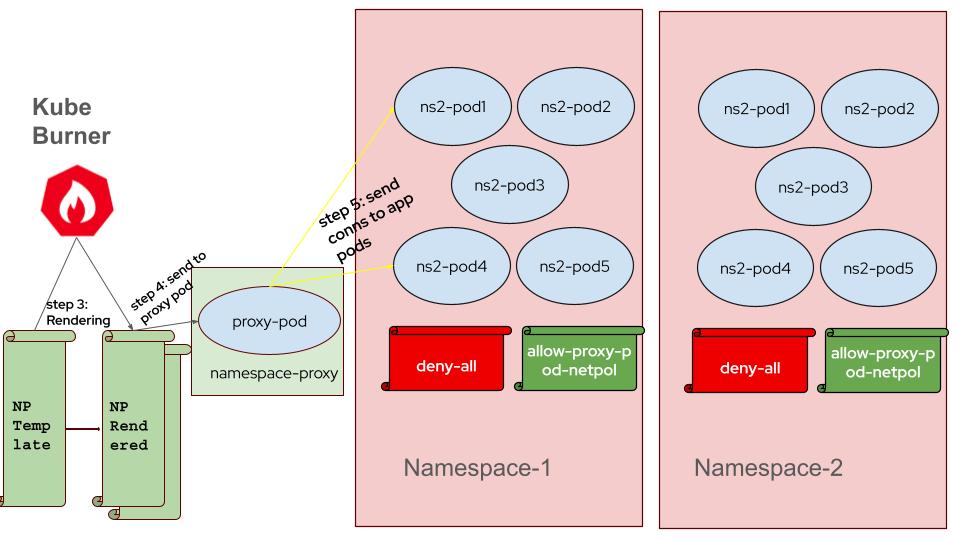
    ping test and latency measurement
    Created by msheth@redhat.com,


    Conclusion

    Developing this network policy workload has been a significant step in ensuring the robustness and scalability of OpenShift network policies. By generating diverse and unique ACL flows and accurately measuring connection latency, our tool provides valuable insights into the performance of OpenShift's networking infrastructure under load. We finished our thorough scale testing with this network policy workload. In a follow-up blog post, we will share the detailed results, including performance metrics, observations, and key takeaways. This upcoming post will offer further insights into how OpenShift network policies perform under significant load.

    Disclaimer: Please note the content in this blog post has not been thoroughly reviewed by the Red Hat Developer editorial team. Any opinions expressed in this post are the author's own and do not necessarily reflect the policies or positions of Red Hat.

    Recent Posts

    • Preventing GPU waste: A guide to JIT checkpointing with Kubeflow Trainer on OpenShift AI

    • How to manage TLS certificates used by OpenShift GitOps operator

    • Configure a split disk on OpenShift Container Platform

    • Red Hat Enterprise Linux 10.2 and 9.8: Top features for developers

    • What GPU kernels mean for your distributed inference

    Red Hat Developers logo LinkedIn YouTube Twitter Facebook

    Platforms

    • Red Hat AI
    • Red Hat Enterprise Linux
    • Red Hat OpenShift
    • Red Hat Ansible Automation Platform
    • See all products

    Build

    • Developer Sandbox
    • Developer tools
    • Interactive tutorials
    • API catalog

    Quicklinks

    • Learning resources
    • E-books
    • Cheat sheets
    • Blog
    • Events
    • Newsletter

    Communicate

    • About us
    • Contact sales
    • Find a partner
    • Report a website issue
    • Site status dashboard
    • Report a security problem

    RED HAT DEVELOPER

    Build here. Go anywhere.

    We serve the builders. The problem solvers who create careers with code.

    Join us if you’re a developer, software engineer, web designer, front-end designer, UX designer, computer scientist, architect, tester, product manager, project manager or team lead.

    Sign me up

    Red Hat legal and privacy links

    • About Red Hat
    • Jobs
    • Events
    • Locations
    • Contact Red Hat
    • Red Hat Blog
    • Inclusion at Red Hat
    • Cool Stuff Store
    • Red Hat Summit
    © 2026 Red Hat

    Red Hat legal and privacy links

    • Privacy statement
    • Terms of use
    • All policies and guidelines
    • Digital accessibility

    Chat Support

    Please log in with your Red Hat account to access chat support.