Redhat Developers  Logo
  • AI

    Get started with AI

    • Red Hat AI
      Accelerate the development and deployment of enterprise AI solutions.
    • AI learning hub
      Explore learning materials and tools, organized by task.
    • AI interactive demos
      Click through scenarios with Red Hat AI, including training LLMs and more.
    • AI/ML learning paths
      Expand your OpenShift AI knowledge using these learning resources.
    • AI quickstarts
      Focused AI use cases designed for fast deployment on Red Hat AI platforms.
    • No-cost AI training
      Foundational Red Hat AI training.

    Featured resources

    • OpenShift AI learning
    • Open source AI for developers
    • AI product application development
    • Open source-powered AI/ML for hybrid cloud
    • AI and Node.js cheat sheet

    Red Hat AI Factory with NVIDIA

    • Red Hat AI Factory with NVIDIA is a co-engineered, enterprise-grade AI solution for building, deploying, and managing AI at scale across hybrid cloud environments.
    • Explore the solution
  • Learn

    Self-guided

    • Documentation
      Find answers, get step-by-step guidance, and learn how to use Red Hat products.
    • Learning paths
      Explore curated walkthroughs for common development tasks.
    • Guided learning
      Receive custom learning paths powered by our AI assistant.
    • See all learning

    Hands-on

    • Developer Sandbox
      Spin up Red Hat's products and technologies without setup or configuration.
    • Interactive labs
      Learn by doing in these hands-on, browser-based experiences.
    • Interactive demos
      Click through product features in these guided tours.

    Browse by topic

    • AI/ML
    • Automation
    • Java
    • Kubernetes
    • Linux
    • See all topics

    Training & certifications

    • Courses and exams
    • Certifications
    • Skills assessments
    • Red Hat Academy
    • Learning subscription
    • Explore training
  • Build

    Get started

    • Red Hat build of Podman Desktop
      A downloadable, local development hub to experiment with our products and builds.
    • Developer Sandbox
      Spin up Red Hat's products and technologies without setup or configuration.

    Download products

    • Access product downloads to start building and testing right away.
    • Red Hat Enterprise Linux
    • Red Hat AI
    • Red Hat OpenShift
    • Red Hat Ansible Automation Platform
    • See all products

    Featured

    • Red Hat build of OpenJDK
    • Red Hat JBoss Enterprise Application Platform
    • Red Hat OpenShift Dev Spaces
    • Red Hat Developer Toolset

    References

    • E-books
    • Documentation
    • Cheat sheets
    • Architecture center
  • Community

    Get involved

    • Events
    • Live AI events
    • Red Hat Summit
    • Red Hat Accelerators
    • Community discussions

    Follow along

    • Articles & blogs
    • Developer newsletter
    • Videos
    • Github

    Get help

    • Customer service
    • Customer support
    • Regional contacts
    • Find a partner

    Join the Red Hat Developer program

    • Download Red Hat products and project builds, access support documentation, learning content, and more.
    • Explore the benefits

Scaling OpenShift Network Policies: Results and Takeaways

August 11, 2025
Venkata Anil Kommaddi
Related topics:
Kubernetes
Related products:
Red Hat OpenShiftRed Hat OpenShift Container PlatformRed Hat OpenShift LocalRed Hat OpenShift Service on AWS

    In a previous blog post, we discussed the design of a new workload specifically created for network policy scale testing. This follow-up post will delve into the results of those tests, evaluating the scalability of network policies and how scaling affects OVS flow programming latency, system resources, and overall performance.


    Test Objectives

    Our primary objectives were to:

    • Evaluate the scalability of OpenShift Network Policies.
    • Measure OpenShift Network Policy readiness latency through connection testing.
    • Measure CPU and Memory utilization during testing.


    Testing Environment

    Testing was conducted on a ROSA OCP 4.16.18 environment with 24 worker nodes.


    Test Methodology

    Our kube-burner network policy workload utilizes two jobs. Both jobs ran the same number of iterations and used the same namespaces. In a 24-worker node environment,

    Job 1:

    • Ran for 240 iterations.
    • Each iteration created one namespace.
    • Each created namespace contained 10 pods.

    Job 2:

    • Ran for a corresponding number of iterations (240)
    • Each iteration targeted one of the namespaces created by Job 1.
    • Within each targeted namespace, 20 network policies were created.
    • Example: Job 2's first iteration created 20 network policies in namespace1 (which was created during Job 1's first iteration).


    Network Policy Configuration

    For our testing, each network policy had the following configurations:

    Configuration ItemValueDescription

    `single_ports`

     5

    Number of single ports in `ingress.from.ports` or `egress.to.ports`.

    `port_ranges`

     5

    Number of port ranges in `ingress.from.ports` or `egress.to.ports`.

    `remote_namespaces`

     5

    Number of namespace labels in `ingress.from.namespaceSelector.matchExpression`.

    `remote_pods`

     5

    Number of pod labels in `ingress.from.podSelector.matchExpressions`.

    `cidr_rules`

     5

    Number of `from.ipBlock.cidr` or `to.ipBlock.cidr` entries.

    `local_pods`

     10

    Number of local pods selected using `spec.podSelector.matchExpressions`.

    For a detailed explanation of how the workload configuration options translate into network policy configurations, please refer to my previous blog post.


    Scenario 1: System Metrics Testing

    This scenario measured system metrics by creating network policies with ingress and egress rules, focusing on resource usage rather than network policy latency.

    • All the tests have 240 namespaces, each with 10 pods.

    OVN resources created when we scale network policies. For example, 403K OVS flows per node created when each namespace has 20 network policies and 4381K when 200 network policies per namespace.
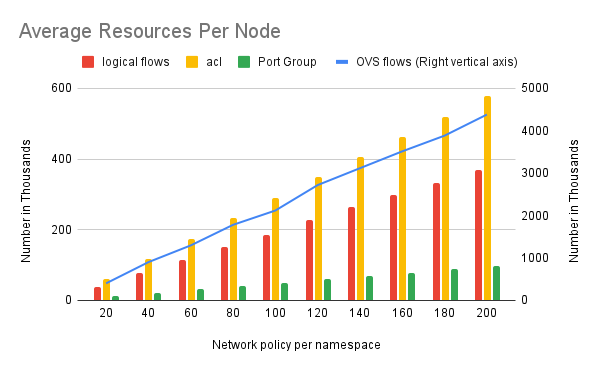
    OVN resources per node during the test
    • Average ovs-vswitchd CPU usage is around 5% across all the  tests
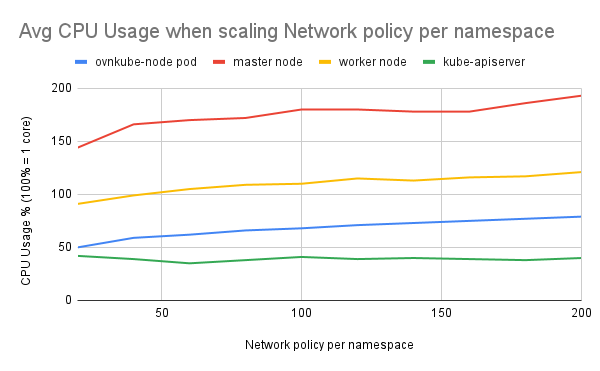
    Avg CPU Usage when scaling Network policy per namespace
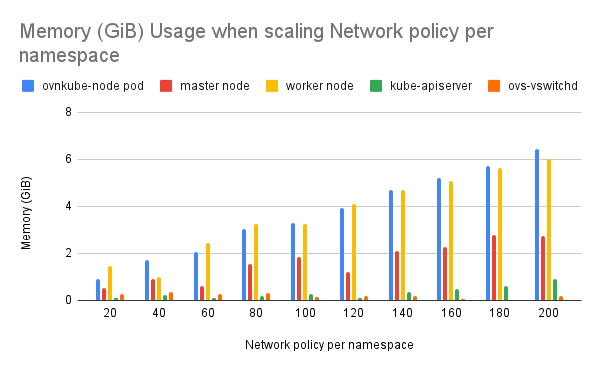
    Memory (GiB) Usage when scaling Network policy per namespace


    Scenario 2: Network Policy Readiness Latency Testing

    This scenario tested the time taken for programming OVS flows by measuring connection latency between client and server pods when a network policy is applied.

    • Each network policy defined connections between 10 local pods and 25 remote pods. We test all the 250 connections for each network policy and the max latency among the 250 connections is reported as the network policy readiness latency.
    • All the tests have 240 namespaces, each with 10 pods.
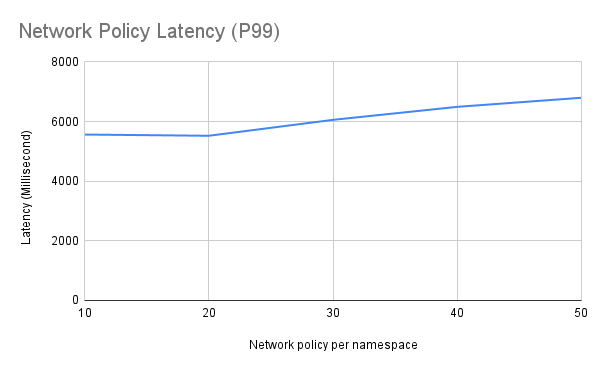
    Network Policy Latency (P99) in Milliseconds


    Observations

    • Observed a proportional increase in OVS flows, logical flows, and ACLs with the increase in network policies.
    • Successfully scaled to 4381K OVS flows per worker node.
    • Average ovs-vswitchd CPU usage was around 5% across all tests.
    • Observed OVN components not releasing memory after resource cleanup (reported bug OCPBUGS-44430).
    • Network policy readiness latency testing was successful even when the max OVS flows per worker node were 1016K. Network policy readiness latency is 5.5 seconds when we have 412K OVS flows per worker node.
    • Worker node CPU usage was between 100% and 150%  (100% = 1 core) during the testing.
    • Worker node memory usage increased as OVS flows increased.
    • Ovnkube-node pod and worker node CPU and memory usage increased with the number of network policies.

    This scaling testing provides valuable insights into the performance and resource utilization of OpenShift Network Policies at scale. These results help us understand the limitations and potential bottlenecks when deploying a large number of network policies.

    Disclaimer: Please note the content in this blog post has not been thoroughly reviewed by the Red Hat Developer editorial team. Any opinions expressed in this post are the author's own and do not necessarily reflect the policies or positions of Red Hat.

    Related Posts

  • Scaling OpenShift Network Policies: Our Journey in Developing a Robust Workload Testing Tool

  • Recent Posts

    • Debugging image mode with Red Hat OpenShift 4.20: A practical guide

    • EvalHub: Because "looks good to me" isn't a benchmark

    • SQL Server HA on RHEL: Meet Pacemaker HA Agent v2 (tech preview)

    • Deploy with confidence: Continuous integration and continuous delivery for agentic AI

    • Every layer counts: Defense in depth for AI agents with Red Hat AI

    Red Hat Developers logo LinkedIn YouTube Twitter Facebook

    Platforms

    • Red Hat AI
    • Red Hat Enterprise Linux
    • Red Hat OpenShift
    • Red Hat Ansible Automation Platform
    • See all products

    Build

    • Developer Sandbox
    • Developer tools
    • Interactive tutorials
    • API catalog

    Quicklinks

    • Learning resources
    • E-books
    • Cheat sheets
    • Blog
    • Events
    • Newsletter

    Communicate

    • About us
    • Contact sales
    • Find a partner
    • Report a website issue
    • Site status dashboard
    • Report a security problem

    RED HAT DEVELOPER

    Build here. Go anywhere.

    We serve the builders. The problem solvers who create careers with code.

    Join us if you’re a developer, software engineer, web designer, front-end designer, UX designer, computer scientist, architect, tester, product manager, project manager or team lead.

    Sign me up

    Red Hat legal and privacy links

    • About Red Hat
    • Jobs
    • Events
    • Locations
    • Contact Red Hat
    • Red Hat Blog
    • Inclusion at Red Hat
    • Cool Stuff Store
    • Red Hat Summit
    © 2026 Red Hat

    Red Hat legal and privacy links

    • Privacy statement
    • Terms of use
    • All policies and guidelines
    • Digital accessibility

    Chat Support

    Please log in with your Red Hat account to access chat support.