Redhat Developers  Logo
  • AI

    Get started with AI

    • Red Hat AI
      Accelerate the development and deployment of enterprise AI solutions.
    • AI learning hub
      Explore learning materials and tools, organized by task.
    • AI interactive demos
      Click through scenarios with Red Hat AI, including training LLMs and more.
    • AI/ML learning paths
      Expand your OpenShift AI knowledge using these learning resources.
    • AI quickstarts
      Focused AI use cases designed for fast deployment on Red Hat AI platforms.
    • No-cost AI training
      Foundational Red Hat AI training.

    Featured resources

    • OpenShift AI learning
    • Open source AI for developers
    • AI product application development
    • Open source-powered AI/ML for hybrid cloud
    • AI and Node.js cheat sheet

    Red Hat AI Factory with NVIDIA

    • Red Hat AI Factory with NVIDIA is a co-engineered, enterprise-grade AI solution for building, deploying, and managing AI at scale across hybrid cloud environments.
    • Explore the solution
  • Learn

    Self-guided

    • Documentation
      Find answers, get step-by-step guidance, and learn how to use Red Hat products.
    • Learning paths
      Explore curated walkthroughs for common development tasks.
    • Guided learning
      Receive custom learning paths powered by our AI assistant.
    • See all learning

    Hands-on

    • Developer Sandbox
      Spin up Red Hat's products and technologies without setup or configuration.
    • Interactive labs
      Learn by doing in these hands-on, browser-based experiences.
    • Interactive demos
      Click through product features in these guided tours.

    Browse by topic

    • AI/ML
    • Automation
    • Java
    • Kubernetes
    • Linux
    • See all topics

    Training & certifications

    • Courses and exams
    • Certifications
    • Skills assessments
    • Red Hat Academy
    • Learning subscription
    • Explore training
  • Build

    Get started

    • Red Hat build of Podman Desktop
      A downloadable, local development hub to experiment with our products and builds.
    • Developer Sandbox
      Spin up Red Hat's products and technologies without setup or configuration.

    Download products

    • Access product downloads to start building and testing right away.
    • Red Hat Enterprise Linux
    • Red Hat AI
    • Red Hat OpenShift
    • Red Hat Ansible Automation Platform
    • See all products

    Featured

    • Red Hat build of OpenJDK
    • Red Hat JBoss Enterprise Application Platform
    • Red Hat OpenShift Dev Spaces
    • Red Hat Developer Toolset

    References

    • E-books
    • Documentation
    • Cheat sheets
    • Architecture center
  • Community

    Get involved

    • Events
    • Live AI events
    • Red Hat Summit
    • Red Hat Accelerators
    • Community discussions

    Follow along

    • Articles & blogs
    • Developer newsletter
    • Videos
    • Github

    Get help

    • Customer service
    • Customer support
    • Regional contacts
    • Find a partner

    Join the Red Hat Developer program

    • Download Red Hat products and project builds, access support documentation, learning content, and more.
    • Explore the benefits

What's .NEW in .NET, Volume 1

March 24, 2017
Don Schenck
Related topics:
.NET

    .NET Core continues to move forward at a rapid pace; this includes not only the framework but also the knowledge and tools related to it. Here are three recent highlights:

    LibYear, a "dotnet CLI tool for managing dependency freshness"

    Quicklink: https://stevedesmond.ca/blog/happy-libyear

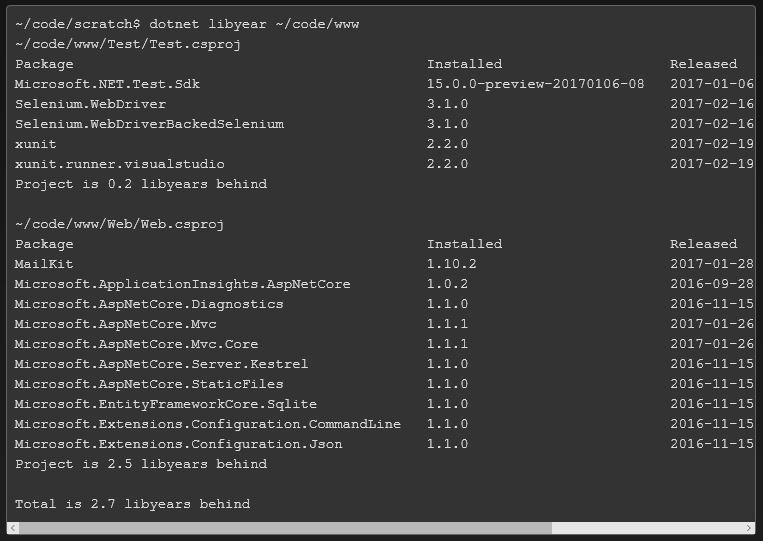
    LibYear (blog post here), written by Steve Desmond, uses your .csproj or project.json file as input and compares it to NuGet.org, producing a list of your dependencies and their freshness. That is, it checks to see if a dependency is current or a previous release, and calculates the age of any downlevel assemblies. It the adds up the ages and produces the age of your libraries in a year, hence "LibYear". Here's an example (from Steve's blog post):
    The code is on Github. This is a great example of a .NET Core open source community member giving back. Thanks, Steve.

    LocalAppVeyor: Run your AppVeyor builds, locally

    Quicklink: https://github.com/joaope/LocalAppVeyor

    AppVeyor (www.AppVeyor.com) is a popular online CI/CD tool for .NET applications. In this open source code, João Correia (github: joaope) has created a utility, which allows you to use your appveyor.yml file to produce local builds. This works on all three .NET Core platforms; Windows, macOX, and Linux. Because it's local to your machine, some (very few) AppVeyor build steps are not supported. The best part of that last sentence? It means you have the opportunity to fork the LocalAppVeyor github repo and add whatever steps are possible. This is the essence of open source. Thanks, João.

    Clean Up CSPROJ

    Quicklink: http://rehansaeed.com/cleaning-up-csproj/

    Muhammad Rehan Saeed's blog is a fountain of knowledge, and this post is great for three reasons:

    1. It helps you clean up your .CSPROJ file
    2. It helps you better understand your .CSPROJ file
    3. The cover picture was taken in Dubai, the Burj Khalifa building is in the background, and I'm pretty sure some software I wrote helped build it.

    This isn't software; rather, it's an instructional blog post about the .CSPROJ file that is created after you run dotnet migrate, and how to clean it up. Again, the biggest gain -- in my opinion -- is the understanding you gain.

    While you're at his blog, you'll probably end up spending a lot of time, as I did, just taking in all the great content. Well done, Muhammad.

    Looking Forward

    This blog post will be a regular feature and part of the .NET Core community. Stay tuned; we're (all) just getting started.

    For additional information and articles on .NET Core visit our .NET Core web page for more on this topic.



    Build and run cross-platform .NET applications on the world's number one enterprise-ready Linux distribution, Red Hat Enterprise Linux.
    Last updated: July 27, 2017

    Recent Posts

    • What's New in OpenShift GitOps 1.21

    • Deploying distributed AI inference: Blueprints & troubleshooting

    • How to integrate OpenShift AI and PG Airman MCP Server

    • Build a RHEL environment with image builder and content templates

    • Implement mTLS and zero trust with cert-manager and trust-manager

    Red Hat Developers logo LinkedIn YouTube Twitter Facebook

    Platforms

    • Red Hat AI
    • Red Hat Enterprise Linux
    • Red Hat OpenShift
    • Red Hat Ansible Automation Platform
    • See all products

    Build

    • Developer Sandbox
    • Developer tools
    • Interactive tutorials
    • API catalog

    Quicklinks

    • Learning resources
    • E-books
    • Cheat sheets
    • Blog
    • Events
    • Newsletter

    Communicate

    • About us
    • Contact sales
    • Find a partner
    • Report a website issue
    • Site status dashboard
    • Report a security problem

    RED HAT DEVELOPER

    Build here. Go anywhere.

    We serve the builders. The problem solvers who create careers with code.

    Join us if you’re a developer, software engineer, web designer, front-end designer, UX designer, computer scientist, architect, tester, product manager, project manager or team lead.

    Sign me up

    Red Hat legal and privacy links

    • About Red Hat
    • Jobs
    • Events
    • Locations
    • Contact Red Hat
    • Red Hat Blog
    • Inclusion at Red Hat
    • Cool Stuff Store
    • Red Hat Summit
    © 2026 Red Hat

    Red Hat legal and privacy links

    • Privacy statement
    • Terms of use
    • All policies and guidelines
    • Digital accessibility

    Chat Support

    Please log in with your Red Hat account to access chat support.