This posts cover the evaluations framework and approach my team used to develop the rh-ai-quickstart/it-self-service-agent AI quickstart and the key insights we learned along the way. This framework allowed us to iterate rapidly and make progress.
We all know that testing is a vital part of building applications. However, existing test frameworks and approaches don't work well for agentic systems because of inherent variability. It's not as simple as checking that the agent said exactly, "Yes, you are eligible"—the agent might communicate that in any number of different ways.
This means that for any turn in a conversation, there are many correct responses, which makes it difficult to test with frameworks that expect deterministic output. If anything, that variability makes it even more important to have a comprehensive test suite (often called evaluations in the context of an AI system) to ensure the project meets its business goals.
About AI quickstarts
AI quickstarts are a catalog of ready-to-run, industry-specific use cases for your Red Hat AI environment. Each AI quickstart is simple to deploy, explore, and extend. They give teams a fast, hands-on way to see how AI can power solutions on open source infrastructure. To learn more, read AI quickstarts: An easy and practical way to get started with Red Hat AI.
This is the fifth post in a series covering what we learned while developing the it-self-service-agent AI quickstart. Catch up on the previous parts in the series:
- Part 1: AI quickstart: Self-service agent for IT process automation
- Part 2: AI meets you where you are: Slack, email & ServiceNow
- Part 3: Prompt engineering: Big vs. small prompts for AI agents
- Part 4: Automate AI agents with the Responses API in Llama Stack
- Part 5: Eval-driven development: Build and evaluate reliable AI agents
- Part 6: Distributed tracing for agentic workflows with OpenTelemetry
- Part 7: 3 lessons for building reliable ServiceNow AI integrations
- Part 8: Guardrails: Enterprise safety shields with Llama Stack
- Part 9: Deploy with confidence: Continuous integration and continuous delivery for agentic AI
If you want to learn more about the business benefits of using agentic AI to automate IT processes, check out AI quickstart: Implementing IT processes with agentic AI on Red Hat OpenShift AI.
Our evaluations journey
During the development of this AI quickstart, we followed the evaluation journey described below. This process is typical for those developing agentic applications:
- Stage 1: Manual testing with a few predefined conversations
- Stage 2: Automated evaluation with basic metrics
- Stage 3: Use-case-specific metrics with context
- Stage 4: Multi-type coverage (predefined + generated + known bad)
- Stage 5: Continuous integration/continuous deployment integration
- Stage 6: Cost-awareness
- Stage 7: Additional context from OpenTelemetry (OTEL) integration and user feedback
- Stage 8: Continuous monitoring
We are currently at stage 6, with instrumentation that lets us assess the cost of running our evaluations.
An example conversation
Before we take you through the key parts of the evaluation framework, it's helpful to understand what a typical conversation looks like. The agent helps users submit laptop refresh requests. Here is an example conversation:
──────────────────
[Turn 0] 🤖 ASSISTANT
──────────────────
Hello! I'm the routing agent, and I'm here to help you get connected with the right specialist agent to assist you with your query. My role is to quickly understand your needs and direct you to the most suitable expert who can provide you with the best possible support.
What brings you here today? Could you please describe what you need help with? We currently have specialist agents available to assist with laptop refresh requests and email address updates. Is either of these topics related to your query, or is there something else you need assistance with? I'm all ears and ready to help!
──────────────
[Turn 1] 👤 USER
──────────────
I need help with laptop refresh
──────────────────
[Turn 2] 🤖 ASSISTANT
──────────────────
Here is your laptop information:
Employee Name: Isabella Mueller
Employee Location: EMEA
Laptop Model: ThinkPad T14
Laptop Serial Number: TP14006
Laptop Purchase Date: 2019-11-18
Laptop Age: 6 years and 1 month
Laptop Warranty Expiry Date: 2022-11-18
Laptop Warranty: Expired
Your laptop, a ThinkPad T14, was purchased on 2019-11-18 and is currently 6 years and 1 month old (73 total months). The company's laptop refresh policy states that standard laptops will be refreshed every 3 years from the date of issuance. Since your laptop is 6 years old (73 months), you are eligible for a laptop refresh. Would you like to proceed with reviewing the available laptop options for your location?
──────────────
[Turn 3] 👤 USER
──────────────
Yes, I'd like to proceed with reviewing the available laptop options for my location, please show me the list.
──────────────────
[Turn 4] 🤖 ASSISTANT
──────────────────
Here are the available laptop options for your location (EMEA):
1. Model: MacBook Air M2 - ServiceNow Code: apple_mac_book_air_m_2
- Manufacturer: Apple
- Target User: General Office
- Cost: €1,299
- Operating System: macOS
- Display Size: 13.6 inches
- Display Resolution: 2560 x 1664
- Graphics Card: Apple M2 GPU
- Minimum Storage: 256 GB SSD
- Weight: 2.7 lbs
- Ports: 2 x Thunderbolt/USB 4, MagSafe
- Minimum Processor: Apple M2
- Minimum Memory: 8 GB
- Dimensions: 11.97 x 8.46 x 0.44 inches
+ other options omitted to avoid making the post too long
──────────────
[Turn 5] 👤 USER
──────────────
I'd like to select option 1, the MacBook Air M2 with ServiceNow Code: apple_mac_book_air_m_2, as it seems suitable for my general office needs.
─────────────────
[Turn 6] 🤖 ASSISTANT
──────────────────
You've selected the MacBook Air M2 with ServiceNow Code: apple_mac_book_air_m_2. Would you like to proceed with the creation of a ServiceNow ticket for a laptop refresh?
──────────────
[Turn 7] 👤 USER
──────────────
Yes, please proceed with creating the ServiceNow ticket for the laptop refresh.
──────────────────
[Turn 8] 🤖 ASSISTANT
──────────────────
A ServiceNow ticket for a laptop refresh has been created for you. The ticket number is REQ3520696. Your request will be processed by the IT Hardware Team, and you will receive updates via email as the ticket progresses.
Is there anything else I can help you with?
In turn 2, the agent pulls the user's laptop information from ServiceNow based on their identity. The laptop options in turn 4 come from a retrieval-augmented generation (RAG) knowledge base based on the user's region. Finally, the agent uses ServiceNow to create a ticket and returns the request ID to the user in turn 8.
The actual conversation flow depends on the questions and answers that the user provides, the inherent variability in model responses, and the chosen prompting approaches. For more on this, see Big prompt vs. small prompt: Architecting your agent for speed, accuracy, and efficiency.
Manual testing with a few predefined conversations
As outlined in the post AI meets you where you are: Slack, email & ServiceNow, we integrated the AI quickstart into existing communication channels like Slack and email. However, our first integration used a command-line interface (CLI), as illustrated in Figure 1. Why? Because we wanted to introduce testing and evaluation from the start.
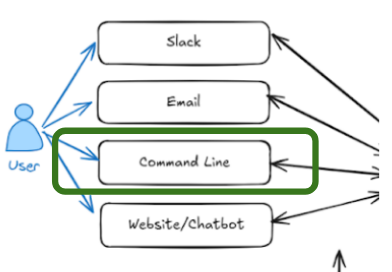
Using the CLI, you can run a conversation with the agent in the Red Hat OpenShift AI namespace $NAMESPACE using oc exec:
# Start interactive chat session
oc exec -it deploy/self-service-agent-request-manager -n $NAMESPACE -- \
  python test/chat-responses-request-mgr.py \
  --user-id alice.johnson@company.com
The --user-id flag specifies the user. In Slack or email, the system identifies the user from their validated credentials.
In the first stage, we used manual conversation flows to start sessions and evaluate how well the agent performed.
The manual approach allowed us to bootstrap development and build the skeleton of the solution.
As an interesting note, we initially believed a smaller model like Llama-4-Scout-17B-16E would work with a single "big" prompt. Later, automated evaluations revealed that this only appeared to work because we had overfit the prompt to our limited manual tests. This shows how a lack of comprehensive evaluations can lead a project in the wrong direction.
Automated evaluation
Next, we automated the conversations where the agent responded predictably to user input. For these cases generating the conversations was straightforward. We captured the sequence in a JSON file like this:
{
    "metadata": {
        "authoritative_user_id": "alice.johnson@company.com",
        "description": "Successful laptop refresh flow"
    },
    "conversation": [
        {
            "role": "user",
            "content": "refresh"
        },
        {
            "role": "user",
            "content": "I would like to see the options"
        },
        {
            "role": "user",
            "content": "3"
        },
        {
            "role": "user",
            "content": "proceed"
        }
    ]
}
You can find our predefined conversations in the it-self-service-agent/evaluations/conversations_config/conversations directory.
We created scripts to read these files, drive the conversation using oc exec, and store the results. The code that starts the conversation with the agent is in it-self-service-agent/evaluations/helpers/openshift_chat_client.py and is as follows:
            cmd = [
                "oc",
                "exec",
                "-it",
                "deploy/self-service-agent-request-manager",
                "--",
                "bash",
                "-c",
                f"{env_vars} /app/.venv/bin/python {'/app/test/' + self.test_script if not self.test_script.startswith('/') else self.test_script}",
            ]
            self.process = subprocess.Popen(
                cmd,
                stdin=subprocess.PIPE,
                stdout=subprocess.PIPE,
                stderr=subprocess.PIPE,
                text=True,
                bufsize=1,
                universal_newlines=True,
            )
it-self-service-agent/evaluations/run_conversations.py is the top-level script which loads each of the predefined conversations and interacts with the agent if you want to take a closer look.
Evaluating conversations with DeepEval
Once we could generate a set of conversations with the agent, we needed to evaluate how well the agent had performed in each conversation. Knowing that each time a conversation was generated, even with the same user responses, would be different, we needed an approach that could handle that variability. Some of the challenges that the approach needed to handle included:
- Non-determinism
- Conversation variation
- Evaluation pickiness
- Model variation
- Prompts extremely sensitive to changes
- Subtle changes hard to spot manually
- 1 conversation is not enough to validate
- Easy to overfit
We asked internal Slack channels for open source evaluation frameworks that support multi-turn conversations. While some suggested Promptfoo, it did not seem like a good fit for multi-turn testing at the time.
We then expanded our research, identifying DeepEval as an open source (Apache 2) framework that supports multi-turn conversations and is actively maintained.
DeepEval uses an LLM as a judge to review multi-step conversations against specific metrics. It includes predefined metrics and lets you define custom metrics for your specific business case.
In stage 2, we tested the agent using predefined DeepEval metrics. In stage 3, we developed a set of 15 custom metrics (Figure 2).
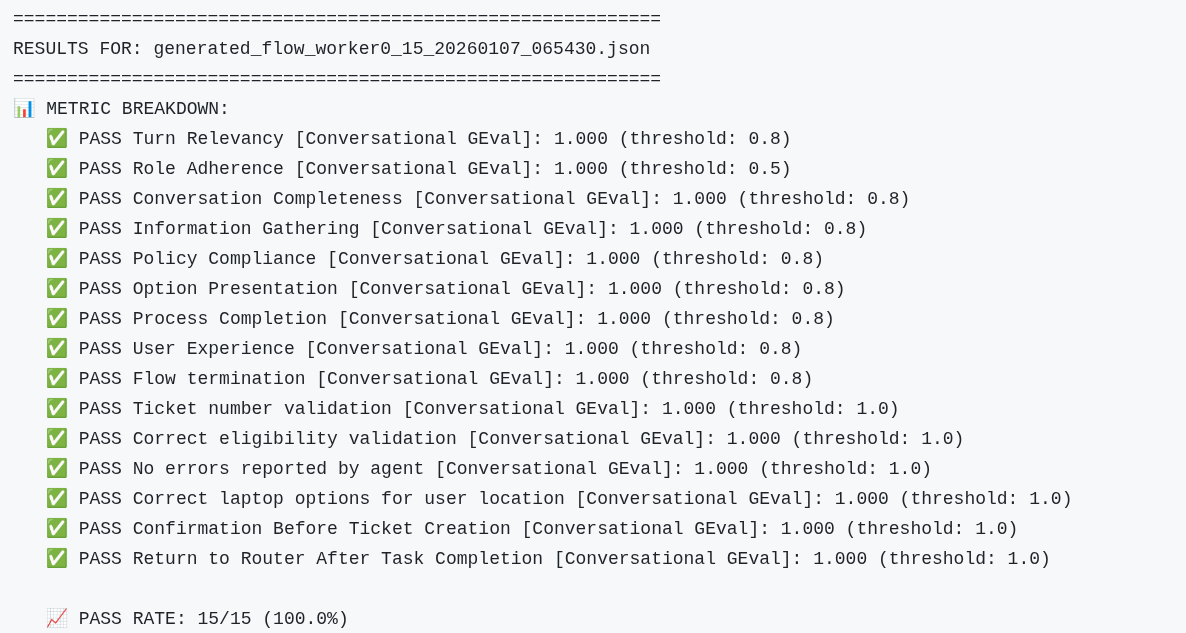
We iterated on these metrics as we discovered edge cases. Each metric targets a specific business requirement: Did the agent verify eligibility? Did it confirm before creating tickets? Did it provide complete laptop options? Start with metrics for your most critical requirements and expand them over time.
Metrics are defined as a ConversationalGEval, which is DeepEval's approach for using an LLM to evaluate multi-turn conversations against custom criteria. The evaluation_steps are instructions for the evaluator LLM—think of them as a detailed rubric. The threshold (1.0 in this case) means we require a perfect score; for more nuanced metrics, you might use 0.7 to allow some flexibility. As an example:
        ConversationalGEval(
            name="Correct eligibility validation",
            threshold=1.0,
            model=custom_model,
            evaluation_params=[TurnParams.CONTENT, TurnParams.ROLE],
            evaluation_steps=[
                "Look for any reference to the laptop refresh policy timeframe in the conversation. The agent may state this in multiple ways:",
                "  - Direct statement: 'laptops will be refreshed every 3 years' or 'standard laptops are refreshed every 3 years'",
                "  - Indirect via eligibility: 'your laptop is over 3 years old and eligible' (implies 3-year policy)",
                "  - Indirect via ineligibility: 'your laptop is 2 years old and not yet eligible' (implies 3-year policy)",
                "  - Reference to age threshold: 'laptops older than 3 years' or 'laptops less than 3 years old'",
                "If the agent mentions ANY timeframe (whether directly or indirectly through eligibility statements), verify it is consistent with the policy in the additional context below, which states that standard laptops are refreshed every 3 years.",
                "If the agent does NOT mention any timeframe or eligibility age at all, this evaluation PASSES (the metric only validates correctness when stated, not whether it's stated).",
                "The user's eligibility status (eligible or not eligible) is irrelevant - only the accuracy of the stated or implied timeframe matters.",
                f"\n\nadditional-context-start\n{default_context}\nadditional-context-end",
            ],
        ),
The evaluation steps tell the judge LLM how to evaluate the conversation for that metric. It is a balancing act when creating metrics that both catch the failures you are looking for and are also forgiving enough to allow the variability that you want to give the agent. We found that you often need to tell the evaluator which responses are acceptable and which are not. You can see this in the preceding example.
The 15 metrics we used are in it-self-service-agent/evaluations/get_deepeval_metrics.py if you would like to look at some of the others in detail.
DeepEval also allows you to specify the agent's role. The role provides critical context that helps the evaluator judge responses. Without this context, the evaluator might flag a correct response as an error because it doesn't understand what the agent is supposed to do. As an example from it-self-service-agent/evaluations/deep_eval.py:
            chatbot_role = """You are an IT Support Agent specializing in hardware replacement.
Your responsibilities:
1. Determine if the authenticated user's laptop is eligible for replacement based on company policy
2. Clearly communicate the eligibility status and policy reasons to the user
3. If the user is NOT eligible:
   - Inform them of their ineligibility with the policy reason (e.g., laptop age)
   - Provide clear, factual information that proceeding may require additional approvals or be rejected
   - Allow them to continue with the laptop selection process if they choose to
4. Guide the user through laptop selection
5. After the user selects a laptop, ALWAYS ask for explicit confirmation before creating the ServiceNow ticket (e.g., "Would you like to proceed with creating a ServiceNow ticket for this laptop?")
6. Only create the ServiceNow ticket AFTER the user confirms they want to proceed
7. After creating the ticket, provide the ticket number and next steps
8. Maintain a professional, helpful, and informative tone throughout
Note: Providing clear, factual information about potential rejection or additional approvals is sufficient. You do not need to be overly cautionary or repeatedly emphasize warnings. Always confirm with the user before creating tickets."""
The result of the evaluation is a rating from 0 to 1 on how well the agent did in the multi-turn conversation and an explanation for that assessment. As an example:
    {
      "metric": "Correct eligibility validation [Conversational GEval]",
      "score": 1.0,
      "success": true,
      "reason": "The conversation fully meets the criteria as the agent correctly states the laptop refresh policy timeframe, mentioning that standard laptops will be refreshed every 3 years from the date of issuance, and the user's laptop is eligible for refresh since it is 4 years and 9 months old, aligning with the policy stated in the additional context.",
      "threshold": 1.0,
      "retry_performed": false
    },
We used the DeepEval library to build a script, deep_eval.py, which evaluates all conversations in a directory and generates a summary.
At this point, we could automatically evaluate multiple conversations and receive a pass/fail summary.
Generating conversations
Predefined conversations are a good start, but we needed more diverse scenarios to reflect real-world use. The variability in agent responses meant that we could not just expand the set of predefined user responses in a way that would work reliably. Instead, we used DeepEval's conversation generation functionality.
The conversation generator allows us to provide a "plug-in" for interacting with the agent. We use the same openshift_chat_client.py that we showed you earlier, allowing the generator to drive conversations with our agents. When creating a DeepEval ConversationSimulator we passed in a callback that uses the OpenShiftChatClient in openshift_chat_client.py:
from deepeval.simulator import ConversationSimulator
    …
    simulator = ConversationSimulator(
        model_callback=worker_model_callback,
        simulator_model=custom_llm,
    )
    …
    async def worker_model_callback(
        input: str, turns: List[Turn], thread_id: str
    ) -> Turn:
            …
            worker_client = OpenShiftChatClient
            …
            response = worker_client.send_message(input)
Along with the simulator, you provide DeepEval with one or more ConversationalGolden objects to describe the interaction scenario.
    conversation_golden = ConversationalGolden(
        scenario="An Employee wants to refresh their laptop. The agent shows them a list they can choose from, they select the appropriate laptop and a ServiceNow ticket number is returned.",
        expected_outcome="They get a ServiceNow ticket number for their refresh request",
        user_description="user who tries to answer the assistant's last question",
    )
Together, these elements let us create it-self-service-agent/evaluations/generator.py to generate conversations.
generator.py supports the ability to generate conversations in parallel. Because each parallel conversation needs to be for a different user (since we maintain conversation state per user in the solution), the system partitions users based on the requested parallelism. Each subset then generates conversations through a specific thread.
Known bad conversations
The performance of the metrics used in the evaluations will vary depending on the model used for the evaluator, and as you tweak the steps for a given evaluation. It is important, therefore, to test that the metrics catch the failures they are designed for when tweaking the metrics or changing the model used as the judge.
To do this, we captured conversations where the agent makes specific mistakes, either by hand or by taking failures we saw the agent make. These became a set of pre-generated conversations with both user and agent responses. We then run DeepEval evaluation against these conversations to identify failures. Our current set includes:
it-self-service-agent/evaluations/results/known_bad_conversation_results
├── allowed_invalid_user-laptop-selection.json
├── bad_laptop_options.json
├── did-not-confirm-service-now-creation.json
├── fail-route-back-to-router.json
├── incomplete.json
├── missing-laptop-details.json
├── missing_laptop_options2.json
├── not-all-laptop-options.json
├── no-ticket-number.json
├── wrong_eligibility.json
└── wrong-selection.json
In our experience, you need an evaluator model that is at least as capable as the model used for your agent. As an example of how models of different "strengths" performed as we developed the AI quickstart:
- Llama-4-Scout-17B-16E fails to catch the failures in four to five of these known bad examples,
- llama-3-3-70b-instruct-w8a8 catches all of the failures, but for one of the metrics struggles and intermittently reports false positives
- Early experiments with Gemini Flash 2.5 revealed three subtle issues in our generated conversations that were not in our "known bad" set.
The more capable the model, the more accurate your evaluations will be.
When an evaluation fails, we follow this process:
- Review the actual conversation to see if the agent truly failed.
- Check if the metric is too strict (false positive).
- If agent failed: fix the agent prompt/logic.
- If metric failed: adjust the evaluation steps.
- Rerun the test against known good and known bad conversations to validate the fix.
In addition, if we notice a failure that is not being reported by our evaluations, we'll add that conversation to our set of known bad conversations and either adjust an existing metric to flag it or add a new metric.
The complete flow
To make it easy to run the predefined conversations along with N generated conversations, we created the it-self-service-agent/evaluations/evaluate.py script which lets you generate a set of conversations, run the predefined conversations, evaluate all of the conversation results and generate an easy-to-consume summary. A summary of a test run with 20 conversations and no failures is displayed in Figure 3. If a failure occurs, DeepEval provides an explanation in the summary.
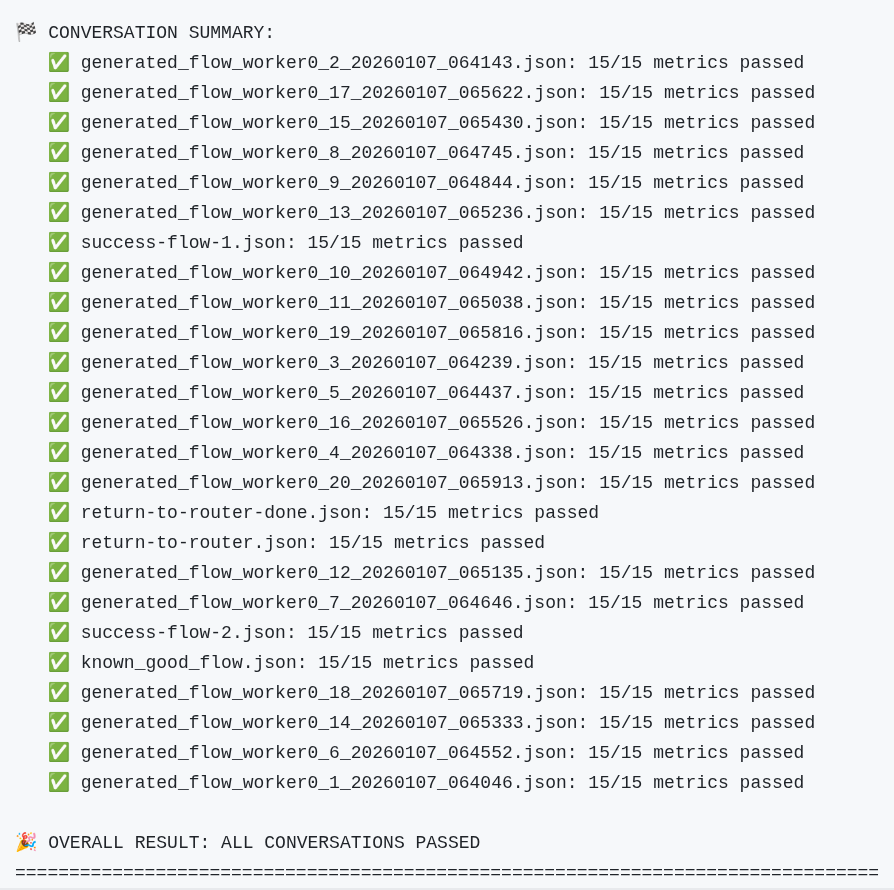
We use this in our GitHub CI for PR reviews and nightly runs. We currently run 20 conversations using different models and different prompting approaches every night. In addition, for changes that we believe might be more likely to affect the reliability of the agent, we can easily generate 100 or more conversations.
We have found that you need to do a larger number of runs, over a larger time period to catch subtle and intermittent failures. We've done runs of 100 or 200 without failure, only to find that the nightly runs surface a few intermittent issues as they run when the model is under different levels of load and stress. The team agreed: Evaluation and CI/CD are critical for maintaining development velocity.
We use our evaluation framework along with CI/CD to avoid major regressions, identify intermittent issues and drive incremental improvement. We'll go into more detail about our CI setup and runs in a later blog post.
Cost
It's important to think about cost when implementing your evaluations approach. We instrumented both the generator and the command line interface so that we could get a count of the tokens used. Figure 4 shows results for a run with our predefined conversations and 20 generated conversations:
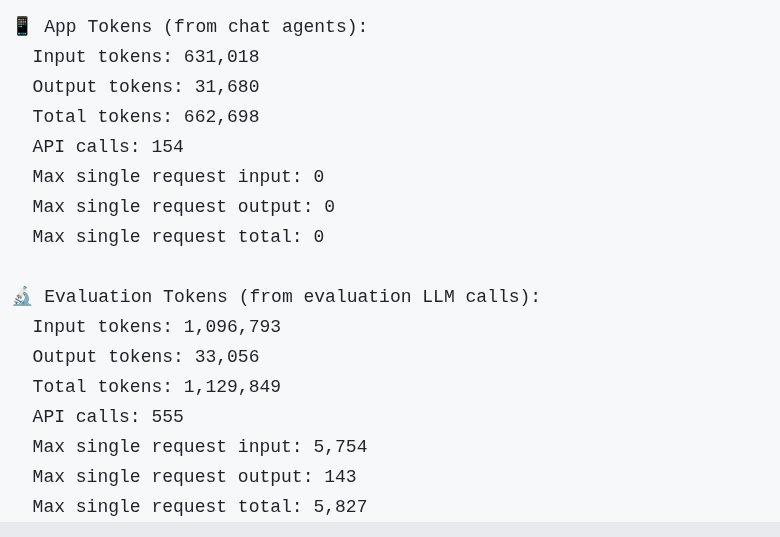
Using standard rates for one of the frontier models, that would be:
Input tokens: 1,600,000 tokens × $0.30 per million = $0.48
Output tokens: 64,000 tokens × $2.50 per million = $0.16
Total Cost: $0.64
While this might not sound like a lot, we perform at least four runs each night. We also have run many ad hoc runs with even more conversations. We use a llama-3-3-70b-instruct-w8a8 model hosted on Red Hat OpenShift AI for both the agent and the evaluation to avoid any unexpected cloud costs at the end of the month.
Wrapping up
We hope this post helped you understand how we implemented and used evaluations in the rh-ai-quickstart/it-self-service-agent AI quickstart. We also hope you feel more confident integrating evaluation into your development process and have a clear example of how to get started.
In closing, here are the top 10 practices for developing an evaluation framework:
- Embrace non-determinism.
- Agree on "good enough" early. Agents make mistakes, so don't expect perfection.
- Build in evaluation hooks early.
- Plan for use-case specific metrics.
- Plan for a capable evaluator model.
- Augment evaluations with key data.
- Test your tests (known bad cases).
- Automate in continuous integration/continuous deployment from the start.
- Establish baselines and track regression.
- Track and manage token usage costs.
Next steps
Try the AI quickstart yourself: Run the AI quickstart (60-90 minutes) to deploy a working multi-agent system.
- Save time: You can have a working system in under 90 minutes rather than spending weeks building orchestration and evaluation frameworks from scratch. Start in testing mode to explore the system, then switch to production mode using Knative Eventing and Kafka when you are ready to scale.
- What you'll learn: Production patterns for AI agent systems that apply beyond IT automation, such as how to test non-deterministic systems, implement distributed tracing for async AI workflows, integrate LLMs with enterprise systems safely, and design for scale. These patterns transfer to any agentic AI project.
- Customization path: The laptop refresh agent is just one example. The same framework supports Privacy Impact Assessments, RFP generation, access requests, software licensing, or your own custom IT processes. Swap the specialist agent, add your own MCP servers for different integrations, customize the knowledge base and define your own evaluation metrics.
To learn more
If this blog post sparked your interest in the IT self-service agent AI quickstart, here are additional resources.
- Explore more AI quickstarts: Browse the AI quickstarts catalog for other production-ready use cases, including fraud detection, document processing, and customer service automation.
- Questions or issues? Open an issue on the GitHub repository or file an issue.
- Learn more about the tech stack:

