In this post, we cover the implementation of the CI/CD pipelines our team used to develop the it-self-service-agent AI quickstart and what we learned along the way.
Continuous integration and continuous delivery (CI/CD) are vital to building applications. For agentic systems, this process is even more important because agents are inherently variable. We'll share our CI/CD implementation and how it helped our development velocity.
About AI quickstarts
AI quickstarts are a catalog of ready-to-run, industry-specific use cases for your Red Hat AI environment. Each AI quickstart is simple to deploy, explore and extend. They give teams a fast, hands-on way to see how AI can power solutions on open source infrastructure. To learn more, read AI quickstarts: An easy and practical way to get started with Red Hat AI.
This is the ninth post in a series covering what we learned while developing the it-self-service-agent AI quickstart. Catch up on the previous parts in the series:
- Part 1: AI quickstart: Self-service agent for IT process automation
- Part 2: AI meets you where you are: Slack, email & ServiceNow
- Part 3: Prompt engineering: Big vs. small prompts for AI agents
- Part 4: Automate AI agents with the Responses API in Llama Stack
- Part 5: Eval-driven development: Build and evaluate reliable AI agents
- Part 6: Distributed tracing for agentic workflows with OpenTelemetry
- Part 7: 3 Lessons for building reliable ServiceNow AI integrations
- Part 8: Guardrails: Enterprise safety shields with Llama Stack
- Part 9: Deploy with confidence: Continuous integration and continuous delivery for agentic AI
If you want to learn more about the business benefits of using agentic AI to automate IT processes, check out AI quickstart: Implementing IT processes with agentic AI on Red Hat OpenShift AI.
Agentic systems need CI/CD more than ever
While CI/CD is a key element of most development projects, it is even more important for agentic systems. Agentic systems rely on large language models (LLMs), which are nondeterministic. That means:
- One test run is never enough. Responses can change with every run, so you need multiple tests to ensure the system works as expected.
- You cannot achieve 100% accuracy. Just as with manual processes, you should not expect an agentic implementation to be 100% accurate. Regular CI/CD runs help you track how often errors occur and manage the associated risks. The key is finding the right balance between cost and correctness.
- LLM behavior can drift over time. You must test continuously even after meeting your initial targets because the accuracy can change.
- If you use externally hosted models, their behavior can change as providers tweak them to improve performance, fix bugs, or reduce costs.
- If you use externally hosted models—either in the cloud or through something like Red Hat OpenShift AI Models-as-a-Service), shared load from other users can impact performance. Shared models can have good and bad days, similar to a person under heavy load.
These factors make a continuous CI/CD pipeline essential for agentic deployments.
Running the CI/CD pipelines
There are many options for running CI/CD pipelines, such as Red Hat OpenShift Pipelines or GitHub Actions. For the it-self-service-agent AI quickstart, we chose GitHub Actions. The AI quickstart is open source and we developed it in a public GitHub repository. We wanted to share the content—including the build and test pipelines—as widely as possible. Red Hat OpenShift Pipelines is often a better choice for enterprise development or when you need more control.
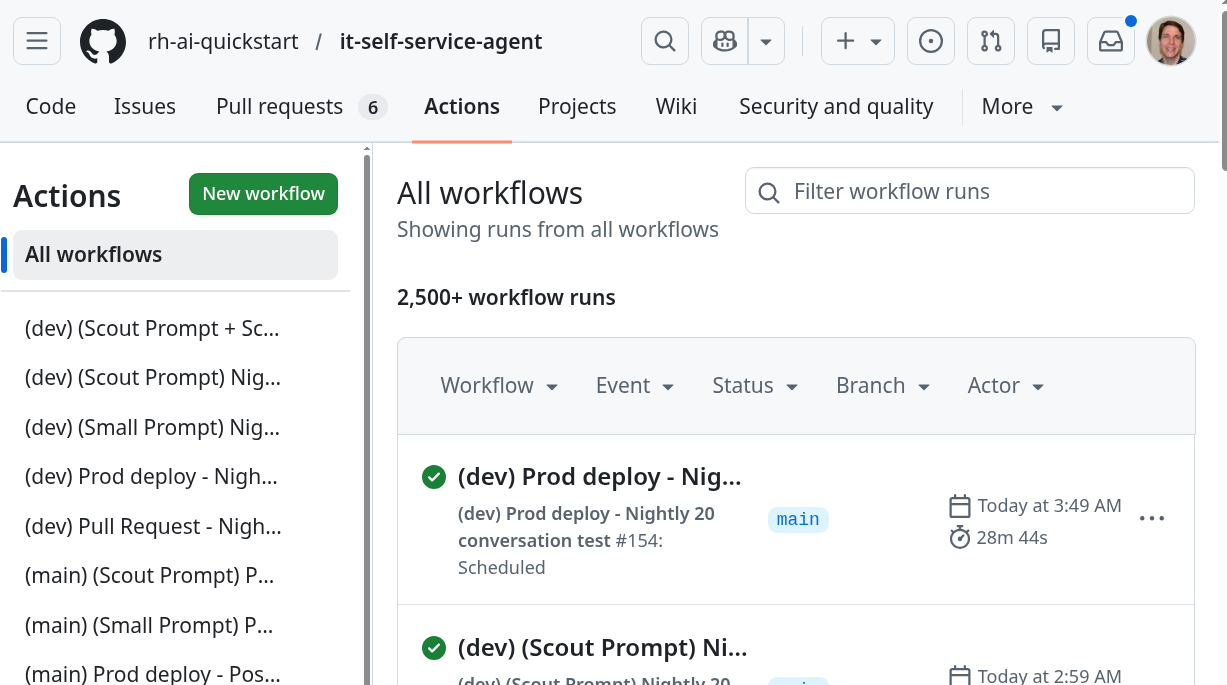
Keeping CI workflows as thin orchestration wrappers over a project Makefile was a particularly useful practice. Every step in GitHub Actions calls a make target, such as make lint, make test-all, make test-short-resp-integration-request-mgr. This ensures developers can run the exact same command locally that CI runs. This eliminates "it passed on my machine" surprises. A failing CI check is always immediately reproducible without pushing another commit.
This example shows the target used for end-to-end testing in the pull request (PR) testing:
.PHONY: test-short-resp-integration-request-mgr
test-short-resp-integration-request-mgr:
        @echo "Running short responses integration test with Request Manager..."
        uv --directory evaluations run evaluate.py -n 1 --test-script chat-responses-request-mgr.py --reset-conversation $(VALIDATE_LAPTOP_DETAILS_FLAG) $(STRUCTURED_OUTPUT_FLAG)
        @echo "short responses integrations tests with Request Manager completed successfully!"
The project uses a dev/main branching strategy. Work lands on dev first, and an automated promotion workflow creates the PR to main when the team is ready to release. The workflow validates version consistency across the Makefile, Helm chart, and values files before opening the PR. This catches common drift where one file is updated and another is forgotten.
What to run in the CI/CD pipelines?
We broke the pipelines into two parts:
- PR testing
- Nightly testing
PR testing ran a smaller set of evaluations to conserve tokens. Nightly testing used longer evaluation runs to provide more comprehensive data for long-term tracking.
PR testing
PR testing is the first gate to avoid regressions when you introduce changes. All PR checks are configured as required status checks in GitHub. This means a PR cannot be merged until every check passes.
The key addition for agentic systems is an integration test with our evaluation framework. This test generates multiple conversations with the deployed agent and uses DeepEval to evaluate them for accuracy. You can read more about that in Eval-driven development: Build and evaluate reliable AI agents.
For each PR, we:
- Run a code quality and dependency check suite which includes:
Flake8for code style,blackfor formatting, andisortfor import ordering.Mypyruns per-directory in strict mode, catching type errors before they reach integration tests.- A custom check enforces consistent logging patterns.
- The Helm templates are exported and validated with
kubeconformagainst the Kubernetes schema. - Per-service
pytestsuites covering core functionality. - Additional checks ensure that demos and build infrastructure continue to work.
- Validate that known-bad conversations are still being caught by the evaluation metrics (see Eval-driven development for a full explanation).
- Run an end-to-end integration test by:
- Deploying a local registry.
- Building the containers for the AI quickstart based on the PR contents and pushing them to the local registry.
- Deploying the AI quickstart in test mode using
kind(Kubernetes in Docker, a tool for running a local Kubernetes cluster). - Running basic evaluations using DeepEval to validate predefined conversations and one generated conversation.
Figure 2 shows the checks on a PR.
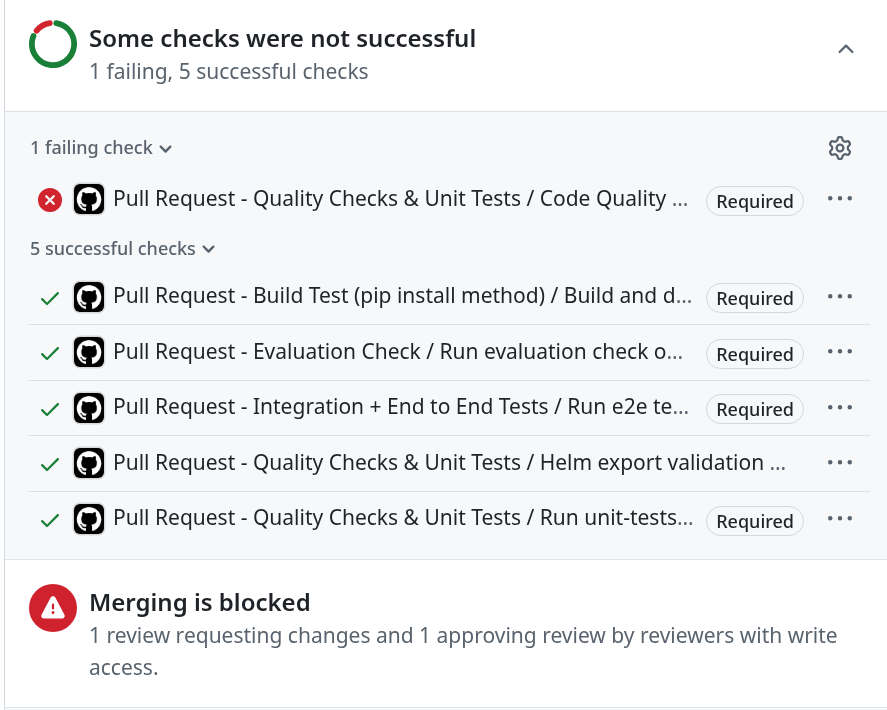
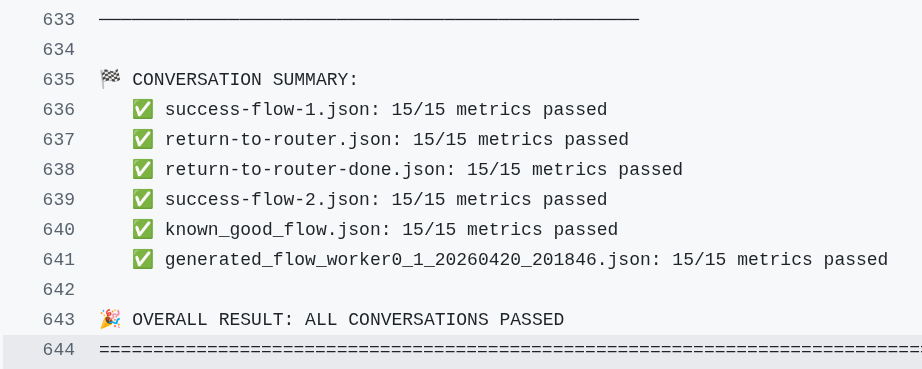
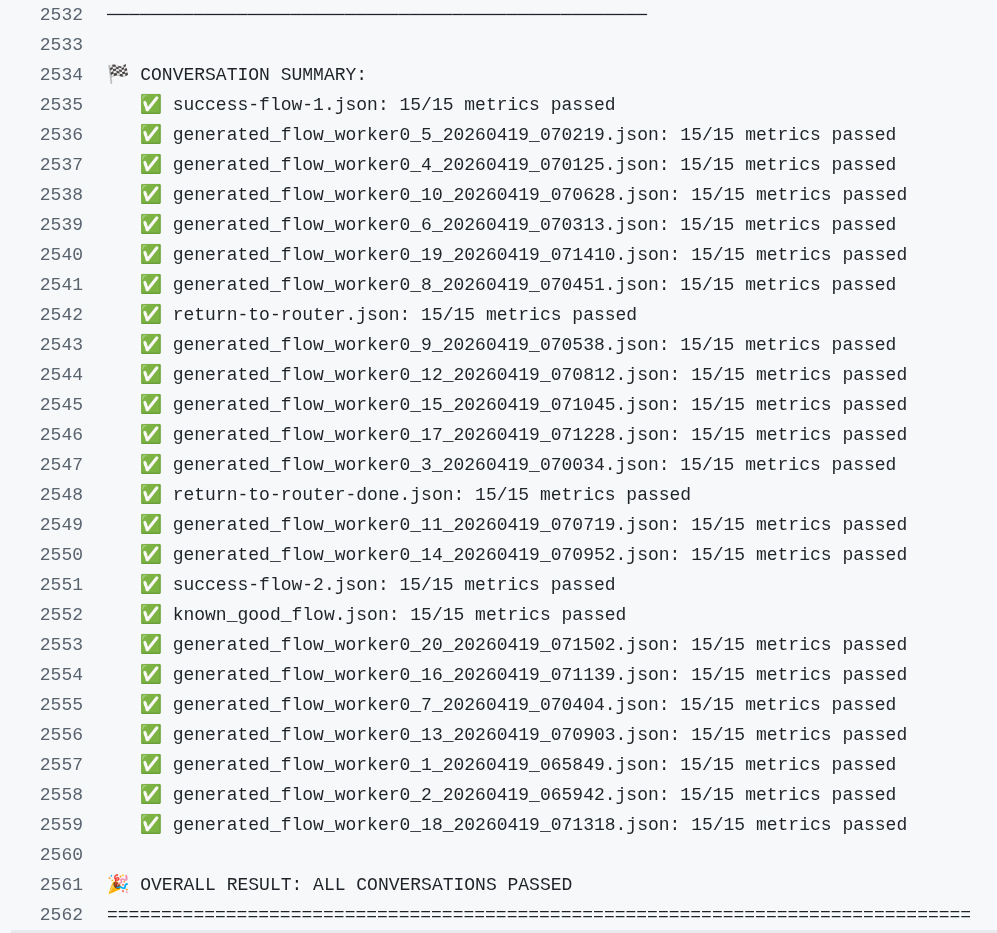
Figure 3 shows an example of the end-to-end test summary output from a PR check run.
Container build and release
When a PR lands on either the main or dev branch, a separate workflow automatically builds all service containers and pushes them to quay.io/rh-ai-quickstart. Each image is tagged three ways: with the semantic version (for example, 0.0.13-dev), the version plus the commit SHA for precise traceability, and—for main only—with latest. This means any user deploying the AI quickstart with the default values gets the most recent stable release. Teams that need to pin to a specific build can do so by commit SHA.
This pipeline also makes the production nightly tests more valuable. Unlike the test-mode nightlies, which build containers fresh from source, the production nightly deploys the containers published when the last PR landed. This is the closest approximation to a real user deployment. It is the only workflow that catches problems appearing only in published artifacts, such as a misconfigured image, a missing dependency masked by the local build environment, or a tag that did not push cleanly.
Nightly testing
Nightly testing includes more configurations, more conversations per run, and different modes to cover all deployment options the AI quickstart supports. We have two types of nightly testing:
- Test mode
- Production mode
In test mode, we use a mock eventing deployment and a mock ServiceNow deployment to simplify setup and testing. These runs are similar to the PR end-to-end integration tests in that they:
- Deploy a local registry.
- Build the containers for the AI quickstart based on the PR contents and push them to the local registry.
- Deploy the AI quickstart in test mode using
kind. - Run evaluations to generate and validate predefined conversations and 20 generated conversations.
We run 3 workflows in test mode with these configurations:
- Llama 3 70b model with "big" prompt with predefined conversation and 20 generated conversations
- Llama 3 70b model with "small" prompt with predefined conversation and 20 generated conversations
- Llama Scout 4 17b model with "small" prompt with predefined conversation and 20 generated conversations
You can read more about the differences between big and small prompts in Prompt engineering: Big vs. small prompts for AI agents.
In production mode, we deploy to a namespace in our OpenShift AI development cluster. We use Apache Kafka for eventing and a real ServiceNow PDI (Personal Developer Instance) to test in an environment that matches a real deployment. Production mode testing also uses the containers published after every PR merge. This ensures we test the same pre-built containers that users receive.
We run one workflow in production mode with this configuration:
- Llama 3 70b model with the big prompt in production mode, including a predefined conversation and 20 generated conversations
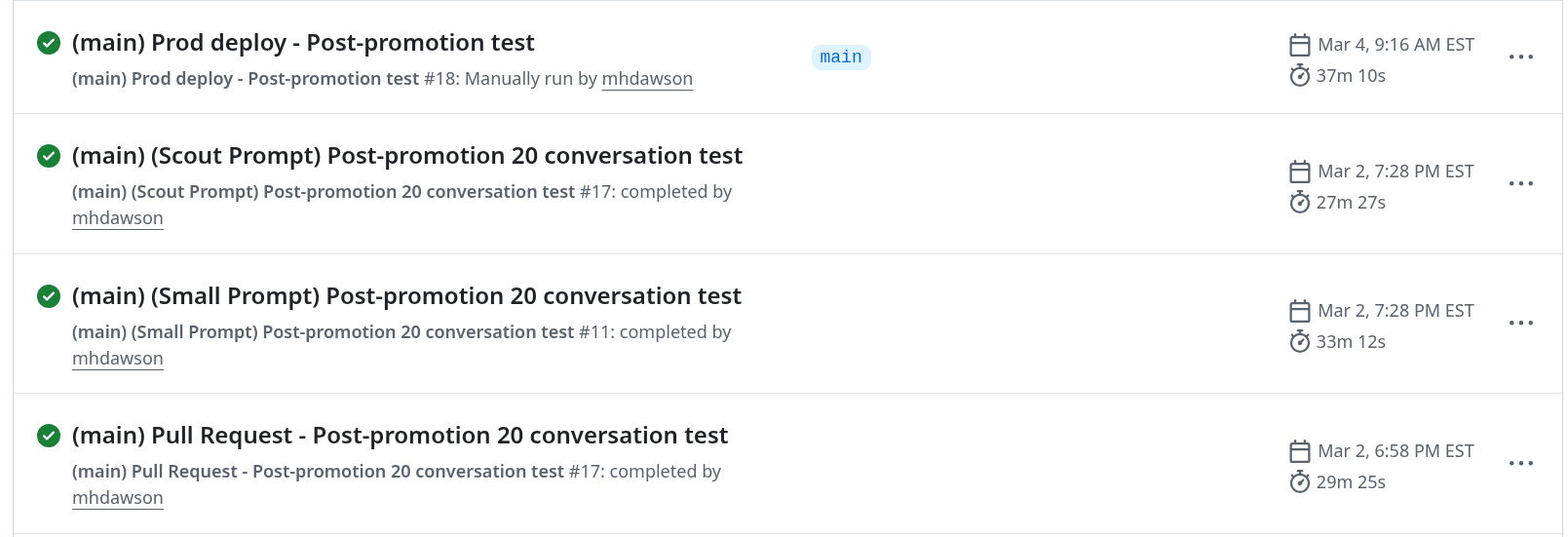
Figure 4 shows the nightly workflows.
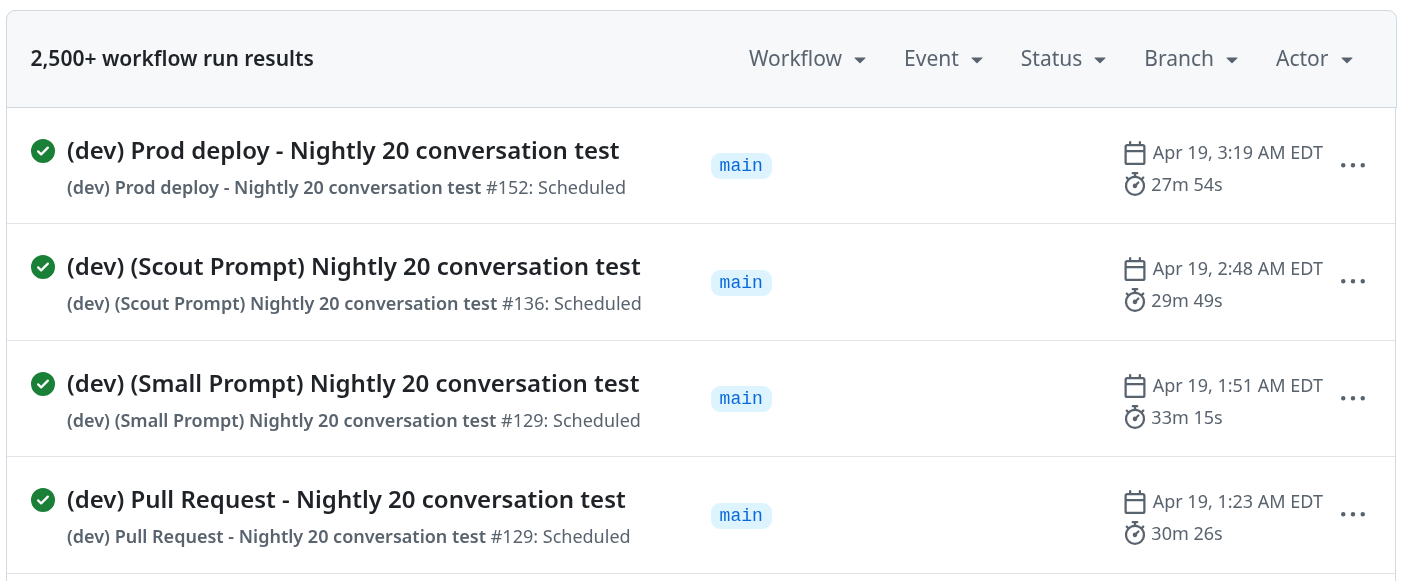
Figure 5 shows a summary of a nightly workflow with 20 generated conversations.
We can also manually trigger these workflows on high-risk PRs to gain confidence before merging them.
These nightly workflows run against the dev branch. A matching set of post-promotion workflows runs against main automatically whenever changes are promoted from dev. The trigger chain follows the container build: a merge to main triggers the build-and-push workflow. That completion triggers the production post-promotion test, which then triggers four workflows on main. This means every promotion to main is automatically validated against the published containers.
Tracking the results
Workflow results for PRs are self-tracking because the checks must pass before you can merge the PR. We review the results for every PR, so no further tracking is necessary.
We track nightly workflow failures in a spreadsheet to identify regressions or increases in intermittent errors. Along with the summary results, every nightly workflow bundles the full evaluation results and uploads them to GitHub Actions as a retained artifact. Artifacts are kept for 30 days, allowing us to review specific conversations and DeepEval results to understand errors.
As an example of how this helped us, you can see a snapshot of what we saw after an upgrade to Llama Stack in the AI quickstart. We ran several hundred conversations without errors before merging the upgrade. However, nightly runs showed more intermittent failures than before. Based on these results, we adjusted the prompts to return to an acceptable level of accuracy.
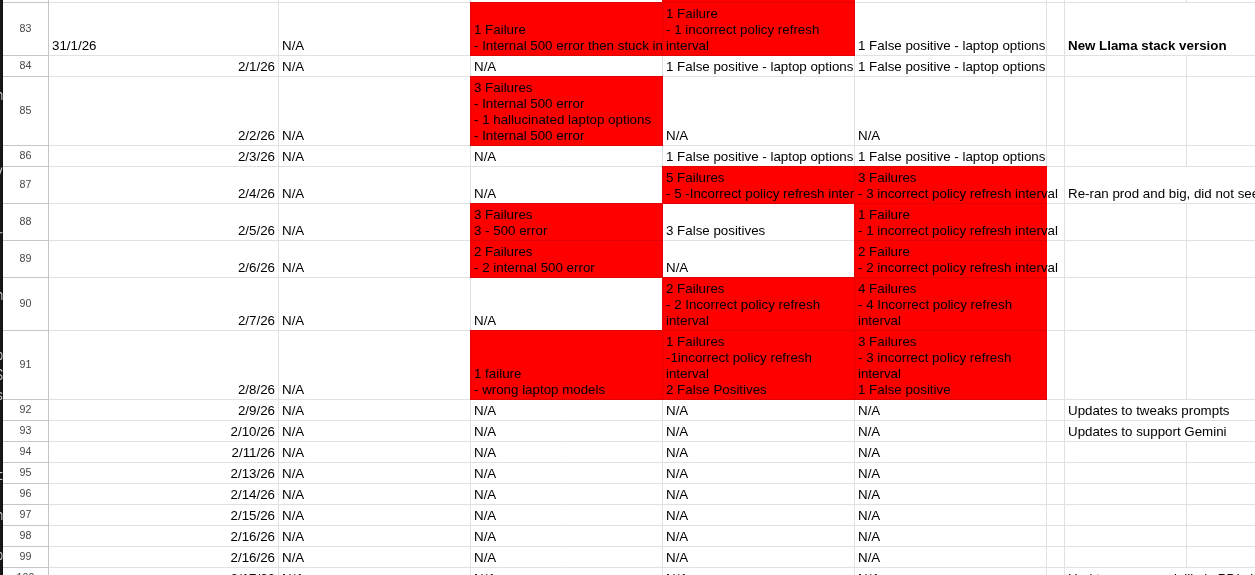
In another instance, a provider enabled safety shields on a shared model. This broke our conversations and nightly runs because the shields flagged details—such as the user's laptop—as personal information. Nightly runs helped us establish that no changes were merged between the last successful run and the first failure, identifying the shared LLM as the source.
What about conversations in production?
Everything described so far uses synthetic or predefined conversations. A question we get almost every time we describe our CI/CD is: "What about conversations in production?"" In production, real users have conversations you might not anticipate. These are the most likely to surface edge cases your test suite has not covered.
The AI quickstart supports this through a post-run audit and evaluation capability. The export_conversations_from_api.py script exports a subset of real completed conversations from the deployed agent, filtered by date, user, or session. These exported conversations use the same format as generated ones. You can pass them directly into the same DeepEval evaluation pipeline using evaluate.py --conversation-source export. For a production deployment, you can extend the nightly CI/CD approach by adding a scheduled workflow. This workflow pulls a random sample of the previous day's conversations and evaluates them, providing a daily signal on how the agent performs with real users instead of just test inputs.
Impact: Iterating with confidence
The greatest benefit came from combining PR checks with nightly runs. PR checks alone were not enough to provide full confidence. A single evaluation of one generated conversation can miss intermittent failures. It was the nightly runs, with their longer evaluations across more conversations and configurations, that gave us confidence that prompt changes, dependency upgrades, and component updates had not introduced regressions.
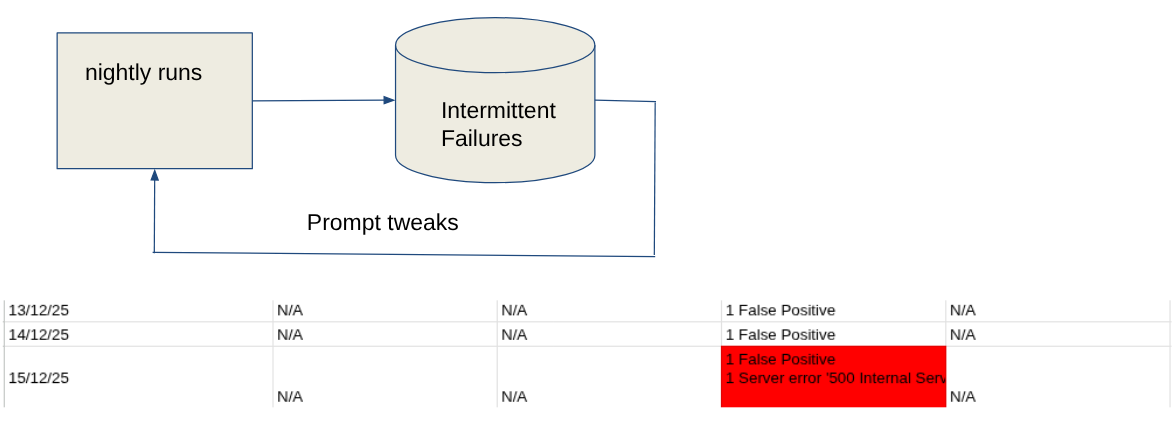
Nightly runs also caught problems beyond our control. Because the agent depends on shared, externally hosted models, external factors can change behavior without a single code change. These factors include enabled safety shields, load on a busy inference endpoint, or quiet model updates from the provider. By feeding nightly results into a failure-tracking spreadsheet, we could spot rising error rates, investigate, adjust the prompts, and confirm the fix with the next set of runs. This feedback cycle, shown in Figure 8, allowed us to resolve regressions quickly during development rather than waiting for a user report.
Don't forget about costs
CI/CD evaluations are invaluable, but they have a token cost you should plan for. As covered in Eval-driven development: Build and evaluate reliable AI agents, a single evaluation run of predefined conversations and 20 generated conversations costs about $0.64 when using a frontier model. For our four nightly workflows, the cost is approximately $2.56 per night, or $75 per month. This total increases with any ad hoc nightly runs triggered for high-risk PRs. These costs can increase quickly when multiplied across several projects in your organization.
To keep costs predictable, we use a model hosted as a service on Red Hat OpenShift AI. This turns a variable cost into a fixed infrastructure cost, which is easier to budget for and avoids surprise bills.
Another useful cost control is concurrency cancellation. We configure every workflow with cancel-in-progress: true, so pushing a new commit to a PR immediately cancels the previous run. Without this, a busy PR can accumulate several in-flight evaluation runs that consume tokens before they finish.
Wrapping up
This post explains how we implemented CI/CD in the rh-ai-quickstart/it-self-service-agent AI quickstart. You can use these examples to integrate CI/CD into your own agentic development process.
For more detail, you can review the workflows in the AI quickstart GitHub repository.
Try the AI quickstart
Run the AI quickstart to deploy a working multi-agent system in 60 to 90 minutes.
- Save time: You can have a working system in under 90 minutes rather than spending weeks building orchestration and evaluation frameworks from scratch. Start in test mode to explore the system, then switch to production mode using Knative Eventing and Kafka when you are ready to scale.
- What you'll learn: Production patterns for AI agent systems that apply beyond IT automation. Examples include testing nondeterministic systems, implementing distributed tracing for asynchronous AI workflows, integrating LLMs with enterprise systems, and designing for scale. These patterns transfer to any agentic AI project.
- Customization path: The laptop refresh agent is just one example. The same framework supports Privacy Impact Assessments, RFP generation, access requests, software licensing or your own custom IT processes. Swap the specialist agent, add your own MCP servers for different integrations, customize the knowledge base, and define your own evaluation metrics.
Learn more
Use these resources to learn more about the IT self-service agent AI quickstart.
- Explore more AI quickstarts: Browse the AI quickstarts catalog for other production-ready use cases, including fraud detection, document processing, and customer service automation.
- Questions or issues? Open an issue on the GitHub repository.
- Learn more about the tech stack:

