Red Hat Ansible Automation Platform 2.7 is now generally available. This release continues our focus on making automation more efficient, resilient, and intelligent for IT teams operating at enterprise scale. Ansible Automation Platform 2.7 introduces new features and enhancements designed to streamline platform engineering, eliminate friction across the automation lifecycle, and put AI to work across IT operations.
Key updates include an expanded automation portal with a new visual execution environment builder and centralized content catalog, along with the enhanced automation intelligent assistant that now supports bring-your-own-knowledge for enterprise-specific guidance. Ansible Automation Platform 2.7 also introduces a Technology Preview of native MCP server integration, enabling AI agents to query jobs, gather facts, and launch automation workflows through natural language, as well as Ansible development workspaces for a secure, consistent browser-based development environment.
Execution environment builder
A significant challenge in scaling automation is ensuring that developers can safely delegate execution, and that the environments their automation runs in are consistent and reproducible. The self-service automation portal addresses both problems in Ansible Automation Platform 2.7 with two major additions: a visual execution environment builder and a centralized content catalog.
The visual execution environment builder walks developers through creating a custom automation environment entirely in the UI — selecting the base image, adding Ansible Content Collections, Python packages, system libraries and custom build steps — without touching the command line. A new centralized content catalog aggregates trusted collections from Git repositories and private automation hub sources, so developers can find and add exactly what they need directly within the builder. Collections are discovered automatically from repositories containing valid galaxy.yml files.
The portal is also now available for RHEL based deployments.
Check out the execution environment builder interactive demo.
Ansible development workspaces
Another challenge for automation teams is ensuring all developers are working from standardized tooling. Installing and maintaining local tooling across different machines and operating systems leads to inconsistencies that slow down onboarding and make it harder to enforce standards. Ansible development workspaces solve this by providing a fully supported, browser based development environment with everything pre-configured, including VS Code, ansible-core, ansible-creator, ansible-lint, and Molecule.
Learn more about Ansible development workspaces.
Agent-enabled developer experience
The MCP server-enabled assistant (Technology Preview) in the Ansible VS Code extension brings AI-powered intelligence directly into the editor by exposing Ansible development tools through an embedded MCP server, so developers can stay focused on writing automation without breaking their flow. The assistant helps developers scaffold compliant automation content, catch errors in context as they write, debug issues faster, and ship reliable playbooks — all without leaving VS Code.
OIDC identity provider for HashiCorp Vault
Managing credentials for automation at scale is one of the more operationally painful and risky parts of automating in an enterprise. Teams often resort to long-live service accounts shared across jobs, a pattern that is hard to audit and difficult to rotate safely.
Ansible Automation Platform 2.7 now acts as a native OIDC identity provider for HashiCorp Vault (Technology Preview), so automation jobs authenticate using short-lived JSON web tokens instead of stored credentials. Each token is automatically scoped to the specific job, user, and organization running the automation, and expires when the job ends (by default aligning with the job's configured timeout, or a platform fallback of five minutes). Two new credential types support this workflow: HashiCorp Vault Secret Lookup (OIDC) for retrieving KV secrets, and HashiCorp Vault Signed SSH (OIDC) for issuing dynamic, short-lived SSH certificates (figure 1). For compliance teams, every Vault secret access is tied to a specific automation run, giving you a clear, auditable trail without managing separate credential lifecycles.
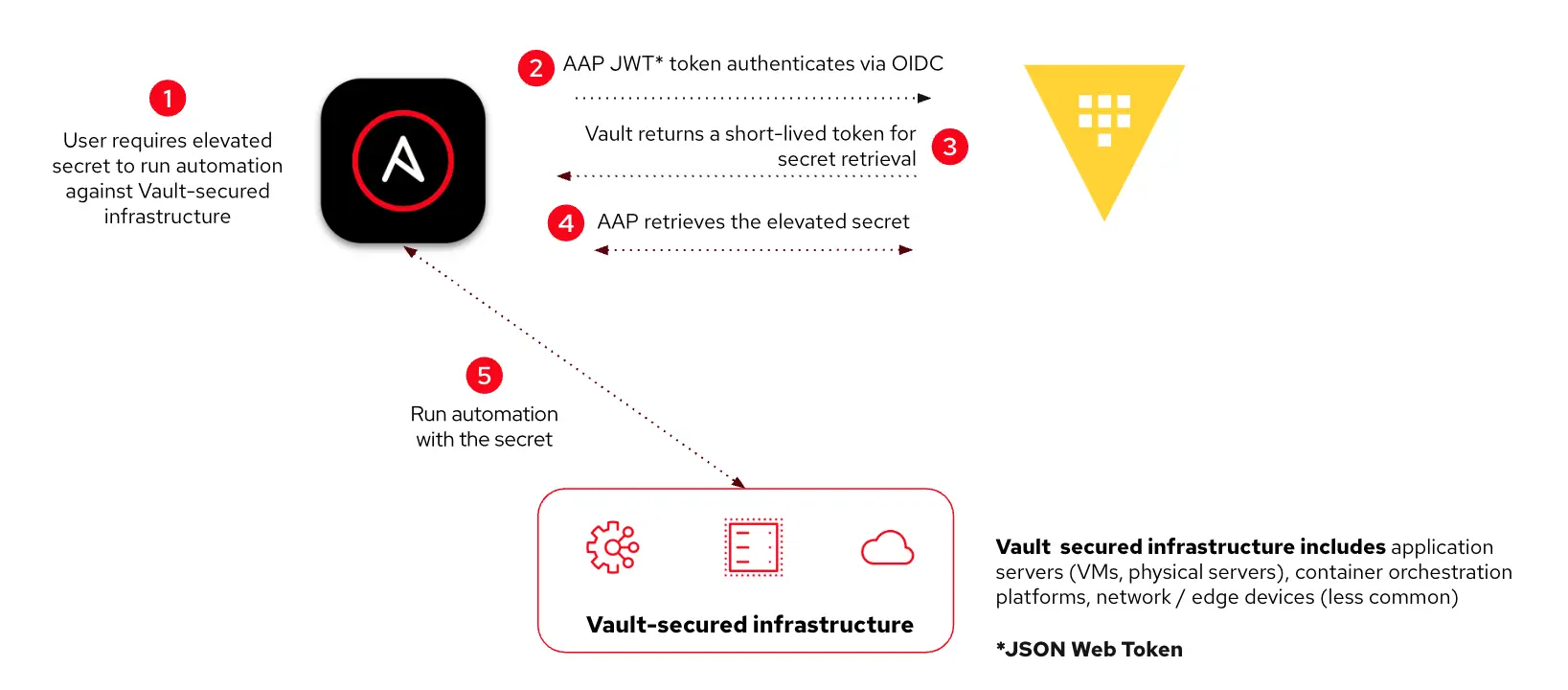
When a user requires a secret to run automation on a Vault-secured component of infrastructure, the OIDC provider issues a token. The Vault returns a short-lived token for secret retrieval, and Ansible retrieves the secret required and uses it to run the automation.
Automation intelligent assistant
The automation intelligent assistant, formerly Ansible Lightspeed intelligent assistant, leverages generative AI to provide support for troubleshooting, onboarding, and day-to-day management of the platform.
The most significant new capability is bring your own knowledge (BYOK), a Technology Preview feature that lets administrators extend the assistant with their organization's internal documentation. After you generate your custom BYOK image with your content, the BYOK image is added as a high-priority source in the assistant's retrieval-augmented generation (RAG) pipeline. When users ask questions, the assistant draws from your organization's specific policies, workflows, and terminology, and supplements with standard Ansible documentation when necessary. The result is an assistant that feels like it knows your organization, not just the product.
MCP server for Ansible Automation Platform
Managing an automation estate today often means navigating a UI or writing API calls to check on jobs, gather facts, or kick off workflows. The model context protocol (MCP) server for Ansible Automation Platform changes this model. The Ansible MCP server allows you to work with your preferred external AI tools (such as Claude, Cursor, or ChatGPT) to directly manage Ansible Automation Platform through natural language, querying job status, gathering facts, and launching automation workflows on demand.
This gives IT operators and administrators a conversational, agent-driven model and can increase efficiency for IT operators and administrators. The MCP server is deployable on both operator-based and container-based installations.
Read more about the MCP server in this blog.
New AIOps solution guides
New solution guides for AIOps workflows with IBM Instana, ServiceNow ITSM, and Splunk provide step-by-step guidance for implementing a complete AIOps workflow with Ansible Automation Platform. IT operations teams can turn observability signals and ITSM events from these platforms into trusted, automated remediation at scale, with detailed patterns for connecting each platform's intelligence to Ansible-driven action. We are adding more solution guides as they become available, so be sure to check the solution guide website often.
Explore the current AIOps solution guides.
Get started today
Ansible Automation Platform 2.7 delivers new tools to help developers, operators, and administrators build, scale, and govern automation more effectively, from a more capable self-service portal and consistent development environments to AI agents that can interact directly with the platform.
Get started by reading the official release notes to see the full scope of what's new in 2.7, and then download the latest version of Ansible Automation Platform!
Last updated: June 16, 2026
