If a 100-token prompt and a 100,000-token prompt both count as one request to your load balancer, then your GPUs are already doing work they don't need to do.
Traditional round-robin balancing treats large language model (LLM) inference like stateless web traffic. But LLM requests are not stateless: They carry context, they benefit from cached computation, and they can vary in cost by orders of magnitude. A load balancer that ignores all of this leaves performance on the table.
The open source llm-d project implements a high-performance distributed inference serving stack that provides a number of ready-made recipes to bring your workloads from zero to production.
In this blog post, we show how llm-d routes each inference request to the GPU that already has the relevant data cached. It can also factor in queue depth and real-time load.
In upstream benchmarks on shared-prefix workloads, it cut time-to-first-token (TTFT) by more than 99% and more than doubled throughput, without changing hardware. We'll show how the Red Hat stack packages this neatly into a single Kubernetes resource, so you get intelligent scheduling without wiring the plumbing yourself.
Why round-robin breaks down for LLMs
Traditional load balancers assume requests are fast, uniform, and stateless. LLM inference breaks all three.
- Requests are slow: A single chat completion can run for 60 seconds while the model generates tokens one at a time. The GPU stays busy the entire time. Round-robin sends the next request to the next pod whether or not that pod is already saturated.
- Requests are not uniform: A 100-token prompt and a 100,000-token prompt both look like "one request" but the longer one needs orders of magnitude more computation during the prefill phase. Without visibility into request size, the load balancer cannot spread work evenly.
- Requests benefit from state: LLM engines like vLLM cache the key-value (KV) tensors (attention state) computed during prefill. If the next request shares the same prefix, the engine can skip that computation entirely. Round-robin scatters requests across all pods, so the same prefix gets recomputed from scratch on every replica.
Suppose four replicas are serving a chatbot. Every user's request starts with the same system prompt. Round-robin computes that prompt four separate times. With intelligent scheduling, it gets computed once and reused (see figure 1).
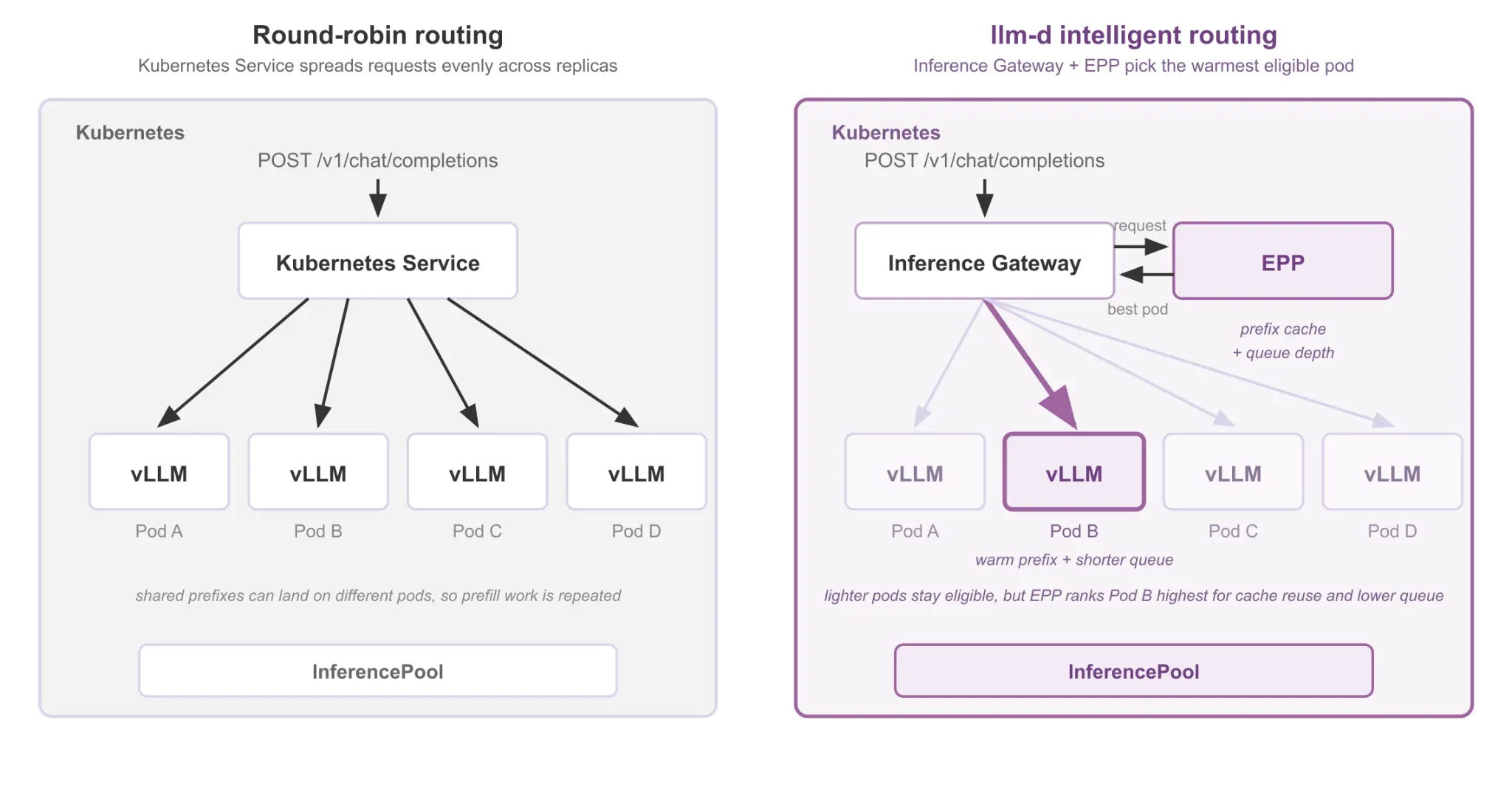
How llm-d routes requests
llm-d fixes this by adding a scheduling layer called the endpoint picker (EPP). Before each request is forwarded, the EPP checks every model server pod to find the best target, starting with which pods already have this request's prefix cached.
The EPP is built on Gateway API Inference Extension, a Kubernetes SIG project. It works with standard gateways like Istio or Envoy Gateway through the ext-proc protocol, so it plugs into infrastructure you may already have. Clients keep using the same inference API. The scheduling happens transparently.
The routing decision follows a three-stage pipeline, as illustrated in figure 2:
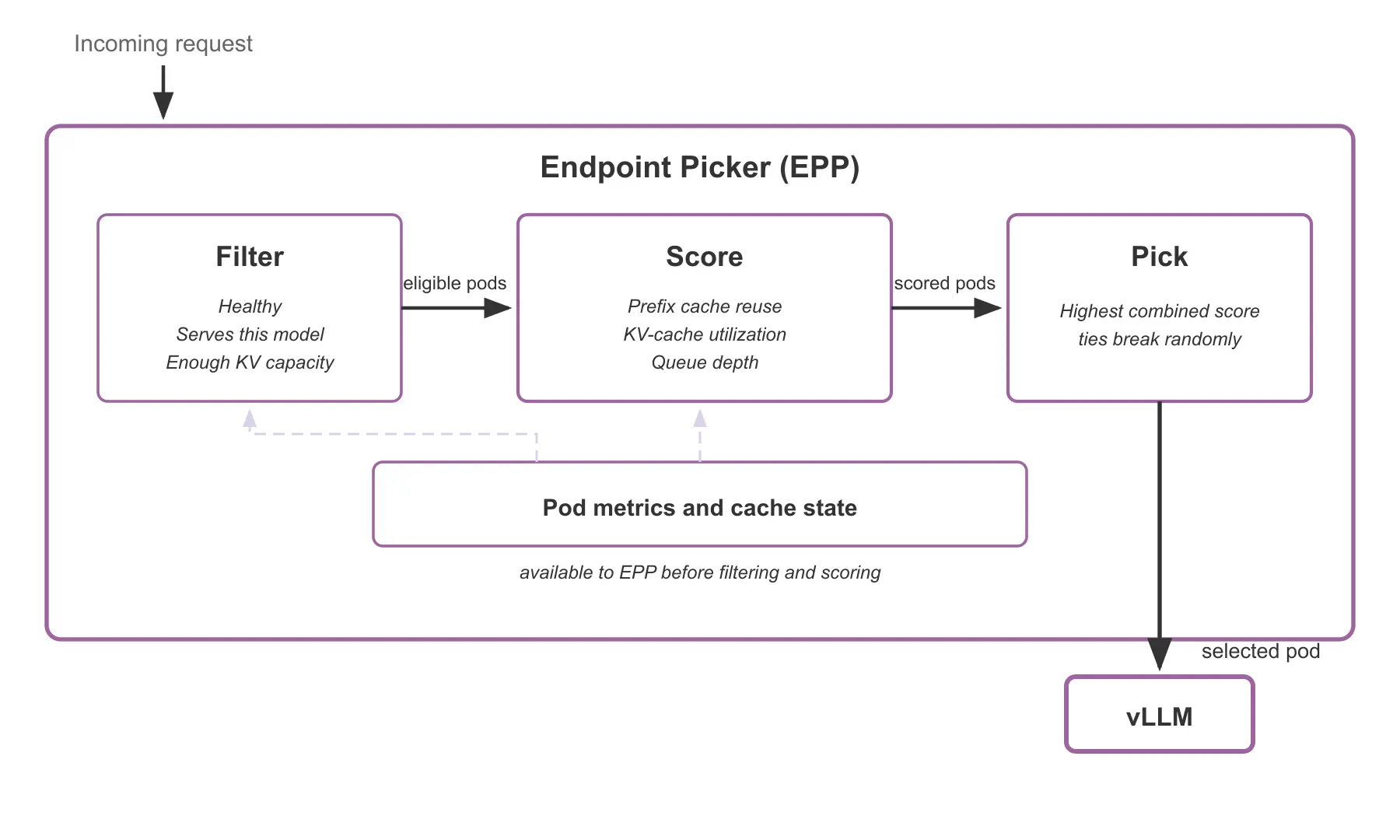
- Filter: Remove pods that cannot serve this request (unhealthy, out of memory or serving a different model).
- Score: Rate each remaining pod on configurable dimensions. By default, the scorer checks how much of this request's prefix each pod already has cached.
- Pick: Select the pod with the highest score. Ties are broken randomly.
All three stages are pluggable. You can swap scorers, add new filters, and tune weights to match your workload.
Prefix caching: where the biggest gains come from
LLM inference is divided into two phases:
- Prefill: Compute-heavy, computes KV tensors for every token at once, and it emits the first token
- Decode: Memory bandwidth-bound, generates only one token at a time
Prefill dominates time-to-first-token, especially for long prompts. For instance, the vLLM inference server stores the resulting KV tensors in GPU memory; this is called the KV cache. With prefix caching, vLLM goes one step further. When a new request shares the same token prefix as a previous one, it reuses those cached tensors across requests, skipping the expensive prefill for the shared portion.
This works well on a single instance. But in a distributed deployment, standard routing scatters requests across pods, so related requests rarely land where the prefix is cached. llm-d's EPP closes that gap: it routes each request to the pod that already holds the relevant prefix, so vLLM's prefix caching actually fires.
By default, the EPP tracks its own routing decisions: it hashes incoming prompts into blocks and compares them against what it has previously routed to each pod. This lightweight approach is fast enough to make a useful routing decision on every request.
Three workload patterns benefit the most:
- Shared system prompts: Every request starts with the same instructions. Cache-aware routing sends them to the same pod.
- Multi-turn conversations: Each turn resends the full history. Only the latest user message is new.
- Agentic tool loops: Tool-calling agents resend tool descriptions with every iteration. Cache-aware routing avoids recomputing them.
To prevent a single pod from becoming a hotspot, the EPP has two safeguards. It periodically routes a fraction of requests away from the cache-warm pod to seed the prefix into additional caches. And if a cache-warm pod's predicted latency is much worse than a less-loaded pod, the EPP breaks affinity. A cache miss is cheaper than waiting behind a long queue.
This approach adds no extra latency to the routing decision. For workloads with high cache churn, llm-d also offers a precise prefix cache mode that introspects each vLLM instance for actual KV cache entries. Precise mode is expected to become the default in a future release.
Add load-aware scheduling
The default profile scores pods using prefix-cache-scorer and queue-scorer,with prefix-cache weighted higher. For workloads that also need load balancing, you can add a load-aware-scorer to the profile. This scorer penalizes pods with longer request queues, so work spreads more evenly across the pool.
When both scorers are active, the EPP combines their outputs into a single weighted score per pod. A chatbot profile might weight prefix-cache-scorer higher to favor cache reuse; a batch processing profile might weight load-aware-scorer higher to favor shorter queues. Additional scorers like session-affinity-scorer, active-request-scorer and context-length-aware are available for specialized use cases. See the scheduling architecture documentation for the full list.
The llm-d team ran the same shared-prefix workload on the same hardware with two configurations: Standard Kubernetes Service routing and the llm-d inference scheduler.
Setup
8 vLLM replicas on 16 H100 GPUs (2 GPUs each, Tensor Parallelism = 2), Qwen/Qwen3-32B, shared-prefix synthetic workload (150 groups, 5 prompts per group) at 60 requests per second.
- Time-to-first-token: 35 seconds to 120 milliseconds. Prefix cache hits skip the expensive prefill entirely (more than 99% reduction).
- Throughput: More than doubled (+151%). GPUs spend their cycles generating new tokens rather than recomputing cached prefixes.
- Request latency: Down 35%. The scheduler spreads load based on real-time pod state, so no single pod becomes a bottleneck.
The more prefix sharing your workload has, the bigger the improvement. Workloads with mostly unique prompts still benefit from load-aware scheduling, but the prefix caching gains are smaller.
The upstream llm-d guide includes a reproducible test harness so you can run these benchmarks on your own cluster. For more on how scorer choice affects different workload profiles, read the full details on the llm-d blog.
What else llm-d provides
Prefix-cache-aware and load-aware scheduling are the most common configurations. But for production deployments with tighter requirements, llm-d provides additional capabilities:
- Predicted latency scheduling: An XGBoost model trained on live traffic predicts per-pod time-to-first-token (TTFT) and time-per-output-token (about 5% mean absolute percentage error (MAPE)). Requests can include service level objective (SLO) headers like x-slo-ttft-ms to route against latency targets. See Predicted latency-based scheduling for LLMs.
- Flow control: Priority bands, fairness policies and backpressure for multi-tenant deployments. See the Flow control configuration guide.
- Prefill/decode disaggregation: Split the compute-heavy prefill phase from the memory-bandwidth-bound decode phase onto different pod pools. See the Prefill/decode disaggregation deployment guide.
The following sections walk through deploying llm-d on two platforms: Red Hat OpenShift AI 3.4 and Red Hat AI Inference on third-party managed Kubernetes services like Azure Kubernetes Services (AKS) or CoreWeave Kubernetes Services (CKS). The scheduling configuration is the same on both; only the installation path differs.
Note: The benchmarks described previously used 16 H100 GPUs with Qwen3-32B. The following deployment examples use a smaller model (Qwen3-8B-FP8-dynamic) with fewer replicas to lower the hardware barrier. You will see the same scheduling behavior (prefix cache hits, intelligent pod selection) but the absolute numbers will differ.
Deploy on Red Hat OpenShift AI
Deploying llm-d upstream means orchestrating multiple helm charts for the inference gateway, the EPP, and the model servers, then wiring HTTPRoutes and configuring your gateway provider manually.
Red Hat OpenShift AI 3.4 collapses all of that into a single resource. The LLMInferenceService controller handles the EPP deployment, gateway wiring, and model server lifecycle automatically. It plugs into OpenShift's built-in monitoring stack, so Prometheus scraping and dashboard access work without extra configuration.
For architecture context on how KServe and llm-d work together, see Best of Both Worlds: Cloud-Native AI Inference at Scale using KServe and llm-d and Production-grade LLM inference at scale with KServe, llm-d and vLLM.
Prerequisites
Before deploying, your cluster needs:
- OpenShift 4.19.9 or later with GPU worker nodes
- Red Hat OpenShift AI 3.4 installed with model serving enabled (installation guide)
- The
openshift-ai-inferencegateway created and the LeaderWorkerSet operator installed by a cluster admin (distributed inference setup) - User workload monitoring enabled (monitoring configuration)
- A Hugging Face token with access to the model you want to serve (this example uses
RedHatAI/Qwen3-8B-FP8-dynamic)
Step 1: Create the inference service
Save the following YAML to a file (for example, qwen3-8b.yaml):
apiVersion: serving.kserve.io/v1alpha1
kind: LLMInferenceService
metadata:
  name: qwen3-8b
  namespace: my-inference-ns
spec:
  replicas: 2
  model:
    uri: hf://RedHatAI/Qwen3-8B-FP8-dynamic
    name: RedHatAI/Qwen3-8B-FP8-dynamic
  template:
    containers:
      - name: main
        resources:
          limits:
            cpu: "4"
            memory: 32Gi
            nvidia.com/gpu: "1"
          requests:
            cpu: "2"
            memory: 16Gi
            nvidia.com/gpu: "1"
  router:
    route: {}
    gateway: {}
    scheduler: {}
Then create the namespace and apply it:
$ oc new-project my-inference-ns
$ oc apply -f qwen3-8b.yaml
Leaving route, gateway, and scheduler empty tells Red Hat OpenShift AI to use the operator-managed defaults. The controller creates the model server pods, deploys the EPP alongside them, and wires the HTTPRoute through the inference gateway.
Step 2: Verify
$ oc get llmisvc qwen3-8b -n my-inference-nsWait for the Ready column to show True.
Deploy on third-party managed Kubernetes services
The same llm-d stack runs on managed Kubernetes platforms like Azure Kubernetes Service and CoreWeave without OpenShift. The scheduling configuration is identical. The deployment path is different: a single Helm chart replaces the Operator Lifecycle Manager (OLM) and the OpenShift operator lifecycle.
Important: Distributed Inference with llm-d on managed Kubernetes is a Technology Preview feature only. Technology Preview features are not supported with Red Hat production service level agreements (SLAs) and might not be functionally complete. Red Hat does not recommend using them in production. These features provide early access to upcoming product features, enabling customers to test functionality and provide feedback during the development process.
For more information about the support scope of Red Hat Technology Preview features, see Technology Preview features support scope.
The dedicated managed Kubernetes (xKS) deployment guide is planned for publication when the feature is generally available.
Prerequisites
Before deploying, your cluster needs:
- Kubernetes 1.33+ on AKS or CoreWeave with GPU nodes
- Helm 3.17+ with Open Container Initiative (OCI) support
- Registry authentication for
registry.redhat.ioandquay.iowith a pull secret file (~/pull-secret.json) - Red Hat AI Inference Server early access credentials from Red Hat
Install Red Hat AI Inference :
$ helm registry login registry.redhat.io
$ helm upgrade rhaii oci://quay.io/rhoai/rhai-on-xks-chart \
    --install --create-namespace \
    --namespace rhaii \
    --set azure.enabled=true \
    --set-file imagePullSecret.dockerConfigJson=~/pull-secret.json
For CoreWeave, replace --set azure.enabled=true with --set azure.enabled=false --set coreweave.enabled=true. The chart installs the Red Hat AI Inference Stack operator, KServe, cert-manager, Istio, and LeaderWorkerSet automatically in two phases. Deployment takes 5-10 minutes.
After installation, configure the inference gateway following the procedure in your Red Hat AI Inference documentation.
Step 1: Create the inference service
The LLMInferenceService spec is the same as on OpenShift, with one difference: Managed Kubernetes has no cluster-wide pull secret, so you must specify imagePullSecrets explicitly. Save the following YAML to a file (for example, qwen3-8b.yaml):
apiVersion: serving.kserve.io/v1alpha1
kind: LLMInferenceService
metadata:
  name: qwen3-8b
  namespace: my-inference-ns
spec:
  replicas: 2
  model:
    uri: hf://RedHatAI/Qwen3-8B-FP8-dynamic
    name: RedHatAI/Qwen3-8B-FP8-dynamic
  router:
    scheduler:
      template:
        imagePullSecrets:
        - name: rhai-pull-secret
        containers:
        - name: main
        - name: tokenizer
    route: {}
    gateway: {}
  template:
    imagePullSecrets:
    - name: rhai-pull-secret
    containers:
    - name: main
      resources:
        limits:
          cpu: "4"
          memory: 32Gi
          nvidia.com/gpu: "1"
        requests:
          cpu: "2"
          memory: 16Gi
          nvidia.com/gpu: "1"
Then create the namespace, the pull secret, and apply it:
$ kubectl create namespace my-inference-ns
$ kubectl create secret docker-registry rhai-pull-secret \
  --from-file=.dockerconfigjson=$HOME/pull-secret.json \
  -n my-inference-ns
$ kubectl apply -f qwen3-8b.yaml
The scheduler.template.containers stubs (main and tokenizer) are required when imagePullSecrets is set. Without them, the controller produces an empty containers list.
Step 2: Verify
$ kubectl get llmisvc -n my-inference-nsWait for READY to show True.
Send traffic and observe
Now it's time to test the setup.
Port-forward to the inference gateway
On Red Hat OpenShift AI:
$ oc port-forward svc/openshift-ai-inference-openshift-default \
  -n openshift-ingress 9090:443 &
$ export TOKEN=$(oc whoami -t)
$ export NO_PROXY=localhost,127.0.0.1
On third-party managed Kubernetes services:
$ kubectl port-forward svc/inference-gateway-istio \
  -n redhat-ods-applications 9090:80 &
Send a shared-prefix workload
Send a few requests that share the same system prompt. On OpenShift AI:
$ for i in $(seq 1 5); do
  curl -sk https://localhost:9090/my-inference-ns/qwen3-8b/v1/chat/completions \
    -H "Content-Type: application/json" \
    -H "Authorization: Bearer ${TOKEN}" \
    -d '{"model":"RedHatAI/Qwen3-8B-FP8-dynamic","messages":[{"role":"system","content":"You are a helpful assistant for Kubernetes operations."},{"role":"user","content":"How do I check pod status?"}],"max_tokens":100}' &
done
wait
On third-party managed Kubernetes:
$ for i in $(seq 1 5); do
  curl -s http://localhost:9090/my-inference-ns/qwen3-8b/v1/chat/completions \
    -H "Content-Type: application/json" \
    -d '{"model":"RedHatAI/Qwen3-8B-FP8-dynamic","messages":[{"role":"system","content":"You are a helpful assistant for Kubernetes operations."},{"role":"user","content":"How do I check pod status?"}],"max_tokens":100}' &
done
wait
The first request runs the full prefill for the system prompt. The four that follow land on the same pod with a cache hit, so they skip prefill and return a faster first token. You should notice the first response taking noticeably longer than the rest. That gap is the scheduling at work.
Observe
Key signals to watch:
- Prefix cache hit rate: Confirms the EPP is routing to pods with cached prefix data.
- Running requests per pod: Shows whether load is distributed. Uneven distribution may mean one pod is bottlenecked or scorer weights need tuning.
- Time-to-first-token: The metric that should improve most compared to round-robin.
On Red Hat OpenShift AI, these metrics are available in the dashboard and through Prometheus. On third-party managed Kubernetes, scrape them directly from Prometheus.
Try it
Adapt the LLMInferenceService example to your model and GPU profile. For complete instructions including authentication, GPU node configuration and gateway creation:
- On OpenShift AI 3.4: Follow the distributed inference documentation.
- On third-party managed Kubernetes: Follow the xKS documentation.
- Upstream on Kubernetes: The optimized baseline guide walks through a full deployment with helmfile, 8 vLLM replicas, and a benchmark harness you can run yourself.
llm-d supports NVIDIA, AMD, Intel XPU, Intel Gaudi, Google TPU, and CPU-only simulation deployments. The project is open source at github.com/llm-d/llm-d.
Next steps
Precise prefix caching is expected to become the default scheduling profile. Heterogeneous GPU support and deeper service level objectives (SLO) integration (request shedding, priority escalation) are in active development upstream. These improvements are expected to be included in future Red Hat AI releases as they mature. Follow the llm-d blog and GitHub releases for updates.
That 100,000-token prompt does not have to mean a 35-second wait.

