This blog post shows how to deploy and secure a basic Oracle SQLcl Model Context Protocol (MCP) server on a Red Hat OpenShift cluster and use it with the OpenShift AI platform as an AI quickstart deployed on OpenShift. AI quickstarts are demo applications that show real-world AI use cases. This quickstart connects agentic AI applications to an Oracle 23ai data warehouse backend. Many OpenShift customers rely on Oracle backends for both transactional and analytical requirements, making this pattern useful.
Learn more: Introducing AI quickstarts
The Oracle SQLcl MCP server is integrated directly into Oracle's core developer tools, primarily via Oracle SQLcl (SQL Developer Command Line). This native integration allows it to work out-of-the-box with popular environments like the Oracle SQL Developer extension for VS Code. For local testing, you can add the local MCP to other popular gen AI-powered IDEs like Cursor.
For example, to add it to your Cursor IDE, the following configuration can be used in the Cursor MCP Settings:
{
  "mcpServers": {
    "sqlcl": {
      "command": "/<path>/sqlcl/bin/sql",
      "args": [
        "-mcp"
      ]
    }
  }
}
The MCP server adds special tracing (in the form of table comments and dedicated system tables) so database administrators (DBAs) can audit which transactions originated from the agentic AI flows.
The current tools in the SQLcl MCP server are as follows:
- List connections: List available Oracle database connections
- Connect: Connect to a specific database
- Disconnect: Disconnect from the current database
- Run SQLcl commands: Execute SQLcl CLI commands
- Run SQL queries: Execute SQL queries and get CSV results
In the demo, we use these tools to connect to the user schema, run queries, and audit the connections available to the MCP server. After you configure the local environment and save your Oracle connections, you can use AI chat tools (Copilot, Claude, VS Code, etc.) to interact with the database. This demo shows how the tools work in a live environment.
We use a hypothetical scenario to show how the Oracle MCP server supports agentic AI use cases. Specifically, this demonstration focuses on the server's capability to convert conversational prompts into standardized SQL transactions for Oracle backends. In this scenario, a sales analyst team wants to use natural language conversational AI to interact with a sales schema in their Oracle 23ai analytical backend.
Red Hat AI provides the necessary AI infrastructure, including LLMOps and services like an OpenShift AI vLLM inference service, Guardrails, and the Llama Stack platform. It connects these agents to existing Oracle backends in an enterprise environment.
For demonstration purposes, we also create a local container of the Oracle 23ai free database, which is based on this image: container-registry.oracle.com/database/free:23.5.0.0
Of course, for production use cases, you would connect the MCP server to a real instance serving analytical and transactional workloads on the enterprise host environments such as Oracle OCI, on-premises or on a public cloud. In reality, most of these instances would likely be read-only replicas to mitigate LLM risks and would be protected with Oracle access controls. In our demo we use a read-only user to mimic access to a sales schema.
The Setup section provides an automation script to populate the database with the TPC-DS benchmark data. TPC-DS (Transaction Processing Performance Council - Decision Support) is a benchmark for decision support systems. Its schema includes tables such as store_sales, web_sales, catalog_sales, customer, item, and date_dim. These standardized queries are designed to simulate real-world business analytics workloads.
To showcase this integration, we will use the AI Virtual Agent demo application. This demo shows how to use OpenShift and OpenShift AI to build an immersive AI agent builder on a secure Kubernetes cluster. While OpenShift AI provides the AI infrastructure, OpenShift is the application platform where you can deploy and scale the AI agents in your environments just like with any microservice. To ensure only authorized and authenticated users access the database, we use both Oracle-native RBAC and OpenShift container platform security primitives. The local MCP server is deployed as an OpenShift container exposing the remote Streamable-HTTP interface.
Sales analysts can use the AI Virtual Agent to send prompts like: show me the top selling product in the last quarter in each geography. Their natural language prompts are translated to SQL using the AI application LLM and then passed to Oracle via one of the MCP tooling (such as Run SQL).
Figure 1 shows a high-level conceptual depiction of the demo architecture.
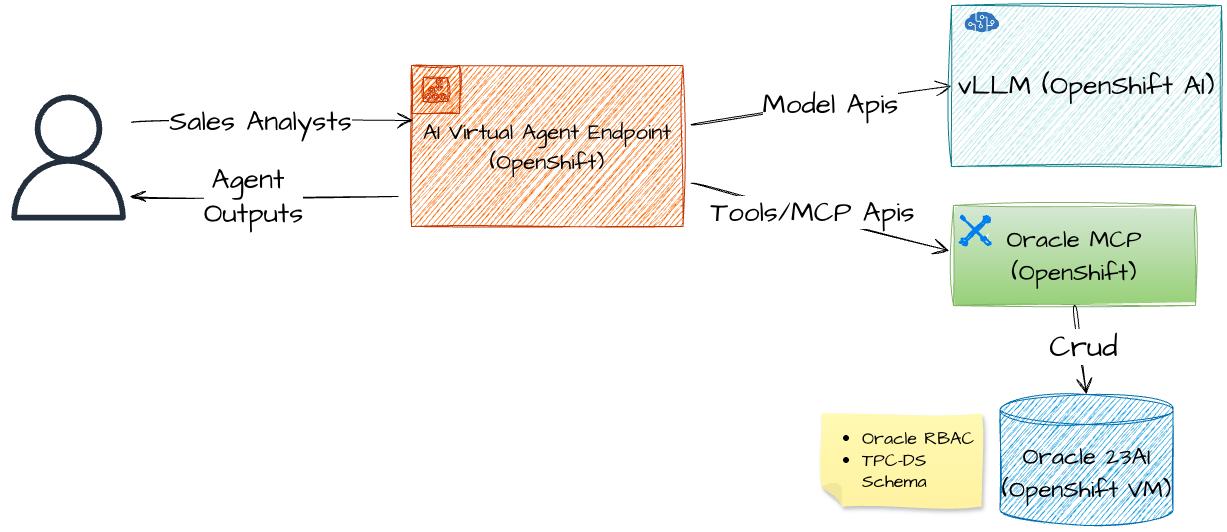
OpenShift is where you deploy your AI applications (AI Virtual Agent in our example). OpenShift AI is where you can deploy your LLMs using GPU nodes while an Oracle MCP server on OpenShift connects your AI application to an existing Oracle database.
Set up the demo
First, make sure to meet the minimum requirements listed in the AI Virtual Agent, you will find them under the requirements section. The two main requirements are an OpenShift Cluster with OpenShift AI.
If you host your models in OpenShift AI, for the LLM model choice we recommend using one of these models: llama-3-1-8b-instruct for simple queries or gpt-oss-20b for more complex queries. The models will be deployed on OpenShift GPU nodes so make sure you have a GPU to match your model choice.
The demo setup will provision the model as an OpenShift AI vLLM service; however if you don't have GPU nodes in your OpenShift cluster you can use Gemini on GCP Vertex AI to power the AI Virtual Agent. This is the only demo resource that is provisioned remotely to the OpenShift cluster.
In our demo chapter, we show how to use the integration of gpt-oss-20b with vLLM (using NVIDIA L40S), we also tested this setup with gemini-2.5-flash on Google Cloud Platform Vertex AI.
The easiest way to deploy the AI Virtual Agent and the Oracle services is to clone the AI Virtual Agent repository and run a simple make command from your local environment. The command deploys all the demo resources in a dedicated OpenShift namespace created based on the NAMESPACE variable provided during setup.
The LLM used is also set during the setup process based on the LLM variable.
The main services provisioned in the dedicated namespace:
- The AI Virtual Agent services and underlying infrastructure (Llama Stack AI gateway, OpenShift AI vLLM inference service, the agent frontend).
- Oracle 23ai free database plus two applicative users created for the demo; to mimic the sales team schema and users. We also set the admin passwords and encrypt them as OpenShift secrets.
- The Oracle sales schema is populated with a sample of the TPC-DS benchmark data (~1 GB, 25 tables).
- The Oracle SQLcl MCP server we will connect to the AI Virtual Agent. For convenience we containerized the SQLcl binaries along with a stdio to streamable-http proxy and a startup script. The image can be found at quay.io/rh-ai-quickstart/oracle-sqlcl:0.5.11.
- Optional remote model endpoint by using the Vertex AI integration.
For a detailed description of the resources that will be deployed in the cluster, refer to Detailed description of the deployed resources.
Alternatively, if you are only interested in the Oracle MCP server on OpenShift (for example, if you want to connect it to other AI applications on OpenShift), we also explain how to install the Oracle MCP server as a standalone service in OpenShift. See Deploying the Oracle MCP server as a standalone.
Deploying the demo
Clone the AI Virtual Agent repository to a local folder and navigate to the setup folder. In the following shell script we set up the demo with a vLLM inference service on OpenShift AI. The model we use is gpt-oss-20b on the NVIDIA L40S GPU.
# clone the repository
git clone https://github.com/rh-ai-quickstart/ai-virtual-agent.git
# Navigate to cluster deployment directory
cd deploy/cluster
# Deploy with the ORACLE option
make install NAMESPACE=<your openshift namespace> \
LLM=gpt-oss-20b LLM_TOLERATION=g6-gpu ORACLE=true
# Note - LLM_TOLERATION is needed for tainted GPU nodes
When using GCP model hosting instead of OpenShift AI vLLM run this command instead (we assume you have a Gemini endpoint deployed on GPC Vertex AI):
# Deploy with Oracle with remote model on Vertex AI
make install NAMESPACE=<your openshit namespace> ORACLE=true  \
GCP_SERVICE_ACCOUNT_FILE=<your GCP service account json file> \
VERTEX_AI_PROJECT=<your gcp project id>  \
VERTEX_AI_LOCATION=<your gcp region>
Verifying the deployment
Wait about 20 minutes for the resources to be deployed (TPC-DS data population takes the majority of time) by the automation and run these oc commands to make sure everything is ready for demo time:
# All Oracle resources
oc get all -l app.kubernetes.io/name=oracle-db -n ai-demo
# Secrets
oc get secrets -l app.kubernetes.io/component=user-secret -n ai-demo
# TPC-DS job completed
oc get job oracle-db-tpcds-populate -n ai-demo
# Expected: COMPLETIONS 1/1
# MCP server
oc get service -l app.kubernetes.io/component=mcp-server -n ai-demo
After all resources are ready, jump right into the demo section and start building agents with the Oracle MCP server.
Deploying the Oracle MCP server as a standalone
If you only want to test the Oracle MCP Server on OpenShift, you can use these Helm charts:
Detailed description of the deployed resources
- AI Virtual Agent service:
- Run this OpenShift CLI command to get the public route to the AI Virtual Agent UI:
oc get routes ai-virtual-agent-authenticated -o \ jsonpath='{.status.ingress[0].host}'- Oracle 23ai as a local container:
- Pod: oracle-db-0 (StatefulSet)
- Image: container-registry.oracle.com/database/free:23.5.0.0
- Storage: 10Gi PVC
- Service: oracle-db:1521/freepdb1
- Database users (auto-created): Three users with auto-generated passwords as Kubernetes secrets (Table 1).
| User | Schema | Mode | Purpose | Secret Name |
|---|---|---|---|---|
| system | system | RW | Admin | oracle-db-user-system |
| sales | sales | RW | Data owner | oracle-db-user-sales |
| sales_reader | sales | RO | MCP/AI access | oracle-db-user-sales-reader |
- Secret contains:
username,password,host,port,serviceName,jdbc-uri,connection-string. In our demo, we will save the read-onlysales_readerin the MCP container to avoid transactions that might change the database. - TPC-DS benchmark data:
- Job: oracle-db-tpcds-populate
- Tables: 25 tables (customers, sales, inventory, stores)
- Volume: ~1 GB, ~2.8M rows in store_sales
- Load time: 15-20 minutes
- Oracle MCP Server (oracle-sqlcl):
- Image: quay.io/rh-ai-quickstart/oracle-sqlcl:0.5.11
- Transport: stdio → Streamable-HTTP
- Endpoint: http://mcp-oracle-sqlcl:8080/mcp
- Tools:
run_sql,list_connections, etc.
Demo of Red Hat AI Virtual Agent and Oracle MCP
Now that we have provisioned all the demo resources, it's time to actually use the Oracle MCP server from the AI Virtual Agent studio and help our sales analysts on their daily tasks!
After deploying the AI Virtual Agent platform to OpenShift, you need to configure the admin user credentials (username and email matching your OpenShift account).
$ make install NAMESPACE=ai-demo LLM=gpt-oss-20b LLM_TOLERATION=g6-gpu ORACLE=true
Updating Helm dependencies
🔧 Collecting environment variables for AI Virtual Agent deployment...
Enter admin user name: your-openshift-username
Enter admin user email: your-openshift-email
💡 Tavily Search API Key
     Without a key, web search capabilities will be disabled in your AI agents.
     To enable web search, obtain a key from https://tavily.com/
Enter Tavily API Key now (or press Enter to continue without web search): tvly-XXXXXXXX
Access the application through the OpenShift public route:
oc get routes ai-virtual-agent-authenticated -o jsonpath='{.status.ingress[0].host}'The platform uses OpenShift OAuth for authentication, so you'll be automatically logged in with your OpenShift credentials.
MCP server discovery and registration
First, we will register the Oracle MCP server in the AI Virtual Agent studio.
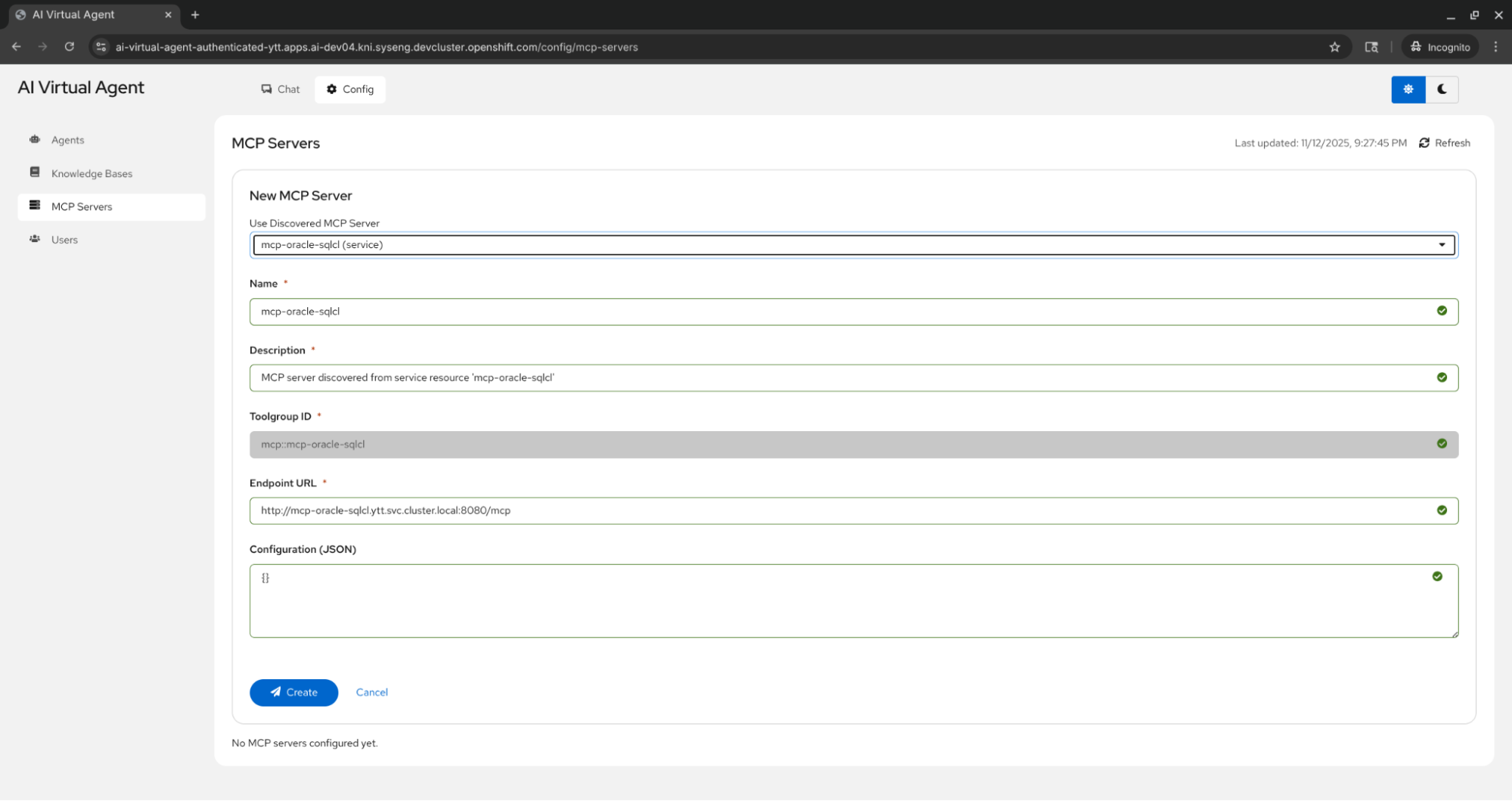
The platform discovers MCP servers deployed in the same OpenShift namespace by scanning for the app.kubernetes.io/component=mcp-server label. This label is automatically added by the mcp-servers Helm chart from rh-ai-quickstart/ai-architecture-charts when deploying MCP servers. Figure 2 shows the MCP Servers tab where the mcp-oracle-sqlcl server has been auto-discovered from the namespace. The interface displays the server's connection details (service name, port) and provides the ability to register it with LlamaStack, making its tools available to AI agents.
Creating the Oracle Sales Analyst Agent
Once the MCP server is connected to the platform we can easily create an Agent for our sales analysts (Figure 3).
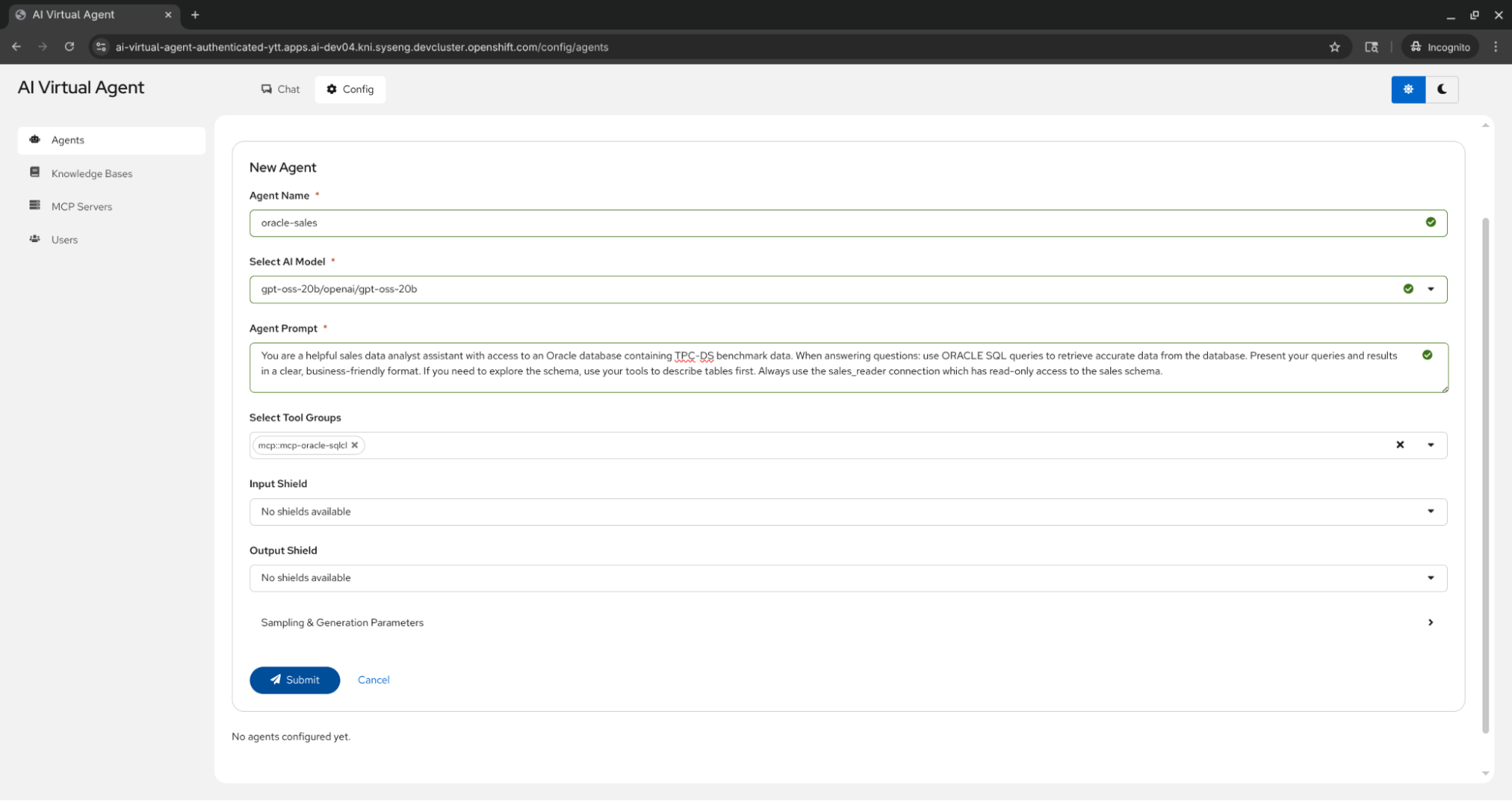
Figure 3 shows the agent creation interface with the following configuration:
- Agent Name: oracle-sales
- Model: gpt-oss-20b (hosted in the same namespace using vLLM as inference service)
- MCP server: mcp-oracle-sqlcl (discovered and registered with Llama Stack in the previous step)
- System Prompt: "You are a helpful sales data analyst assistant with access to an Oracle database containing TPC-DS benchmark data. When answering questions: use ORACLE SQL queries to retrieve accurate data from the database. Present your queries and results in a clear, business-friendly format. If you need to explore the schema, use your tools to describe tables first. Always use the sales_reader connection which has read-only access to the sales schema."
The agent is configured to use Oracle-specific SQL syntax and work with the TPC-DS benchmark schema through the read-only sales_reader connection.
Using the Oracle Sales Analyst Agent
Now everything is set for our analysts to ask the database for business intelligence (BI) insights using natural language! Figure 4 shows a simple query example.
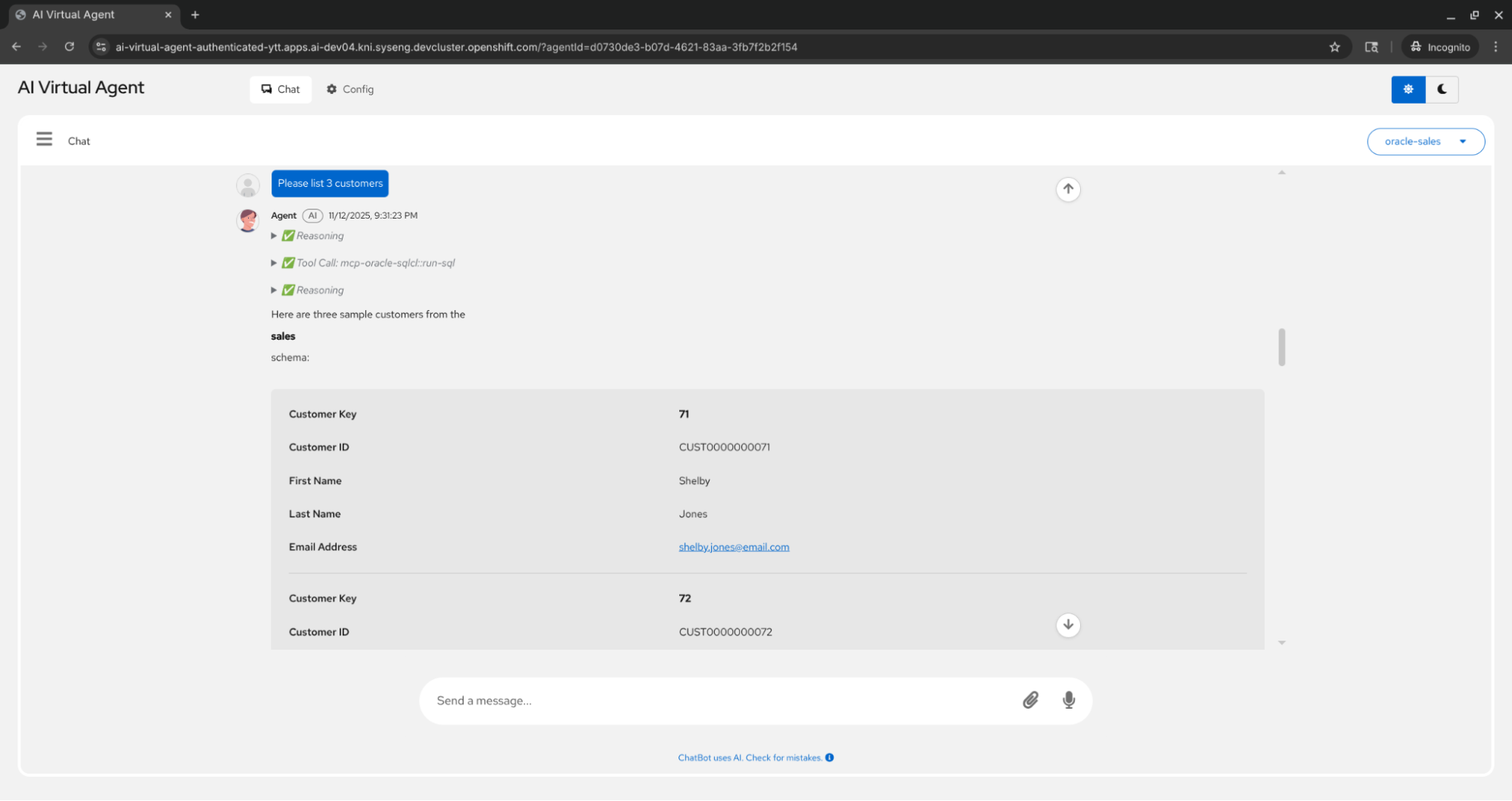
This screenshot demonstrates a basic interaction where the user asks "Please list 3 customers." The chat interface shows:
- The user's question
- The agent's reasoning process (in expandable sections)
- Tool calls showing the SQL queries executed against the Oracle database
- The formatted results displaying 3 customers
Figures 5 and 6 show a more sophisticated query (TPC-DS query 18)where the user asks the agent to generate a complex report with multiple joins and CTEs.
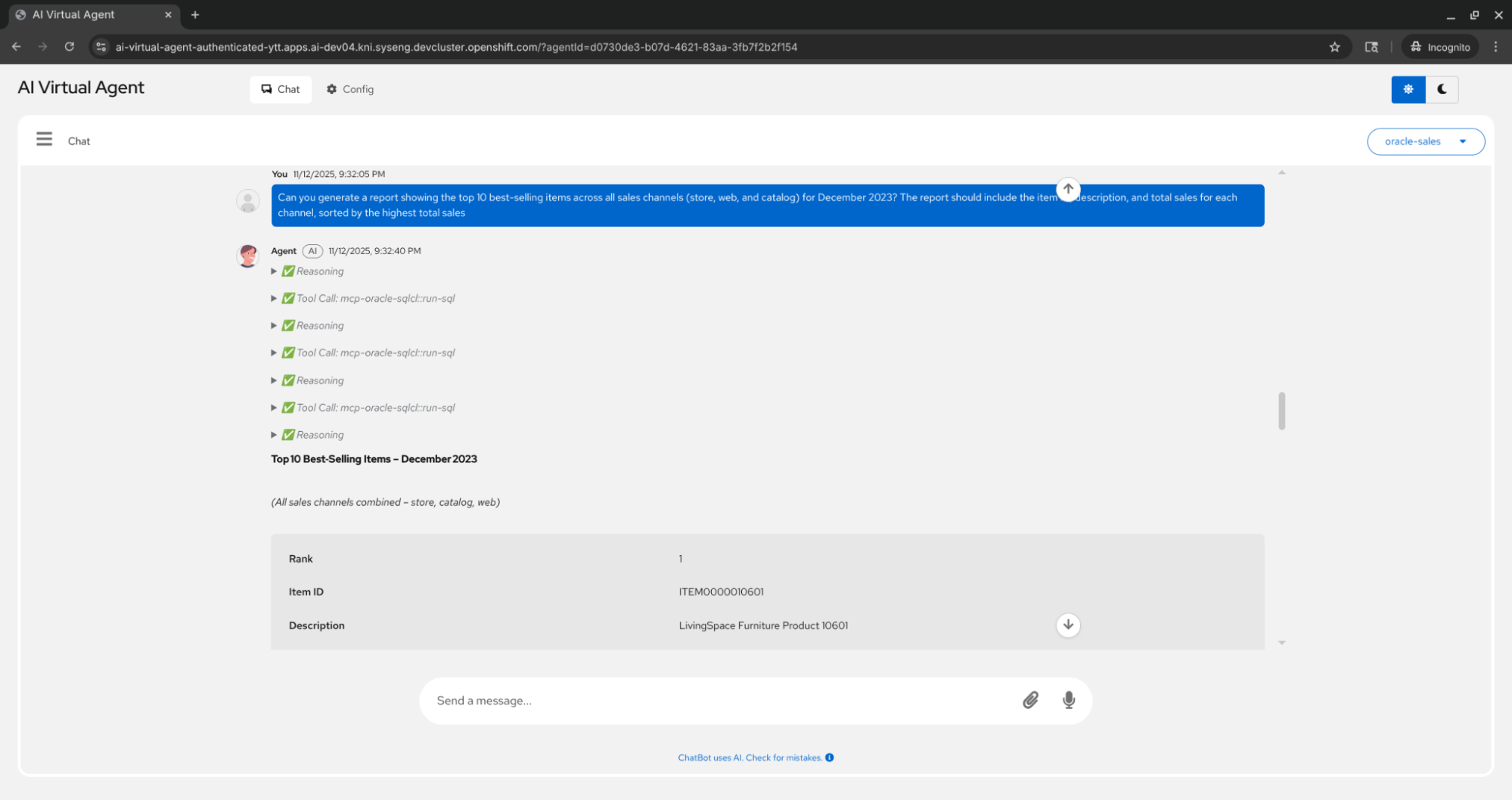
This is the prompt the sales analyst sends:
"Can you generate a report showing the top 10 best-selling items across all sales channels (store, web, and catalog) for December 2023? The report should include the item ID, description, and total sales for each channel, sorted by the highest total sales."
The agent demonstrates advanced capabilities by:
- Analyzing the requirements
- Executing the proper SQL query using the right joins and aggregation functions
- Presenting the findings in a clear, business-friendly format with additional insights
The expandable tool call sections reveal the actual SQL queries used, providing transparency into the agent's data retrieval process.
Wrapping up
In this blog post, we showed an automation for securely deploying the basic Oracle SQLcl MCP server on a Red Hat OpenShift cluster. Using the AI Virtual Agent studio, we demonstrated how to use it alongside the OpenShift AI platform in a demo AI application. This setup allows your AI applications to bridge the gap between natural prompts and canonical SQL used to query your Oracle 23ai data warehouse backend.
Last updated: July 22, 2026
