Redhat Developers  Logo
  • Products

    Platforms

    • Red Hat Enterprise Linux
      Red Hat Enterprise Linux Icon
    • Red Hat AI
      Red Hat AI
    • Red Hat OpenShift
      Openshift icon
    • Red Hat Ansible Automation Platform
      Ansible icon
    • See all Red Hat products

    Featured

    • Red Hat build of OpenJDK
    • Red Hat Developer Hub
    • Red Hat JBoss Enterprise Application Platform
    • Red Hat OpenShift Dev Spaces
    • Red Hat OpenShift Local
    • Red Hat Developer Sandbox

      Try Red Hat products and technologies without setup or configuration fees for 30 days with this shared Red Hat OpenShift and Kubernetes cluster.
    • Try at no cost
  • Technologies

    Featured

    • AI/ML
      AI/ML Icon
    • Linux
      Linux Icon
    • Kubernetes
      Cloud icon
    • Automation
      Automation Icon showing arrows moving in a circle around a gear
    • See all technologies
    • Programming languages & frameworks

      • Java
      • Python
      • JavaScript
    • System design & architecture

      • Red Hat architecture and design patterns
      • Microservices
      • Event-Driven Architecture
      • Databases
    • Developer experience

      • Productivity
      • Tools
      • GitOps
    • Automated data processing

      • AI/ML
      • Data science
      • Apache Kafka on Kubernetes
    • Platform engineering

      • DevOps
      • DevSecOps
      • Red Hat Ansible Automation Platform for applications and services
    • Secure development & architectures

      • Security
      • Secure coding
  • Learn

    Featured

    • Kubernetes & cloud native
      Openshift icon
    • Linux
      Rhel icon
    • Automation
      Ansible cloud icon
    • AI/ML
      AI/ML Icon
    • See all learning resources

    E-books

    • GitOps cookbook
    • Podman in action
    • Kubernetes operators
    • The path to GitOps
    • See all e-books

    Cheat sheets

    • Linux commands
    • Bash commands
    • Git
    • systemd commands
    • See all cheat sheets

    Documentation

    • Product documentation
    • API catalog
    • Legacy documentation
  • Developer Sandbox

    Developer Sandbox

    • Access Red Hat’s products and technologies without setup or configuration, and start developing quicker than ever before with our new, no-cost sandbox environments.
    • Explore the Developer Sandbox

    Featured Developer Sandbox activities

    • Get started with your Developer Sandbox
    • OpenShift virtualization and application modernization using the Developer Sandbox
    • Explore all Developer Sandbox activities

    Ready to start developing apps?

    • Try at no cost
  • Blog
  • Events
  • Videos

Zero trust security and dynamic credentials on OpenShift

Advanced strategies for managing ephemeral credentials and network isolation in CI/CD pipelines

January 5, 2026
Antonio Biondillo
Related topics:
CI/CDDevSecOpsKubernetesSecuritySystem Design
Related products:
Red Hat Advanced Cluster Security for KubernetesRed Hat OpenShift Container PlatformRed Hat Trusted Software Supply Chain

    In my previous article, we explored externalizing secrets using the External Secrets Operator (ESO). This follow-up addresses the next step in DevSecOps evolution: eliminating long-term secrets in favor of dynamic, ephemeral credentials and advanced network isolation.

    For architects and site reliability engineers operating on Red Hat OpenShift, the goal is to transform the pipeline from a consumer of static passwords into an entity with a verifiable identity, capable of negotiating "just-in-time" (JIT) access.

    Zero trust architecture for pipelines

    The logical diagram in Figure 1 illustrates the authentication and authorization flow between components.
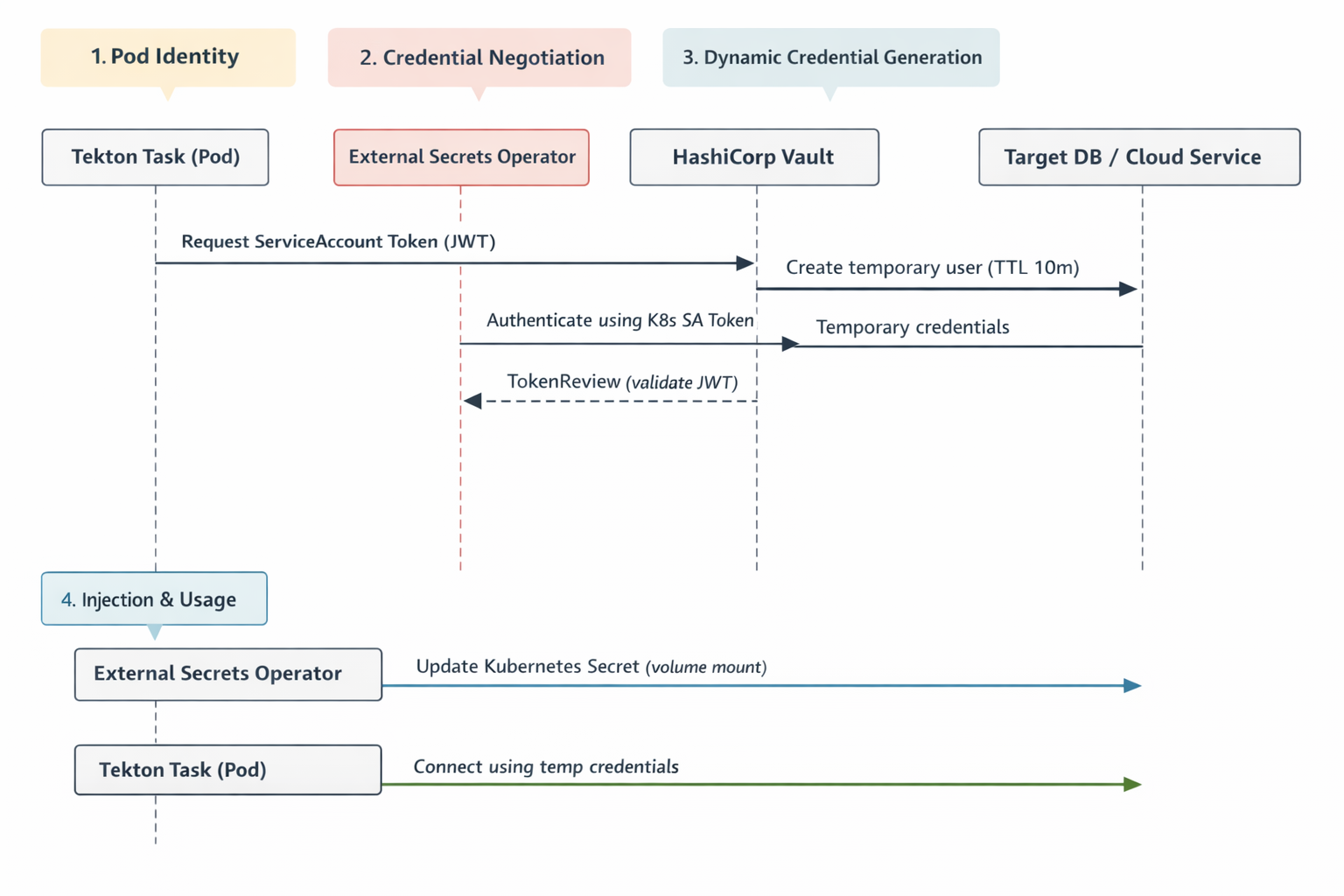
    Sequence Diagram
    Figure 1: Diagram showing how a building task confirms its identity and requests temporary credentials to connect to a database.

    Workload identity

    There is no longer a static "secret zero." Identity is guaranteed by the OpenShift ServiceAccount token, which is cryptographically signed and verified by HashiCorp Vault via the TokenReview API.

    Network isolation: User-defined networks

    For high-security multi-tenant environments, such as banking or telecommunications, standard NetworkPolicies might not suffice. With OpenShift 4.18 and later, user-defined networks (UDN) allow for complete Layer 2/3 isolation for critical pipeline namespaces.

    Here is an example of how to set up a user-defined network. This manifest isolates pipeline traffic in a dedicated overlay network, preventing lateral movement from other compromised pods in the cluster.

    apiVersion: network.openshift.io/v1
    kind: UserDefinedNetwork
    metadata:
      name: secure-pipeline-net
      namespace: ci-cd-secure
    spec:
      topology: Layer3
      layer3:
        role: Primary
        subnets:
          - cidr: 10.0.128.0/24
            hostSubnet: 24

    Requesting temporary credentials with Vault

    Instead of using a static secret, we use the VaultDynamicSecret custom resource to instruct the External Secrets Operator to request credentials only when they are needed.

    Example: A database migration pipeline requiring DDL privileges only while the task is running.

    apiVersion: generators.external-secrets.io/v1alpha1
    kind: VaultDynamicSecret
    metadata:
      name: dynamic-db-creds
      namespace: ci-cd
    spec:
      # Database engine path configured in Vault
      path: "database/creds/pipeline-migration-role"
      method: "GET"
      provider:
        server: "http://vault.vault.svc:8200"
        auth:
          kubernetes:
            mountPath: "kubernetes"
            role: "pipeline-role"
            serviceAccountRef:
              name: "pipeline-sa"

    Consumption in Tekton: Volume vs. env var

    Important: Never inject dynamic secrets as environment variables (env). If the secret rotates or expires during execution, the process will not see the new value. Always use volumeMounts, as Kubernetes updates files in the volume atomically.

    An optimized Tekton task:

    apiVersion: tekton.dev/v1beta1
    kind: Task
    metadata:
      name: flyway-migration
    spec:
      stepTemplate:
        volumeMounts:
          - name: db-creds
            mountPath: /etc/secrets
            readOnly: true
      steps:
        - name: migrate
          image: flyway/flyway:latest
          script: |
            #!/bin/sh
            # Reads fresh credentials from the filesystem at runtime
            export FLYWAY_USER=$(cat /etc/secrets/username)
            export FLYWAY_PASSWORD=$(cat /etc/secrets/password)
            
            flyway -url=jdbc:postgresql://prod-db:5432/mydb migrate
      volumes:
        - name: db-creds
          secret:
            secretName: db-dynamic-secret # Generated by ESO

    Reverse sync: The PushSecret pattern

    In hybrid scenarios (such as when an on-premise OpenShift updates a service on IBM Cloud or Azure), use PushSecret to propagate certificates or keys generated by the pipeline to an external vault.

    apiVersion: external-secrets.io/v1alpha1
    kind: PushSecret
    metadata:
      name: push-generated-cert
      namespace: ci-cd
    spec:
      refreshInterval: 10s
      deletionPolicy: Delete
      secretStoreRefs:
        - name: ibm-secrets-manager
          kind: ClusterSecretStore
      selector:
        secret:
          name: generated-mtls-cert # Secret created by the pipeline
      data:
        - match:
            secretKey: tls.crt
            remoteRef:
              remoteKey: imported-certs/app-cert

    Security context and compliance

    To ensure compliance with Red Hat Advanced Cluster Security for Kubernetes, every task must operate with minimal privileges.

    • Drop capabilities: Remove all capabilities in the SecurityContext.
    • Seccomp profile: Apply RuntimeDefault.
    • Short time to live (TTL): Configure Vault roles with a maximum TTL equal to the Tekton task timeout (such as 15 minutes).

    Vault role configuration (HCL snippet):

    path "database/creds/pipeline-migration-role" {
      capabilities = ["read"]
      ttl = "15m"
      max_ttl = "1h"
    }

    Conclusion

    Adopting dynamic credentials on OpenShift transforms security from "perimeter defense" to "continuous verification." By combining Tekton, the External Secrets Operator, and the new user-defined networks, you can build pipelines that possess no secrets but rent them only for the milliseconds required for execution, drastically reducing the attack surface of the software supply chain.

    Related Posts

    • Manage credentials with Tekton and OpenShift on IBM Cloud

    • Introducing the external secrets operator for OpenShift

    • Zero trust automation on AWS with Ansible and Terraform

    • Integrate Red Hat build of Trustee with the External Secrets Operator

    • Implement zero-touch provisioning for OpenShift with GitOps

    • How the External Secrets Operator manages Quay credentials

    Recent Posts

    • Zero trust security and dynamic credentials on OpenShift

    • How to deploy and benchmark vLLM with GuideLLM on Kubernetes

    • Getting started with OpenShift APIs for Data Protection

    • How in-place pod resizing boosts efficiency in OpenShift

    • Automate Oracle 19c deployments on OpenShift Virtualization

    What’s up next?

    Learn how to integrate Red Hat OpenShift, Submariner, OpenShift Service Mesh, and the Kubernetes Gateway API to build a resilient, full-mesh networking fabric for applications across multi-cluster and hybrid cloud environments.

    Start the learning path
    Red Hat Developers logo LinkedIn YouTube Twitter Facebook

    Platforms

    • Red Hat AI
    • Red Hat Enterprise Linux
    • Red Hat OpenShift
    • Red Hat Ansible Automation Platform
    • See all products

    Build

    • Developer Sandbox
    • Developer tools
    • Interactive tutorials
    • API catalog

    Quicklinks

    • Learning resources
    • E-books
    • Cheat sheets
    • Blog
    • Events
    • Newsletter

    Communicate

    • About us
    • Contact sales
    • Find a partner
    • Report a website issue
    • Site status dashboard
    • Report a security problem

    RED HAT DEVELOPER

    Build here. Go anywhere.

    We serve the builders. The problem solvers who create careers with code.

    Join us if you’re a developer, software engineer, web designer, front-end designer, UX designer, computer scientist, architect, tester, product manager, project manager or team lead.

    Sign me up

    Red Hat legal and privacy links

    • About Red Hat
    • Jobs
    • Events
    • Locations
    • Contact Red Hat
    • Red Hat Blog
    • Inclusion at Red Hat
    • Cool Stuff Store
    • Red Hat Summit
    © 2025 Red Hat

    Red Hat legal and privacy links

    • Privacy statement
    • Terms of use
    • All policies and guidelines
    • Digital accessibility

    Report a website issue