Redhat Developers  Logo
  • AI

    Get started with AI

    • Red Hat AI
      Accelerate the development and deployment of enterprise AI solutions.
    • AI learning hub
      Explore learning materials and tools, organized by task.
    • AI interactive demos
      Click through scenarios with Red Hat AI, including training LLMs and more.
    • AI/ML learning paths
      Expand your OpenShift AI knowledge using these learning resources.
    • AI quickstarts
      Focused AI use cases designed for fast deployment on Red Hat AI platforms.
    • No-cost AI training
      Foundational Red Hat AI training.

    Featured resources

    • OpenShift AI learning
    • Open source AI for developers
    • AI product application development
    • Open source-powered AI/ML for hybrid cloud
    • AI and Node.js cheat sheet

    Red Hat AI Factory with NVIDIA

    • Red Hat AI Factory with NVIDIA is a co-engineered, enterprise-grade AI solution for building, deploying, and managing AI at scale across hybrid cloud environments.
    • Explore the solution
  • Learn

    Self-guided

    • Documentation
      Find answers, get step-by-step guidance, and learn how to use Red Hat products.
    • Learning paths
      Explore curated walkthroughs for common development tasks.
    • Guided learning
      Receive custom learning paths powered by our AI assistant.
    • See all learning

    Hands-on

    • Developer Sandbox
      Spin up Red Hat's products and technologies without setup or configuration.
    • Interactive labs
      Learn by doing in these hands-on, browser-based experiences.
    • Interactive demos
      Click through product features in these guided tours.

    Browse by topic

    • AI/ML
    • Automation
    • Java
    • Kubernetes
    • Linux
    • See all topics

    Training & certifications

    • Courses and exams
    • Certifications
    • Skills assessments
    • Red Hat Academy
    • Learning subscription
    • Explore training
  • Build

    Get started

    • Red Hat build of Podman Desktop
      A downloadable, local development hub to experiment with our products and builds.
    • Developer Sandbox
      Spin up Red Hat's products and technologies without setup or configuration.

    Download products

    • Access product downloads to start building and testing right away.
    • Red Hat Enterprise Linux
    • Red Hat AI
    • Red Hat OpenShift
    • Red Hat Ansible Automation Platform
    • See all products

    Featured

    • Red Hat build of OpenJDK
    • Red Hat JBoss Enterprise Application Platform
    • Red Hat OpenShift Dev Spaces
    • Red Hat Developer Toolset

    References

    • E-books
    • Documentation
    • Cheat sheets
    • Architecture center
  • Community

    Get involved

    • Events
    • Live AI events
    • Red Hat Summit
    • Red Hat Accelerators
    • Community discussions

    Follow along

    • Articles & blogs
    • Developer newsletter
    • Videos
    • Github

    Get help

    • Customer service
    • Customer support
    • Regional contacts
    • Find a partner

    Join the Red Hat Developer program

    • Download Red Hat products and project builds, access support documentation, learning content, and more.
    • Explore the benefits

Introducing incident detection in Red Hat Advanced Cluster Management for Kubernetes 2.14

August 5, 2025
Tomas Remes Luiz Bernardo Levenhagen
Related topics:
Hybrid cloudObservabilityOperators
Related products:
Red Hat Advanced Cluster Management for KubernetesRed Hat OpenShiftRed Hat OpenShift Container Platform

    Incident detection groups the cascade of related alerts that occur during system issues (alert storms) into manageable incidents. This helps teams identify root causes more effectively and prioritize critical problems by providing a color-coded timeline and categorizing alerts by severity and affected components, rather than getting overwhelmed by individual notifications. 

    To address this challenge, the incident detection feature, currently a technology preview for Red Hat OpenShift with the Cluster Observability Operator, allows users to navigate between incidents and related alerts within a single cluster. Utilizing this feature requires installing and correctly configuring the Cluster Observability Operator on each cluster. This can be tedious when you manage multiple clusters, but luckily the Red Hat Advanced Cluster Management for Kubernetes is here to help.

    Red Hat Advanced Cluster Management for Kubernetes 2.14 introduces a development preview of the incident detection feature, enabling the deployment of the Cluster Observability Operator across all managed clusters.

    Installing the Incidents overview in the Advanced Cluster Management Hub cluster

    The installation is implemented in multicluster-observability-addon, which is managed by the MultiClusterObservability custom resource. This add-on relies on several CustomResourceDefinitions that must be present in the Hub cluster. Currently, these CRDs require manual installation, a process that will be automated or addressed differently in future releases.

    To manually install of the CRDs, you can perform the following steps (note you will need kubectl, Git, and curl to be available in your system):

    1. Clone the multicluster-observability-addon repository:

      git clone git@github.com:stolostron/multicluster-observability-addon.git
    2. Log in to the Hub cluster.
    3. Install the CRDs with:

      make install-crds

    You can now enable incident detection by updating the MultiClusterObservability custom resource, which installs the Cluster Observability Operator on spoke clusters. You can update it in the UI using the OpenShift Container Platform web console (Figure 1).
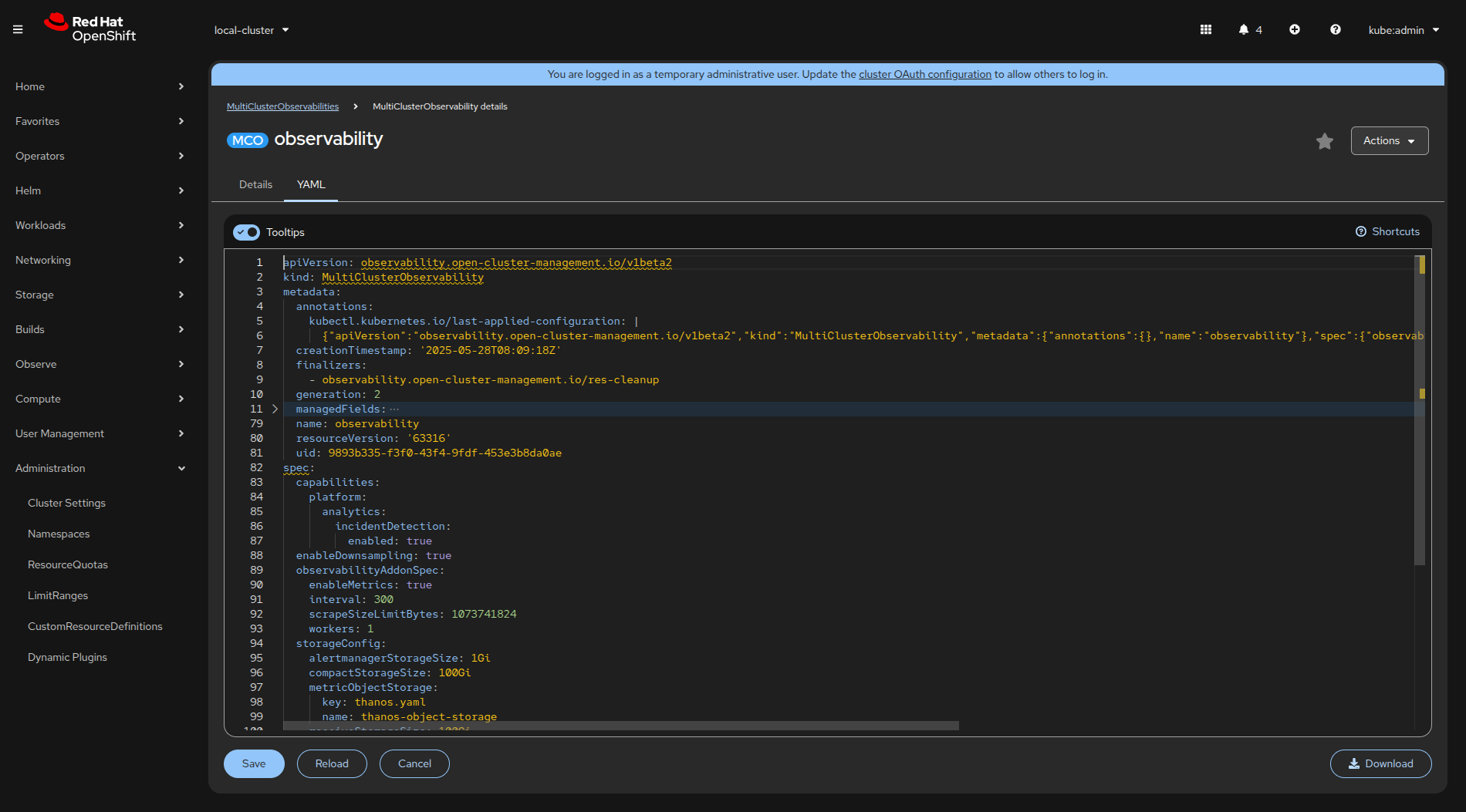
    Enabling incident detection by updating the MultiClusterObservability custom resource in the OpenShift web console.
    Figure 1: Enabling incident detection by updating the MultiClusterObservability custom resource in the OpenShift web console.

    The crucial YAML configuration is the following part (as mentioned in the dev preview docs):

     capabilities:
        platform:
          analytics:
            incidentDetection:
              enabled: true

    Alternatively, you can patch the custom resource by using the OpenShift client:

    oc patch multiclusterobservabilities.observability.open-cluster-management.io observability --type=merge -p '{"spec":{"capabilities":{"platform":{"analytics":{"incidentDetection":{"enabled":true}}}}}}'

    This creates the multicluster-observability-addon-manager Pod in the open-cluster-management-observability namespace, and the Cluster Observability Operator is installed to the spoke clusters as well as to the Hub cluster, as shown in Figure 2.
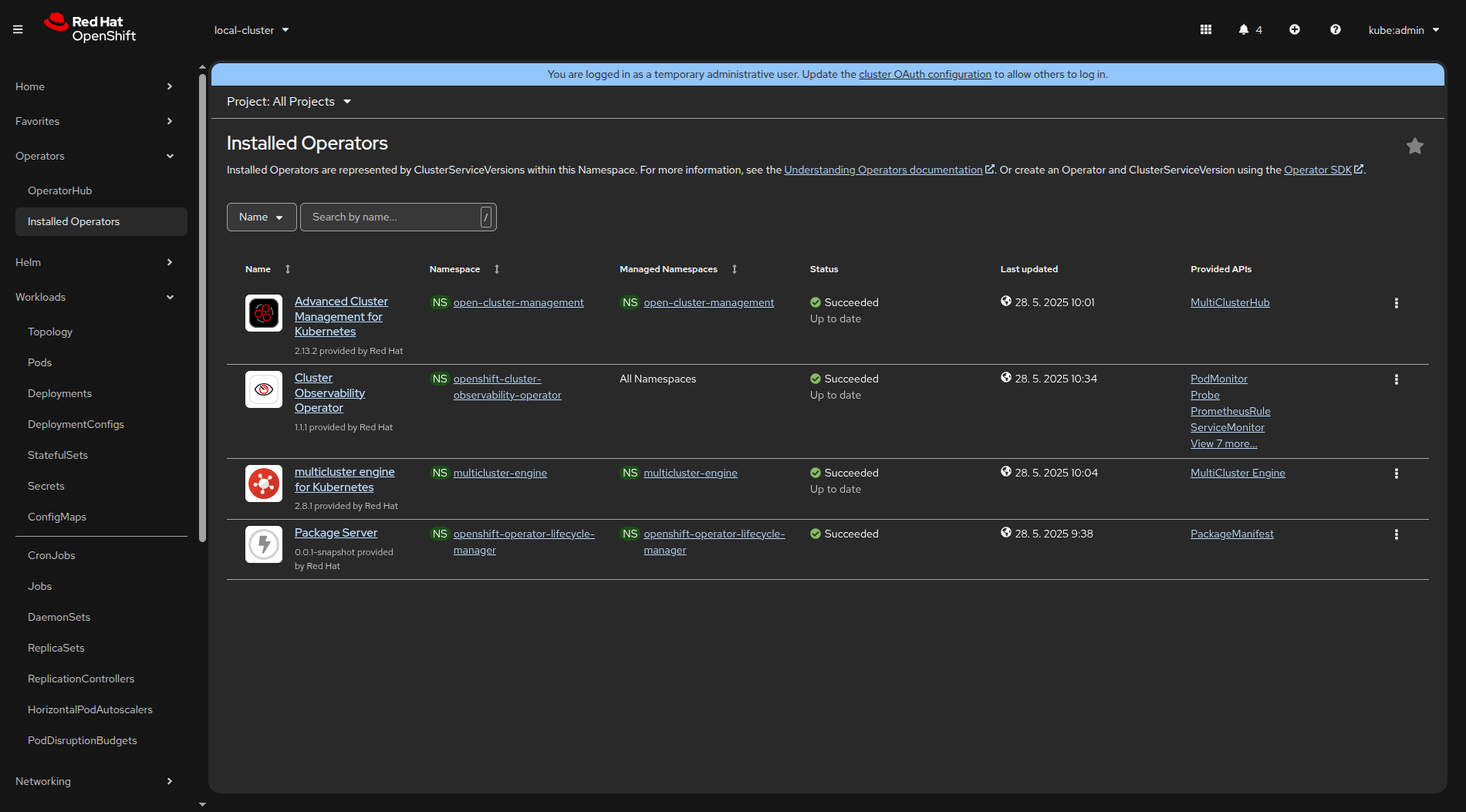
    Cluster Observability Operator installation in spoke clusters.
    Figure 2: Cluster Observability Operator installation in spoke clusters.

    Having the Cluster Observability Operator already installed on some spoke clusters leads to the issue with two OperatorGroup resources (tracked in COO-973). To resolve this, delete one of the OperatorGroup resources. 

    Incidents overview in the Advanced Cluster Management Grafana

    Once the Cluster Observability Operator has been successfully installed, a new Incidents menu item will appear under the Observe menu on the left (Figure 3).
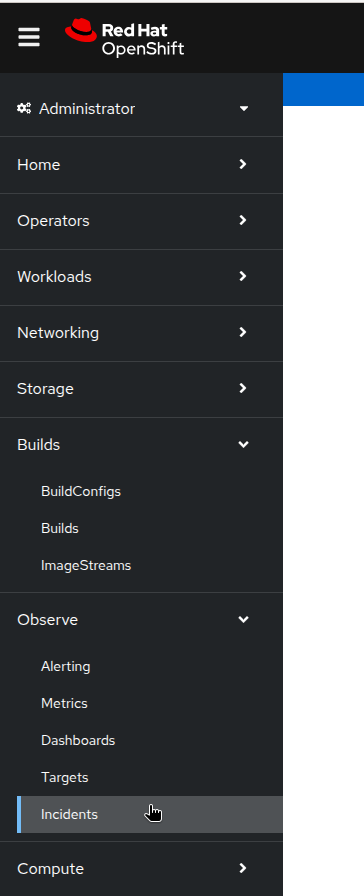
    Incidents menu item in the OpenShift web console.
    Figure 3: Incidents menu item in the OpenShift web console.

    More importantly, the required Prometheus metrics will be forwarded to the Advanced Cluster Management Thanos instance and you can review the Incidents overview in the RHACM Grafana instance in the Dashboards → Incidents → Incidents Overview. See Figure 4.
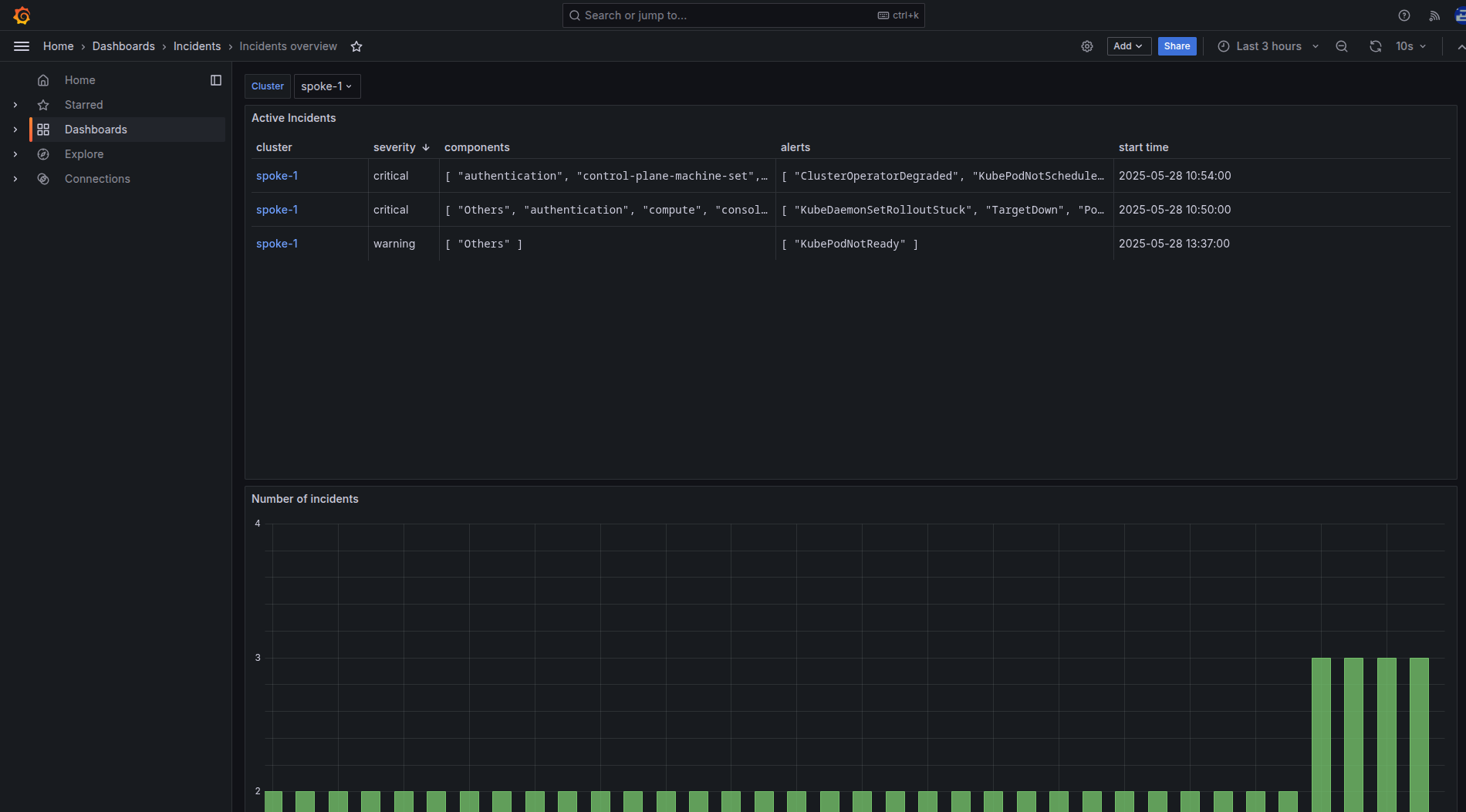
    Incidents Overview in the Advanced Cluster Management Grafana instance.
    Figure 4:  Incidents Overview in the Advanced Cluster Management Grafana instance.

    The incidents overview displays a dropdown list for filtering the clusters, followed by a table of active incidents within the selected cluster. Incidents in the table are sorted by priority in descending order and each row in the table corresponds to a single incident. The Incident detail user interface within the OpenShift web console is displayed as shown in Figure 5.
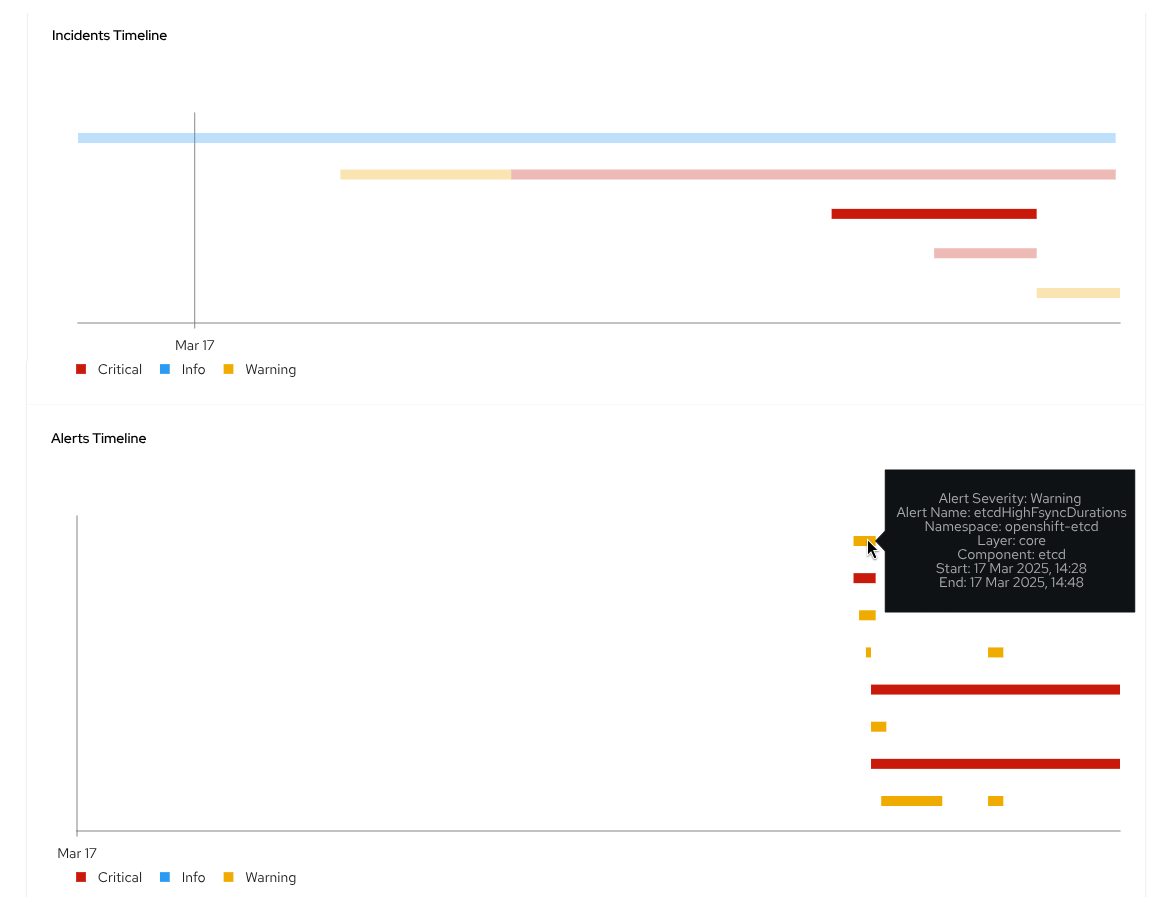
    Incident detail user interface within the OpenShift web console.
    Figure 5: Incident detail user interface within the OpenShift web console.

    A link to the corresponding incident detail in the OpenShift Container Platform web console of the respective cluster is available in the first column on the left. The Incident detail user interface requires OpenShift version 4.19 (or later) and Cluster Observability Operator version 1.2 (or later) to function. 

    The next columns show the incident's severity, the components involved, and the alerts involved. The rightmost column indicates the incident's occurrence time.

    Figure 6 shows the active incidents in each cluster, there is a graph displaying the number of incidents over time.
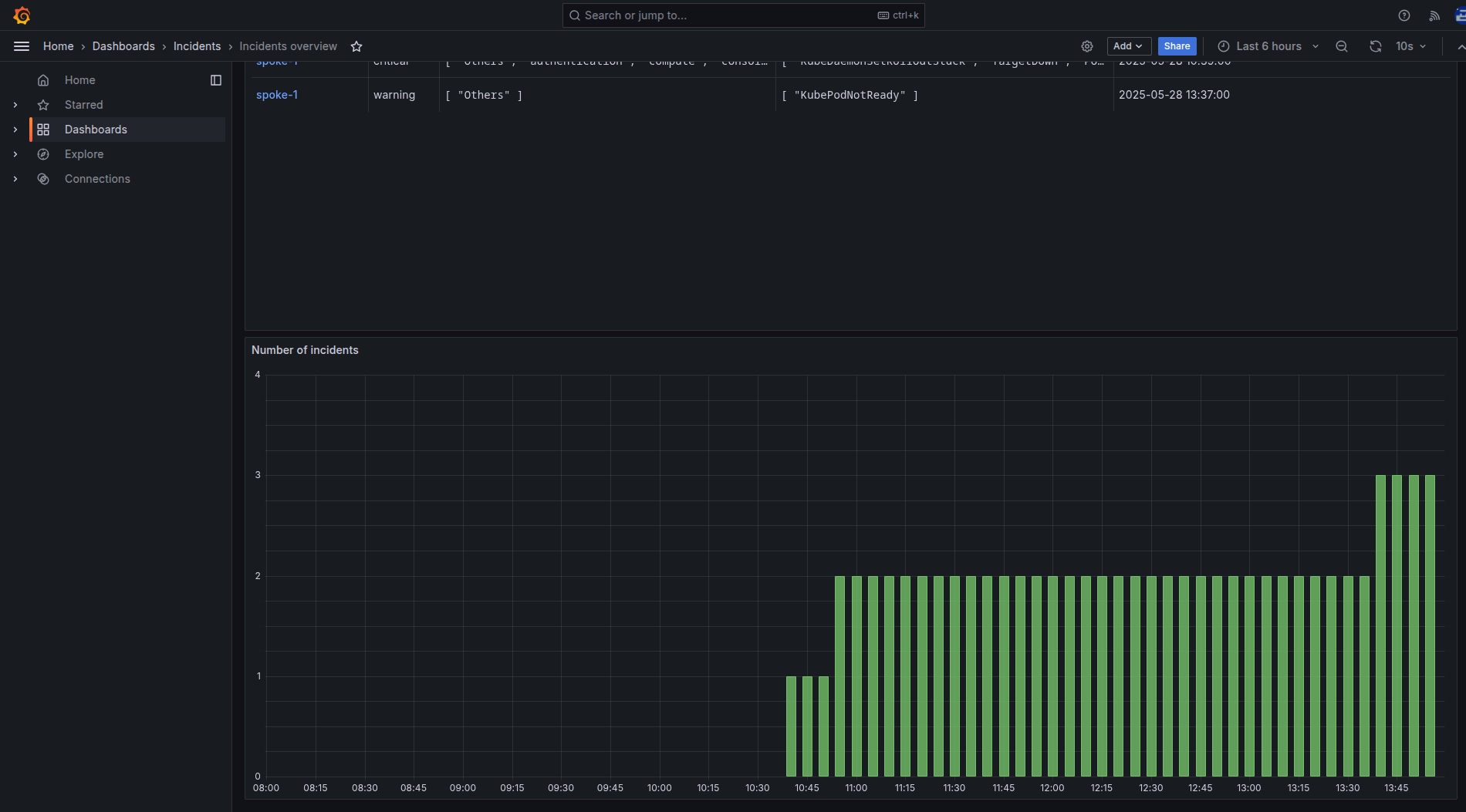
    Graph displaying the number of active incidents over time in each cluster.
    Figure 6: Graph displaying the number of active incidents over time in each cluster.

    Interactive demo

    Check out the following interactive demo to see a snapshot of this feature, and understand on how to identify abnormal, suspicious, or critical events occurring within a cluster and timely plan a course of action.

    What’s next?

    Ready to experience incident detection in Red Hat Advanced Cluster Management 2.14? Existing customers can upgrade through their usual channels. If you're a new user, visit the Red Hat Advanced Cluster Management product page to learn more, start a trial, or explore the documentation.

    We’d also like you to help shape the future of this feature. We are looking forward to receiving your feedback. You can share your questions and recommendations with us using the Red Hat OpenShift feedback form.

    Last updated: August 18, 2025

    Related Posts

    • Incident detection for OpenShift tech preview is here

    • Installing Red Hat Advanced Cluster Management (ACM) for Kubernetes

    • Monitor OpenShift Virtualization using user-defined projects and Grafana

    • Monitor an Ansible Automation Platform database using Prometheus and Grafana

    • Six popular incident management tools for Red Hat Enterprise Linux

    • How incident detection simplifies OpenShift observability

    Recent Posts

    • Red Hat Hardened Images: Top 5 benefits for software developers

    • How EvalHub manages two-layer Kubernetes control planes

    • Tekton joins the CNCF as an incubating project

    • Federated identity across the hybrid cloud using zero trust workload identity manager

    • Confidential virtual machine storage attack scenarios

    Red Hat Developers logo LinkedIn YouTube Twitter Facebook

    Platforms

    • Red Hat AI
    • Red Hat Enterprise Linux
    • Red Hat OpenShift
    • Red Hat Ansible Automation Platform
    • See all products

    Build

    • Developer Sandbox
    • Developer tools
    • Interactive tutorials
    • API catalog

    Quicklinks

    • Learning resources
    • E-books
    • Cheat sheets
    • Blog
    • Events
    • Newsletter

    Communicate

    • About us
    • Contact sales
    • Find a partner
    • Report a website issue
    • Site status dashboard
    • Report a security problem

    RED HAT DEVELOPER

    Build here. Go anywhere.

    We serve the builders. The problem solvers who create careers with code.

    Join us if you’re a developer, software engineer, web designer, front-end designer, UX designer, computer scientist, architect, tester, product manager, project manager or team lead.

    Sign me up

    Red Hat legal and privacy links

    • About Red Hat
    • Jobs
    • Events
    • Locations
    • Contact Red Hat
    • Red Hat Blog
    • Inclusion at Red Hat
    • Cool Stuff Store
    • Red Hat Summit
    © 2026 Red Hat

    Red Hat legal and privacy links

    • Privacy statement
    • Terms of use
    • All policies and guidelines
    • Digital accessibility

    Chat Support

    Please log in with your Red Hat account to access chat support.